
Hidden Files and Folders, doesnt show

kyzersoze

Awesome XD
Member
Local time
6:59 AM
Messages
60
Location
Inside my House ^_^
Uhmm. Hey Guys. I'm new here, so it's my first time to post here.

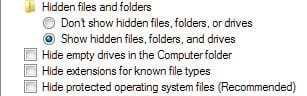
I Kinda got a problem, I open the windows explorer. and click the Organize button and go to the folders and search options, and click on View the Show Hidden files and Folders, then I unheck the Hide protected operating system files to see the hidden files. But, I dont see the hidden files in anywhere. and when I click back to the folder options, I see that the "Show hidden files and folders" were unticked. What's the problem? PLease Help.
 

My Computer My Computer

Computer Manufacturer/Model Number
Acer Aspire 4820TG
OS
Windows 7 Home Premium 64-bit Service Pack 1
CPU
Intel Core i5 M460 @ 2.53Ghz
Motherboard
Acer ZQ1B
Memory
4GB DDR3
Graphics Card(s)
ATI Mobility Radeon HD 5650, Intel HD Graphics
Monitor(s) Displays
AUO - 14 inches
Screen Resolution
1366x768
Hard Drives
Western Digital WD6400BEVT-22A0RT0 (640GB)

My Computer My Computer

Computer type
PC/Desktop
Computer Manufacturer/Model Number
Dell XPS 420
OS
Windows 10, Home Clean Install
CPU
Intel Core2 processsor Q8200(2.33Ghz 1333FSB) Quad Core Tech
Motherboard
Dell
Memory
6 gb
Graphics Card(s)
ATI Radeon 256MB HD3650
Sound Card
Intergrated 7.1 Channel Audio
Monitor(s) Displays
Dell SP2009W 20"
Hard Drives
640 GB Serial ATA Hard drive
Cooling
Fan
Keyboard
Dell USB Keyboard
Mouse
Dell Premium Optical USB
Internet Speed
DSL 2.85
I think I did it correct and, I tried the clean boot but, I know everything is fine. It's just that, one night when I scanned my laptop, It found a virus. And I removed it instantly, I just don't whether it caused that to happen becuase, it's just this time that I changed the folder options.
 

My Computer My Computer

Computer Manufacturer/Model Number
Acer Aspire 4820TG
OS
Windows 7 Home Premium 64-bit Service Pack 1
CPU
Intel Core i5 M460 @ 2.53Ghz
Motherboard
Acer ZQ1B
Memory
4GB DDR3
Graphics Card(s)
ATI Mobility Radeon HD 5650, Intel HD Graphics
Monitor(s) Displays
AUO - 14 inches
Screen Resolution
1366x768
Hard Drives
Western Digital WD6400BEVT-22A0RT0 (640GB)
Hi, kysersoze (love that movie), welcome to the Seven Forums! :)

Have you unchecked "Hide protected operating system files"?


ScreenShot00312.jpg
 

My Computer My Computer

Computer Manufacturer/Model Number
Toshiba L355D
OS
Windows 7 Ultimate x64 SP1
CPU
Core2 Duo
Motherboard
Intel
Memory
4 GB
Graphics Card(s)
GM965 on-board
Sound Card
RealTek on-board
Monitor(s) Displays
19"+17"(laptop)
Screen Resolution
1440x900 (x 2)
Hard Drives
500GB Ext. 200GB Internal
PSU
N/A
Case
N/A
Cooling
N/A
A friend of mine has the same problem i.e. when he checked show hidden files, then after closing the window and re-opening it, found that the show hidden files and folders is unchecked. It was a infection in his case.
Download Malwarebytes' Antimalware if you haven't already, update it and run a full scan.
Also check the below link.
How to Enable Show Hidden Files and Folders
ps: don't download any removal tool posted there.
 

My Computer My Computer

Computer Manufacturer/Model Number
HCL
OS
Winbdows 7 ultimate x64 | Ubuntu 12.04 x64 LTS
CPU
Core 2 Duo e7400 @ 2.90GHz
Motherboard
Gigabyte G31M-ES2L
Memory
3GB DDR2
Graphics Card(s)
Asus Nvidia GTX 560Ti 1GB
Sound Card
On-board
Monitor(s) Displays
HCL eZeeBee 18.5" LCD
Screen Resolution
1366x768 @ 60Hz
Hard Drives
Western Digital 320GB
PSU
Corsair CX500 V2 500W
Cooling
Stock
Keyboard
Stock
Mouse
Stock
Internet Speed
15-25kBps D/L | 10kBps U/L | Hey Don't laugh
malwarebytes found an infection in the registry, and I deleted it. will that cause an inoperable system??? Help T_T
 

My Computer My Computer

Computer Manufacturer/Model Number
Acer Aspire 4820TG
OS
Windows 7 Home Premium 64-bit Service Pack 1
CPU
Intel Core i5 M460 @ 2.53Ghz
Motherboard
Acer ZQ1B
Memory
4GB DDR3
Graphics Card(s)
ATI Mobility Radeon HD 5650, Intel HD Graphics
Monitor(s) Displays
AUO - 14 inches
Screen Resolution
1366x768
Hard Drives
Western Digital WD6400BEVT-22A0RT0 (640GB)
@mikedl I already tried it, but it didn't work also T_T
 

My Computer My Computer

Computer Manufacturer/Model Number
Acer Aspire 4820TG
OS
Windows 7 Home Premium 64-bit Service Pack 1
CPU
Intel Core i5 M460 @ 2.53Ghz
Motherboard
Acer ZQ1B
Memory
4GB DDR3
Graphics Card(s)
ATI Mobility Radeon HD 5650, Intel HD Graphics
Monitor(s) Displays
AUO - 14 inches
Screen Resolution
1366x768
Hard Drives
Western Digital WD6400BEVT-22A0RT0 (640GB)
Pls post the deletion log. Open malwarebytes and go to the logs tab. Pls copy paste and not attach.
 

My Computer My Computer

Computer Manufacturer/Model Number
HCL
OS
Winbdows 7 ultimate x64 | Ubuntu 12.04 x64 LTS
CPU
Core 2 Duo e7400 @ 2.90GHz
Motherboard
Gigabyte G31M-ES2L
Memory
3GB DDR2
Graphics Card(s)
Asus Nvidia GTX 560Ti 1GB
Sound Card
On-board
Monitor(s) Displays
HCL eZeeBee 18.5" LCD
Screen Resolution
1366x768 @ 60Hz
Hard Drives
Western Digital 320GB
PSU
Corsair CX500 V2 500W
Cooling
Stock
Keyboard
Stock
Mouse
Stock
Internet Speed
15-25kBps D/L | 10kBps U/L | Hey Don't laugh
@Ezio
I ran only the quick scan.


Malwarebytes' Anti-Malware 1.50.1.1100
Malwarebytes

Database version: 5396

Windows 6.1.7600
Internet Explorer 8.0.7600.16385

12/26/2010 8:09:08 PM
mbam-log-2010-12-26 (20-09-08).txt

Scan type: Quick scan
Objects scanned: 166265
Time elapsed: 2 minute(s), 2 second(s)

Memory Processes Infected: 0
Memory Modules Infected: 0
Registry Keys Infected: 0
Registry Values Infected: 2
Registry Data Items Infected: 2
Folders Infected: 0
Files Infected: 0

Memory Processes Infected:
(No malicious items detected)

Memory Modules Infected:
(No malicious items detected)

Registry Keys Infected:
(No malicious items detected)

Registry Values Infected:
HKEY_CURRENT_USER\SOFTWARE\Microsoft\Internet Explorer\AboutURLs\blank (Trojan.StartPage) -> Value: blank -> Quarantined and deleted successfully.
HKEY_CURRENT_USER\SOFTWARE\Microsoft\Internet Explorer\AboutURLs\Tabs (Trojan.StartPage) -> Value: Tabs -> Quarantined and deleted successfully.

Registry Data Items Infected:
HKEY_CURRENT_USER\SOFTWARE\Microsoft\Internet Explorer\Main\Default_Page_URL (Hijack.StartPage) -> Bad: (http://www.114116.info) Good: (Google) -> Quarantined and deleted successfully.
HKEY_CURRENT_USER\SOFTWARE\Microsoft\Windows\CurrentVersion\Explorer\Advanced\Folder\Hidden\SHOWALL\CheckedValue (PUM.Hijack.System.Hidden) -> Bad: (0) Good: (1) -> Quarantined and deleted successfully.

Folders Infected:
(No malicious items detected)

Files Infected:
(No malicious items detected)
 

My Computer My Computer

Computer Manufacturer/Model Number
Acer Aspire 4820TG
OS
Windows 7 Home Premium 64-bit Service Pack 1
CPU
Intel Core i5 M460 @ 2.53Ghz
Motherboard
Acer ZQ1B
Memory
4GB DDR3
Graphics Card(s)
ATI Mobility Radeon HD 5650, Intel HD Graphics
Monitor(s) Displays
AUO - 14 inches
Screen Resolution
1366x768
Hard Drives
Western Digital WD6400BEVT-22A0RT0 (640GB)
So, my doubt was right. The registry key controlling the hidden files behaviour was hijacked. But mbam dealt with it nicely.
Are you now able to view hidden files?
I'd also advise you to run a full scan also as there were some trojans also there which usually install more malware.
 

My Computer My Computer

Computer Manufacturer/Model Number
HCL
OS
Winbdows 7 ultimate x64 | Ubuntu 12.04 x64 LTS
CPU
Core 2 Duo e7400 @ 2.90GHz
Motherboard
Gigabyte G31M-ES2L
Memory
3GB DDR2
Graphics Card(s)
Asus Nvidia GTX 560Ti 1GB
Sound Card
On-board
Monitor(s) Displays
HCL eZeeBee 18.5" LCD
Screen Resolution
1366x768 @ 60Hz
Hard Drives
Western Digital 320GB
PSU
Corsair CX500 V2 500W
Cooling
Stock
Keyboard
Stock
Mouse
Stock
Internet Speed
15-25kBps D/L | 10kBps U/L | Hey Don't laugh
Back
Top