Hi,
I have winxp c: part, a copy of same on e: and win7 on f: part. I can boot to both. winxp looks like it has for a long time. win7 boots like 7 and behaves like 7.
Fine.
But remember, drive letter F is simply the 7 partition as viewed while under XP. While under 7, that partition is its own C (though obviously not the same C as XP calls itself when booted to XP).
So in order to have a proper discussion, it's really important that you indicate which OS you are booted to when you discuss a problem or describe a screenshot.
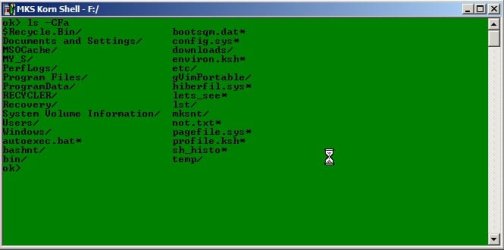
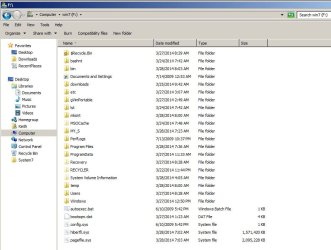
In the screenshots you've posted, since you've shown the 7 partition as F that means to me you are booted to XP and looking at the 7 partition using XP Windows Explorer . I'm also assuming that the output of MKS you show was produced while running MKS under XP, as opposed to when running MKS under 7. Yes??
Can you produce that MKS display in some type of alphabetical sequence that is more readable, so that it can be easily matched up against the Explore equivalent and any differences easily seen??
(sorry... I'm not familiar with MKS, but I can obviously understand its output if intuitive and easy-to-read)
Inspecting this dual boot installation I noticed files that are in root dir were not visible via win7.
You've only shown the root of F (i.e. the 7 partition) while booted to XP. You haven't shown the same partition while booted to 7 (when it is lettered C, from 7's perspective).
So if there is some difference in the view of the root of that partition where 7 lives, depending on whether you're booted to XP or 7, please provide TWO screenshots so that the difference can be seen.
I can not write a file to root via office, any sub-dir is fine.
Again... this is ambiguous. You don't say whether you're booted to XP or 7 when you try to "write a file to the root", which I assume means to the root of that partition on which 7 lives (and which is lettered F when booted to XP). Yes??
So are you booted to XP and trying to write to F (i.e. where 7 lives) using Office or some other application?
And what does "can not write" mean... are you getting an error message such as "access denied", or some other error? Or did the write seem to work but you then can't see it?
I would imagine your 7 partition is formatted as NTFS. What is your XP partition formatted as... NTFS or FAT32?
I can write files and dirs via mks-tools every where.
Again... ambiguous. Are you doing this while booted to XP and running MKS?
Win7 only sees the directories made at root level. It will see all files in sub-dirs.
I don't understand what you're saying at all.
Show an example of what you're trying to describe with a screenshot (worth 1000 words).