Solved Hide formulas

Sven1458

New member
Member
VIP
Local time
4:11 PM
Messages
137
Hi All,
I am designing a form in Excel to be used in manufacturing.
Since math seems to be a problem in our company I included some formulas to automate the process and cut down on mistakes.
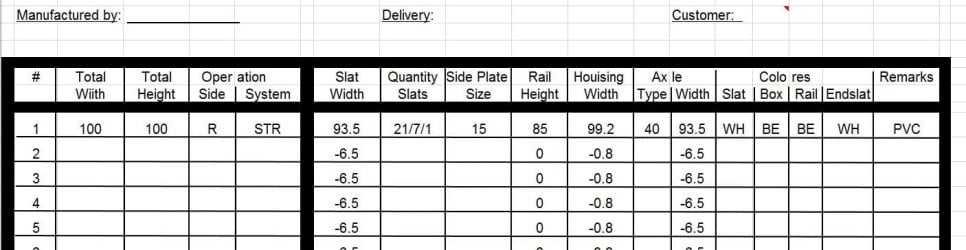
In the screen shot you can see the first 4 columns that have to be entered by the user and then the form will calculate the fields:
Slat width
Rail Height
Housing width
Axle width
If there is nothing entered in the first 4 columns, I would like the fields that do calculations to be blank to make it less confusing. They should only show anything when a value is entered in column 1-4
So the question is how do I do that?
Anyone?
Thanks
Sven
 

Attachments
  • Capture.JPG
    Capture.JPG
    68.8 KB · Views: 3

My Computer

Computer type
PC/Desktop
Computer Manufacturer/Model Number
Custom Build
OS
windows 7 ultimate x64
CPU
AMD FX 6 CORE PROCESSOR
Memory
16 GB
Graphics Card(s)
on MB
Sound Card
on MB
Monitor(s) Displays
Acer
Screen Resolution
1920x1080
Hard Drives
Seagate ( C:\)
Case
mini tower
Keyboard
Logitech wireless
Mouse
Logitech wireless
Antivirus
MSE
Browser
IE11
There's a setting in Excel Options/advanced that has a checkbox for "show a zero in cells that have a zero value".

The default is to have it checked, which will show 0.

Try unchecking it.
 

My Computer

Computer type
PC/Desktop
Computer Manufacturer/Model Number
Ignatz Special; 4 speed manual gearbox; factory air conditioning; one of one
OS
Windows 7 Home Premium SP1, 64-bit
CPU
Intel Skylake i5-6600K, not overclocked
Motherboard
AsRock Z170M Extreme 4, micro ATX
Memory
8 GB HyperX DDR4-2666 (2 x 4 GB)
Graphics Card(s)
none; graphics are integrated on CPU
Sound Card
onboard: Realtek ALC1150; external: USB Behringer UF0-202
Monitor(s) Displays
Dell S2340M 23 inch IPS
Screen Resolution
1600 x 900
Hard Drives
System: Crucial MX100 series SSD, 128 GB;
Data: Samsung Spinpoint 103SJ, 1 TB;
Backup: WD Caviar Green WD30EZRX-00D8PB0, 3 TB
PSU
Rosewill SilentNight 500 watt fanless, semi-modular
Case
Antec Solo II
Cooling
Noctua NH-U12S; Noctua F12 intake, Noctua S12A exhaust
Keyboard
Microsoft 200 6JH-00001 USB
Mouse
Dell or Microsoft optical wired; USB
Antivirus
Microsoft Security Essentials and Malwarebytes Premium
Browser
Pale Moon
Other Info
All fans PWM; speeds at idle: CPU circa 500 rpm; intake circa 600 rpm; exhaust circa 600 rpm; CPU temps 27 idle and 47 C load in a warm room (27 C/81 F) when running Intel Extreme Tuning Utility stress test.
Thanks for that tip, it works on the field that has a "0" in it, but not on the other fields because they show a "6.5"
or "0.8". Is there a way to make those disappear?

Sven
 

My Computer

Computer type
PC/Desktop
Computer Manufacturer/Model Number
Custom Build
OS
windows 7 ultimate x64
CPU
AMD FX 6 CORE PROCESSOR
Memory
16 GB
Graphics Card(s)
on MB
Sound Card
on MB
Monitor(s) Displays
Acer
Screen Resolution
1920x1080
Hard Drives
Seagate ( C:\)
Case
mini tower
Keyboard
Logitech wireless
Mouse
Logitech wireless
Antivirus
MSE
Browser
IE11
make your formula conditional in each cell you want supressed

If (A1 != ""; calculate value; "")

If cell A1 is NOT null
calculate the number

else
write null

could be blank or null string.


It's been a long time since I wrote Excel formula's - sorry it isn't exact

Hopefully you can hit the formula help and work out the exact syntax

Bill
.
 

My Computer

Computer type
Laptop
Computer Manufacturer/Model Number
HP Pavilion dv6-6c10us
OS
x64 (6.3.9600) Win8.1 Pro & soon dual boot x64 (6.1.7601) Win7_SP1 HomePrem
CPU
AMD A6-3420M APU with Radeon(tm) HD Graphics
Motherboard
Hewlett-Packard 1805
Memory
6.00 GB
Graphics Card(s)
AMD Radeon(TM) HD 6520G
Sound Card
(1) AMD High Definition Audio Device (2) IDT High Definiti
Monitor(s) Displays
HP W2072a 20" LCD (1600 x 900) @ 60 Hz
Screen Resolution
1366 x 768 x 32 bits (4294967296 colors) @ 60 Hz
Hard Drives
ST640LM0 00 HM641JI SATA Disk Device
Keyboard
Logitech k520 wireless KB
Mouse
Logitech m320 wireless mouse (bundled with KB)
Internet Speed
15/5 | 54 MB Wireless 'n'
Antivirus
Realtime: Defender or Avast | On-demand: Malwarebytes, ESET
Browser
IE 11 on Win8, IE 10 on win 7
Other Info
Media: [Gimp, Audacity, VLC] || Comm: [WEmail 2012, Skype] || Productivity: [OpenOffice,| Textpad] || Utils: [Sysinternals, cCleaner, Speccy, Defraggler]
Thanks Slartybart,
I will try to figure it out. I never wrote anything like that before, just regular formulas.
Thanks again
Sven
 

My Computer

Computer type
PC/Desktop
Computer Manufacturer/Model Number
Custom Build
OS
windows 7 ultimate x64
CPU
AMD FX 6 CORE PROCESSOR
Memory
16 GB
Graphics Card(s)
on MB
Sound Card
on MB
Monitor(s) Displays
Acer
Screen Resolution
1920x1080
Hard Drives
Seagate ( C:\)
Case
mini tower
Keyboard
Logitech wireless
Mouse
Logitech wireless
Antivirus
MSE
Browser
IE11
Slartybart,
I tried to get this going, but can not make it work.
can you give me the exact formula, looking at line 1 in my screen shot?
total width = 100 should go to 93.5 in slat width and have nothing show when there is on entry in total width.
thanks for your help
Sven
 

My Computer

Computer type
PC/Desktop
Computer Manufacturer/Model Number
Custom Build
OS
windows 7 ultimate x64
CPU
AMD FX 6 CORE PROCESSOR
Memory
16 GB
Graphics Card(s)
on MB
Sound Card
on MB
Monitor(s) Displays
Acer
Screen Resolution
1920x1080
Hard Drives
Seagate ( C:\)
Case
mini tower
Keyboard
Logitech wireless
Mouse
Logitech wireless
Antivirus
MSE
Browser
IE11
make your formula conditional in each cell you want supressed

If (A1 != ""; calculate value; "")

Pardon me for jumping in. Just to elucidate on Bill's formula,

In the each of the cells that performs a calculation you would test the value of the dependent cell first, as Bill has shown.

So, If we call the first column A, then the formula in EACH of the calculated cells is..

Using positive logic: IF($A1="","",do calculations)

or

Using Negative Logic: IF($A1<>"",do calculations,"")

The operators for "Not equal" are <>, not !=

I was always taught to use positive logic. But either will work.

Now, as regards the Dollar sign; This allows you to copy the formula across other columns and it will always check column A's value for NULL. By not using a $ before the 1, when we copy down we will get the correct row reference.

Tanya
 

My Computer

Computer type
PC/Desktop
Computer Manufacturer/Model Number
Home Made
OS
Linux Mint 17 Cinnamon | Win 7 Ult x64
CPU
Intel I7-3770K @ 4.2ghz
Motherboard
ASRock Extreme 4
Memory
32GB G-Skill C10Q
Graphics Card(s)
EVGA GTX 670 2GB SC
Sound Card
Creative Fatality ExtremeGamer
Monitor(s) Displays
LG E2742V x 2
Screen Resolution
1920x1080
Hard Drives
256GB Vertex 4 SSD
2TB Seagate ST2000DM001
1TB Seagate ST1000DM003
PSU
Corsair HX 650
Case
HAF 932 advanced
Cooling
Corsair H100i liquid cooler
Keyboard
Logitech Wireless
Mouse
Logitech Wireless
Internet Speed
OptusNet NBN 100/40
Antivirus
Malwarebytes
Browser
Firefox 30
Other Info
Router: Sagemcom F@st 3846 Crippled by Optus.
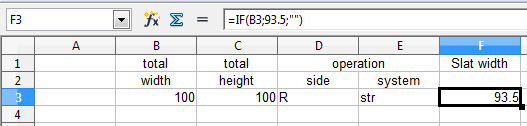
this should help.... it's in OpenOffice Calc, but spreadsheet formulas are somewhat similar if not the same

=IF(B2;93.5;"")

edit: Ignore my typo in the image - B2 is correct if I understand what you want - B3 would test the height not the width.... sorry 'bout that.

basically says if there's a value, any value in column 2, set the current cell to 93.5, otherwise make it blank

Try that simple formula first, then add your own calculation where I put a static 93.5
 

Attachments

  • Capture.PNG
    Capture.PNG
    3 KB · Views: 35

My Computer

Computer type
Laptop
Computer Manufacturer/Model Number
HP Pavilion dv6-6c10us
OS
x64 (6.3.9600) Win8.1 Pro & soon dual boot x64 (6.1.7601) Win7_SP1 HomePrem
CPU
AMD A6-3420M APU with Radeon(tm) HD Graphics
Motherboard
Hewlett-Packard 1805
Memory
6.00 GB
Graphics Card(s)
AMD Radeon(TM) HD 6520G
Sound Card
(1) AMD High Definition Audio Device (2) IDT High Definiti
Monitor(s) Displays
HP W2072a 20" LCD (1600 x 900) @ 60 Hz
Screen Resolution
1366 x 768 x 32 bits (4294967296 colors) @ 60 Hz
Hard Drives
ST640LM0 00 HM641JI SATA Disk Device
Keyboard
Logitech k520 wireless KB
Mouse
Logitech m320 wireless mouse (bundled with KB)
Internet Speed
15/5 | 54 MB Wireless 'n'
Antivirus
Realtime: Defender or Avast | On-demand: Malwarebytes, ESET
Browser
IE 11 on Win8, IE 10 on win 7
Other Info
Media: [Gimp, Audacity, VLC] || Comm: [WEmail 2012, Skype] || Productivity: [OpenOffice,| Textpad] || Utils: [Sysinternals, cCleaner, Speccy, Defraggler]
I am designing a form in Excel to be used in manufacturing.
Since math seems to be a problem in our company I included some formulas to automate the process and cut down on mistakes.
.......

They should only show anything when a value is entered in column 1-4
So the question is how do I do that?

There are several ways to achieve your goal, and I applaud your efforts to make improvements at your workplace.
I will take the approach of not showing the formula result until multiple cells contain the source values entered by the user. If you need to have all 4 entries before doing the calculation then this could work
=IF(COUNT(A2:2)=4,SUM(A2:2),"")
which says to count the cells containing a number in the range a2-d2 and if that equals 4 then do the calculation sum of the range a2-d2 . In my version of Excel the Count function only counts a cell if the value is a number.
If you want to be able to count a cell that contains either letters or numbers then use
=IF(COUNTA(A2:2)=4,SUM(A2:2),"")
but be aware that this will count a cell that contains a space character (looks empty but it is not).

Rick
 

My Computer

OS
Windows 7 Home 32bit
Thanks to all who responded.
I think I am misunderstanding what you are telling me.
The formulas are in the sheet, where do I put: If (A1 != ""; calculate value; "")
I am ruing office 2013.

I tried to put this with the formula, but that must be wrong.
Thanks
 

My Computer

Computer type
PC/Desktop
Computer Manufacturer/Model Number
Custom Build
OS
windows 7 ultimate x64
CPU
AMD FX 6 CORE PROCESSOR
Memory
16 GB
Graphics Card(s)
on MB
Sound Card
on MB
Monitor(s) Displays
Acer
Screen Resolution
1920x1080
Hard Drives
Seagate ( C:\)
Case
mini tower
Keyboard
Logitech wireless
Mouse
Logitech wireless
Antivirus
MSE
Browser
IE11
If you are going to insist on using negative logic the correct formula is..

if($A1<>"",do calculations,"")

This is copied into each cell where you want to do calculations.

Using the $ in front of the A mans that column A will be used as the test value for all formulas.

Tanya
 

My Computer

Computer type
PC/Desktop
Computer Manufacturer/Model Number
Home Made
OS
Linux Mint 17 Cinnamon | Win 7 Ult x64
CPU
Intel I7-3770K @ 4.2ghz
Motherboard
ASRock Extreme 4
Memory
32GB G-Skill C10Q
Graphics Card(s)
EVGA GTX 670 2GB SC
Sound Card
Creative Fatality ExtremeGamer
Monitor(s) Displays
LG E2742V x 2
Screen Resolution
1920x1080
Hard Drives
256GB Vertex 4 SSD
2TB Seagate ST2000DM001
1TB Seagate ST1000DM003
PSU
Corsair HX 650
Case
HAF 932 advanced
Cooling
Corsair H100i liquid cooler
Keyboard
Logitech Wireless
Mouse
Logitech Wireless
Internet Speed
OptusNet NBN 100/40
Antivirus
Malwarebytes
Browser
Firefox 30
Other Info
Router: Sagemcom F@st 3846 Crippled by Optus.
I GOT IT!!
I finally got it going, thanks to all who helped
took me a while, but I also learned something new.
Thanks Again

Sven
 

My Computer

Computer type
PC/Desktop
Computer Manufacturer/Model Number
Custom Build
OS
windows 7 ultimate x64
CPU
AMD FX 6 CORE PROCESSOR
Memory
16 GB
Graphics Card(s)
on MB
Sound Card
on MB
Monitor(s) Displays
Acer
Screen Resolution
1920x1080
Hard Drives
Seagate ( C:\)
Case
mini tower
Keyboard
Logitech wireless
Mouse
Logitech wireless
Antivirus
MSE
Browser
IE11
If you are going to insist on using negative logic the correct formula is..

if($A1<>"",do calculations,"")

This is copied into each cell where you want to do calculations.

Using the $ in front of the A mans that column A will be used as the test value for all formulas.

Tanya

Thanks Tanya - I insist on very little.
Not negative logic, just logic (that wasn't a double negative there was it?)

I'm just having a bit of fun with you, now that Sven is on his way.
Side note: I mentioned Band for a million years to a friend who is in a band and he's considering changing the name.

Please credit Tanya (press the scale icon on her post) for giving you the correct syntax.

Good job Sven, glad you're on the way to becoming the company Excel guru.

Bill
.
 

My Computer

Computer type
Laptop
Computer Manufacturer/Model Number
HP Pavilion dv6-6c10us
OS
x64 (6.3.9600) Win8.1 Pro & soon dual boot x64 (6.1.7601) Win7_SP1 HomePrem
CPU
AMD A6-3420M APU with Radeon(tm) HD Graphics
Motherboard
Hewlett-Packard 1805
Memory
6.00 GB
Graphics Card(s)
AMD Radeon(TM) HD 6520G
Sound Card
(1) AMD High Definition Audio Device (2) IDT High Definiti
Monitor(s) Displays
HP W2072a 20" LCD (1600 x 900) @ 60 Hz
Screen Resolution
1366 x 768 x 32 bits (4294967296 colors) @ 60 Hz
Hard Drives
ST640LM0 00 HM641JI SATA Disk Device
Keyboard
Logitech k520 wireless KB
Mouse
Logitech m320 wireless mouse (bundled with KB)
Internet Speed
15/5 | 54 MB Wireless 'n'
Antivirus
Realtime: Defender or Avast | On-demand: Malwarebytes, ESET
Browser
IE 11 on Win8, IE 10 on win 7
Other Info
Media: [Gimp, Audacity, VLC] || Comm: [WEmail 2012, Skype] || Productivity: [OpenOffice,| Textpad] || Utils: [Sysinternals, cCleaner, Speccy, Defraggler]
If you are going to insist on using negative logic the correct formula is..

if($A1<>"",do calculations,"")

This is copied into each cell where you want to do calculations.

Using the $ in front of the A mans that column A will be used as the test value for all formulas.

Tanya

Thanks Tanya - I insist on very little.
Not negative logic, just logic (that wasn't a double negative there was it?)

I'm just having a bit of fun with you, now that Sven is on his way.
Side note: I mentioned Band for a million years to a friend who is in a band and he's considering changing the name.

Please credit Tanya (press the scale icon on her post) for giving you the correct syntax.

Good job Sven, glad you're on the way to becoming the company Excel guru.

Bill
.

Hehe.. I used to get told off all the time when I did my first excel course at school. The teacher was paranoid about using positive logic... I guess it just stuck.

Seriously though, Team effort.

Good luck to you Sven.
 

My Computer

Computer type
PC/Desktop
Computer Manufacturer/Model Number
Home Made
OS
Linux Mint 17 Cinnamon | Win 7 Ult x64
CPU
Intel I7-3770K @ 4.2ghz
Motherboard
ASRock Extreme 4
Memory
32GB G-Skill C10Q
Graphics Card(s)
EVGA GTX 670 2GB SC
Sound Card
Creative Fatality ExtremeGamer
Monitor(s) Displays
LG E2742V x 2
Screen Resolution
1920x1080
Hard Drives
256GB Vertex 4 SSD
2TB Seagate ST2000DM001
1TB Seagate ST1000DM003
PSU
Corsair HX 650
Case
HAF 932 advanced
Cooling
Corsair H100i liquid cooler
Keyboard
Logitech Wireless
Mouse
Logitech Wireless
Internet Speed
OptusNet NBN 100/40
Antivirus
Malwarebytes
Browser
Firefox 30
Other Info
Router: Sagemcom F@st 3846 Crippled by Optus.
Hi All,
Thanks to Slartybart and TanyaC I have my spreadsheet working and I was wondering if there was a way to further improve on it, here is what I would like to do:

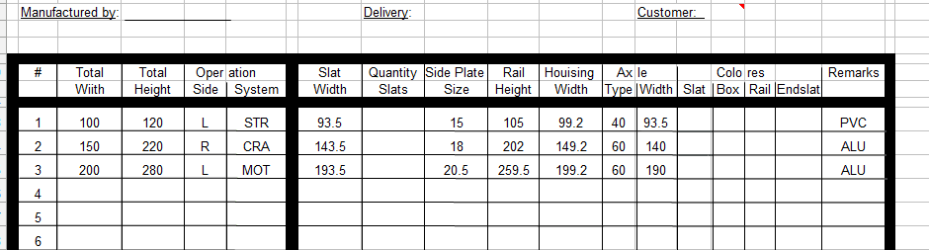
In the attachment you see 4 columns: Total Height, Total Width, Operation Side and Operation System.
In the Column Operation System you can see 3 types,
STR = STRAP
CRA= CRANK
MOT= MOTOR
Then there is the column: Axle Type and the options are 40 or 60.
40 only is used if a strap is used, 60 is for Crank or motor. When I type STR in the field, I would like 40 to appear in the column AXLE Type. When I type CRA or MOT I would like 60 to appear instead. Is that doable?
Furthermore, when a 40 appears, the deduction from total width is 6.5 and the total is shown in the column Axle width.
If 60 appears the deduction is 10. The formula has to be adjusted. Doable?

Thanks
Sven


Attachments

  • Capture.PNG
    Capture.PNG
    7.4 KB · Views: 1

My Computer

Computer type
PC/Desktop
Computer Manufacturer/Model Number
Custom Build
OS
windows 7 ultimate x64
CPU
AMD FX 6 CORE PROCESSOR
Memory
16 GB
Graphics Card(s)
on MB
Sound Card
on MB
Monitor(s) Displays
Acer
Screen Resolution
1920x1080
Hard Drives
Seagate ( C:\)
Case
mini tower
Keyboard
Logitech wireless
Mouse
Logitech wireless
Antivirus
MSE
Browser
IE11
Sure, more conditional testing

The easiest way to learn is open the function wizard. type an equal sign into the cell you want your result. You should see an fx button on your toolbar (near the sum 'E' icon) - select logical from the dropdown box and select if
That should give you fields to fill (test, then, else).

Play with it and have fun doing something new.

in the axle column (K) write a formula testing the operation system column(E) value
=if(E3 == "STR";40;if(E3== ("CRA" OR "MOT"); 60;"ERROR"))

I'm sure the syntax is all wrong, I pick row number 3 at random and the column letters are off too. But it is just an example.

If you start in the function wizard, you can see the results immediately.

The function is a bit trickier.
if E3 = STR write 40
otherwise test to see if E3 = CRA OR MOT - write 60 if that test passes
otherwise write an error msg - you have to decide what to do if none of the acceptable values are typed in the op system column. (My msg is really too long - maybe write a noticeable numeric - say 99)

Our friend Tanya might stop back and give you the correct syntax, but give it a shot. You'll be surprised how easy it is once you understand a few basics. Take a look at what Tanya posted and the function you already wrote - I'm sure it will come together for you.

Furthermore, when a 40 appears, the deduction from total width is 6.5 and the total is shown in the column Axle width.
If 60 appears the deduction is 10. The formula has to be adjusted. Doable?

yes doable. similar function in the total width column
=if(e3 = "STR"; a3-6.5;if(E3== ("CRA" OR "MOT"); a3-10; ERROR))

Man am I rusty at this stuff - imagine that I used to write excel functions for accounting in my spare time. You think they'd be good at math wouldn't you :)


=If (not; "post a call for help"; "we're here")
 

My Computer

Computer type
Laptop
Computer Manufacturer/Model Number
HP Pavilion dv6-6c10us
OS
x64 (6.3.9600) Win8.1 Pro & soon dual boot x64 (6.1.7601) Win7_SP1 HomePrem
CPU
AMD A6-3420M APU with Radeon(tm) HD Graphics
Motherboard
Hewlett-Packard 1805
Memory
6.00 GB
Graphics Card(s)
AMD Radeon(TM) HD 6520G
Sound Card
(1) AMD High Definition Audio Device (2) IDT High Definiti
Monitor(s) Displays
HP W2072a 20" LCD (1600 x 900) @ 60 Hz
Screen Resolution
1366 x 768 x 32 bits (4294967296 colors) @ 60 Hz
Hard Drives
ST640LM0 00 HM641JI SATA Disk Device
Keyboard
Logitech k520 wireless KB
Mouse
Logitech m320 wireless mouse (bundled with KB)
Internet Speed
15/5 | 54 MB Wireless 'n'
Antivirus
Realtime: Defender or Avast | On-demand: Malwarebytes, ESET
Browser
IE 11 on Win8, IE 10 on win 7
Other Info
Media: [Gimp, Audacity, VLC] || Comm: [WEmail 2012, Skype] || Productivity: [OpenOffice,| Textpad] || Utils: [Sysinternals, cCleaner, Speccy, Defraggler]
outstanding advice.
thank you very much. after I got the "old stuff" done, I feel like trying new stuff and this is what I want to try.
thanks for pointing me in the right direction. I'll be an Excel wizard in no time.
I check back to see if Tanya has any advice. This will keep me out of trouble over the long weeend.
Thanks again
Sven
 

My Computer

Computer type
PC/Desktop
Computer Manufacturer/Model Number
Custom Build
OS
windows 7 ultimate x64
CPU
AMD FX 6 CORE PROCESSOR
Memory
16 GB
Graphics Card(s)
on MB
Sound Card
on MB
Monitor(s) Displays
Acer
Screen Resolution
1920x1080
Hard Drives
Seagate ( C:\)
Case
mini tower
Keyboard
Logitech wireless
Mouse
Logitech wireless
Antivirus
MSE
Browser
IE11
Here you go...

I had to zip the xlsx file because I couldn't upload a spreadsheet file, so unzip it. It's called sven.xlsx.

Have a look, and ask any questions you have..

Tanya
 

Attachments

My Computer

Computer type
PC/Desktop
Computer Manufacturer/Model Number
Home Made
OS
Linux Mint 17 Cinnamon | Win 7 Ult x64
CPU
Intel I7-3770K @ 4.2ghz
Motherboard
ASRock Extreme 4
Memory
32GB G-Skill C10Q
Graphics Card(s)
EVGA GTX 670 2GB SC
Sound Card
Creative Fatality ExtremeGamer
Monitor(s) Displays
LG E2742V x 2
Screen Resolution
1920x1080
Hard Drives
256GB Vertex 4 SSD
2TB Seagate ST2000DM001
1TB Seagate ST1000DM003
PSU
Corsair HX 650
Case
HAF 932 advanced
Cooling
Corsair H100i liquid cooler
Keyboard
Logitech Wireless
Mouse
Logitech Wireless
Internet Speed
OptusNet NBN 100/40
Antivirus
Malwarebytes
Browser
Firefox 30
Other Info
Router: Sagemcom F@st 3846 Crippled by Optus.
Here you go...

I had to zip the xlsx file because I couldn't upload a spreadsheet file, so unzip it. It's called sven.xlsx.

Have a look, and ask any questions you have..

Tanya

You are too good, it is much easier to understand a formula if you can see a real one. You also caught what I missed in the column calcs (opps wrong column - that's what I get for doing this ad hoc... not in excel or even calc - just winging it :)

Thanks Tanya.


@Sven: I do have one small mod to the axel formulas - people can type anything in the cells, not only the 3 accepted strings. After playing with your spreadsheet, this input validation could be on all cells (that changes the entire project - test cell input, flag or disallow erroneous input, and the test for null cells would have to change). Maybe Sven can build a better mousetrap after putting this "easy" one to bed.

Axel Type Formula: =IF($F5="","",IF($F5="STR",40,60))
I would add a tertiary test to check for CRA or MOT
=IF($F5="","",IF($F5="STR",40,IF(($F5="CRA") OR ($F5="MOT"),60,"ERR")))

Hope I "converted" Calc to Excel correctly - might have missed a ($) or (;)

You can get quite detailed in your formulae, validating user input. Play around with what you have now - type in strange values, only fill in some cells - see what happens and determine how much you want to invest in this skunkworks project of yours.

I think you have enough confidence writing excel formulas now. Lean on the wizard for a while - it still helps me resolve errors.

Google search for Excel formulas. They might help or they might distract. Help in Excel is fairly well written and there are examples you can steal (I think - there used to be anyway)

Bill
.
 

My Computer

Computer type
Laptop
Computer Manufacturer/Model Number
HP Pavilion dv6-6c10us
OS
x64 (6.3.9600) Win8.1 Pro & soon dual boot x64 (6.1.7601) Win7_SP1 HomePrem
CPU
AMD A6-3420M APU with Radeon(tm) HD Graphics
Motherboard
Hewlett-Packard 1805
Memory
6.00 GB
Graphics Card(s)
AMD Radeon(TM) HD 6520G
Sound Card
(1) AMD High Definition Audio Device (2) IDT High Definiti
Monitor(s) Displays
HP W2072a 20" LCD (1600 x 900) @ 60 Hz
Screen Resolution
1366 x 768 x 32 bits (4294967296 colors) @ 60 Hz
Hard Drives
ST640LM0 00 HM641JI SATA Disk Device
Keyboard
Logitech k520 wireless KB
Mouse
Logitech m320 wireless mouse (bundled with KB)
Internet Speed
15/5 | 54 MB Wireless 'n'
Antivirus
Realtime: Defender or Avast | On-demand: Malwarebytes, ESET
Browser
IE 11 on Win8, IE 10 on win 7
Other Info
Media: [Gimp, Audacity, VLC] || Comm: [WEmail 2012, Skype] || Productivity: [OpenOffice,| Textpad] || Utils: [Sysinternals, cCleaner, Speccy, Defraggler]
Hi,

This is not a valid excel formula...

=IF($F5="","",IF($F5="STR",40,IF(($F5="CRA") OR ($F5="MOT"),60,"ERR")))

This is the corrected formula...

=IF($F5="","",IF($F5="STR",40,IF(OR($F5="CRA",$F5="MOT"),60,"ERR")))

You were close... ;)

Tanya
 

My Computer

Computer type
PC/Desktop
Computer Manufacturer/Model Number
Home Made
OS
Linux Mint 17 Cinnamon | Win 7 Ult x64
CPU
Intel I7-3770K @ 4.2ghz
Motherboard
ASRock Extreme 4
Memory
32GB G-Skill C10Q
Graphics Card(s)
EVGA GTX 670 2GB SC
Sound Card
Creative Fatality ExtremeGamer
Monitor(s) Displays
LG E2742V x 2
Screen Resolution
1920x1080
Hard Drives
256GB Vertex 4 SSD
2TB Seagate ST2000DM001
1TB Seagate ST1000DM003
PSU
Corsair HX 650
Case
HAF 932 advanced
Cooling
Corsair H100i liquid cooler
Keyboard
Logitech Wireless
Mouse
Logitech Wireless
Internet Speed
OptusNet NBN 100/40
Antivirus
Malwarebytes
Browser
Firefox 30
Other Info
Router: Sagemcom F@st 3846 Crippled by Optus.
Back
Top