Solved Hide User in winlogon (active directory)

mafia1990

New member
Local time
3:57 PM
Messages
8
Hi

I want to know how can I hide a user account in the login screen. User is in an “Active Directory”.

I know to do this , I need change some registry keys :

HKEY_LOCAL_MACHINE\SOFTWARE\Microsoft\Windows NT\CurrentVersion\Winlogon\SpecialAccounts\UserList

But this method not work when system use “Active Directory”!
 

My Computer My Computer

At a glance

windows 7 32bit ,windows 7 x64intelddr2geforce
Computer type
PC/Desktop
OS
windows 7 32bit ,windows 7 x64
CPU
intel
Motherboard
asus
Memory
ddr2
Graphics Card(s)
geforce
What's your purpose to do this? As far as I know (been a long time since I saw a domain), only the accounts that have logged in on that particular machine is listed (or perhaps only the last logon).

You should be using group policy (gpedit.msc) I believe, see if:
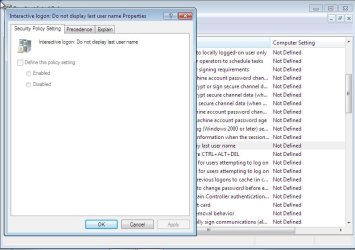
Computer Configuration - Windows Settings - Security Settings - Local Policies - Security options - "Interactive logon: Do not display last user name" set to enable will do the job.

You can enable this only to a certain machine or a group of machines.
 
Last edited:

My Computer My Computer

At a glance

Windows 7 Ultimate x64 SP1AMD Phenom 2 1090T2x8GB Kingston HyperX Fury Black 1600Mhz Unga...MSI GTX 970 Gaming 4G
Computer type
PC/Desktop
Computer Manufacturer/Model Number
Custom Build
OS
Windows 7 Ultimate x64 SP1
CPU
AMD Phenom 2 1090T
Motherboard
Gigabyte GA-890FXA-UD5
Memory
2x8GB Kingston HyperX Fury Black 1600Mhz Unganged
Graphics Card(s)
MSI GTX 970 Gaming 4G
Sound Card
Realtek On-Board HD 7.1 Audio / Logitech G35
Monitor(s) Displays
3xAcer GD245HQ
Screen Resolution
1920x1080
Hard Drives
Samsung 850 Pro 512GB SSD - OS /
WD Caviar Black SATA 3 - 1 TBx2 - Dynamic RAID 0 /
WD Caviar Green SATA 2 - 640GBx2 - Dynamic RAID 0 /
WD Caviar Green SATA 2 - 640GB - Internal Backup /
Seagate Barracude SATA 3 - 3TB - External Backup/ Sync
PSU
HighPower 1000W
Case
Cooler Master HAF 932
Cooling
Noctua NH-D14
Keyboard
Logitech G19
Mouse
Logitech G500
Internet Speed
100/4 Mbit Cable (100GB quota)
Antivirus
ZoneAlarm Extreme Security / MBAM Pro / MBAE Free / SAS Free
Browser
IE 11 - Firefox - Chrome
Other Info
Logitech F710/ G27/ G940/ Z5500 // TrackIR 5 // Nvidia 3D Surround Vision
Thanks for your reply
This is partly solved my problem
But there is a problem with “other user” that I can’t remove it

I tried this methods:
Hide entry points for Fast User Switching
Interactive logon: Do not display last user name

but these methods not work when user is member of an AD domain
 

My Computer My Computer

At a glance

windows 7 32bit ,windows 7 x64intelddr2geforce
Computer type
PC/Desktop
OS
windows 7 32bit ,windows 7 x64
CPU
intel
Motherboard
asus
Memory
ddr2
Graphics Card(s)
geforce
Run in the computer that you are experimenting: rsop.msc
This will show you the effective group policy settings. What does it say for "Interactive Logon: Do not dosplay last user name"?

Did you restart the PC?

This is the proper method to enforce in a domain environment, if it isn't working then you are doing something wrong.
See Do not display last user name Windows setting (dontdisplaylastusername), it has a bit more info and the registry change that does the same thing (maybe you would like that more)
 

My Computer My Computer

At a glance

Windows 7 Ultimate x64 SP1AMD Phenom 2 1090T2x8GB Kingston HyperX Fury Black 1600Mhz Unga...MSI GTX 970 Gaming 4G
Computer type
PC/Desktop
Computer Manufacturer/Model Number
Custom Build
OS
Windows 7 Ultimate x64 SP1
CPU
AMD Phenom 2 1090T
Motherboard
Gigabyte GA-890FXA-UD5
Memory
2x8GB Kingston HyperX Fury Black 1600Mhz Unganged
Graphics Card(s)
MSI GTX 970 Gaming 4G
Sound Card
Realtek On-Board HD 7.1 Audio / Logitech G35
Monitor(s) Displays
3xAcer GD245HQ
Screen Resolution
1920x1080
Hard Drives
Samsung 850 Pro 512GB SSD - OS /
WD Caviar Black SATA 3 - 1 TBx2 - Dynamic RAID 0 /
WD Caviar Green SATA 2 - 640GBx2 - Dynamic RAID 0 /
WD Caviar Green SATA 2 - 640GB - Internal Backup /
Seagate Barracude SATA 3 - 3TB - External Backup/ Sync
PSU
HighPower 1000W
Case
Cooler Master HAF 932
Cooling
Noctua NH-D14
Keyboard
Logitech G19
Mouse
Logitech G500
Internet Speed
100/4 Mbit Cable (100GB quota)
Antivirus
ZoneAlarm Extreme Security / MBAM Pro / MBAE Free / SAS Free
Browser
IE 11 - Firefox - Chrome
Other Info
Logitech F710/ G27/ G940/ Z5500 // TrackIR 5 // Nvidia 3D Surround Vision
look GokAy
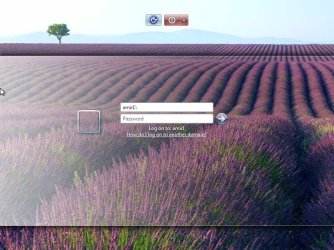
this is my screen login ==>screen.jpg(attached)
and this is rsop result ===> rsop.jpg(attached)

i want to remove "other user"
but this methods not remove that

"tnx for hidden user account and your link(it was useful) "
 

Attachments

  • screen.jpg
    screen.jpg
    86 KB · Views: 0
  • rsop.jpg
    rsop.jpg
    34 KB · Views: 0

My Computer My Computer

At a glance

windows 7 32bit ,windows 7 x64intelddr2geforce
Computer type
PC/Desktop
OS
windows 7 32bit ,windows 7 x64
CPU
intel
Motherboard
asus
Memory
ddr2
Graphics Card(s)
geforce
You are looking at the wrong place in rsop.msc, check my first post (#2)

Also it is working, amir1 is your domain name or computer name. That part is needed to specify if you want to logon using a domain or local account.

Is it clear now?
 

My Computer My Computer

At a glance

Windows 7 Ultimate x64 SP1AMD Phenom 2 1090T2x8GB Kingston HyperX Fury Black 1600Mhz Unga...MSI GTX 970 Gaming 4G
Computer type
PC/Desktop
Computer Manufacturer/Model Number
Custom Build
OS
Windows 7 Ultimate x64 SP1
CPU
AMD Phenom 2 1090T
Motherboard
Gigabyte GA-890FXA-UD5
Memory
2x8GB Kingston HyperX Fury Black 1600Mhz Unganged
Graphics Card(s)
MSI GTX 970 Gaming 4G
Sound Card
Realtek On-Board HD 7.1 Audio / Logitech G35
Monitor(s) Displays
3xAcer GD245HQ
Screen Resolution
1920x1080
Hard Drives
Samsung 850 Pro 512GB SSD - OS /
WD Caviar Black SATA 3 - 1 TBx2 - Dynamic RAID 0 /
WD Caviar Green SATA 2 - 640GBx2 - Dynamic RAID 0 /
WD Caviar Green SATA 2 - 640GB - Internal Backup /
Seagate Barracude SATA 3 - 3TB - External Backup/ Sync
PSU
HighPower 1000W
Case
Cooler Master HAF 932
Cooling
Noctua NH-D14
Keyboard
Logitech G19
Mouse
Logitech G500
Internet Speed
100/4 Mbit Cable (100GB quota)
Antivirus
ZoneAlarm Extreme Security / MBAM Pro / MBAE Free / SAS Free
Browser
IE 11 - Firefox - Chrome
Other Info
Logitech F710/ G27/ G940/ Z5500 // TrackIR 5 // Nvidia 3D Surround Vision
yes ,sry for that
domain name =amir1
pc name= amir
 

Attachments

  • rsop.jpg
    rsop.jpg
    59.9 KB · Views: 0

My Computer My Computer

At a glance

windows 7 32bit ,windows 7 x64intelddr2geforce
Computer type
PC/Desktop
OS
windows 7 32bit ,windows 7 x64
CPU
intel
Motherboard
asus
Memory
ddr2
Graphics Card(s)
geforce
It is alright, learning is a part of the process :)

Did you use the group policy or registry to disable display of last logon? I can't see it in your last screenshot (is that rsop or gpedit?)
 

My Computer My Computer

At a glance

Windows 7 Ultimate x64 SP1AMD Phenom 2 1090T2x8GB Kingston HyperX Fury Black 1600Mhz Unga...MSI GTX 970 Gaming 4G
Computer type
PC/Desktop
Computer Manufacturer/Model Number
Custom Build
OS
Windows 7 Ultimate x64 SP1
CPU
AMD Phenom 2 1090T
Motherboard
Gigabyte GA-890FXA-UD5
Memory
2x8GB Kingston HyperX Fury Black 1600Mhz Unganged
Graphics Card(s)
MSI GTX 970 Gaming 4G
Sound Card
Realtek On-Board HD 7.1 Audio / Logitech G35
Monitor(s) Displays
3xAcer GD245HQ
Screen Resolution
1920x1080
Hard Drives
Samsung 850 Pro 512GB SSD - OS /
WD Caviar Black SATA 3 - 1 TBx2 - Dynamic RAID 0 /
WD Caviar Green SATA 2 - 640GBx2 - Dynamic RAID 0 /
WD Caviar Green SATA 2 - 640GB - Internal Backup /
Seagate Barracude SATA 3 - 3TB - External Backup/ Sync
PSU
HighPower 1000W
Case
Cooler Master HAF 932
Cooling
Noctua NH-D14
Keyboard
Logitech G19
Mouse
Logitech G500
Internet Speed
100/4 Mbit Cable (100GB quota)
Antivirus
ZoneAlarm Extreme Security / MBAM Pro / MBAE Free / SAS Free
Browser
IE 11 - Firefox - Chrome
Other Info
Logitech F710/ G27/ G940/ Z5500 // TrackIR 5 // Nvidia 3D Surround Vision
this is rsop
and
I used this methods:
Do not display last user name (group policy)
dontdisplaylastname (regedit)


but i think this methods make other users enabled instead disable
 

My Computer My Computer

At a glance

windows 7 32bit ,windows 7 x64intelddr2geforce
Computer type
PC/Desktop
OS
windows 7 32bit ,windows 7 x64
CPU
intel
Motherboard
asus
Memory
ddr2
Graphics Card(s)
geforce
It will only work on the PC you have enabled the "Interactive logon: Disable ..."
But if you want other PCs with same setting, you can use group policy on your Domain Controller (opening a new mmc.msc and adding group policy snap-in should work too) to create an OU (organizational unit) which includes the PCs you want and applying the setting to that OU instead. I believe you can find many resources about group policy online.

This is good as a starter - https://en.m.wikipedia.org/wiki/Group_Policy
 

My Computer My Computer

At a glance

Windows 7 Ultimate x64 SP1AMD Phenom 2 1090T2x8GB Kingston HyperX Fury Black 1600Mhz Unga...MSI GTX 970 Gaming 4G
Computer type
PC/Desktop
Computer Manufacturer/Model Number
Custom Build
OS
Windows 7 Ultimate x64 SP1
CPU
AMD Phenom 2 1090T
Motherboard
Gigabyte GA-890FXA-UD5
Memory
2x8GB Kingston HyperX Fury Black 1600Mhz Unganged
Graphics Card(s)
MSI GTX 970 Gaming 4G
Sound Card
Realtek On-Board HD 7.1 Audio / Logitech G35
Monitor(s) Displays
3xAcer GD245HQ
Screen Resolution
1920x1080
Hard Drives
Samsung 850 Pro 512GB SSD - OS /
WD Caviar Black SATA 3 - 1 TBx2 - Dynamic RAID 0 /
WD Caviar Green SATA 2 - 640GBx2 - Dynamic RAID 0 /
WD Caviar Green SATA 2 - 640GB - Internal Backup /
Seagate Barracude SATA 3 - 3TB - External Backup/ Sync
PSU
HighPower 1000W
Case
Cooler Master HAF 932
Cooling
Noctua NH-D14
Keyboard
Logitech G19
Mouse
Logitech G500
Internet Speed
100/4 Mbit Cable (100GB quota)
Antivirus
ZoneAlarm Extreme Security / MBAM Pro / MBAE Free / SAS Free
Browser
IE 11 - Firefox - Chrome
Other Info
Logitech F710/ G27/ G940/ Z5500 // TrackIR 5 // Nvidia 3D Surround Vision
i mean how remove 'Other user' login screen
 

Attachments

  • Untitled.jpg
    Untitled.jpg
    7.8 KB · Views: 6

My Computer My Computer

At a glance

windows 7 32bit ,windows 7 x64intelddr2geforce
Computer type
PC/Desktop
OS
windows 7 32bit ,windows 7 x64
CPU
intel
Motherboard
asus
Memory
ddr2
Graphics Card(s)
geforce

My Computer My Computer

At a glance

Windows 7 Ultimate x64 SP1AMD Phenom 2 1090T2x8GB Kingston HyperX Fury Black 1600Mhz Unga...MSI GTX 970 Gaming 4G
Computer type
PC/Desktop
Computer Manufacturer/Model Number
Custom Build
OS
Windows 7 Ultimate x64 SP1
CPU
AMD Phenom 2 1090T
Motherboard
Gigabyte GA-890FXA-UD5
Memory
2x8GB Kingston HyperX Fury Black 1600Mhz Unganged
Graphics Card(s)
MSI GTX 970 Gaming 4G
Sound Card
Realtek On-Board HD 7.1 Audio / Logitech G35
Monitor(s) Displays
3xAcer GD245HQ
Screen Resolution
1920x1080
Hard Drives
Samsung 850 Pro 512GB SSD - OS /
WD Caviar Black SATA 3 - 1 TBx2 - Dynamic RAID 0 /
WD Caviar Green SATA 2 - 640GBx2 - Dynamic RAID 0 /
WD Caviar Green SATA 2 - 640GB - Internal Backup /
Seagate Barracude SATA 3 - 3TB - External Backup/ Sync
PSU
HighPower 1000W
Case
Cooler Master HAF 932
Cooling
Noctua NH-D14
Keyboard
Logitech G19
Mouse
Logitech G500
Internet Speed
100/4 Mbit Cable (100GB quota)
Antivirus
ZoneAlarm Extreme Security / MBAM Pro / MBAE Free / SAS Free
Browser
IE 11 - Firefox - Chrome
Other Info
Logitech F710/ G27/ G940/ Z5500 // TrackIR 5 // Nvidia 3D Surround Vision
This is partly solved my problem
 

My Computer My Computer

At a glance

windows 7 32bit ,windows 7 x64intelddr2geforce
Computer type
PC/Desktop
OS
windows 7 32bit ,windows 7 x64
CPU
intel
Motherboard
asus
Memory
ddr2
Graphics Card(s)
geforce
Back
Top