Hiding system folders on a shared computer

apertotes

New member
Hello, I am sharing a computer with my son and I want to hide some programs from him, mainly Steam games, but not only. I have managed to hide them from his start menu. He has a standard account, so I think on that front we are OK.

I have also managed to prevent him from accessing the control panel, and thus seeing the list of installed programs.

But I have a problem:

Windows explorer. I tried navigating from his account, and he can go into program files without any problem, he can even go into windows folder. He can not delete files, but he can run them. So, you know how kids are. He will see all the installed programs and try to run directly their .exe file. And even though he won't be able to launch Steam games, he will see a list of all installed games, and I want to prevent that from happening.

He can even go to "Start", type "witch" and a few seconds later he'll be able to see that we have The Witcher 2 installed on the computer. He won't be able to launch it if I activate Parental Controls, but the damage is done.

So, can anybody help me hiding certain folders (windows and program files) from a standard user explorer?

Thanks!
 

My Computer

Computer type
PC/Desktop
Computer Manufacturer/Model Number
Custom
OS
Windows 7 Ultimate x64
CPU
Intel i5-4670K
Motherboard
Gigabyte Z87-UDH5
Memory
16 gb DDR3 G.Skill 1600
Graphics Card(s)
MSI Gaming gtx 770
Hard Drives
Samsung 840 EVO - 500 gb
Antivirus
MS Essentials
Browser
Firefox
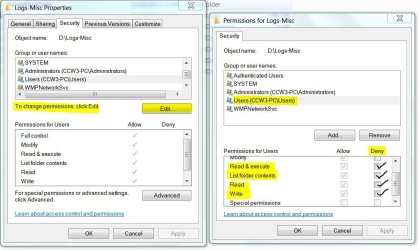
Yes. Use folder permissions. Log on as the Administrator. Open Windows Explorer then right click on a folder and select Properties. Click on the Security Tab then click on the Edit button. On the Permissions window, select the user you want to change and check the Deny boxes that apply.

Here's a sample:
 

Attachments

  • Folder Permissions.JPG
    Folder Permissions.JPG
    114.6 KB · Views: 0

My Computer

Computer type
PC/Desktop
Computer Manufacturer/Model Number
Built 2/11/2011
OS
Windows 7 Pro-x64
CPU
i7-2600 3.4GHz - 3.8GHz Turbo
Motherboard
Intel DH67BL-B3
Memory
8Gb - 2x4GB, Muskin 991770 PC3-1333
Graphics Card(s)
Integrated Intel HD 2000
Sound Card
Integrated Intel 10.1 HD, RealTek ALC892
Monitor(s) Displays
Asus LCD VH222H, Haier HL24XSL2a
Screen Resolution
1920x1080, 1920x1080
Hard Drives
Crucial SSD C300-128Gb,
Western Digital WD5002AALX - 500Gb,
Western Digital WD7501AALS - 750Gb
PSU
Seasonic 650W 80+ Gold Modular
Case
Rosewill Defender
Cooling
Stock CPU, Four 120mm case fans, PCH fan added
Keyboard
Logitech EX100 Y-RBH94 Wireless
Mouse
Logitech EX100 M-RCE95 Wireless
Internet Speed
3.0/1.5 Mbs
Antivirus
Microsoft Security Essentials
Browser
Microsoft Internet Explorer 11
Other Info
Antec Veris Premier-Multimedia IR Station,
Cyber Accoustics-3602 Speakers,
AFT XM-5U Card Reader,
Hauppauge TV-HVR-2250,
Sony LX300 USB Turntable
Thanks! When I try to do that, I get two errors:

1. Error Applying Security: An error occurred while applying security information to

c:\Program Files (x86)

Access is denied

2. Windows Security: Unable to save permission changes on Program Files (x86)

Access is denied

--------------------------------------

I got this when I tried to change permissions for my son's account on the program files folder (both of them) and on the windows folder.

But I was successful when I tried with the NVIDIA folder.

Are Program Files, Program Files (x86) and Windows folders special in that it is not possible to change permissions even as administrator?
 

My Computer

Computer type
PC/Desktop
Computer Manufacturer/Model Number
Custom
OS
Windows 7 Ultimate x64
CPU
Intel i5-4670K
Motherboard
Gigabyte Z87-UDH5
Memory
16 gb DDR3 G.Skill 1600
Graphics Card(s)
MSI Gaming gtx 770
Hard Drives
Samsung 840 EVO - 500 gb
Antivirus
MS Essentials
Browser
Firefox
I was afraid of that. I didn't try it on Windows' reserved folders. I hesitate to recommend trying the Advanced options by taking ownership of the folder. (From Trusted Installer to Administrator) It may cause Windows to stop running. If it will even let you change it. Some experimenting with the location of installed programs might work. Most all installers let you choose the location of installed programs. I wonder if the "location" was created by you (Admin) that it would then let you set the folder permissions.

I see that you have Ultimate. There's a feature in Ultimate and Enterprise versions called AppLocker that can restrict users from running executables (exe, com, dll, etc) but as I understand, it takes a heavy toll on performance. I don't have any experience with it so I can't help there. And I don't think it restricts viewing of folders.
What Is AppLocker?

I'll post a help needed request for someone more informed of to the security options. I've always been a One PC-One User person and never needed it in my environment so I'm behind. :o
 

My Computer

Computer type
PC/Desktop
Computer Manufacturer/Model Number
Built 2/11/2011
OS
Windows 7 Pro-x64
CPU
i7-2600 3.4GHz - 3.8GHz Turbo
Motherboard
Intel DH67BL-B3
Memory
8Gb - 2x4GB, Muskin 991770 PC3-1333
Graphics Card(s)
Integrated Intel HD 2000
Sound Card
Integrated Intel 10.1 HD, RealTek ALC892
Monitor(s) Displays
Asus LCD VH222H, Haier HL24XSL2a
Screen Resolution
1920x1080, 1920x1080
Hard Drives
Crucial SSD C300-128Gb,
Western Digital WD5002AALX - 500Gb,
Western Digital WD7501AALS - 750Gb
PSU
Seasonic 650W 80+ Gold Modular
Case
Rosewill Defender
Cooling
Stock CPU, Four 120mm case fans, PCH fan added
Keyboard
Logitech EX100 Y-RBH94 Wireless
Mouse
Logitech EX100 M-RCE95 Wireless
Internet Speed
3.0/1.5 Mbs
Antivirus
Microsoft Security Essentials
Browser
Microsoft Internet Explorer 11
Other Info
Antec Veris Premier-Multimedia IR Station,
Cyber Accoustics-3602 Speakers,
AFT XM-5U Card Reader,
Hauppauge TV-HVR-2250,
Sony LX300 USB Turntable

My Computer

Computer type
PC/Desktop
Computer Manufacturer/Model Number
Custom
OS
Windows 7 Ultimate x64
CPU
Intel i5-4670K
Motherboard
Gigabyte Z87-UDH5
Memory
16 gb DDR3 G.Skill 1600
Graphics Card(s)
MSI Gaming gtx 770
Hard Drives
Samsung 840 EVO - 500 gb
Antivirus
MS Essentials
Browser
Firefox

My Computer

Computer type
Laptop
Computer Manufacturer/Model Number
Employer provided Dell Latitude
OS
W7 Pro SP1 64bit
CPU
i7
Memory
8GB
Graphics Card(s)
Intel HD Graphics
Hard Drives
crappy SSD
Antivirus
Employer mandated Symantec Endpoint Protection
Browser
Pale Moon 64bit, IE11 64bit & Chrome 64bit
Can I return ownership to the Trusted Installer while still having my son denied permissions on some folders inside? And also, when I go to ownership I see only Me and Administrator accounts to select as owner's. If I click on "Other users and groups", and then "Advanced", I get a list with all the users and groups, but Trusted Installer is not there. I know that the user still exists, because it still has permissions granted on these folders, and because it is still the owner of the Windows folder. But I can not select it from the complete list of users and groups. So, how can I give him back the ownership of the folders?
 

My Computer

Computer type
PC/Desktop
Computer Manufacturer/Model Number
Custom
OS
Windows 7 Ultimate x64
CPU
Intel i5-4670K
Motherboard
Gigabyte Z87-UDH5
Memory
16 gb DDR3 G.Skill 1600
Graphics Card(s)
MSI Gaming gtx 770
Hard Drives
Samsung 840 EVO - 500 gb
Antivirus
MS Essentials
Browser
Firefox
The NTFS access and deny permissions should be unaffected by returning ownership to the TrustedInstaller. You can test it on one folder before fixing the other ones. Here is a tutorial on how to do that: TrustedInstaller - Restore as Owner (The steps are the same in Vista and W7.)

The reason for returning ownership is: "ownership" is part of the Windows security model. This helps to prevent changes to these protected folders by not allowing user accounts (even admins ones) to change/infect files.
 

My Computer

Computer type
Laptop
Computer Manufacturer/Model Number
Employer provided Dell Latitude
OS
W7 Pro SP1 64bit
CPU
i7
Memory
8GB
Graphics Card(s)
Intel HD Graphics
Hard Drives
crappy SSD
Antivirus
Employer mandated Symantec Endpoint Protection
Browser
Pale Moon 64bit, IE11 64bit & Chrome 64bit
I'm not sure about that. I drilled deep into Advanced user permissions and it wasn't listed. :confused: "TrustedInstaller" is a special group Windows uses. You'll see it appear in update and scan logs. It's not a real user per say.
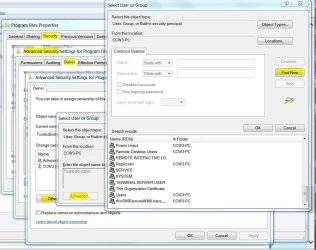
Enter this command from an elevated (Run as Administrator) command prompt (CMD). SFC /scannow
If there's a problem with TI, it should show a message in the command window. This is a system file checker that verifies system file integrity and repairs it. It doesn't check permissions but if there's a permission problem it will error out.
 

Attachments

  • File Permissions - Advanced.JPG
    File Permissions - Advanced.JPG
    155.2 KB · Views: 0

My Computer

Computer type
PC/Desktop
Computer Manufacturer/Model Number
Built 2/11/2011
OS
Windows 7 Pro-x64
CPU
i7-2600 3.4GHz - 3.8GHz Turbo
Motherboard
Intel DH67BL-B3
Memory
8Gb - 2x4GB, Muskin 991770 PC3-1333
Graphics Card(s)
Integrated Intel HD 2000
Sound Card
Integrated Intel 10.1 HD, RealTek ALC892
Monitor(s) Displays
Asus LCD VH222H, Haier HL24XSL2a
Screen Resolution
1920x1080, 1920x1080
Hard Drives
Crucial SSD C300-128Gb,
Western Digital WD5002AALX - 500Gb,
Western Digital WD7501AALS - 750Gb
PSU
Seasonic 650W 80+ Gold Modular
Case
Rosewill Defender
Cooling
Stock CPU, Four 120mm case fans, PCH fan added
Keyboard
Logitech EX100 Y-RBH94 Wireless
Mouse
Logitech EX100 M-RCE95 Wireless
Internet Speed
3.0/1.5 Mbs
Antivirus
Microsoft Security Essentials
Browser
Microsoft Internet Explorer 11
Other Info
Antec Veris Premier-Multimedia IR Station,
Cyber Accoustics-3602 Speakers,
AFT XM-5U Card Reader,
Hauppauge TV-HVR-2250,
Sony LX300 USB Turntable
carwiz,
I think that we posted at almost the same time. I'm guessing that your statement, "I'm not sure about that" was meant to be a response to apertotes asking, "Can I return ownership to the Trusted Installer while still having my son denied permissions on some folders inside".

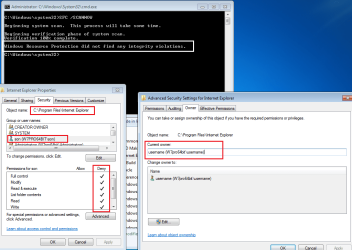
I went ahead and tested my understanding of the relationship between item ownership and NTFS access/deny permissions. While I was at it, I threw SFC into the mix :-)


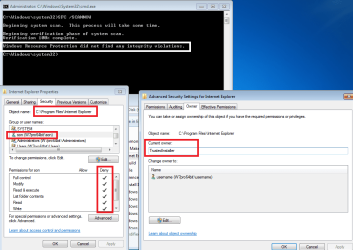
SFC does not show any "integrity violations" - even though there is a security problem. This shows the results of an SFC scan while the user account named username has ownership of what should be a protected folder.
deny1.png


As I expected, returning ownership to TrustedInstaller did not cause any integrity violations and the Deny permissions held.
deny2.png


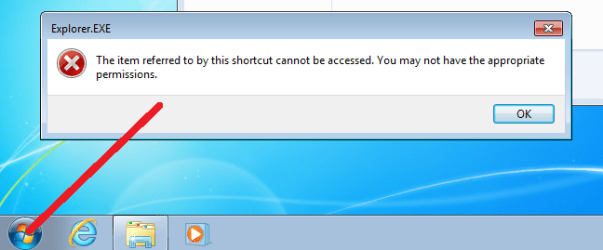
This is what the standard user account named son sees after ownership of the IE folder (and its contents) has been restored to that special account named TrustedInstaller:
deny3.png


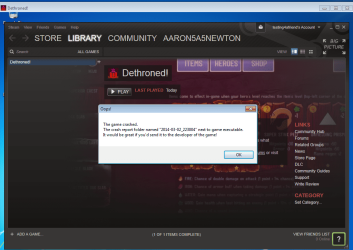
apertotes,I realize that the IE folder (and its contents) was not the target of your Deny permissions settings; it was just an easy example for my testing and screenshots.
deny4.png
 

My Computer

Computer type
Laptop
Computer Manufacturer/Model Number
Employer provided Dell Latitude
OS
W7 Pro SP1 64bit
CPU
i7
Memory
8GB
Graphics Card(s)
Intel HD Graphics
Hard Drives
crappy SSD
Antivirus
Employer mandated Symantec Endpoint Protection
Browser
Pale Moon 64bit, IE11 64bit & Chrome 64bit
The NTFS access and deny permissions should be unaffected by returning ownership to the TrustedInstaller. You can test it on one folder before fixing the other ones. Here is a tutorial on how to do that: TrustedInstaller - Restore as Owner (The steps are the same in Vista and W7.)

The reason for returning ownership is: "ownership" is part of the Windows security model. This helps to prevent changes to these protected folders by not allowing user accounts (even admins ones) to change/infect files.

First, I wan to say thank you and carwiz for you detailed help.

And second, in the thread you linked they say that not all files and folders should be owned by TrustedInstaller, and there was even one user that after doing that could not install or uninstall programs anymore. But I am a bit confused, because it seems in his case it was only Norton, and also in some posts they were talking about the windows folder, not program files.

So, is there any way to know if returning the ownership of Program Files folders and subfolders and files to Trustedinstaller will create a bigger mess than leaving it as it is now?
 

My Computer

Computer type
PC/Desktop
Computer Manufacturer/Model Number
Custom
OS
Windows 7 Ultimate x64
CPU
Intel i5-4670K
Motherboard
Gigabyte Z87-UDH5
Memory
16 gb DDR3 G.Skill 1600
Graphics Card(s)
MSI Gaming gtx 770
Hard Drives
Samsung 840 EVO - 500 gb
Antivirus
MS Essentials
Browser
Firefox
You are welcome. Helping in forums is an entertaining and educational hobby for me. Some people read a good book, I read a good forum or two :-)

I would not worry too much about the member that had an issue with Norton, there is not enough detail to determine what else that forum member might have done to things. It is easy to forget to select the option to propagate changes to all files and sub-folders.

I seem to recall that you changed things in the Steam folder. I understand a tiny bit about Steam, but I'm not a gamer. (Okay, so I did waste hours trapping a stupid cat. But that is not the same thing :-)

I have the luxury of using Virtual Machines (VM). I'm installing Steam into a VM and a free to play game - just to see what account should own those folders/files. I'll post back when I know more.

For the other folders/files, we may need to ask forum members that have the apps.
 

My Computer

Computer type
Laptop
Computer Manufacturer/Model Number
Employer provided Dell Latitude
OS
W7 Pro SP1 64bit
CPU
i7
Memory
8GB
Graphics Card(s)
Intel HD Graphics
Hard Drives
crappy SSD
Antivirus
Employer mandated Symantec Endpoint Protection
Browser
Pale Moon 64bit, IE11 64bit & Chrome 64bit
I changed 2 things:

1. Ownership on both Program Files folder, with subfolders and files, from Trustedinstaller to myself (and I am the first account that was created, and with administrator status, UAC deactivated)

2. Deny permissions to my son's account for Steam and Nvidia Geforce Experience folders.

What I am worried is that maybe when I changed the ownership not every file and folder inside the Program Files folder was owned by Trustedinstaller, and by changing it again and giving Trustedinstaller ownership of every single file and folder I break something.
 

My Computer

Computer type
PC/Desktop
Computer Manufacturer/Model Number
Custom
OS
Windows 7 Ultimate x64
CPU
Intel i5-4670K
Motherboard
Gigabyte Z87-UDH5
Memory
16 gb DDR3 G.Skill 1600
Graphics Card(s)
MSI Gaming gtx 770
Hard Drives
Samsung 840 EVO - 500 gb
Antivirus
MS Essentials
Browser
Firefox
This was funny:

steam1.png


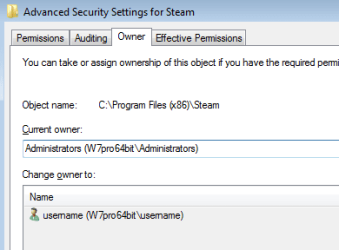
The top level folder for Steam is owned by:
steam2.png


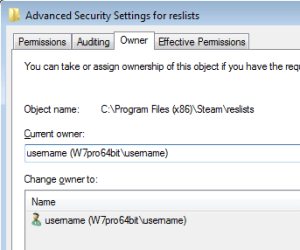
Glancing thru the sub-folders (and some files)...
...shows them to be owned by the account that installed them.
steam3.png


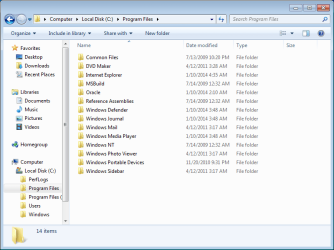
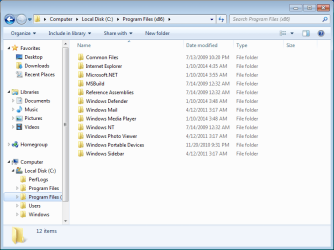
Upon re-reading this thread, I noticed that you took ownership of the entire Programs Files folder structure (as opposed to just the folders that needed restrictions). So, let's follow the general rule that stuff that Windows installs should have TrustedInstaller as the owner and stuff that users installed can keep your account as the owner. This rule is very general because user installed apps can have the TrustedInstaller as the owner too.


Work thru each of the folders shown in the right hand pane and set the TrustedInstaller account as owner:

W7-1.png

W7-2.png
 

My Computer

Computer type
Laptop
Computer Manufacturer/Model Number
Employer provided Dell Latitude
OS
W7 Pro SP1 64bit
CPU
i7
Memory
8GB
Graphics Card(s)
Intel HD Graphics
Hard Drives
crappy SSD
Antivirus
Employer mandated Symantec Endpoint Protection
Browser
Pale Moon 64bit, IE11 64bit & Chrome 64bit
Wow! That is so incredibly helpful! Thanks a lot!

By the way, I am a complete noob in all these permissions and accounts and group policies, so spending many hours during the weekend trying to achieve my objective, I could not help but wonder if it would have been easier in a different OS, like MAC OS or linux. I guess that given the name of this forum most users won't be specialists in other OS, but I am sure that there are also many that also know quite a bit about them.
 

My Computer

Computer type
PC/Desktop
Computer Manufacturer/Model Number
Custom
OS
Windows 7 Ultimate x64
CPU
Intel i5-4670K
Motherboard
Gigabyte Z87-UDH5
Memory
16 gb DDR3 G.Skill 1600
Graphics Card(s)
MSI Gaming gtx 770
Hard Drives
Samsung 840 EVO - 500 gb
Antivirus
MS Essentials
Browser
Firefox
I know a tiny bit about the Linux/Unix file permissions setup and while Apple has changed a lot of things, the underlying OS is BSD. I think that the file permissions for Apple's iOSes and BSD are still the same. As I understand it, those OSes do not use inherited permissions.

In other words...
...if I setup a file server using Ubuntu
(the desktop version - 'cuz I need a GUI)
...and I shared a folder for all accounts to use
...then your account made a sub-folder in that shared folder
...your co-workers could not get to those files.

That does not work well in an office setting were the folder was meant to share files for all workers. In Windows, the sub-folder would have automatically picked up the permissions of the parent folder.

As far as restricting a child from using apps on Linux/Unix/Apple OSes...
...as the saying goes, "There is an app for that."

Windows has an app for that too. It is called Parental Controls and it can get into a state were the Parent cannot change stuff. I don't suggest it to people.
 

My Computer

Computer type
Laptop
Computer Manufacturer/Model Number
Employer provided Dell Latitude
OS
W7 Pro SP1 64bit
CPU
i7
Memory
8GB
Graphics Card(s)
Intel HD Graphics
Hard Drives
crappy SSD
Antivirus
Employer mandated Symantec Endpoint Protection
Browser
Pale Moon 64bit, IE11 64bit & Chrome 64bit
I took a look at parental controls, but what I did not like that if the monitored account would try to launch a forbidden program, they would get a message saying that they needed to contact their administrator. I do not want a whistle blower telling my son that I am hiding games from him. I want it to be as silent and invisible as possible.
 

My Computer

Computer type
PC/Desktop
Computer Manufacturer/Model Number
Custom
OS
Windows 7 Ultimate x64
CPU
Intel i5-4670K
Motherboard
Gigabyte Z87-UDH5
Memory
16 gb DDR3 G.Skill 1600
Graphics Card(s)
MSI Gaming gtx 770
Hard Drives
Samsung 840 EVO - 500 gb
Antivirus
MS Essentials
Browser
Firefox
Back
Top