
High CPU usage, even after clean re-install

AlastairCunning

New member
Local time
2:07 PM
Messages
2
Hi Guys,

I have Windows 7 Professional 64bit. Recently my CPU usage started to get really high, even when seemingly idle. % varies from 10-100% and fluctuates pretty wildly. Any normal activity sends it up into the 60%+ zone.

Here are my specs:

Intel Core 2 Duo P9700 2.80GHz
RAM 2x2GB

So far I've done a system scan (command prompt, sfc/scannow) and came up clean.

I've re-installed windows 7 twice and even before i do anything its already higher than one would expect.

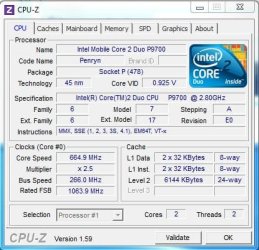
After reading some post is ran CPU-Z (see attachment). Am i right in thinking that my core speed is way down?

If not, any ideas what i can do to diagnose/fix my problem?

Thanks in advance!
 

Attachments
  • CPU-Z capture.JPG
    CPU-Z capture.JPG
    45.7 KB · Views: 17

My Computer

OS
windows 7 professional 64bit
CPU
Intel Core 2 Duo P9700 2.80GHz
Memory
2 x 2GB
Hard Drives
120Gb SSD
Providing you know there is no infection on your hard drive then I would suggest you check there isn't a BIOS update for your motherboard in order to accommodate the P9700, and that in general your BIOS settings are set at safety defaults when tackling this sort of issue.
 

My Computer

Computer Manufacturer/Model Number
Custom built machine
OS
W7 x64
CPU
Intel Q9300 2.5Ghz Quad LGA775 (Would like Q9650)
Motherboard
Gigabyte GA-EP45T-UD3R (F6 Bios)
Memory
4Gb OCZ Gold 1,333Mhz
Graphics Card(s)
Palit HD4850 O/C Sonic 512Mb DDR3, Dual DViD's
Sound Card
Azalia to twin Samson 50w Studio Monitors
Monitor(s) Displays
Twin Dell (E-IPS) U2311H 23.6" Screens
Screen Resolution
1920 x 1080 @ 60Hz
Hard Drives
Crucial M4 SSD, archives on twin Western Digital Caviar Black WD2002FAEX, 2TB, 7200rpm HDD's, Samsung Ritemaster CD/DVD Burner...
PSU
OCZ 600w
Case
Lian-Li PC8 acoustifoamed' aluminium tower
Cooling
Scythe 140mm Zipang
Keyboard
Cherry PS/2 custom model
Mouse
Lenovo USB laser "Thinkpad" Mouse
Internet Speed
ADSL2+ @14Mbps downstream & Cat6 Gigabit Ethernet
Antivirus
NOD32
Browser
Opera
Other Info
Silicon Dust HD Homerun Dual FTA (Ethernet) TV Tuners, Dray Tek Vigor 2850Vn router and 8x HP Gigabit Switch. Lian-Li CR26 Card Reader, Canon MF4430 iSensys laser printer/scanner.
Providing you know there is no infection on your hard drive then I would suggest you check there isn't a BIOS update for your motherboard in order to accommodate the P9700, and that in general your BIOS settings are set at safety defaults when tackling this sort of issue.

Thanks very much for the response.

I also have an SSD and did a 'clean all' on command of it before my last re-install. Could a virus have survivied that? I assume not...

I might have come across as more competent than I actually am.

How do I do these things you suggest?
 

My Computer

OS
windows 7 professional 64bit
CPU
Intel Core 2 Duo P9700 2.80GHz
Memory
2 x 2GB
Hard Drives
120Gb SSD
Any BIOS updates, and their history and reason for introduction, should be listed on your motherboard manufacturers website.

Your splash screen at POST (the white lettering which appears on screen before you boot into Windows) will tell you what BIOS version you have onboard. You can freeze the screen at any instant by pressing "Pause" on your keyboard.

Normally to get into the BIOS you will see on onscreen prompt at POST saying hit "Del" or another key.

Once into the BIOS things are mainly self explanatory, and unless your motherboard is very recent you will have to navigate using your keyboards arrow, esc, and return keys.

This link might assist you :)

Maximum PC | Ultimate BIOS Guide: Every Setting Decrypted and Explained!
 

My Computer

Computer Manufacturer/Model Number
Custom built machine
OS
W7 x64
CPU
Intel Q9300 2.5Ghz Quad LGA775 (Would like Q9650)
Motherboard
Gigabyte GA-EP45T-UD3R (F6 Bios)
Memory
4Gb OCZ Gold 1,333Mhz
Graphics Card(s)
Palit HD4850 O/C Sonic 512Mb DDR3, Dual DViD's
Sound Card
Azalia to twin Samson 50w Studio Monitors
Monitor(s) Displays
Twin Dell (E-IPS) U2311H 23.6" Screens
Screen Resolution
1920 x 1080 @ 60Hz
Hard Drives
Crucial M4 SSD, archives on twin Western Digital Caviar Black WD2002FAEX, 2TB, 7200rpm HDD's, Samsung Ritemaster CD/DVD Burner...
PSU
OCZ 600w
Case
Lian-Li PC8 acoustifoamed' aluminium tower
Cooling
Scythe 140mm Zipang
Keyboard
Cherry PS/2 custom model
Mouse
Lenovo USB laser "Thinkpad" Mouse
Internet Speed
ADSL2+ @14Mbps downstream & Cat6 Gigabit Ethernet
Antivirus
NOD32
Browser
Opera
Other Info
Silicon Dust HD Homerun Dual FTA (Ethernet) TV Tuners, Dray Tek Vigor 2850Vn router and 8x HP Gigabit Switch. Lian-Li CR26 Card Reader, Canon MF4430 iSensys laser printer/scanner.
The core speed in your screenshot is probably correct. These processors throttle way down when idle, to lower heat and save on battery usage. If you want a more accurate reading, put your CPU under a stress, and then run CPU-Z.
 

My Computer

OS
Windows 7 Ultimate x64 SP1
CPU
Intel Core i7-2600
Motherboard
Gigabyte GA-P67A-UD3P-B3
Memory
12 GB Patriot Extreme DDR3-1333
Graphics Card(s)
Nvidia GTX 470
Monitor(s) Displays
Dell UltraSharp 2209WA
Hard Drives
OCZ Agility3 240 GB, WD5001AALS, WD7501AALS
PSU
OCZ ModStream 700W
Case
CoolerMaster HAF 912 Advanced
Cooling
CoolerMaster Hyper 212 Plus
Back
Top