High CPU usage problems when starting a program.

Duco

New member
Local time
12:31 AM
Messages
3
Hello,

When i Start a game or anything else my CPU usage goes immediately to 100%, but my pc should be more then good enough to run it.
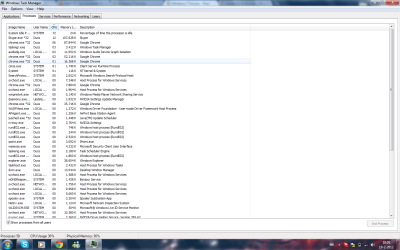
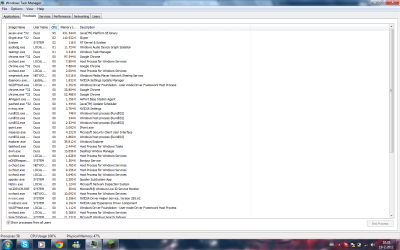
See attacment pc data voor info and CPU without game for CPU when i only run chrome and skype.
When I start a game like minecraft that almost need no CPU it goes to 100%
See attacment CPU with minecraft using 95%

Anyone an idee how this can happen?

Thanks!
 

Attachments

  • Pc data.png
    Pc data.png
    5.2 KB · Views: 33
  • CPU without game.png
    CPU without game.png
    63.9 KB · Views: 112
  • CPU with minecraft using 95%.png
    CPU with minecraft using 95%.png
    63.4 KB · Views: 103

My Computer

OS
Windows 7 ultimate x64
Well I do know that Chrome eats CPU speed. Do you have lots of background tasks going on that will slow your CPU down.
 

My Computer

Computer type
PC/Desktop
Computer Manufacturer/Model Number
Apple 2012 Mac Mini
OS
Mac OS X 10.9
CPU
Intel i7 Ivy Bridge (2.3Ghz)
Motherboard
Apple
Memory
8GB's DDR3 (1333 MHz)
Graphics Card(s)
Intel 4000 (1024MB)
Monitor(s) Displays
HP 23inch LED
Screen Resolution
1920 x 1080
Hard Drives
1TB
Case
Mac Mini Case
Keyboard
Mac Logitech Solar Powered
Mouse
Magic Touch Pad
Internet Speed
About 3.00 MBps
Browser
Chrome
Also what kind of CPU do you have?
 

My Computer

Computer type
PC/Desktop
Computer Manufacturer/Model Number
Apple 2012 Mac Mini
OS
Mac OS X 10.9
CPU
Intel i7 Ivy Bridge (2.3Ghz)
Motherboard
Apple
Memory
8GB's DDR3 (1333 MHz)
Graphics Card(s)
Intel 4000 (1024MB)
Monitor(s) Displays
HP 23inch LED
Screen Resolution
1920 x 1080
Hard Drives
1TB
Case
Mac Mini Case
Keyboard
Mac Logitech Solar Powered
Mouse
Magic Touch Pad
Internet Speed
About 3.00 MBps
Browser
Chrome

My Computer

Computer Manufacturer/Model Number
Homebuilt
OS
Windows 7 Home Premium x64
CPU
Core i7 2600K
Motherboard
Asus P8Z77-V LX
Memory
4GB DDR3 Kingston HyperX
Graphics Card(s)
Gigabyte GTX 670
Sound Card
Realtek HD Audio
Monitor(s) Displays
Delium Monitor
Screen Resolution
1360 x 768
Hard Drives
C: (500GB)
PSU
Corsair 620W
Case
Antec
Cooling
Cooling Master
Keyboard
Logitech
Mouse
Logitech wireless mouse M 505
Internet Speed
60MBPS
I don't no wich task I can end and I only had task manager and this site with chrome and skype nothing more but it should easely run that :S
 

My Computer

OS
Windows 7 ultimate x64
I have the same problem but I was fix it whit out any software.

try to uninstall one by one last program that you installed earlier at the win save mode.

I hope this help or you can contact me at my YM [email protected] if you still don't understand
 

My Computer

OS
win 7 ulimate 32 bit
if you download a sysinternals tool called Process Monitor v2.96 By Mark Russinovich and Bryce Cogswell (microsoft) this will give you a much better view than task manager and you will be able to see whats using your cpu etc. shut processors down etc the website explains it very well also there is a suite of tools i recommend to users

PROCESSOR MONITOR LINK >>> Process Monitor

SYSINTERNALS SUITE LINK >>> Sysinternals Suite


Introduction

Process Monitor is an advanced monitoring tool for Windows that shows real-time file system, Registry and process/thread activity. It combines the features of two legacy Sysinternals utilities, Filemon and Regmon, and adds an extensive list of enhancements including rich and non-destructive filtering, comprehensive event properties such session IDs and user names, reliable process information, full thread stacks with integrated symbol support for each operation, simultaneous logging to a file, and much more. Its uniquely powerful features will make Process Monitor a core utility in your system troubleshooting and malware hunting toolkit.
Overview of Process Monitor Capabilities

Process Monitor includes powerful monitoring and filtering capabilities, including:
More data captured for operation input and output parameters
Non-destructive filters allow you to set filters without losing data
Capture of thread stacks for each operation make it possible in many cases to identify the root cause of an operation
Reliable capture of process details, including image path, command line, user and session ID
Configurable and moveable columns for any event property
Filters can be set for any data field, including fields not configured as columns
Advanced logging architecture scales to tens of millions of captured events and gigabytes of log data
Process tree tool shows relationship of all processes referenced in a trace
Native log format preserves all data for loading in a different Process Monitor instance
Process tooltip for easy viewing of process image information
Detail tooltip allows convenient access to formatted data that doesn't fit in the column
Cancellable search
Boot time logging of all operations

The best way to become familiar with Process Monitor's features is to read through the help file and then visit each of its menu items and options on a live system.

 

My Computer

Computer Manufacturer/Model Number
packard bell IXTREME M5722
OS
Operating System : Windows 7 Home Premium Edition 6.01.7600 SP1 (x64)
CPU
Processor : Intel Core 2 Quad Q8300 @ 2500 MHz
Motherboard
Mainboard : Packard Bell (Acer EG43M )
Memory
Physical Memory :8GB Corsair4x 2GB 800MHz C5 DDR2
Graphics Card(s)
Video Card : XFX 6700 AMD
Monitor(s) Displays
Maestro 234DL - BenQ V2220 - BenQ VW2420H
Screen Resolution
Current Display :1920x1080p pixels at 60 Hz in HD LED
Hard Drives
Hard Disks : WDC (1000 GB)
Drive C: (Hard Disk) : 428 GB available on 491 GB
Drive D: (Hard Disk) : 426 GB available on 492 GB
SAMSUNG spinpoint HD103SJ 1000.2 GB
(X 2) KINGSTON SSD NOW V 30GB
PSU
XFX ProSeries 550W PSU
Case
PACKARD BELL IXTREME
Cooling
System Blower Current: 150mA Air Flow16CFM ;Akasa 90mm rear
Keyboard
Gigabyte Aivia K8100
Mouse
TRUST-Wireless Laser Mouse - Carbon edition MI-7770C
Internet Speed
TP-LINK > TL-WN951N / AV500 Gigabit Powerline Adapters
Browser
chrome dev
Other Info
EXTRA COOLING>(FAN CONTROLLER) PC Bay Cooler 3 x 40mm fans; Akasa AK-HD-BL Blue hard drive cooler 2 x 40 mm fan 4500 rpm 29.7 dBA
Bios> American Megatrends Inc.
Version : P01-A1
Date : 08/31/2009
I have Minecraft on my computer as well, and when its running it uses a lot of the system resources. The game uses your RAM heavily becuase it wants to store all the game data it can in active memory so that the screen can be updated as you move with out lagging so much. It is normal for the game to consume >90% (greater than) of the processsor becuse it's constantly having to deal with I/O from the memory. I believe it has to do with the game being programmed with only Java, Java is resource heavy anyway. I don't think its a problem with your computer it's just how the game is. Version 1.9 of the game is the worst about that problem. I tried version 1.1 and while it still has some heavy use, at least it don't stay at 99% cpu usage all the time like 1.9 did.

I have the game open and running now, it's keeping the CPU at 92% and it's just sitting there paused with RAM usage at 1.1GB of ram just for the Javaw.exe process. So I don't think its a problem, its more of a "because it is the way it was made" issue. I have an AMD Phenom II X2 and Minecraft keeps it busy to say the least.
 

My Computer

Computer type
PC/Desktop
OS
Windows 10 Pro
CPU
AMD FX-4100 4Ghz
Motherboard
Gigabyte GA-970A-DS3
Memory
8GB Corsair PC3-10700H Dual Channel @1600mhz
Graphics Card(s)
NVIDIA GeForce GTX 660 2GB GDDR5
Sound Card
Realtek HD Audio (On Board Audio Controller)
Monitor(s) Displays
Dell 19" 1400x900 and HP x20LED 1600x900 plus mounted TV
Hard Drives
C: - 640GB Western Digital
D: - 1000GB Western Digital
E: - 3000GB Toshiba (3TB)
PSU
OCZ ModXstream-Pro 730W
Case
Rosewill Nautilus
Cooling
Traditional Air/Fan Cooling
Keyboard
Ivation Illuminated Keyboard (Blue LED)
Mouse
E-3lue Cobra
Internet Speed
DSL @ 740kb/s download
Antivirus
Microsoft Security Essentials
Browser
Firefox
It is not only minecraft cuz when i have nothing open and i move my mouse rapidly it consumes up to 40% of cpu but when my mouse is still is again like only 3%.

I noticed that almost every program i run let my cpu go up to 80-100% only a few programs doesn't and those are really low on cpu usage.

Also my sound uses up to 60% cpu but I formatted my laptop and installed windows again but it stills occur I think there is a problem with my hardware and not windows ...

I didn't had the time to open and check my laptop but I have in the weekend so then I check it.

but still thanks for the help everyone
 

My Computer

OS
Windows 7 ultimate x64
Back
Top