high cpu usage when gaming due to other programs!! need to kill them:)

morgon80

New member
Local time
3:34 AM
Messages
17
hi again. when i am gaming i noticed via task manager i have a few things running in background that are constant cpu drain and wondering how to kill these for good and to know what they are? as they are using so much cpu. NVSTREAMSVC.EXE and MSMPENG.EXE are using more than xplane which is a beast of a sim to run so the more free cpu the better. any help would be appreciated thanks.
 

My Computer My Computer

Computer type
PC/Desktop
Computer Manufacturer/Model Number
custom build
OS
windows 10 64 bit
CPU
amd fx9590 5.1ghz
Motherboard
asus m5a99fx 2.0
Memory
32GB ram
Graphics Card(s)
nvidia gtx770 4gb classified
Screen Resolution
1920x1080
Hard Drives
1x scan disk ssd 2x hdd
Cooling
corsair H100i
Antivirus
windows security center
Browser
chrome

My Computer My Computer

Computer type
PC/Desktop
Computer Manufacturer/Model Number
Ignatz Special; 4 speed manual gearbox; factory air conditioning; one of one
OS
Windows 7 Home Premium SP1, 64-bit
CPU
Intel Skylake i5-6600K, not overclocked
Motherboard
AsRock Z170M Extreme 4, micro ATX
Memory
8 GB HyperX DDR4-2666 (2 x 4 GB)
Graphics Card(s)
none; graphics are integrated on CPU
Sound Card
onboard: Realtek ALC1150; external: USB Behringer UF0-202
Monitor(s) Displays
Dell S2340M 23 inch IPS
Screen Resolution
1600 x 900
Hard Drives
System: Crucial MX100 series SSD, 128 GB;
Data: Samsung Spinpoint 103SJ, 1 TB;
Backup: WD Caviar Green WD30EZRX-00D8PB0, 3 TB
PSU
Rosewill SilentNight 500 watt fanless, semi-modular
Case
Antec Solo II
Cooling
Noctua NH-U12S; Noctua F12 intake, Noctua S12A exhaust
Keyboard
Microsoft 200 6JH-00001 USB
Mouse
Dell or Microsoft optical wired; USB
Antivirus
Microsoft Security Essentials and Malwarebytes Premium
Browser
Pale Moon
Other Info
All fans PWM; speeds at idle: CPU circa 500 rpm; intake circa 600 rpm; exhaust circa 600 rpm; CPU temps 27 idle and 47 C load in a warm room (27 C/81 F) when running Intel Extreme Tuning Utility stress test.
thanks for reply. will that be turned off forever or just until next reboot do you know?
 

My Computer My Computer

Computer type
PC/Desktop
Computer Manufacturer/Model Number
custom build
OS
windows 10 64 bit
CPU
amd fx9590 5.1ghz
Motherboard
asus m5a99fx 2.0
Memory
32GB ram
Graphics Card(s)
nvidia gtx770 4gb classified
Screen Resolution
1920x1080
Hard Drives
1x scan disk ssd 2x hdd
Cooling
corsair H100i
Antivirus
windows security center
Browser
chrome
You can turn services off permanently if you want as long as you are willing to accept the consequences, which are unknown to me. All you can do is try it and be prepared to turn them back on if necessary. Services have a way of interacting with each other, so it's hard to tell what turning off a service might do.

Non-Microsoft services shouldn't affect Windows, but maybe you need that NVSTREAMVC thing for some good reason. Only you would know that. I've never heard of it.
 

My Computer My Computer

Computer type
PC/Desktop
Computer Manufacturer/Model Number
Ignatz Special; 4 speed manual gearbox; factory air conditioning; one of one
OS
Windows 7 Home Premium SP1, 64-bit
CPU
Intel Skylake i5-6600K, not overclocked
Motherboard
AsRock Z170M Extreme 4, micro ATX
Memory
8 GB HyperX DDR4-2666 (2 x 4 GB)
Graphics Card(s)
none; graphics are integrated on CPU
Sound Card
onboard: Realtek ALC1150; external: USB Behringer UF0-202
Monitor(s) Displays
Dell S2340M 23 inch IPS
Screen Resolution
1600 x 900
Hard Drives
System: Crucial MX100 series SSD, 128 GB;
Data: Samsung Spinpoint 103SJ, 1 TB;
Backup: WD Caviar Green WD30EZRX-00D8PB0, 3 TB
PSU
Rosewill SilentNight 500 watt fanless, semi-modular
Case
Antec Solo II
Cooling
Noctua NH-U12S; Noctua F12 intake, Noctua S12A exhaust
Keyboard
Microsoft 200 6JH-00001 USB
Mouse
Dell or Microsoft optical wired; USB
Antivirus
Microsoft Security Essentials and Malwarebytes Premium
Browser
Pale Moon
Other Info
All fans PWM; speeds at idle: CPU circa 500 rpm; intake circa 600 rpm; exhaust circa 600 rpm; CPU temps 27 idle and 47 C load in a warm room (27 C/81 F) when running Intel Extreme Tuning Utility stress test.
there are a number of utilities that allow you to have an 'entertainment mode' or 'gaming mode' that turn off unnecessary programs when specific game apps are running, and turn them back on again afterwards, and/or reset application cpu,memory, i/o priorities to a lower level for those apps, and increase them for the game. process lasso (plasso) by bitsum is one such, works right out of the box to ensure cpu usage is balanced, and can reset priorities in a gaming mode when a game runs.
 

My Computer My Computer

Computer type
PC/Desktop
Computer Manufacturer/Model Number
Custom build Nanu by 3SX
OS
Win 7 ultimate x64 sp1
CPU
Intel i7 4 core 3770k ivy bridge o/c to 4.2ghz
Motherboard
Asus p8z77-i Deluxe
Memory
16 GB
Graphics Card(s)
Nvidia geforce GTX650
Sound Card
Realtek on mb
Monitor(s) Displays
24in. lcd/led
Screen Resolution
1920x1080
Hard Drives
128GB Kingston SSD
500GB seagate maximus xt hybrid
500GB hitachi HD
500GB external WD Passport usb3
PSU
Silverstone 450 watt
Case
Silverstone FT03 Black Fortress
Cooling
Water cooler
Keyboard
Logitech wireless kbd/mouse mk300
Mouse
Logitech wireless kbd/mouse mk300
Internet Speed
8mb adsl (actuall speed is around 6mb)
Other Info
Asus DSL-N55U wireless router
SONY BC-5850H 6X BLURAY writer
OUTPOST Security Suite
thanks i will give that a go maybe. NVSTREAMSVC.EXE i dont know why this is running as its part of the nvidia geforce streaming service which i dont use. tbh id rather stop stuff and save the cpu use than install a program to stop things which will no doubt use space on cpu at a guess.
 

My Computer My Computer

Computer type
PC/Desktop
Computer Manufacturer/Model Number
custom build
OS
windows 10 64 bit
CPU
amd fx9590 5.1ghz
Motherboard
asus m5a99fx 2.0
Memory
32GB ram
Graphics Card(s)
nvidia gtx770 4gb classified
Screen Resolution
1920x1080
Hard Drives
1x scan disk ssd 2x hdd
Cooling
corsair H100i
Antivirus
windows security center
Browser
chrome
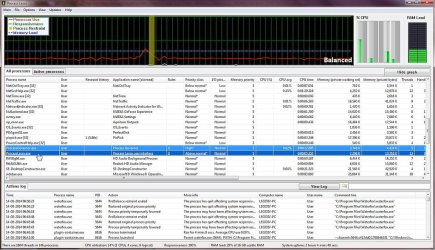
plasso isusing 0.02% cpu at the moment i did the screen dump below. the plasso service and gui are highlighted below in the attached dump of the program's gui display. the extra load is negligable, especially comared to what it saves.

p.s. when i did the screen shot, i noted that a program, malware bytes anti malware was using 11% of the cpus. that's 550 times what plasso itself was using. i used plasso to terminate it and i then rechecked the settings to ensure it doesn't run in background again. i want to use it only for manual scans rather than rersident.
 

Attachments

  • Capture 001.jpg
    Capture 001.jpg
    134 KB · Views: 3

My Computer My Computer

Computer type
PC/Desktop
Computer Manufacturer/Model Number
Custom build Nanu by 3SX
OS
Win 7 ultimate x64 sp1
CPU
Intel i7 4 core 3770k ivy bridge o/c to 4.2ghz
Motherboard
Asus p8z77-i Deluxe
Memory
16 GB
Graphics Card(s)
Nvidia geforce GTX650
Sound Card
Realtek on mb
Monitor(s) Displays
24in. lcd/led
Screen Resolution
1920x1080
Hard Drives
128GB Kingston SSD
500GB seagate maximus xt hybrid
500GB hitachi HD
500GB external WD Passport usb3
PSU
Silverstone 450 watt
Case
Silverstone FT03 Black Fortress
Cooling
Water cooler
Keyboard
Logitech wireless kbd/mouse mk300
Mouse
Logitech wireless kbd/mouse mk300
Internet Speed
8mb adsl (actuall speed is around 6mb)
Other Info
Asus DSL-N55U wireless router
SONY BC-5850H 6X BLURAY writer
OUTPOST Security Suite
Back
Top