Gigabyte GA-MA785GPMT-UD2H, AMD Phenom II X3, Win7Pro64Sp1
I'm having two weird problems, that may be related, or maybe not. Some background... I built this machine five years ago, and recently decided to upgrade to an SSD, and to clean things up by reloading Windows, getting all current AMD drivers, and loading only the apps I care about. The install went well, but as I began using it, I noticed that about once an hour, the active window would freeze, with the message "not responding" on the title bar. Windows was still alive, as I could bring focus to other windows, although sometimes a second window would freeze as well. My only recourse was to wait... 20, 30, sometimes 40 seconds... and then operation would return to normal.
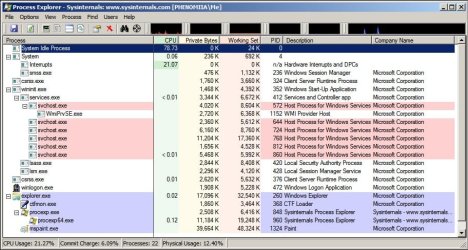
Process Explorer reported that one of my CPU cores was constantly spending 60% or more of its time handling interrupts and DPCs. Interestingly, whenever a window was frozen, this process would drop to nearly zero.
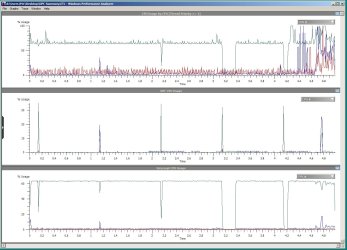
I ran Windows Performance Analyzer, and saw that one CPU core was spending over 60% of its time on interrupts, except for exactly once per second, when CPU DPC usage would spike way up for a few dozen microseconds, coincidental with CPU interrupt usage dropping to zero.
Getting a summary table at the point of the DPC spike showed that almost all of it was due to Usbport.sys.
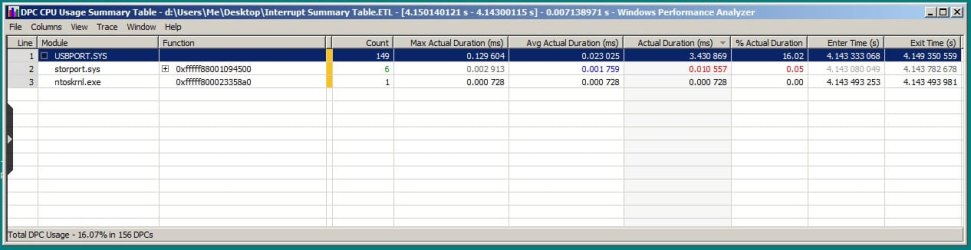
Getting a summary table from when the interrupt usage was high (away from the previously described spike), showed that almost all of the interrupt usage was split evenly between storport.sys and wdf01000.sys.

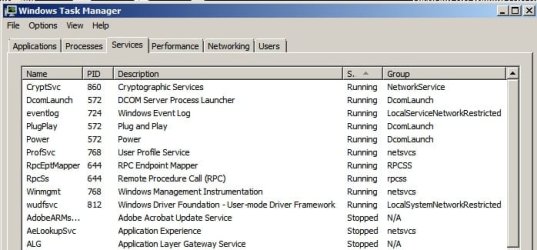
I updated my usb drivers in accordance with Microsoft security bulletin MS13-081. DriverView reports version 6.1.7601.17514 for storport.sys, version 1.9.7600.16385 for wdf01000.sys, and version 6.1.7601.18328 for usbport.sys.
As a test, I booted into Safe Mode, and the problem persisted, even without manually starting any programs.
At this point, I have no idea what to do or try next. Any advice would be very appreciated.
I'm having two weird problems, that may be related, or maybe not. Some background... I built this machine five years ago, and recently decided to upgrade to an SSD, and to clean things up by reloading Windows, getting all current AMD drivers, and loading only the apps I care about. The install went well, but as I began using it, I noticed that about once an hour, the active window would freeze, with the message "not responding" on the title bar. Windows was still alive, as I could bring focus to other windows, although sometimes a second window would freeze as well. My only recourse was to wait... 20, 30, sometimes 40 seconds... and then operation would return to normal.
Process Explorer reported that one of my CPU cores was constantly spending 60% or more of its time handling interrupts and DPCs. Interestingly, whenever a window was frozen, this process would drop to nearly zero.
I ran Windows Performance Analyzer, and saw that one CPU core was spending over 60% of its time on interrupts, except for exactly once per second, when CPU DPC usage would spike way up for a few dozen microseconds, coincidental with CPU interrupt usage dropping to zero.
Getting a summary table at the point of the DPC spike showed that almost all of it was due to Usbport.sys.
Getting a summary table from when the interrupt usage was high (away from the previously described spike), showed that almost all of the interrupt usage was split evenly between storport.sys and wdf01000.sys.
I updated my usb drivers in accordance with Microsoft security bulletin MS13-081. DriverView reports version 6.1.7601.17514 for storport.sys, version 1.9.7600.16385 for wdf01000.sys, and version 6.1.7601.18328 for usbport.sys.
As a test, I booted into Safe Mode, and the problem persisted, even without manually starting any programs.
At this point, I have no idea what to do or try next. Any advice would be very appreciated.
My Computer
- Computer type
- PC/Desktop
- Computer Manufacturer/Model Number
- custom
- OS
- Win7Pro64Sp1
- CPU
- AMD Phenom II X3 720
- Motherboard
- GA-MA785GPMT-UD2H
- Memory
- 4Gig
- Graphics Card(s)
- ATI Radeon HD 4200
- Hard Drives
- Samsung SSD 850 EVO 250G SATA
- Antivirus
- AVG
- Browser
- FF