
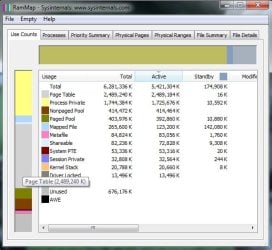
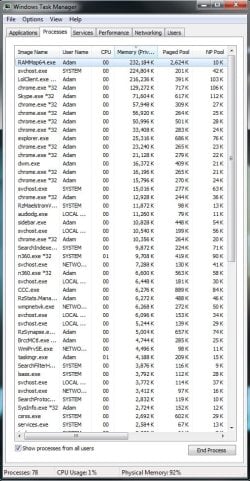
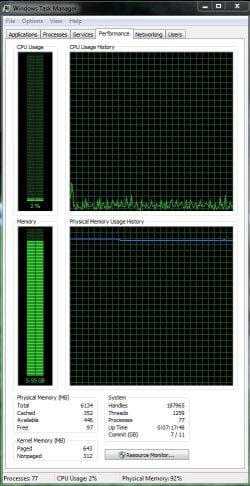
For the past few weeks, I've had issues with low available RAM. I've downloaded RAMMAP and analyzed what may be issue and i've found that the "Page Table" portion of my RAM is using up quite a lot of space. It doesn't matter what programs I close, this portion of memory does not decrease and the longer my computer is on while in use, the larger this page table becomes without ever decreasing. I can only run my computer for 6-7 hours at a time before the Page Table uses up 70-80% of my RAM, leaving me with very little memory for actually application use. I don't know how to diagnose what program could be causing the issue. Please help. I've provided all necessary screenshots.
Tech Support Guy System Info Utility version 1.0.0.2
OS Version: Microsoft Windows 7 Home Premium, Service Pack 1, 64 bit
Processor: Intel(R) Core(TM) i7 CPU 920 @ 2.67GHz, Intel64 Family 6 Model 26 Stepping 5
Processor Count: 8
RAM: 6134 Mb
Graphics Card: AMD Radeon HD 6700 Series, 1024 Mb
Hard Drives: C: Total - 114470 MB, Free - 11073 MB; D: Total - 199996 MB, Free - 85747 MB; E: Total - 410473 MB, Free - 198987 MB;
Motherboard: ASUSTeK Computer INC., P6T
Antivirus: Norton 360 Premier Edition, Updated and Enabled
Tech Support Guy System Info Utility version 1.0.0.2
OS Version: Microsoft Windows 7 Home Premium, Service Pack 1, 64 bit
Processor: Intel(R) Core(TM) i7 CPU 920 @ 2.67GHz, Intel64 Family 6 Model 26 Stepping 5
Processor Count: 8
RAM: 6134 Mb
Graphics Card: AMD Radeon HD 6700 Series, 1024 Mb
Hard Drives: C: Total - 114470 MB, Free - 11073 MB; D: Total - 199996 MB, Free - 85747 MB; E: Total - 410473 MB, Free - 198987 MB;
Motherboard: ASUSTeK Computer INC., P6T
Antivirus: Norton 360 Premier Edition, Updated and Enabled
Attachments
My Computer
- Computer type
- PC/Desktop
- OS
- Win7 64 bit home premium

