High Physical Memory Usage

sgrimm1016

New member
Local time
9:53 AM
Messages
3
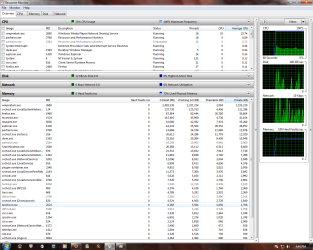
Last night after I scanned my computer with mcafee I noticed my comp was acting slow and sluggish, I opened task manager and found that my physical memory was high and i only had 30 some processes running. Still having the same problem after I clean rebooted, disk defragged and checked for updates but sadly nothing has worked. Here's a SS of my task manager, hopefully someone can help me out


Attachments
  • Untitled.png
    Untitled.png
    37 KB · Views: 311
Last edited:

My Computer

Computer Manufacturer/Model Number
Gigabyte Technology Co., Ltd.
OS
windows 7 home premium 64 bit
CPU
AMD Phenom(tm) II X4 955 Processor (4 CPUs), ~3.2GHz
Memory
4096MB RAM
Graphics Card(s)
NVIDIA GeForce 9800 GT
I fail to see a high RAM usage in your snip. Look into Resource Monitor > Memory tab. The colored bar will tell you the real story. The sluggishness could have other reasons.
 

My Computer

Computer Manufacturer/Model Number
HP, Dell, Gateway, Toshiba - 4 laptops and 2 desktops
OS
Vista, Windows7, Mint Mate, Zorin, Windows 8
CPU
from 1.6GHz Duo to i7
Monitor(s) Displays
2x HP w2207
Hard Drives
5x HDD, 7x SSD, 12x Externals
Keyboard
with trackball - no mices
Mouse
Trackball mice
Internet Speed
DSL 6000
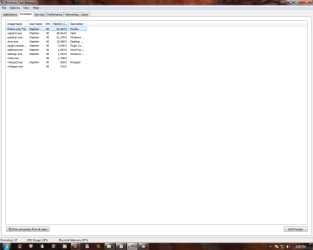
Getting rid McAfee would be your first and best step in making your computer less sluggish. (There are numerous and far superior alternatives to McAfee) Post a screenshot of all running process, after clicking on "show processes for all users" and of the services and startup tabs in MSconfig.. that will get things started
 
It's been jumping up and down from 30+ to 80 then back down while sitting idle, I'm not exactly computer savvy so it may be something minor i just noticed a decrease in performance.
 

Attachments

  • Untitled.png
    Untitled.png
    73.7 KB · Views: 329

My Computer

Computer Manufacturer/Model Number
Gigabyte Technology Co., Ltd.
OS
windows 7 home premium 64 bit
CPU
AMD Phenom(tm) II X4 955 Processor (4 CPUs), ~3.2GHz
Memory
4096MB RAM
Graphics Card(s)
NVIDIA GeForce 9800 GT
Your problem is the windows media player network sharing service. Did you recently add a lot of music to windows media player? That will make your system slow for several hours or even days while it updates files. If you're not planning to share music or media over a home network, you can safely disable that service.. and your problem will be solved
 
That seemed to do the trick, had a little trouble disabling it but once i restarted the comp it seems a lot happier, thanks for the help :D
 

My Computer

Computer Manufacturer/Model Number
Gigabyte Technology Co., Ltd.
OS
windows 7 home premium 64 bit
CPU
AMD Phenom(tm) II X4 955 Processor (4 CPUs), ~3.2GHz
Memory
4096MB RAM
Graphics Card(s)
NVIDIA GeForce 9800 GT
Your problem is the windows media player network sharing service. Did you recently add a lot of music to windows media player? That will make your system slow for several hours or even days while it updates files. If you're not planning to share music or media over a home network, you can safely disable that service.. and your problem will be solved
Exactly, best is to set it to "manual" in Services.
 

My Computer

Computer Manufacturer/Model Number
HP, Dell, Gateway, Toshiba - 4 laptops and 2 desktops
OS
Vista, Windows7, Mint Mate, Zorin, Windows 8
CPU
from 1.6GHz Duo to i7
Monitor(s) Displays
2x HP w2207
Hard Drives
5x HDD, 7x SSD, 12x Externals
Keyboard
with trackball - no mices
Mouse
Trackball mice
Internet Speed
DSL 6000
Exactly, best is to set it to "manual" in Services.
even better to uncheck all network options on the first use. The main reason I don't use WMP for my music is because this would take almost a full day to sync:
 
Last edited:
Exactly, best is to set it to "manual" in Services.
even better to uncheck all network options on the first use. The main reason I don't use WMP for my music is because this would take almost a full day to sync:


+1rep for the advice.
I thought I had alot of MP3's ( 175 gigs) :eek:
 

My Computer

Computer Manufacturer/Model Number
Gateway/NV7923u & NV79C52u Laptops
OS
windows 7 professional & ultimate 64bit laptops
CPU
2.27 boost to 2.53 & 2.53 boost to 2.80
Motherboard
Mobile Intel® HM55 Express Chipset ???
Memory
4GB
Graphics Card(s)
Intel® Graphics Media Accelerator HD
Sound Card
realtek High-definition audio support
Monitor(s) Displays
17.3 " HD 1600 x 900
Hard Drives
hatachi Travelstar 5400 500GB & west digital 500GB
Internet Speed
35MB fios
you should see the stacks of CDs I stored in my basement.. took me about 4 years to rip them all
 
you should see the stacks of CDs I stored in my basement.. took me about 4 years to rip them all


holy cow, I forgot about my CD's =336 x 700mb about 150GB more. I'll never rip them, the sound quality is great as CD's
 

My Computer

Computer Manufacturer/Model Number
Gateway/NV7923u & NV79C52u Laptops
OS
windows 7 professional & ultimate 64bit laptops
CPU
2.27 boost to 2.53 & 2.53 boost to 2.80
Motherboard
Mobile Intel® HM55 Express Chipset ???
Memory
4GB
Graphics Card(s)
Intel® Graphics Media Accelerator HD
Sound Card
realtek High-definition audio support
Monitor(s) Displays
17.3 " HD 1600 x 900
Hard Drives
hatachi Travelstar 5400 500GB & west digital 500GB
Internet Speed
35MB fios

My Computer

Computer type
PC/Desktop
Computer Manufacturer/Model Number
Me
OS
Win 7 Ultimate x64
CPU
FX-8350 @ 4.6 GHz so far
Motherboard
Asus M5A97 EVO
Memory
ADATA XPG V1 Series Black 8GB DDR3 1600
Graphics Card(s)
Sapphire R9 270x Dual-X
Sound Card
Xonar DGX w/ Corsair Vengence 1300
Monitor(s) Displays
Acer S232HL Abid
Screen Resolution
1920x1080
Hard Drives
120 GB OCZ Vertex 3
500 GB Seagate 7200.12
PSU
Antec Earthwatts 650W Green
Case
Antec Three Hundred
Cooling
Cooler Master 212 EVO
Keyboard
Logitech G510
Mouse
Logitech G500s
Internet Speed
35000/3000

My Computer

Computer Manufacturer/Model Number
Gateway/NV7923u & NV79C52u Laptops
OS
windows 7 professional & ultimate 64bit laptops
CPU
2.27 boost to 2.53 & 2.53 boost to 2.80
Motherboard
Mobile Intel® HM55 Express Chipset ???
Memory
4GB
Graphics Card(s)
Intel® Graphics Media Accelerator HD
Sound Card
realtek High-definition audio support
Monitor(s) Displays
17.3 " HD 1600 x 900
Hard Drives
hatachi Travelstar 5400 500GB & west digital 500GB
Internet Speed
35MB fios
FLAC is good, but if you're a windows person you can also consider WMA lossless (WMP doesn't natively support FLAC, but it does support WMA obviously :P).
 

My Computer

Computer type
PC/Desktop
Computer Manufacturer/Model Number
Custom
OS
Windows 10 Pro x64
CPU
Intel Core i7 4790K @ 4.5GHz
Motherboard
Asus Maximus Hero VII
Memory
32GB DDR3
Graphics Card(s)
Nvidia GeForce GTX970
Sound Card
Realtek HD Audio
Screen Resolution
1920x1200
Hard Drives
1x Samsung 250GB SSD
4x WD RE 2TB (RAIDZ)
PSU
Corsair AX760i
Case
Fractal Design Define R4
Cooling
Noctua NH-D15
Back
Top