high ram usage?

saketh321

New member
Local time
6:07 AM
Messages
4
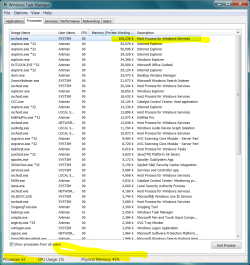
whenever i try to see the ram usage of my computer it tells me around 40% or so right away at startup with 2gb of ram. I checked out the processes and see that svchost.exe is taking up about 94000 kb of ram. When i track that to a service i see it is the Windows driver foundation service.

Is this high ram usage because of a driver or does x64 take up quite a bit more of ram than x86?
 

My Computer

Computer Manufacturer/Model Number
Toshiba A100-TA9
OS
windows 7 ultimate X64
CPU
T5600
Memory
2gb
Graphics Card(s)
nvidia 7600GO
whenever i try to see the ram usage of my computer it tells me around 40% or so right away at startup with 2gb of ram. I checked out the processes and see that svchost.exe is taking up about 94000 kb of ram. When i track that to a service i see it is the Windows driver foundation service.

Is this high ram usage because of a driver or does x64 take up quite a bit more of ram than x86?

64bit does need more ram. Minimum is 2gigs. svchost using 94Mb isnt unusual.

Ken
 

My Computer

Computer Manufacturer/Model Number
HP Pavillion dv-7 1005 Tx
OS
Win 8 Release candidate 8400
CPU
[email protected]
Memory
4 gigs
Graphics Card(s)
Nvidia 9600M
Sound Card
HD built-in
Monitor(s) Displays
17" Wxga
Screen Resolution
1440x900
Cooling
none
Internet Speed
45Mb down 5Mb up
Stable responsive system with 4GB.

.
 

Attachments

  • Capture.PNG
    Capture.PNG
    52.3 KB · Views: 347
I keep Windows Driver Foundation disabled because I had some other problem with it. Never had a problem without it.
 

My Computer

Computer Manufacturer/Model Number
HP, Dell, Gateway, Toshiba - 4 laptops and 2 desktops
OS
Vista, Windows7, Mint Mate, Zorin, Windows 8
CPU
from 1.6GHz Duo to i7
Monitor(s) Displays
2x HP w2207
Hard Drives
5x HDD, 7x SSD, 12x Externals
Keyboard
with trackball - no mices
Mouse
Trackball mice
Internet Speed
DSL 6000
Stable responsive system with 4GB.

Holy guacamole Antman!

I get Win7 x64 to run in less than 300MB. Barebones of course. Just enough stuff for gaming and browsing the net.

If you ever heard of blackviper than you know what I'm talking about. Except that my config is even more barebones than his.
 

My Computer

Computer Manufacturer/Model Number
Too many to list.
OS
XP, Seven, 2008R2
CPU
AMD, Intel, VIA
Motherboard
Various
Memory
Corsair, Kingston, etc.
Graphics Card(s)
ATI, NVIDIA
Monitor(s) Displays
Samsung
Hard Drives
Maxtor, Western Digital
Keyboard
qwerty
Internet Speed
22 Mb/s @ home, 1 Gb/s @ server
Other Info
All of my systems still run fastest on XP 32-bit for the most part. Win7 is fun to play with, but I still prefer XP for raw speed, security, and functionality.
I do not adjust anything. My system is highly repsonsive and mostly issue free. Any anomolies have been introduced while attempting to recreate problems posted on the forum.

No USB power issues. No large file copy problems drive to drive, net loc to net loc, or via HTTP or FTP. No RDP issues. No disappearring volumes. No sluggish menus.

No vanishing GUI elements. All monitors come online on demand. No sleep issues. No hibernation issues.

Ad infinitum, ad nauseum.

My point - leave it alone. It works fine.
 
I do not adjust anything. My system is highly repsonsive and mostly issue free. Any anomolies have been introduced while attempting to recreate problems posted on the forum.

No USB power issues. No large file copy problems drive to drive, net loc to net loc, or via HTTP or FTP. No RDP issues. No disappearring volumes. No sluggish menus.

No vanishing GUI elements. All monitors come online on demand. No sleep issues. No hibernation issues.

Ad infinitum, ad nauseum.

My point - leave it alone. It works fine.
That's how mine runs, too. With 1 gig...

And, I boot XP from SD or USB anything.

What should I do to fix it ? :)
 

My Computer

Computer Manufacturer/Model Number
Gateway GT5056
OS
XP_Pro, W7_7201, W7RC.vhd, SciLinux5.3, Fedora12, Fedora9_2x, OpenSolaris_09-06
CPU
AMD 64x2
Motherboard
Yes
Memory
1 gig
Graphics Card(s)
Dunno
Sound Card
Realtek something
Monitor(s) Displays
Samsung SyncMaster 940MW w/TV
Screen Resolution
1280x1024
Hard Drives
250 GB WD, USB Seagate Freedesk 1.5 T
Internet Speed
Cable modem
Other Info
1 + 1 = 10b,
7 + 7 = 16o,
a + b = 15h.
I do not adjust anything. My system is highly repsonsive and mostly issue free. Any anomolies have been introduced while attempting to recreate problems posted on the forum.

No USB power issues. No large file copy problems drive to drive, net loc to net loc, or via HTTP or FTP. No RDP issues. No disappearring volumes. No sluggish menus.

No vanishing GUI elements. All monitors come online on demand. No sleep issues. No hibernation issues.

Ad infinitum, ad nauseum.

My point - leave it alone. It works fine.
That's how mine runs, too. With 1 gig...

And, I boot XP from SD or USB anything.

What should I do to fix it ? :)

Spurn the combined wisdom of thousands of the cleverest people in the industry - the ones who wrote Windows and determined its default settings - and instead seek the guidance of one pimply-faced teenager who calls himself "Black Viper" as to what system components should be allowed to run and when ;)
 

My Computer

Computer Manufacturer/Model Number
Multiple machines in various stages of decomposition.
OS
Win7x64
Checked it out.

He's not a teenager.

But, no 'operating systems' experience either, let alone MS versions... ;)
 

My Computer

Computer Manufacturer/Model Number
Gateway GT5056
OS
XP_Pro, W7_7201, W7RC.vhd, SciLinux5.3, Fedora12, Fedora9_2x, OpenSolaris_09-06
CPU
AMD 64x2
Motherboard
Yes
Memory
1 gig
Graphics Card(s)
Dunno
Sound Card
Realtek something
Monitor(s) Displays
Samsung SyncMaster 940MW w/TV
Screen Resolution
1280x1024
Hard Drives
250 GB WD, USB Seagate Freedesk 1.5 T
Internet Speed
Cable modem
Other Info
1 + 1 = 10b,
7 + 7 = 16o,
a + b = 15h.
BV is not all that bad. He does make sufficient disclaimer and does provide some good homework. I think he is penalized for the success of his thoroughness. He has the definitive layman's site on the subject matter. I cannot fault him for how the work is misused.

I used to buy and sell copies of a certain Cookbook - years ago. I did not condone its content - I was just making a 200% markup.
 
oh well i guess i gotta go the 32 bit way...
 

My Computer

Computer Manufacturer/Model Number
Toshiba A100-TA9
OS
windows 7 ultimate X64
CPU
T5600
Memory
2gb
Graphics Card(s)
nvidia 7600GO
Listen to Antman & H2SO4 stay with 64Bit and if you must add 2gb of memory.

Ken
 

My Computer

Computer Manufacturer/Model Number
Dell Optiplex 980
OS
Win7 x64 Ultimate SP1
CPU
Intel i7-2600
Memory
8 Gig
Graphics Card(s)
Geforce gt 520
Monitor(s) Displays
LG & Acer
Screen Resolution
1920x1080
Internet Speed
Fios 45/35
Other Info
Windows Home Server
Spurn the combined wisdom of thousands of the cleverest people in the industry - the ones who wrote Windows and determined its default settings

I personally don't need 70 services or 63 processes running, three quarters which I'll never use, that suck up system resources and present security risks.

For example, why is there services for Wireless enabled when I don't even have a wireless network adapter in my computer? IPv6 when my home network is IPv4? Windows Defender? UPnP? I don't need it. Things like that are pointless to me so I don't agree that the people who wrote Windows knows what's best.

Black Viper could be a pimple faced nerd for all I care. He's still cooler than Bill Gates, the guy who thought noone would ever need more than 640K of memory in their computer.
 

My Computer

Computer Manufacturer/Model Number
Too many to list.
OS
XP, Seven, 2008R2
CPU
AMD, Intel, VIA
Motherboard
Various
Memory
Corsair, Kingston, etc.
Graphics Card(s)
ATI, NVIDIA
Monitor(s) Displays
Samsung
Hard Drives
Maxtor, Western Digital
Keyboard
qwerty
Internet Speed
22 Mb/s @ home, 1 Gb/s @ server
Other Info
All of my systems still run fastest on XP 32-bit for the most part. Win7 is fun to play with, but I still prefer XP for raw speed, security, and functionality.
For example, why is there services for Wireless enabled when I don't even have a wireless network adapter in my computer? IPv6 when my home network is IPv4? Windows Defender? UPnP? I don't need it. Things like that are pointless to me so I don't agree that the people who wrote Windows knows what's best.

Black Viper could be a pimple faced nerd for all I care. He's still cooler than Bill Gates, the guy who thought noone would ever need more than 640K of memory in their computer.
Agreed. Bill Gates is an idiot. Good point.

It is much wiser to enable services that will not be needed than it is to disable services that will be needed.

Elevate your perspective.
 
They make Windows for the average user. They know that computer techs and the type will go ahead and disable services they don't want. If something doesn't work, the same people that disabled services can usually figure out what the problem is. That's why there are services many people will never use auto enabled at default. Being Microsoft, it probably causes them to receive a lesser amount of support issue requests.
 

My Computer

Computer Manufacturer/Model Number
self built
OS
7600.20510 x86
CPU
P4 550 3.4 GHz HT running at 3.5 GHz
Motherboard
MSI PM8M3-V (MS-7211 v1.x) Micro-ATX mainboard
Memory
OCZ 2 GB(2x1GB) DDR400mHz running @ 414 mHz
Graphics Card(s)
HIS Radeon HD 3850 IceQ 3 Turbo HDMI Dual DL-DVI AGP
Sound Card
MOTU Traveler firewire studio interface 192 kHz 24 bit
Monitor(s) Displays
22" widescreen Acer X223W LCD, 17" Compaq P75 CRT
Screen Resolution
1680x1050 and 1280x1024
Hard Drives
SATA I x2 WD, 400 GB and 120 GB, SATA 2 WD Caviar Black 1 TB
PSU
350W generic
Case
Cybertronpc, it glows blue
Cooling
stock cpu fan, Ice-Q 3 gpu and system, many case fans
Keyboard
Logitch Classical Keyboard 200
Mouse
Logitech Mediaplay cordless
Internet Speed
1792/448 kbits/sec
Other Info
SATA II PCI fake RAID adapter, 1 GB Readyboost, original ATI Remote Wonder (even works with WMC perfectly), Logitech Rumblepad 2 game controller x2
Spurn the combined wisdom of thousands of the cleverest people in the industry - the ones who wrote Windows and determined its default settings

I personally don't need 70 services or 63 processes running, three quarters which I'll never use, that suck up system resources and present security risks.

For example, why is there services for Wireless enabled when I don't even have a wireless network adapter in my computer? IPv6 when my home network is IPv4? Windows Defender? UPnP? I don't need it. Things like that are pointless to me so I don't agree that the people who wrote Windows knows what's best.

Black Viper could be a pimple faced nerd for all I care. He's still cooler than Bill Gates, the guy who thought noone would ever need more than 640K of memory in their computer.

I think one of the mods perhaps blew away my earlier response to you, if I had to guess because I used a mildly derogatory (but mostly harmless) noun for a generic hapless computer end-user. (Or maybe I'm going senile and I forgot to click "submit"... it's hard to be sure.)

Anyway, I wanted to say that my comment was made in jest and that no disrespect was meant :)
 

My Computer

Computer Manufacturer/Model Number
Multiple machines in various stages of decomposition.
OS
Win7x64
The advantages of disabling all those services is highly overrated. Little to no gain what so ever by doing it IMO. This fact has been discussed on many forums. The ones who think otherwise are just fooling themselfs or just being foolish.
 

My Computer

Computer type
PC/Desktop
Computer Manufacturer/Model Number
Home built
OS
Windows 7 Ult, Windows 8.1 Pro,
CPU
Q9650-4.275GHz, E8600 4.5GHz, E6750-3.8GHz
Motherboard
Evga 780i FTW
Memory
G.Skill PC2 9600 1200Mhz 5 5 5 15 2T
Graphics Card(s)
GTX480
Sound Card
Asus Xonar D2
Monitor(s) Displays
HannsG
Screen Resolution
1680X1050
Hard Drives
GSkill Phoenix Pro 120GB SSD
PSU
ThermalTake Toughpower 1000Watt modular
Case
ThermalTake XaserV
Cooling
Xigmatek S1283
Keyboard
Logitech G15
Mouse
Logitech G9
Internet Speed
T1
Back
Top