High RAM usage?

higgins

New member
Member
VIP
Local time
1:53 AM
Messages
144
Hi all!

As I've come to use CPU meter gadget, I noticed that the RAM usage of Windows 7 is extremely high. I mean, I used to run XP with 1GB or RAM and then upgraded it to 2GB and barring some high-intensity work, it was IMO never lacking anything... but running 7 I think I've never seen the RAM usage under 75% from my current 4GB! It's quite common to have 80% usage even when the computer isn't particularly doing anything. I use almost exactly the same software than I used to with my 2GB XP. What's eating up my RAM? Is this high usage normal?

Thanks!
 

My Computer

Computer type
PC/Desktop
OS
Windows 7 x64
CPU
AMD Athlon(tm) II X2 250 Processor
Motherboard
N68C-GS FX
Memory
4GB DDR3 (PC3-10700H) Apacer Technology
Graphics Card(s)
NVIDIA GeForce GTX 560
Screen Resolution
1920x1080
Hard Drives
SSD + 2x HDD
PSU
450W
Case
Codegen SuperPower M608-CA 450W
Cooling
Fan
Antivirus
Microsoft Security Essentials
Hello,

What anti-virus are you using?

Could you please post a screenshot of the Performance tab, of Task Manager, sorted by memory usage?

Thanks,
~JK
 

My Computer

Computer Manufacturer/Model Number
Custom
OS
Windows 7 Professional x64
CPU
Intel i7 2600K OC'd @ 4620 MHz
Motherboard
Asus P8Z68-V Pro
Memory
16GB GSkill Sniper 2133 Mhz (4x4GB)
Graphics Card(s)
EVGA GeForce GTX 480 SuperClocked+
Sound Card
Realtek High Definition Audio
Monitor(s) Displays
2x Acer S273HLbmii 27"
Screen Resolution
2 x 1920x1080
Hard Drives
64GB Crucial M4 SSD

Storage: Hitachi 1TB 5400RPM, Samsung 1.5TB 5400RPM
PSU
Corsair HW Series 750w (modular)
Case
Cooler Master HAF 932 Advanced Blue Edition
Cooling
CM Hyper 212+ CPU cooler, 3x 230mm + 1x 140mm case fans
Keyboard
Logitech MK320 (wireless)
Mouse
Logitech MK320 (wireless)
Internet Speed
30 Mb/s : 2 Mb/s
I use AVG free edition.

On the shots...
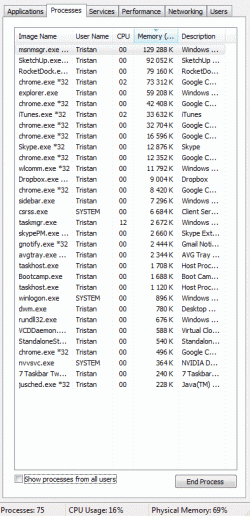
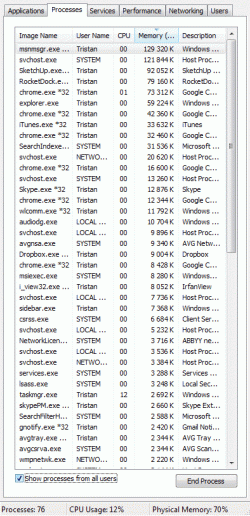
"Regular processes" totals 646 228 K, "all users processes" that are visible on the shot total 907 556 K.

As seen, the computer uses 69-70% of its 4GB memory.
 

Attachments

  • Clipboard02.gif
    Clipboard02.gif
    42.1 KB · Views: 239
  • Clipboard04.gif
    Clipboard04.gif
    50.4 KB · Views: 257

My Computer

Computer type
PC/Desktop
OS
Windows 7 x64
CPU
AMD Athlon(tm) II X2 250 Processor
Motherboard
N68C-GS FX
Memory
4GB DDR3 (PC3-10700H) Apacer Technology
Graphics Card(s)
NVIDIA GeForce GTX 560
Screen Resolution
1920x1080
Hard Drives
SSD + 2x HDD
PSU
450W
Case
Codegen SuperPower M608-CA 450W
Cooling
Fan
Antivirus
Microsoft Security Essentials
Have a look in the performance tab of the task manager, check out the stat under 'Physical Memory' that says 'Available:'
This is a more accurate reflection of your available RAM. Windows 7 (and Vista) include a technology called SuperFetch, which caches data from your hard drive to RAM to make computer use faster. It is quite ingenious how it does it, as it takes into account the programs you use during certain times of the day and week and loads them before you ask for it. This means that it is instantly there instead of having to load straight from the hard drive, which is much slower.

But don't worry, if a program needs a lot of memory, Windows 7 will dump enough cache to load the program instantly. The 'Available:' stat is the amount of memory free + memory cached, as the cached memory can be dumped immediately.

This behaviour is normal and nothing to worry about.
 

My Computer

Computer Manufacturer/Model Number
Dell Inspiron 1545
OS
Windows 7 build 7100 x86
CPU
Intel Core 2 Duo 2.1GHz
Motherboard
GM45 chipset
Memory
3GB
Graphics Card(s)
Intel(TM) Graphics Media Accelerator X4500HD
Sound Card
Realtek HD
Monitor(s) Displays
15.6" WLED 720p
Screen Resolution
1366x768
Hard Drives
320GB 5400rpm hard drive
Ah, the huge memory load is normal (and good) then. Thanks!
 

My Computer

Computer type
PC/Desktop
OS
Windows 7 x64
CPU
AMD Athlon(tm) II X2 250 Processor
Motherboard
N68C-GS FX
Memory
4GB DDR3 (PC3-10700H) Apacer Technology
Graphics Card(s)
NVIDIA GeForce GTX 560
Screen Resolution
1920x1080
Hard Drives
SSD + 2x HDD
PSU
450W
Case
Codegen SuperPower M608-CA 450W
Cooling
Fan
Antivirus
Microsoft Security Essentials
It looks like your just running a lot of stuff at once. You can see (6) google chrome processes alone then throw in itunes and skype etc etc. One thing kind of curious though is on the second screenshot it looks odd that msn messenger and svhost are both using 100k+.

EDIT:

MY fault svhost running that high is normal. Still not sure on messenger though.
 
Last edited:

My Computer

Computer type
PC/Desktop
Computer Manufacturer/Model Number
Home Built
OS
Win7 Ultimate x64
CPU
Intel I5 4690k
Motherboard
MSI Z97 Gaming 5
Memory
16gb Corsair DDR3 @1600mhz
Graphics Card(s)
GTX 970
Sound Card
Realtek HD 5.1
Monitor(s) Displays
Acer 23" LCD
Screen Resolution
1920x1080
Hard Drives
Samsung Evo III SSD
WD 1TB Black
PSU
EVGA Supernove 650w
Case
Diabolik
Cooling
Cooler Master
Keyboard
Logitech
Mouse
Logitech
Internet Speed
Fiber
Other Info
Logitech X-540 5.1 Surround Sound/
Logitech Rumblepad2/
Thrustmaster RGT FFB Wheel
It looks like your just running a lot of stuff at once. You can see (6) google chrome processes alone then throw in itunes and skype etc etc.
Six browser tabs, Skype and a music player is a LOT? :shock:

One thing kind of curious though is on the second screenshot it looks odd that msn messenger and svhost are both using 100k+.
Not normal?
 

My Computer

Computer type
PC/Desktop
OS
Windows 7 x64
CPU
AMD Athlon(tm) II X2 250 Processor
Motherboard
N68C-GS FX
Memory
4GB DDR3 (PC3-10700H) Apacer Technology
Graphics Card(s)
NVIDIA GeForce GTX 560
Screen Resolution
1920x1080
Hard Drives
SSD + 2x HDD
PSU
450W
Case
Codegen SuperPower M608-CA 450W
Cooling
Fan
Antivirus
Microsoft Security Essentials
Back
Top