High unexplained RAM usage

Keshavdsd

New member
Local time
4:26 AM
Messages
3
Location
Indore, India
I have already formatted PC several times but there was no improvement in speed. I have been getting this weird problem with Windows 7, and I apologize if this has been posted and solved before, but I couldn't find anything. So, I don't remember when this started, but my RAM usage is upwards to 80% with 2 GB of RAM. And I am currently running a lot of programs, true, but closing them all does nothing. It's as if Windows is failing to eliminate the resources used by the programs even after closing. The RAM is around 50% on start-up (which seems insanely high...) And it won't go way all that much even if I end every process I can. Anybody have any clues to fixing this? It never happened before when I was using win 7 on the same machine.

System Config:
Processor- Intel (R) Core(TM) i3 CPU M 380 @2.53GHz
RAM- 2GB (Usable 1.74GB)
System Type - 64 Bit Operating System

Thanks
 

My Computer

Computer type
Laptop
Computer Manufacturer/Model Number
Acer
OS
Windows 7 Ultimate x64
Run a scan with your anti virus.
Run a scan with Malwarebytes.
 

My Computer

Computer type
PC/Desktop
Computer Manufacturer/Model Number
Dell XPS 420
OS
Windows 10, Home Clean Install
CPU
Intel Core2 processsor Q8200(2.33Ghz 1333FSB) Quad Core Tech
Motherboard
Dell
Memory
6 gb
Graphics Card(s)
ATI Radeon 256MB HD3650
Sound Card
Intergrated 7.1 Channel Audio
Monitor(s) Displays
Dell SP2009W 20"
Hard Drives
640 GB Serial ATA Hard drive
Cooling
Fan
Keyboard
Dell USB Keyboard
Mouse
Dell Premium Optical USB
Internet Speed
DSL 2.85
A screenshot of Task Manager - Performance tab when the problem occurs would be useful.

50% memory usage at bootup on a 2 GB system is not insanely high. It is about typical. Memory usage in any modern OS is highly dynamic. The memory usage of processes is by no means a constant value but varies according to the amount of memory available, what the process is doing now, what other processes are doing, and more. Process memory usage at bootup will be trimmed back if more is needed for other applications. I have seen this happen many times.
 

My Computer

Computer type
PC/Desktop
Computer Manufacturer/Model Number
HP
OS
Windows 7 Pro 64 bit
CPU
Xeon W3520
Memory
8 GB
Graphics Card(s)
Nvidia Geforce 210
2GB isn't much RAM for x64 Ultimate, especially if running several programs. I doubt that the laptop was sold with that setup. I suggest either get more RAM or install x86.
 

My Computer

Computer type
PC/Desktop
Computer Manufacturer/Model Number
self build
OS
Windows 7 pro x64 SP1
CPU
Intel i7-2600k o/c to 4.6GHz
Motherboard
MSI Z68-GD80
Memory
8GB Mushkin 1866MHz
Graphics Card(s)
Nvidia GTX 750 Ti 2GB
Sound Card
integrated
Monitor(s) Displays
Liyama ProLite 27"
Screen Resolution
1920*1080 px
Hard Drives
Seagate 2TB
PSU
Coolermaster GX 750W
Case
Antec 300 case + 5 fans
Cooling
Dark Rock Pro
Internet Speed
62Mbit down 18Mbit up
Antivirus
MSE
Browser
Firefox
Other Info
Blackgold BGT3650 Quad HD TV card. Also have various 3770 + 4770K render boxes.
Problem have not solved yet.
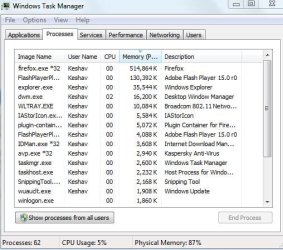
I am using Acer Aspire 5745 laptop. Today i saw task manager and see that the my browser Google chrome is taking more process so i have uninstalled it.. snapshot attached below:
But after all i feel that my system is yet too slow. Now i am using only Firfox but nothing can happen in speed of laptop.
Before i have scan my system to avast, kaspersky and malwarebyte.
Kindly help me.
Thanks
 

Attachments

  • Capture.PNG
    Capture.PNG
    18 KB · Views: 13
  • Capture1.JPG
    Capture1.JPG
    55.2 KB · Views: 13

My Computer

Computer type
Laptop
Computer Manufacturer/Model Number
Acer
OS
Windows 7 Ultimate x64
Running a scan is not a problem. It should be done on a routine basis. If your last post indicates that you have 2 antivirus and malwarebytes, get rid of one of the Anti Virus. Having 2 antivirus can be a problem right there. I would keep Avast and Malwarebytes.
 

My Computer

Computer type
PC/Desktop
Computer Manufacturer/Model Number
Dell XPS 420
OS
Windows 10, Home Clean Install
CPU
Intel Core2 processsor Q8200(2.33Ghz 1333FSB) Quad Core Tech
Motherboard
Dell
Memory
6 gb
Graphics Card(s)
ATI Radeon 256MB HD3650
Sound Card
Intergrated 7.1 Channel Audio
Monitor(s) Displays
Dell SP2009W 20"
Hard Drives
640 GB Serial ATA Hard drive
Cooling
Fan
Keyboard
Dell USB Keyboard
Mouse
Dell Premium Optical USB
Internet Speed
DSL 2.85
Sorry, but that screenshot isn't what I asked for. I asked for the "Performance tab".

But it does seem you are asking too much from a 2 GB system running a 64 bit OS. Running both Firefox and chrome at the same time. 2 GB RAM is the minimum supported on a 64 bit OS. Note that the Task Manager is not showing any of the system processes. "Show processes from all users" is needed to do that. Also the "Memory (Private Working Set)" column does not show full memory usage of a process. Having multiple AV products running can have unpredictable results, except they are likely to be unpleasant.
 

My Computer

Computer type
PC/Desktop
Computer Manufacturer/Model Number
HP
OS
Windows 7 Pro 64 bit
CPU
Xeon W3520
Memory
8 GB
Graphics Card(s)
Nvidia Geforce 210
Back
Top