Higher Ram Usage in Svchost and Updates - way to view service ram?

Keyes

New member
Member
VIP
Local time
2:42 AM
Messages
122
Ive noticed my ram usage is up more than normal, usage up 400-600MB. (Total 8gb.) This usage came about as some batch of windows updates lately. I have noticed inflated svchost processes. Currently the largest process I have is usage 194MB, and is an svchost. It had been 370MB, but I stopped the superfetch process temporarily, and it dropped over 150MB.

My running processes hardly add up to the 2.3GB being used. How can I see how much ram a service of a process uses? Process explorer and task manager dont show this.
 

My Computer My Computer

At a glance

Windows 7 Home Premium 64 bit
Computer type
PC/Desktop
OS
Windows 7 Home Premium 64 bit
Post a screenshot of Task Manager - Performance tab.

The total process memory usage will never equal total memory usage. Modern operating systems are far too complex for anything that simple. The memory usage of a process can vary greatly for a wide variety of reasons. There are situations where usage of 370 MB by an instance of svchost.exe would be a reasonable value.

How can I see how much ram a service of a process uses?

It is not practical to do this. It would require advanced tools and very detailed inside information that has never been published by Microsoft.
 

My Computer My Computer

At a glance

Windows 7 Pro 64 bitXeon W35208 GBNvidia Geforce 210
Computer type
PC/Desktop
Computer Manufacturer/Model Number
HP
OS
Windows 7 Pro 64 bit
CPU
Xeon W3520
Memory
8 GB
Graphics Card(s)
Nvidia Geforce 210
Post a screenshot of Task Manager - Performance tab.

The total process memory usage will never equal total memory usage. Modern operating systems are far too complex for anything that simple. The memory usage of a process can vary greatly for a wide variety of reasons. There are situations where usage of 370 MB by an instance of svchost.exe would be a reasonable value.

How can I see how much ram a service of a process uses?

It is not practical to do this. It would require advanced tools and very detailed inside information that has never been published by Microsoft.

Thank you for the reply.

Id like to mention I have seen svchost use almost 800MB when using the windows update service aswell.

Currently the system is running on a consistent 18% (normal, 1.5GB, total commit 1/15, 19%) ram usage now, once I see any increasing usage I will update this with information from the performance tab.
 

My Computer My Computer

At a glance

Windows 7 Home Premium 64 bit
Computer type
PC/Desktop
OS
Windows 7 Home Premium 64 bit
So it seems overtime (8 hours uptime) it went from 19% to 28% in use, with the same programs running. I noticed a svchost with the following services running has 390MB in ram.

Wlansvc
UxSms
TrkWKs
SysMain
PcaSvc
Netman
hidserv
audioendpointbuilder

I started and stopped svchost and it returned to 150MB in use, 25% ram use. Although that does not explain where the other 5-6% goes.

Physical Memory
total 8140
cached 5934
available 6041
free 155

Kernel Memory
paged 390
nonpaged 116

System
Handles 17800 (approx)
Threads 758
processes 62
commit GB 1/15

Hopefully this information helps.
 

My Computer My Computer

At a glance

Windows 7 Home Premium 64 bit
Computer type
PC/Desktop
OS
Windows 7 Home Premium 64 bit

My Computer My Computer

At a glance

Windows 10 Pro. 64/ version 1709 Windows 7 Pr...Intel i7-6800K @ 4.3Corsair Platinum 16 gig @2400EVGA GTX 1070 OC
Computer type
PC/Desktop
Computer Manufacturer/Model Number
Home made Desktop
OS
Windows 10 Pro. 64/ version 1709 Windows 7 Pro/64
CPU
Intel i7-6800K @ 4.3
Motherboard
ASUS X-99 Deluxe II
Memory
Corsair Platinum 16 gig @2400
Graphics Card(s)
EVGA GTX 1070 OC
Monitor(s) Displays
Asus 27" LED LCD/VE278Q
Screen Resolution
1920-1080 or 1280-720 HDMI
Hard Drives
INTEL SSD 730-240 Gb Sata 3.0/
PSU
EVGA Platium 1200W
Case
Phanteks Luxe Tempered Glass 8 fans/ one radiator
Cooling
XSPC/ Water Cooled CPU
Keyboard
Das 4 Professional
Mouse
Logitech M705/MX Anywhere 2-S
Internet Speed
100 mbits
Antivirus
Microsoft Security Essentials/ Malwarebytes Premium 3.0/ SAS
Browser
I.E. 11 default/Firefox/ ISP Time Warner Cable/Spectrum
Other Info
LG BluRay Burner/
Sound system-KLipsch-THX/
Icy Dock ssd Hot Swap bays.
I willl try and get an image uploaded. Is there anything extra besides the graphs that an image will provide to solving this? The information I have above was all from that performance tab.

Thank you.
 

My Computer My Computer

At a glance

Windows 7 Home Premium 64 bit
Computer type
PC/Desktop
OS
Windows 7 Home Premium 64 bit
The numbers in post #4 seem quite reasonable. It appears usage is about 2 GB which on a 8 GB system is not unusual or cause for concern. Adding up the memory usage column in Task Manager is rarely useful and will never equal total usage. There are very significant users of memory that are not processes, not all of which are shown in Task Manager. It is not possible to fully account for all memory usage with Task Manager.

There are multiple legitimate reasons why the instance of svchost.exe is as high as it is.
 

My Computer My Computer

At a glance

Windows 7 Pro 64 bitXeon W35208 GBNvidia Geforce 210
Computer type
PC/Desktop
Computer Manufacturer/Model Number
HP
OS
Windows 7 Pro 64 bit
CPU
Xeon W3520
Memory
8 GB
Graphics Card(s)
Nvidia Geforce 210
The numbers in post #4 seem quite reasonable. It appears usage is about 2 GB which on a 8 GB system is not unusual or cause for concern. Adding up the memory usage column in Task Manager is rarely useful and will never equal total usage. There are very significant users of memory that are not processes, not all of which are shown in Task Manager. It is not possible to fully account for all memory usage with Task Manager.

There are multiple legitimate reasons why the instance of svchost.exe is as high as it is.

Even now on 59 processes with tge same programs open I have 31% usage. It was at 33, but svchost had went up to almost 400MB, with svchost causing it again.

So there seems to be something that the average task manager cant see that is increasing the ram usage, but I dont know what.
 

My Computer My Computer

At a glance

Windows 7 Home Premium 64 bit
Computer type
PC/Desktop
OS
Windows 7 Home Premium 64 bit
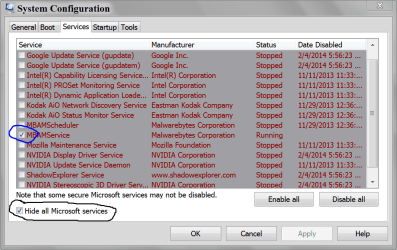
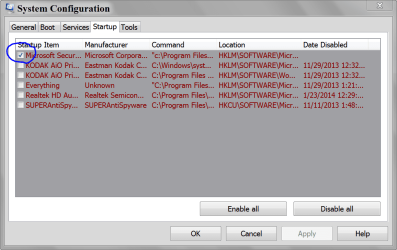
Pictures from your system like these might help.
Chasing a few MB of ram usage can be very fruitless.

MSCONFIG SERVICES.PNG

MSCONFIG STARTUP.PNG
 

My Computer My Computer

At a glance

Windows 10 Pro. 64/ version 1709 Windows 7 Pr...Intel i7-6800K @ 4.3Corsair Platinum 16 gig @2400EVGA GTX 1070 OC
Computer type
PC/Desktop
Computer Manufacturer/Model Number
Home made Desktop
OS
Windows 10 Pro. 64/ version 1709 Windows 7 Pro/64
CPU
Intel i7-6800K @ 4.3
Motherboard
ASUS X-99 Deluxe II
Memory
Corsair Platinum 16 gig @2400
Graphics Card(s)
EVGA GTX 1070 OC
Monitor(s) Displays
Asus 27" LED LCD/VE278Q
Screen Resolution
1920-1080 or 1280-720 HDMI
Hard Drives
INTEL SSD 730-240 Gb Sata 3.0/
PSU
EVGA Platium 1200W
Case
Phanteks Luxe Tempered Glass 8 fans/ one radiator
Cooling
XSPC/ Water Cooled CPU
Keyboard
Das 4 Professional
Mouse
Logitech M705/MX Anywhere 2-S
Internet Speed
100 mbits
Antivirus
Microsoft Security Essentials/ Malwarebytes Premium 3.0/ SAS
Browser
I.E. 11 default/Firefox/ ISP Time Warner Cable/Spectrum
Other Info
LG BluRay Burner/
Sound system-KLipsch-THX/
Icy Dock ssd Hot Swap bays.
You know what I think. I think, you should stop looking at Task Manager, stop looking at Memory Usage. We are no longer in the olden days where ever megabyte was precious and must be guarded and saved. You have some 8192 megabytes to play around with now. You do not need to sit there and micromanage it.


However, if you truly need to manage your RAM and keep as little of it in use as possible this method will work the best.

Turn off your computer, open the case, look for the RAM modules, take all of them out, put them in a box, store in a cool dry place. Next take a 1 GB stick of RAM put it into an empty slot, close the machine backup and power on. Windows will no longer touch your precious memory.

And yes, I am very serious.
 

My Computer My Computer

At a glance

Windows 10 Pro (x64)Intel Core i7-3930K (3.2GHz - 4.5GHz)4x Samsung 4GB PC3-12800 DDR3 (16GB 1600MHz)Nvidia Geforce GTX 690
Computer type
PC/Desktop
Computer Manufacturer/Model Number
Alienware Aurora ALX R4
OS
Windows 10 Pro (x64)
CPU
Intel Core i7-3930K (3.2GHz - 4.5GHz)
Motherboard
Alienware Aurora-R4 x79
Memory
4x Samsung 4GB PC3-12800 DDR3 (16GB 1600MHz)
Graphics Card(s)
Nvidia Geforce GTX 690
Sound Card
SteelSeries Siberia Elite
Monitor(s) Displays
Dell UltraSharp U3011
Screen Resolution
2560x1600
Hard Drives
Samsung 850 Pro 256 GB, Seagate 1TB Desktop Hybrid HDD, 2x Western Digital 4TB Green HDD
PSU
875W Some Dell PSU <.<
Case
Alienware Aurora ALX
Cooling
Custom Liquid Cooling (EK CPU & GPU blocks) dual EK 480RAD
Keyboard
Logitech G710+ Mechanical
Mouse
Logitech G700s
Internet Speed
Verizon Fios (50 mbps average)
Other Info
Server: Intel NUC D54250WYK: i5-4250U, 16GB, 256 GB mSATA, Windows Server 2012 R2
logicearth your method would surly take the worry away.
Like I said before.

Chasing a few MB of ram usage can be very fruitless.
 

My Computer My Computer

At a glance

Windows 10 Pro. 64/ version 1709 Windows 7 Pr...Intel i7-6800K @ 4.3Corsair Platinum 16 gig @2400EVGA GTX 1070 OC
Computer type
PC/Desktop
Computer Manufacturer/Model Number
Home made Desktop
OS
Windows 10 Pro. 64/ version 1709 Windows 7 Pro/64
CPU
Intel i7-6800K @ 4.3
Motherboard
ASUS X-99 Deluxe II
Memory
Corsair Platinum 16 gig @2400
Graphics Card(s)
EVGA GTX 1070 OC
Monitor(s) Displays
Asus 27" LED LCD/VE278Q
Screen Resolution
1920-1080 or 1280-720 HDMI
Hard Drives
INTEL SSD 730-240 Gb Sata 3.0/
PSU
EVGA Platium 1200W
Case
Phanteks Luxe Tempered Glass 8 fans/ one radiator
Cooling
XSPC/ Water Cooled CPU
Keyboard
Das 4 Professional
Mouse
Logitech M705/MX Anywhere 2-S
Internet Speed
100 mbits
Antivirus
Microsoft Security Essentials/ Malwarebytes Premium 3.0/ SAS
Browser
I.E. 11 default/Firefox/ ISP Time Warner Cable/Spectrum
Other Info
LG BluRay Burner/
Sound system-KLipsch-THX/
Icy Dock ssd Hot Swap bays.
My only concern is if these svchost processes inflate so much into the multiple gigabyte ranges, since they only seem to be getting bigger.
 

My Computer My Computer

At a glance

Windows 7 Home Premium 64 bit
Computer type
PC/Desktop
OS
Windows 7 Home Premium 64 bit
When you get to 90% Memory Usage, then you can start worrying about. Trying to be preemptive will only cause more issues and likely just kill the performance of your machine.

Understand, using memory does not make the computer slow it makes it faster. Trying to reduce memory usage is the opposite of what you want. More memory usage == better performance. (Generally for those nit-pickers)
 

My Computer My Computer

At a glance

Windows 10 Pro (x64)Intel Core i7-3930K (3.2GHz - 4.5GHz)4x Samsung 4GB PC3-12800 DDR3 (16GB 1600MHz)Nvidia Geforce GTX 690
Computer type
PC/Desktop
Computer Manufacturer/Model Number
Alienware Aurora ALX R4
OS
Windows 10 Pro (x64)
CPU
Intel Core i7-3930K (3.2GHz - 4.5GHz)
Motherboard
Alienware Aurora-R4 x79
Memory
4x Samsung 4GB PC3-12800 DDR3 (16GB 1600MHz)
Graphics Card(s)
Nvidia Geforce GTX 690
Sound Card
SteelSeries Siberia Elite
Monitor(s) Displays
Dell UltraSharp U3011
Screen Resolution
2560x1600
Hard Drives
Samsung 850 Pro 256 GB, Seagate 1TB Desktop Hybrid HDD, 2x Western Digital 4TB Green HDD
PSU
875W Some Dell PSU <.<
Case
Alienware Aurora ALX
Cooling
Custom Liquid Cooling (EK CPU & GPU blocks) dual EK 480RAD
Keyboard
Logitech G710+ Mechanical
Mouse
Logitech G700s
Internet Speed
Verizon Fios (50 mbps average)
Other Info
Server: Intel NUC D54250WYK: i5-4250U, 16GB, 256 GB mSATA, Windows Server 2012 R2
Back
Top