High Memory usage in svchost with Windows Update

TGMP3212

New member
Local time
4:17 AM
Messages
1
Hello all, I just noticed something and wanted to be sure or see if this is normal. When Windows Update checks for updates, svchost will jump up to ~500MB in usage, or after updates have been installed. It will stay there. If just checking for updates, but I don't install any, it will drop down to ~400MB, but no lower than that. Now, if I go into services and disable the Windows Update service, the memory usage drops from wherever it was at, down to ~22MB. What's with this, or is it just normal?
 

My Computer My Computer

Computer type
PC/Desktop
Computer Manufacturer/Model Number
Custom Build
OS
Win7 64-bit
CPU
i5-3570k
Motherboard
ASUS Sabertooth Z77
Memory
16GB
Graphics Card(s)
2x GTX 670
Sound Card
XONAR DX - UniXonar Driver
Monitor(s) Displays
2x HP 2511x
Screen Resolution
1920x1080
Hard Drives
1x Corsair 120GB SSD
2x 1TB WD HDD
PSU
Corsair 1200W
Case
Corsair Carbide 500R
Cooling
Air
Keyboard
Ducky Zero Shine - MX Brown
Mouse
Anker 2000DPI
Internet Speed
105mbps/ 10 mbps
Antivirus
Panda Free Antivirus
Browser
Firefox
Hello and welcome TGMP I am not real sure as to your concerns nor am I sure if the RAM usage is unusual - to me having that much on board if it doesn't cause any issues with what you are doing then I would just forget about it.
To be honest I have never checked this on any of my machines RAM usage using anything much at all.

Nice set up by the way:)
 

My Computer My Computer

Computer type
PC/Desktop
Computer Manufacturer/Model Number
Own build (new) Desk1 / Asus ROG Win 7 / Desk2 1st build
OS
Desk1 7 Home Prem / Desk2 10 Pro / Main lap Asus ROG 10 Pro 2 laptop Toshiba 7 Pro Asus P2520 7 & 10
CPU
Desk1 i5 3750K / Laptop i7 GTX 860M / Desk2 i5 2500
Motherboard
Desk1 Asus P877-V / Desk2 Gigabyte H67 UD3H / Laptop ?
Memory
Desk1 8GB (1866) / Desk2 16GB (1333) / Laptop 8Gb DDR3
Graphics Card(s)
Desk 1& 2NVidia GTX 650 & Laptops on board Intel
Sound Card
Desk 1 & 2 -XONAR DG Realtek High Def audio Laptop
Monitor(s) Displays
Desk 1 Benq HD 2450 / Desk2 Philips 24" / Laptop 17.5"
Screen Resolution
1920x1080 D1 & D2 & Laptop 1
Hard Drives
Desk1 Samsung 120GB 830 SSD
Asus ROG 256GB 850 Pro SSD
Desk2 Samsung 840 256 SSD
Toshiba 120GB EVO
PSU
Desk 1 Corsair HX 1050/ Laptop ? / Desk 2 Corsair HX 650
Case
Desk 1 Cooler HAF XM ? Toshiba laptop / Desk2 Coolermaster
Cooling
Fans on all Desk1 -2 Desk2 - all Coolermasters 5 Laptop ?
Keyboard
Desk 1 MS Sidewinder X6 Desk 2 MS Sidewinder X 4
Mouse
Desk 1&2 - Gigabyte MS 900 gamer - laptop - Logitec wireless
Internet Speed
ADSL2+
Other Info
One other Desktop (tester) and spare Toshba laptop both with SSD's
Running Kaspersky 2016 ISS on all machines config'd identically
Logitec audio stereo systems on each machine (x3)
Canon MG5250MFC
Router/modem TP-Link running WPA2SK
That memory usage does seem high. But having 16 GB RAM is also unusual. When available memory is plentiful, as would seem likely here, the memory manager will be very free in giving it to processes. This is a good thing. Memory was meant to be used, not sit idle. In the event that available memory becomes short the memory manager will trim the usage of these processes to meet the demand. With 16 GB RAM I wouldn't expect that to happen very often.

I see nothing to be concerned about.

Also understand that memory management in a modern OS is vastly complex, far beyond what most people imagine.
 

My Computer My Computer

Computer type
PC/Desktop
Computer Manufacturer/Model Number
HP
OS
Windows 7 Pro 64 bit
CPU
Xeon W3520
Memory
8 GB
Graphics Card(s)
Nvidia Geforce 210
That memory usage does seem high. But having 16 GB RAM is also unusual. When available memory is plentiful, as would seem likely here, the memory manager will be very free in giving it to processes. This is a good thing. Memory was meant to be used, not sit idle. In the event that available memory becomes short the memory manager will trim the usage of these processes to meet the demand. With 16 GB RAM I wouldn't expect that to happen very often.

I see nothing to be concerned about.

Also understand that memory management in a modern OS is vastly complex, far beyond what most people imagine.
Pretty much the same as I was thinking LM only I am a bit more simpler than you LOL!!
 

My Computer My Computer

Computer type
PC/Desktop
Computer Manufacturer/Model Number
Own build (new) Desk1 / Asus ROG Win 7 / Desk2 1st build
OS
Desk1 7 Home Prem / Desk2 10 Pro / Main lap Asus ROG 10 Pro 2 laptop Toshiba 7 Pro Asus P2520 7 & 10
CPU
Desk1 i5 3750K / Laptop i7 GTX 860M / Desk2 i5 2500
Motherboard
Desk1 Asus P877-V / Desk2 Gigabyte H67 UD3H / Laptop ?
Memory
Desk1 8GB (1866) / Desk2 16GB (1333) / Laptop 8Gb DDR3
Graphics Card(s)
Desk 1& 2NVidia GTX 650 & Laptops on board Intel
Sound Card
Desk 1 & 2 -XONAR DG Realtek High Def audio Laptop
Monitor(s) Displays
Desk 1 Benq HD 2450 / Desk2 Philips 24" / Laptop 17.5"
Screen Resolution
1920x1080 D1 & D2 & Laptop 1
Hard Drives
Desk1 Samsung 120GB 830 SSD
Asus ROG 256GB 850 Pro SSD
Desk2 Samsung 840 256 SSD
Toshiba 120GB EVO
PSU
Desk 1 Corsair HX 1050/ Laptop ? / Desk 2 Corsair HX 650
Case
Desk 1 Cooler HAF XM ? Toshiba laptop / Desk2 Coolermaster
Cooling
Fans on all Desk1 -2 Desk2 - all Coolermasters 5 Laptop ?
Keyboard
Desk 1 MS Sidewinder X6 Desk 2 MS Sidewinder X 4
Mouse
Desk 1&2 - Gigabyte MS 900 gamer - laptop - Logitec wireless
Internet Speed
ADSL2+
Other Info
One other Desktop (tester) and spare Toshba laptop both with SSD's
Running Kaspersky 2016 ISS on all machines config'd identically
Logitec audio stereo systems on each machine (x3)
Canon MG5250MFC
Router/modem TP-Link running WPA2SK
See this all the time in my customers' computers

And it's not restricted to machines with 16GB RAM. For computers with 4GB or less RAM it does actually cause performance issues.

On new builds with Windows 7 and 16GB RAM I have seen this SVCHost use 3GB+ of RAM while doing its initial 163 updates.

So it's nothing to worry about, but I do find it annoying the MS have just made the assumption that everyone has machines with 16GB of RAM these days and have changed Windows update's memory usage accordingly.

If anyone knows a way to stop Windows Update hogging so much RAM, I would like to hear it.
 

My Computer My Computer

Computer type
PC/Desktop
OS
Windows 7 Hpome Premium 64 Bit
I think it depends on RAM. Like the previous posts mentioned, Windows 7 or later and even OS X are takes advantage of RAM (e.g. svchost.exe - windows update service) to make the tasks faster. Try updating a system with 150+ updates on one go with 2 GB RAM. Svchost will surely use less RAM but the same task takes longer than the one using 3 GB out of 16 GB physical RAM capacity.

One way to reduce the RAM usage on svchost windows update service is to set the updates to never. Then you go check it once a month every Tuesday at the 2nd week of the month since that's the day MS publish their updates.
 

My Computer My Computer

Computer type
Laptop
Computer Manufacturer/Model Number
Dell Optiplex SX270, Lenovo Z470
OS
Windows 7 Professional x64 SP1
CPU
Intel® Pentium® 4 @ 2.26 GHz, Intel Core i7-2670QM @ 2.20 GH
Motherboard
Dell, Lenovo
Memory
512MB Dual channel DDR SDRAM @ 400MHz 2.5-3-3-7, 8 GB DDR3
Graphics Card(s)
Intel 82865G, Nvidia GeForce 520M Graphics
Sound Card
SoundMax Integrated Audio, Integrated HD Audio
Monitor(s) Displays
LG W1952
Screen Resolution
1440x900, 1366 x 768
Hard Drives
40 GB 2.5" IDE 4200 RPM HDD, 500 GB 5400 RPM Sata 1.5 + 32 GB SSD
PSU
Dell 145 Watt, Lenovo 120 Watt Power Adapter
Case
Optiplex SX270 Small Form Factor, Laptop
Cooling
Dell Proprietary Air Cooling, Stock laptop cooling
Keyboard
Dell SK-8125 USB Keyboard
Mouse
Dell PS/2 2 button ball mouse with wheel scroll
Internet Speed
300 Mbit down / 20 Mbps up Time Warner Cable
Antivirus
MSE, Malwarebytes Scanner
Browser
Internet (Aizawa) Explorer 11
Other Info
Running Windows Server 2012 Datacenter on a virtual machine to run Metro Apps.
What I do is simple.
I have done it on my system from 4gig to 32gig.
Just let Windows 7 manage the memory. It know what it is doing unlike XP.

If Windows 7 does this or that with memory and you start doing things on your system Windows 7 will pick that up faster than us humans and make adjustment.

If one is going to watch their memory kb by kb or mb by mb your going to drive yourself nuts.

Windows 7 also like to be rebooted now and again to get a fresh start with memory management.

Just so every body knows. Rebooting a computer give no pain to the owner of the computer.
 

My Computer My Computer

Computer type
PC/Desktop
Computer Manufacturer/Model Number
Home made Desktop
OS
Windows 10 Pro. 64/ version 1709 Windows 7 Pro/64
CPU
Intel i7-6800K @ 4.3
Motherboard
ASUS X-99 Deluxe II
Memory
Corsair Platinum 16 gig @2400
Graphics Card(s)
EVGA GTX 1070 OC
Monitor(s) Displays
Asus 27" LED LCD/VE278Q
Screen Resolution
1920-1080 or 1280-720 HDMI
Hard Drives
INTEL SSD 730-240 Gb Sata 3.0/
PSU
EVGA Platium 1200W
Case
Phanteks Luxe Tempered Glass 8 fans/ one radiator
Cooling
XSPC/ Water Cooled CPU
Keyboard
Das 4 Professional
Mouse
Logitech M705/MX Anywhere 2-S
Internet Speed
100 mbits
Antivirus
Microsoft Security Essentials/ Malwarebytes Premium 3.0/ SAS
Browser
I.E. 11 default/Firefox/ ISP Time Warner Cable/Spectrum
Other Info
LG BluRay Burner/
Sound system-KLipsch-THX/
Icy Dock ssd Hot Swap bays.
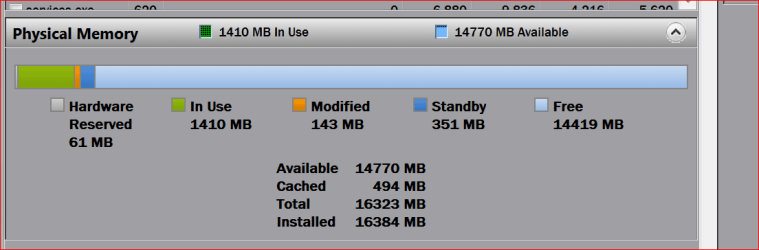
This is my memory before and after a reboot.
Before is the top picture.

Now after the reboot Windows will monitor the system and make adjustment as needed and all works well.
The after reboot picture will start looking like the before reboot picture as Windows 7 makes need adjustment.


Capture.PNGBefore I boot.PNG

Windows memory after a reboot.PNG
 

My Computer My Computer

Computer type
PC/Desktop
Computer Manufacturer/Model Number
Home made Desktop
OS
Windows 10 Pro. 64/ version 1709 Windows 7 Pro/64
CPU
Intel i7-6800K @ 4.3
Motherboard
ASUS X-99 Deluxe II
Memory
Corsair Platinum 16 gig @2400
Graphics Card(s)
EVGA GTX 1070 OC
Monitor(s) Displays
Asus 27" LED LCD/VE278Q
Screen Resolution
1920-1080 or 1280-720 HDMI
Hard Drives
INTEL SSD 730-240 Gb Sata 3.0/
PSU
EVGA Platium 1200W
Case
Phanteks Luxe Tempered Glass 8 fans/ one radiator
Cooling
XSPC/ Water Cooled CPU
Keyboard
Das 4 Professional
Mouse
Logitech M705/MX Anywhere 2-S
Internet Speed
100 mbits
Antivirus
Microsoft Security Essentials/ Malwarebytes Premium 3.0/ SAS
Browser
I.E. 11 default/Firefox/ ISP Time Warner Cable/Spectrum
Other Info
LG BluRay Burner/
Sound system-KLipsch-THX/
Icy Dock ssd Hot Swap bays.
It is important to understand that process memory usage us HIGHLY dynamic, determined primarily by need and availability. Usage of an individual process can vary over a short period of time by a factor of 100 or more. This usage is always under the control of the system memory manager with the goal of maximizing overall system performance. There is no provision made for the user to override or control this. System services do not have any special privileges here, all processes being on a level playing field. There is no priority system whereby some processes are more important than others. The process priority as shown in Task Manager is for other purposes and has nothing to do with memory usage.

Processes compete for memory according to need. When memory is plentiful processes will be allowed to use pretty much whatever they want. If a process can use 3 GB or more memory and it can be provided without unduly effecting other processes why should it be restricted? If a time should come when there is memory pressure and more is needed for other processes this usage will be trimmed back, drastically if necessary. The memory usage of an inactive process can be trimmed back to almost nothing if need be.

The whole process of memory management is highly complex with many factors taken into consideration. Most of the time it works very well. Of course problems can develop and they must be dealt with according to the details of the situation.
 

My Computer My Computer

Computer type
PC/Desktop
Computer Manufacturer/Model Number
HP
OS
Windows 7 Pro 64 bit
CPU
Xeon W3520
Memory
8 GB
Graphics Card(s)
Nvidia Geforce 210
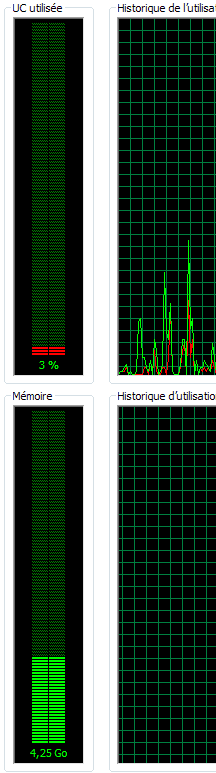
I also have 16Gb Ram onto my machine and like the OP posted, When Windows Update checks for updates, svchost jumps up to 250Mb/320Mb then after 10/15mn it goes back to 30Mb.

I can have up to 4.25GB of memory occupied!!
 

Attachments

  • Capture.PNG
    Capture.PNG
    3 KB · Views: 0

My Computer My Computer

Computer type
PC/Desktop
Computer Manufacturer/Model Number
Custom Build
OS
Windows 7 Professional SP1 - x64 [Non-UEFI Boot]
CPU
Ivy Bridge Core i5 3570K (Delidded)
Motherboard
Asus P8Z77-V LE PLUS
Memory
G.Skill "Ares" DDR3 PC3-12800 - 1600MHz (16Gb)
Graphics Card(s)
Asus Dual-RX480-O4G
Sound Card
Creative Sound Blaster Z w/5.1 sound system
Monitor(s) Displays
Asus IPS 23"
Screen Resolution
16/9
Hard Drives
Internal:
500Go Sata 6Gb/s (x2)
500Go Sata 3Gb/s (x2)
SSD 60Go Sata 6Gb/s
PSU
In Win C 900W Series 80+ Platinum
Case
Thermaltake Chaser A71
Cooling
Custom Water Cooling Loop
Keyboard
Cooler Master QuickFire XTi
Mouse
Razer Imperator 2012 (4G)
Antivirus
MSE
Browser
IE 11.0.xxx Rtm
Other Info
"Raid0" with Intel Smart Response Technology (HDD/SSD)
jesus guys you don't understand such a simple thing, Windows Update will eat 16GB of RAM easy if you will download 2011 version of windows 7 and will try to update it via Windows Update, the more updates await the more RAM will be eaten, and that's why it's annoying, you can disable it completely - for that you need to open the start menu, then write services in the search bar, and open the Services Running on this Computer , after that go to the very bottom of the list and find Windows Update, right click on it/All Tasks/Stop , then right click on it again/Properties/and change the Startup type from Automatic to Disabled, and you done, if it will even enable itself again then that was one of your utilities fault like AVG TuneUp for example,,, yeah you can say that you can avoid all that if just will set automatic search for updates or will search them manually once a week - but then again, it eats internet speed.
 

My Computer My Computer

Computer type
PC/Desktop
OS
Windows 7 Ultimate 64bit
Well I set mine to check but let me decide what to download and install that way I can keep a little ahead of stuff I may not think necessary - a lot of non Windows stuff comes through Windows updates for example Toshiba have a nasty habit of inserting some of their crapware in along with updates .

As for the AVG (and others) tune up crap well anyone who uses more than CCleaner in my mind requires urgent psychiatric treatment.

If you keep the update leftovers cleaned out then I don't see a problem. As for reinstalling and having so many updates - I think it is par for the course - tedious yes but necessary.
 

My Computer My Computer

Computer type
PC/Desktop
Computer Manufacturer/Model Number
Own build (new) Desk1 / Asus ROG Win 7 / Desk2 1st build
OS
Desk1 7 Home Prem / Desk2 10 Pro / Main lap Asus ROG 10 Pro 2 laptop Toshiba 7 Pro Asus P2520 7 & 10
CPU
Desk1 i5 3750K / Laptop i7 GTX 860M / Desk2 i5 2500
Motherboard
Desk1 Asus P877-V / Desk2 Gigabyte H67 UD3H / Laptop ?
Memory
Desk1 8GB (1866) / Desk2 16GB (1333) / Laptop 8Gb DDR3
Graphics Card(s)
Desk 1& 2NVidia GTX 650 & Laptops on board Intel
Sound Card
Desk 1 & 2 -XONAR DG Realtek High Def audio Laptop
Monitor(s) Displays
Desk 1 Benq HD 2450 / Desk2 Philips 24" / Laptop 17.5"
Screen Resolution
1920x1080 D1 & D2 & Laptop 1
Hard Drives
Desk1 Samsung 120GB 830 SSD
Asus ROG 256GB 850 Pro SSD
Desk2 Samsung 840 256 SSD
Toshiba 120GB EVO
PSU
Desk 1 Corsair HX 1050/ Laptop ? / Desk 2 Corsair HX 650
Case
Desk 1 Cooler HAF XM ? Toshiba laptop / Desk2 Coolermaster
Cooling
Fans on all Desk1 -2 Desk2 - all Coolermasters 5 Laptop ?
Keyboard
Desk 1 MS Sidewinder X6 Desk 2 MS Sidewinder X 4
Mouse
Desk 1&2 - Gigabyte MS 900 gamer - laptop - Logitec wireless
Internet Speed
ADSL2+
Other Info
One other Desktop (tester) and spare Toshba laptop both with SSD's
Running Kaspersky 2016 ISS on all machines config'd identically
Logitec audio stereo systems on each machine (x3)
Canon MG5250MFC
Router/modem TP-Link running WPA2SK
Nyaro if I understand your post you recommend disabling Windows 7 Updates.

I totally disagree. Windows 7 needs it's proper Updates. You can choose to get them automatically or manually. Either way works. I do mine manually checking several times a day along with checking my security programs for updates. All update on my systems are done manually.
All one has to do is remember to do them or a system can fall way behind in getting it's needed updates.

You are correct while downloading updates it could slow down your other uses of the internet. It depends on your system and internet method used. So what, the updates are needed.

Windows 7 updates will not eat up 16 gigs of ram. Never, no way. How would people with less ram ever get updates if that was true?

AVG Tuneup and things like that are nothing but snakeware junk.
 

My Computer My Computer

Computer type
PC/Desktop
Computer Manufacturer/Model Number
Home made Desktop
OS
Windows 10 Pro. 64/ version 1709 Windows 7 Pro/64
CPU
Intel i7-6800K @ 4.3
Motherboard
ASUS X-99 Deluxe II
Memory
Corsair Platinum 16 gig @2400
Graphics Card(s)
EVGA GTX 1070 OC
Monitor(s) Displays
Asus 27" LED LCD/VE278Q
Screen Resolution
1920-1080 or 1280-720 HDMI
Hard Drives
INTEL SSD 730-240 Gb Sata 3.0/
PSU
EVGA Platium 1200W
Case
Phanteks Luxe Tempered Glass 8 fans/ one radiator
Cooling
XSPC/ Water Cooled CPU
Keyboard
Das 4 Professional
Mouse
Logitech M705/MX Anywhere 2-S
Internet Speed
100 mbits
Antivirus
Microsoft Security Essentials/ Malwarebytes Premium 3.0/ SAS
Browser
I.E. 11 default/Firefox/ ISP Time Warner Cable/Spectrum
Other Info
LG BluRay Burner/
Sound system-KLipsch-THX/
Icy Dock ssd Hot Swap bays.
Well the post eating RAM to be honest I was holding back and trying to be as polite as I could and Layback has just added what is in my opinion his courteous reply.

If it were not for that member being a "tad" uninformed then I would have worded my answer a bit stronger and probably got my knuckles rapped for doing so.:sarc:
 

My Computer My Computer

Computer type
PC/Desktop
Computer Manufacturer/Model Number
Own build (new) Desk1 / Asus ROG Win 7 / Desk2 1st build
OS
Desk1 7 Home Prem / Desk2 10 Pro / Main lap Asus ROG 10 Pro 2 laptop Toshiba 7 Pro Asus P2520 7 & 10
CPU
Desk1 i5 3750K / Laptop i7 GTX 860M / Desk2 i5 2500
Motherboard
Desk1 Asus P877-V / Desk2 Gigabyte H67 UD3H / Laptop ?
Memory
Desk1 8GB (1866) / Desk2 16GB (1333) / Laptop 8Gb DDR3
Graphics Card(s)
Desk 1& 2NVidia GTX 650 & Laptops on board Intel
Sound Card
Desk 1 & 2 -XONAR DG Realtek High Def audio Laptop
Monitor(s) Displays
Desk 1 Benq HD 2450 / Desk2 Philips 24" / Laptop 17.5"
Screen Resolution
1920x1080 D1 & D2 & Laptop 1
Hard Drives
Desk1 Samsung 120GB 830 SSD
Asus ROG 256GB 850 Pro SSD
Desk2 Samsung 840 256 SSD
Toshiba 120GB EVO
PSU
Desk 1 Corsair HX 1050/ Laptop ? / Desk 2 Corsair HX 650
Case
Desk 1 Cooler HAF XM ? Toshiba laptop / Desk2 Coolermaster
Cooling
Fans on all Desk1 -2 Desk2 - all Coolermasters 5 Laptop ?
Keyboard
Desk 1 MS Sidewinder X6 Desk 2 MS Sidewinder X 4
Mouse
Desk 1&2 - Gigabyte MS 900 gamer - laptop - Logitec wireless
Internet Speed
ADSL2+
Other Info
One other Desktop (tester) and spare Toshba laptop both with SSD's
Running Kaspersky 2016 ISS on all machines config'd identically
Logitec audio stereo systems on each machine (x3)
Canon MG5250MFC
Router/modem TP-Link running WPA2SK
Microsoft released a patch in june to help solve the problem of memory of Windows Update in Windows 7.
https://support.microsoft.com/en-us/kb/3050265

See this information on that hotfix:

Support Tip: ConfigMgr 2012 update scan fails and causes incorrect compliance status - The Official Configuration Manager Support Team Blog - Site Home - TechNet Blogs

It has been pointed out that it's only for WSUS - NOT ordinary Windows Updates. See:

http://www.sevenforums.com/windows-...-recent-installs-post3071583.html#post3071583
 

My Computer My Computer

Computer type
Laptop
Computer Manufacturer/Model Number
ASUS
OS
Microsoft Windows 7 Home Premium 64-bit 7601 Multiprocessor Free Service Pack 1
CPU
AMD C-60 APU with Radeon(tm) HD Graphics
Motherboard
ASUSTeK COMPUTER INC. X501U
Memory
4.00 GB
Graphics Card(s)
AMD Radeon HD 6290 Graphics
Sound Card
(1) AMD High Definition Audio Device (2) Realtek High Defi
Screen Resolution
1366 x 768 x 32 bits (4294967296 colors) @ 60 Hz
Hard Drives
Hitachi HTS545050A7E380 SATA Disk Device
Antivirus
Comodo CIS & FW, SecureAplus App Whitelisting, Threatfire
Browser
Cyberfox 64bit, Opera 64bit, Airfox
Other Info
Spy-The-Spy, HitmanPro.Alert, Norton Connect Safe, MJRegWatcher, BitDefender TrafficLight, Voodoo Shield, Zemana AntiMalware
Back
Top