
Solved Higher screen resolution on computer zooms my computer in

AC005

New member
Local time
5:26 AM
Messages
3
I turned on my computer today and then when I got to the login screen, that's when I noticed that I was zoomed in to the upper left corner of my screen. I logged into my account, and when I did, I noticed that I wasn't exactly zoomed in perfectly to the upper left corner of my screen (shown later in image 2 and 3). I couldn't see the taskbar and some icons on my screen were cut off. My computer monitor is a Samsung SyncMaster 2343BWX. In the lower right corner of the monitor, I have an "AUTO" button that autoadjusts the screen for me. I thought that it was just a small problem with the autoadjusting so I pressed the "AUTO" button, but then it didn't fix itself. Then I opened up Windows Start and then tried changing my screen resolution around. I moved from 2048x1152 to 1920x1080. Still zoomed in. Then I moved from 1920x1080 to 1680x1050 and then I could finally see the taskbar. I can see everything now, but I'm used to 2048x1152 and I'd like to have my computer back to that.

While in 2048x1152 where the screen was messed up, I pressed print screen and pasted the image onto paint. It looks normal
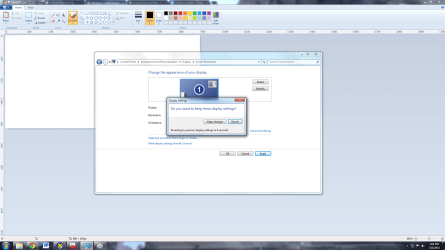
Screen Resolution.png

But what it actually looked like on my screen was this
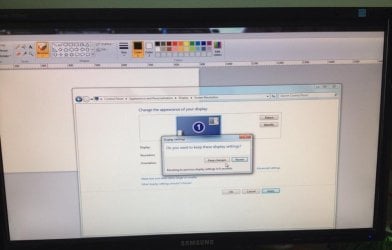
Actual Screen Resolution.jpg

So in actuality I only saw this much of the first "normal" image
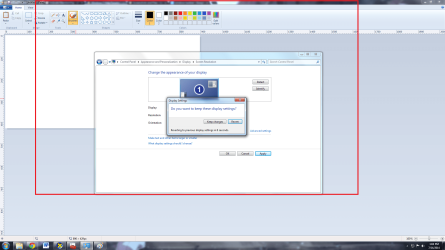
Screen Resolutionn.png

Could it be from a virus or something? How do I fix this? Thanks.

P.S. 1920x1080 is also messed up like 2048x1152
 

My Computer My Computer

Computer type
PC/Desktop
Computer Manufacturer/Model Number
Dell
OS
Windows 7 Ultimate 64bit
CPU
Intel(R) Core(TM)2 Duo CPU
Motherboard
Inspiron 530
Memory
3326MB RAM
Graphics Card(s)
ATI Radeon HD 5500 Series
Monitor(s) Displays
Samsung SyncMaster 2343BWX
Hard Drives
ST380013AS ATA Device;
WDC WD7500AARS-00Y5B1 ATA Device
Set the resolution back to where you want it, then click on an open area of the Desktop. Press and hold the Ctrl key then rotate the mouse wheel. One way makes things bigger, the other makes them smaller.

See if that fixes your problem.
 

My Computer My Computer

Computer type
PC/Desktop
Computer Manufacturer/Model Number
Lenovo IdeaCenter 450
OS
Windows 10 Pro X64
CPU
Intel Quad Core i7-4770 @ 3.4Ghz
Memory
16.0GB PC3-12800 DDR3 SDRAM 1600 MHz
Graphics Card(s)
Intel Integrated HD Graphics
Sound Card
Realtek HD Audio
Monitor(s) Displays
HP 22" LCD
Screen Resolution
1680 x 1050
Hard Drives
250GB Samsung EVO SATA-3 SSD
2TB Seagate ST2000DM001 SATA-2
1.5TB Seagate ST3150041AS SATA
Keyboard
Dell USB
Mouse
Lenovo USB
Internet Speed
Cable via Road Runner 3MB Upload, 30MB Download
Antivirus
Windows Defender, MBAM Pro, MBAE
Browser
Seamonkey
Other Info
UEFI/GPT
PLDS DVD-RW DH16AERSH
I've tried that; it only makes the icons on the screen bigger and smaller :/
 

My Computer My Computer

Computer type
PC/Desktop
Computer Manufacturer/Model Number
Dell
OS
Windows 7 Ultimate 64bit
CPU
Intel(R) Core(TM)2 Duo CPU
Motherboard
Inspiron 530
Memory
3326MB RAM
Graphics Card(s)
ATI Radeon HD 5500 Series
Monitor(s) Displays
Samsung SyncMaster 2343BWX
Hard Drives
ST380013AS ATA Device;
WDC WD7500AARS-00Y5B1 ATA Device
It should also change the size of the text.

You could try doing a System Restore to before this happened.
 

My Computer My Computer

Computer type
PC/Desktop
Computer Manufacturer/Model Number
Lenovo IdeaCenter 450
OS
Windows 10 Pro X64
CPU
Intel Quad Core i7-4770 @ 3.4Ghz
Memory
16.0GB PC3-12800 DDR3 SDRAM 1600 MHz
Graphics Card(s)
Intel Integrated HD Graphics
Sound Card
Realtek HD Audio
Monitor(s) Displays
HP 22" LCD
Screen Resolution
1680 x 1050
Hard Drives
250GB Samsung EVO SATA-3 SSD
2TB Seagate ST2000DM001 SATA-2
1.5TB Seagate ST3150041AS SATA
Keyboard
Dell USB
Mouse
Lenovo USB
Internet Speed
Cable via Road Runner 3MB Upload, 30MB Download
Antivirus
Windows Defender, MBAM Pro, MBAE
Browser
Seamonkey
Other Info
UEFI/GPT
PLDS DVD-RW DH16AERSH
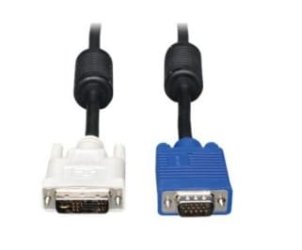
The problem was the monitor cable. I had the ones with the blue heads and when I switched it out for the ones with the white heads it worked (not exactly sure of their names).
 

My Computer My Computer

Computer type
PC/Desktop
Computer Manufacturer/Model Number
Dell
OS
Windows 7 Ultimate 64bit
CPU
Intel(R) Core(TM)2 Duo CPU
Motherboard
Inspiron 530
Memory
3326MB RAM
Graphics Card(s)
ATI Radeon HD 5500 Series
Monitor(s) Displays
Samsung SyncMaster 2343BWX
Hard Drives
ST380013AS ATA Device;
WDC WD7500AARS-00Y5B1 ATA Device
DisplauyCOnnectors.jpg

Left is DVI, right is VGA.
 

My Computer My Computer

Computer type
PC/Desktop
Computer Manufacturer/Model Number
Lenovo IdeaCenter 450
OS
Windows 10 Pro X64
CPU
Intel Quad Core i7-4770 @ 3.4Ghz
Memory
16.0GB PC3-12800 DDR3 SDRAM 1600 MHz
Graphics Card(s)
Intel Integrated HD Graphics
Sound Card
Realtek HD Audio
Monitor(s) Displays
HP 22" LCD
Screen Resolution
1680 x 1050
Hard Drives
250GB Samsung EVO SATA-3 SSD
2TB Seagate ST2000DM001 SATA-2
1.5TB Seagate ST3150041AS SATA
Keyboard
Dell USB
Mouse
Lenovo USB
Internet Speed
Cable via Road Runner 3MB Upload, 30MB Download
Antivirus
Windows Defender, MBAM Pro, MBAE
Browser
Seamonkey
Other Info
UEFI/GPT
PLDS DVD-RW DH16AERSH
Back
Top