Solved Home Group Question

flogit

New member
Member
VIP
Local time
5:47 PM
Messages
359
Location
south wales uk
Hi,Been trying to setup a home group for my son,All went well after a few hitches.
Home group is working okay,When he selects the home group from his laptop to see his wife's desktop the home group shows up okay but on the wife's pc there are some irregular icons on display,How does she set up not to show the icons that are shown on the image enclosed.The ones that are high lighted in red. :cry:
Many thanks.

MlSwJgD.png
 

My Computer

Computer Manufacturer/Model Number
compaq presario CQ61
OS
windows 7 home premium 64bit
Both computers or all have to have same home group credentials

You may need to check if that PC is fully set up to see everything also it would of been 100 times easier to make the folders in question from the drive it was coming from to make it a network drive
then create the folders that you want to be accessed through that

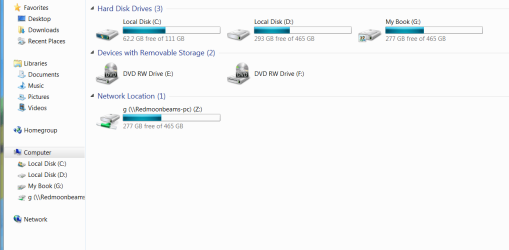
As you see here I took one of my back up hard drives External My book in this case and made it a network drive with everything that needs to floating around all pc's

This would just cut out creating folders for everything and it would save you so much time in the long run hope this helps you out
 

Attachments

  • Network drive.PNG
    Network drive.PNG
    26 KB · Views: 5

My Computer

Computer type
PC/Desktop
Computer Manufacturer/Model Number
CoreI7-6700K MrFingerIII Special Builds
OS
Windows 10 Home Premium 64bit sp1
CPU
Intel I7-6700K @ 4.6 Ghz 1.344 volts everyday OC
Motherboard
Asrock Fatality K6 Z170 Socket 1151
Memory
32GB G-Skill TridentZ 3200mhz 16-18-18-38 DDR4
Graphics Card(s)
Sli Gigabyte Windforce GTX 980 G1
Sound Card
AC97 Creative Rage Tactic 3D Headphones Bluetooth
Monitor(s) Displays
27" Asus ROG Swift PG278Q G-Sync 48" Vizio Smart HD TV
Screen Resolution
2560x1440p 27"- 48" Currently Gaming at 2560x1440p Res 2K
Hard Drives
250GB Samsung Evo840SSD Seagate baracuda 500 GB WD Mybook 500Gb 1TB Seagate Barracuda
PSU
HX1050w Corsair Silver 80plus certified crosfire/sli
Case
Enthod Pro Full Tower
Cooling
Corsair H110i GT 280 mm High Performance WaterBlock
Keyboard
Logitech wireless keyboard
Mouse
Logitech wireless mouse
Internet Speed
Cox Cable 100+ mb
Antivirus
WebRoot Spysweeper with Antivirus
Browser
IE-10, Chrome, Opera
Other Info
My Other Rig is a AMD FX8320E @4.6Ghz 16GB Ballistic Sport Ram
Mobo Asrock Fatality 990FX 120GB OCZ SSD 1TB Seagate Barracuda Corsair H75 Cooling PSU Corsair CX750
GPU GTX Gigabyte 970G1
Thanks for the info,Will be having a good look into it later today.
Thank you.
 

My Computer

Computer Manufacturer/Model Number
compaq presario CQ61
OS
windows 7 home premium 64bit
Hi,Been trying to setup a home group for my son,All went well after a few hitches.
Home group is working okay,When he selects the home group from his laptop to see his wife's desktop the home group shows up okay but on the wife's pc there are some irregular icons on display,How does she set up not to show the icons that are shown on the image enclosed.The ones that are high lighted in red. :cry:
Many thanks.

MlSwJgD.png

The problem is that these shares were created through the C: drive so they show up in the Library area next to the Homegroup shares. I've made this mistake several times in the past, easy enough to fix.

To remove the My Documents share you need to go to C:>Users>Username>My Documents>Sharing tab>Advanced Sharing tab, uncheck where it says "Share this folder" hit Apply OK etc. Do the same thing for the My Pictures folder.

That should remove the shared My Documents folder. I'm not sure where the Rhiannor Main Folder is located but you need to do the same thing with that folder in order to un-share it. All shares should disappear when you get it right. :)
 

My Computer

Computer type
PC/Desktop
Computer Manufacturer/Model Number
Home built
OS
Windows 7 Ult, Windows 8.1 Pro,
CPU
Q9650-4.275GHz, E8600 4.5GHz, E6750-3.8GHz
Motherboard
Evga 780i FTW
Memory
G.Skill PC2 9600 1200Mhz 5 5 5 15 2T
Graphics Card(s)
GTX480
Sound Card
Asus Xonar D2
Monitor(s) Displays
HannsG
Screen Resolution
1680X1050
Hard Drives
GSkill Phoenix Pro 120GB SSD
PSU
ThermalTake Toughpower 1000Watt modular
Case
ThermalTake XaserV
Cooling
Xigmatek S1283
Keyboard
Logitech G15
Mouse
Logitech G9
Internet Speed
T1
  • Like
Reactions: Arc
chev65,Thanks for that info.
It solved the problem,a simple mistake took hours to sort out,All is well now.:D
Many Thanks.Great.:):)
 

My Computer

Computer Manufacturer/Model Number
compaq presario CQ61
OS
windows 7 home premium 64bit
chev65,Thanks for that info.
It solved the problem,a simple mistake took hours to sort out,All is well now.:D
Many Thanks.Great.:):)

Very good flogit, I've done the same thing myself in the past so I knew just how to fix it. :)
 

My Computer

Computer type
PC/Desktop
Computer Manufacturer/Model Number
Home built
OS
Windows 7 Ult, Windows 8.1 Pro,
CPU
Q9650-4.275GHz, E8600 4.5GHz, E6750-3.8GHz
Motherboard
Evga 780i FTW
Memory
G.Skill PC2 9600 1200Mhz 5 5 5 15 2T
Graphics Card(s)
GTX480
Sound Card
Asus Xonar D2
Monitor(s) Displays
HannsG
Screen Resolution
1680X1050
Hard Drives
GSkill Phoenix Pro 120GB SSD
PSU
ThermalTake Toughpower 1000Watt modular
Case
ThermalTake XaserV
Cooling
Xigmatek S1283
Keyboard
Logitech G15
Mouse
Logitech G9
Internet Speed
T1
Back
Top