
Homegroup and network -- now you see 'em now you don't. We have 5 computers, 4 of which have Win7 home premium (all 64bit), 1 runs Win7Pro 64 bit. We are using the Lynksys E2000 wireless n router (WPA2 mode). The desktop is directly wired through LAN. Each machine has Norton Internet Security 2011 installed, I have set up each system to 'full trust' (Norton's network map shows all machines on the network.
All workgroup names match. Each computer shows itself as having joined the homegroup. I made sure all libraries are shared and all pcs are discoverable. None of the computers see each other in Network and sharing center network map, or in network, or in homegroup. What's weird about it is sometimes I can get them all showing up and the next day (sometimes only an hour later) - gone. Sometimes one pc goes missing, or two, or all. Individually each machine can connect to the network and has internet access without a problem.
I have tried pinging all machines from each machine and some are reachable, some time out, some unreachable, it's different for each machine each time I do it.
Sometimes resetting the router works for all pcs, sometimes it doesn't. Today it worked on 2 of the machines but less than an hour later they were gone again. I have searched the forums for months and have tried every recommended fix I could find that seemed applicable.
Please, if anyone has any ideas to help me sort this out, I would be forever grateful. Thanks in advance for your time. Oh, and I have also completely reset all Homegroups a few times, it may work for a bit, then it stops working again. I have also tried disabling Norton and looking at router settings (I don't understand the 3/4 of the settings so I haven't messed with it)
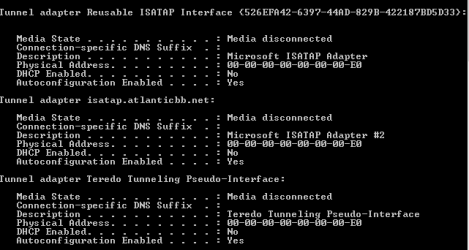
I have added ipconfig stuff, maybe there's a problem there. Honestly, I don't know what any of it means, but maybe it will help.
All workgroup names match. Each computer shows itself as having joined the homegroup. I made sure all libraries are shared and all pcs are discoverable. None of the computers see each other in Network and sharing center network map, or in network, or in homegroup. What's weird about it is sometimes I can get them all showing up and the next day (sometimes only an hour later) - gone. Sometimes one pc goes missing, or two, or all. Individually each machine can connect to the network and has internet access without a problem.
I have tried pinging all machines from each machine and some are reachable, some time out, some unreachable, it's different for each machine each time I do it.
Sometimes resetting the router works for all pcs, sometimes it doesn't. Today it worked on 2 of the machines but less than an hour later they were gone again. I have searched the forums for months and have tried every recommended fix I could find that seemed applicable.
Please, if anyone has any ideas to help me sort this out, I would be forever grateful. Thanks in advance for your time. Oh, and I have also completely reset all Homegroups a few times, it may work for a bit, then it stops working again. I have also tried disabling Norton and looking at router settings (I don't understand the 3/4 of the settings so I haven't messed with it)
I have added ipconfig stuff, maybe there's a problem there. Honestly, I don't know what any of it means, but maybe it will help.
Attachments

Last edited:
My Computer
At a glance
windows 7 pro, 64 bit
- OS
- windows 7 pro, 64 bit

 ! And guess what... as of this morning it's working again. Last night the power went out for a couple of minutes. The router must have reset and everybody is showing up as they should. I've done router resets before, though, to no avail. Maybe I should just get in the habit of flipping the main breaker every morning, or as a less drastic measure pull the power on the router while the coffee is brewing. There must be some sort of conflict happening between the router settings and W7, or Norton. I will continue to dig, focusing more on Linksys tech support site. If I find anything I will post it here. Thank you again!


