home network remote. can it be done?

mecherra

New member
Local time
10:18 AM
Messages
5
Location
ct.
howdee
Now that I have my home network working between my laptop and my desktop. (I am able to share files between them) I am onto my next project.
Could someone give me instructions on how to set up a remote access? (for the best way to describe what i want to do) I do not want to go out of my home network and would only like to use this remote access between my desk and my lap at home only.Thank you for you experiance
 

My Computer My Computer

Computer type
Laptop
Computer Manufacturer/Model Number
toshiba satalite a505
OS
64 winows 7 professional
CPU
I3
Motherboard
m330
Remote Desktop Connection program.. the Host should have ultimate or higher i think.. not sure about professional ..check it out.. right click my computer .. properties..remote.. and it should have remote desktop option
 

My Computer My Computer

Computer type
Laptop
OS
Windows 7 Home Premium
Thank you. Now that remote is enabled on both computers, I am still not shure of if and how to connect to my desktop from laptop within my home network to use this remote funtion. Could you help some more?
 

My Computer My Computer

Computer type
Laptop
Computer Manufacturer/Model Number
toshiba satalite a505
OS
64 winows 7 professional
CPU
I3
Motherboard
m330

My Computer My Computer

Computer type
Laptop
Computer Manufacturer/Model Number
HP ENVY 17-1150eg
OS
Windows 10 Pro x64 EN-GB
CPU
1.6 GHz Intel Core i7-720QM Processor
Memory
6 GB
Graphics Card(s)
ATI Mobility Radeon HD 5850 Graphics
Sound Card
Beats sound system with integrated subwoofer
Monitor(s) Displays
17" laptop display, 22" LED and 32" Full HD TV through HDMI
Screen Resolution
1600*900 (1), 1920*1080 (2&3)
Hard Drives
Internal: 2 x 500 GB SATA Hard Disk Drive 7200 rpm
External: 2TB for backups, 3TB USB3 network drive for media
Cooling
As Envy runs a bit warm, I have it on a Cooler Master pad
Keyboard
Logitech diNovo Media Desktop Laser (bluetooth)
Mouse
Logitech Performance Mouse MX
Internet Speed
50/10 Mbps VDSL
Antivirus
Windows Defender 4.3.9431.0
Browser
Maxthon 3.5.2., IE11
I have several pcs on a network, used for rendering, and I manage them (check temps etc) using remote desktop. Any version of Vista, 7 or 8 can initiate a remote session, but the remote pc (the one being connected to) must be Pro or higher. All my pcs have static ip's.

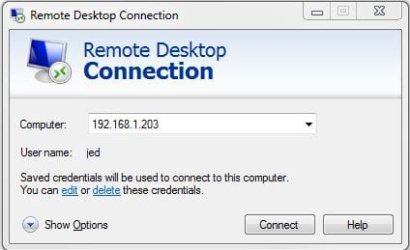
So to use RDC, go all programs, accessories, remote desktop connection. This box opens - enter the remote ip.

rdc.JPG

you will probably be asked for username and password (for the remote pc) - you can save this info. I don't use passwords on my render pcs, and for security reasons blank password logon is not allowed - there is a tweak that allows this.

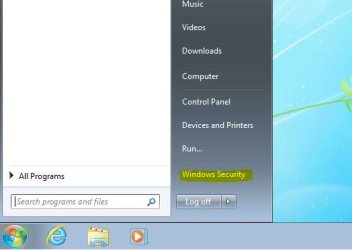
BTW to shutdown the remote pc, click Windows security

rdc_shutdown.JPG

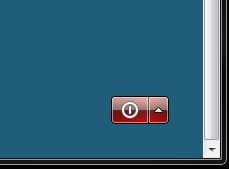
and the power button

off.JPG

HTH
 

My Computer My Computer

Computer type
PC/Desktop
Computer Manufacturer/Model Number
self build
OS
Windows 7 pro x64 SP1
CPU
Intel i7-2600k o/c to 4.6GHz
Motherboard
MSI Z68-GD80
Memory
8GB Mushkin 1866MHz
Graphics Card(s)
Nvidia GTX 750 Ti 2GB
Sound Card
integrated
Monitor(s) Displays
Liyama ProLite 27"
Screen Resolution
1920*1080 px
Hard Drives
Seagate 2TB
PSU
Coolermaster GX 750W
Case
Antec 300 case + 5 fans
Cooling
Dark Rock Pro
Internet Speed
62Mbit down 18Mbit up
Antivirus
MSE
Browser
Firefox
Other Info
Blackgold BGT3650 Quad HD TV card. Also have various 3770 + 4770K render boxes.
Back
Top