Home Premium - Unidentified Network

Richardxxx

New member
Local time
6:56 PM
Messages
5
Location
Norwich UK
I have 4 computers on the home network running Win7 Home Premium BUT one of them cannot connect to the network via the LAN connection. I get the error message Unidentified Network. It can connect wirelessly. There is an excellent tutorial on this subject but this doesn't work for me. I have also - as suggested in one post - tried changing the Network Address to a random number - this doesn't work either.

This computer was up-graded from Vista - When running Vista the LAN connection worked fine. I have now done a clean install - the LAN connection still gives me - "Unidentified Network"...... The same problem

Please has anyone any ideas as this is driving me mad

Thanks Richard
 

My Computer

Computer Manufacturer/Model Number
This computer is like Topsey - it just growed!
OS
Windows 7
CPU
Intel(R) Core(TM)2 Duo CPU
Motherboard
Gigabyte Technology Co., Ltd.
Memory
4 GB (not all used)
Graphics Card(s)
NVIDIA GeForce 6600 GT
Sound Card
NVIDIA High Defination Audio
Monitor(s) Displays
2 by ACER
Hard Drives
Primary internal 300GB
Secondary Internal 400GB

Several USB drives
Case
Don't know
Cooling
3 Fans
I have 4 computers on the home network running Win7 Home Premium BUT one of them cannot connect to the network via the LAN connection. I get the error message Unidentified Network. It can connect wirelessly. There is an excellent tutorial on this subject but this doesn't work for me. I have also - as suggested in one post - tried changing the Network Address to a random number - this doesn't work either.

This computer was up-graded from Vista - When running Vista the LAN connection worked fine. I have now done a clean install - the LAN connection still gives me - "Unidentified Network"...... The same problem

Please has anyone any ideas as this is driving me mad

Thanks Richard

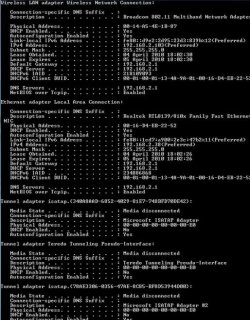
Upload a screenshot of the ipconfig /all output. You can use the built in snipping tool by typing snipping in search.


let us know if you need help

Ken
 

My Computer

Computer Manufacturer/Model Number
HP Pavillion dv-7 1005 Tx
OS
Win 8 Release candidate 8400
CPU
[email protected]
Memory
4 gigs
Graphics Card(s)
Nvidia 9600M
Sound Card
HD built-in
Monitor(s) Displays
17" Wxga
Screen Resolution
1440x900
Cooling
none
Internet Speed
45Mb down 5Mb up
I have 4 computers on the home network running Win7 Home Premium BUT one of them cannot connect to the network via the LAN connection. I get the error message Unidentified Network. It can connect wirelessly. There is an excellent tutorial on this subject but this doesn't work for me. I have also - as suggested in one post - tried changing the Network Address to a random number - this doesn't work either.

This computer was up-graded from Vista - When running Vista the LAN connection worked fine. I have now done a clean install - the LAN connection still gives me - "Unidentified Network"...... The same problem

Please has anyone any ideas as this is driving me mad

Thanks Richard

Upload a screenshot of the ipconfig /all output. You can use the built in snipping tool by typing snipping in search.


let us know if you need help

Ken

Thank you I hope I have done the right thing here and this is what you wanted.

Regards

Richard
 

Attachments

  • ipconfig output_resize.jpg
    ipconfig output_resize.jpg
    70.6 KB · Views: 160

My Computer

Computer Manufacturer/Model Number
This computer is like Topsey - it just growed!
OS
Windows 7
CPU
Intel(R) Core(TM)2 Duo CPU
Motherboard
Gigabyte Technology Co., Ltd.
Memory
4 GB (not all used)
Graphics Card(s)
NVIDIA GeForce 6600 GT
Sound Card
NVIDIA High Defination Audio
Monitor(s) Displays
2 by ACER
Hard Drives
Primary internal 300GB
Secondary Internal 400GB

Several USB drives
Case
Don't know
Cooling
3 Fans
Hi Richard

This sounds similar to an issue I had. I had this Unidentified Network appearing on Startup and it prevented Internet Access for my PC on the Home Network until I got rid of it.

It took a while to find, but my issue was down to Apple's Bonjour Service, installed by Apple programs such as iTunes or Quicktime.

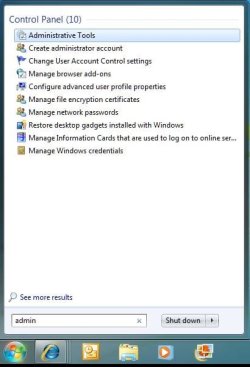
You should type admin into Windows 7's Start Menu "Search programs and files" box. You should see Administrative Tools highlighted somewhere near the top. Double click it:
Clipboard01.jpg

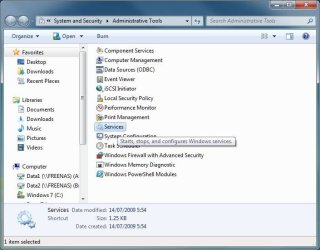
Double click on Services to open the Services list:
Clipboard02.jpg

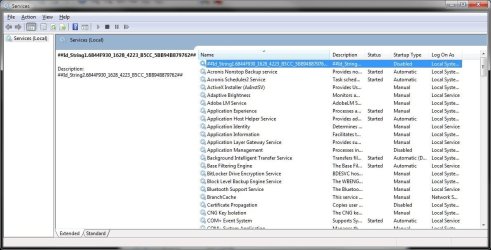
You're looking for a Service called Bonjour. If you can't find it under that name it is likely to be the unidentified ID_String service as in my screenshot near the top of the list:
Clipboard03.jpg

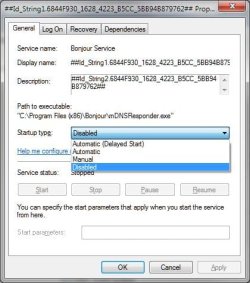
Double click the entry to open the box. On the General tab select the drop down arrow and set the Service to Disabled. If you later find you need the Service running for a program (I didn't) you can set the Automatic (Delayed Start) option instead, as that is also supposed to work.
Clipboard04.jpg

Apply and OK out of the box and then reboot your PC to see if it solves the problem. You'll know it's the right service as the Path to executable line should read "C:\Program Files (x86)\Bonjour\mDNSResponder.exe" or "C:\Program Files\Bonjour\mDNSResponder.exe" if you're using Windows 7 32bit version.
Clipboard05.jpg

Hope this helps
 

My Computer

Computer Manufacturer/Model Number
Self Build
OS
Windows 7 Home Premium x64
CPU
Intel Core 2 Quad Q6600 @ 2.40GHz
Motherboard
Asus P5B-E
Memory
4Gb (2x Corsair CM2X2048-6400C5)
Graphics Card(s)
NVIDIA GeForce 9600 GT 512Mb
Sound Card
Realtek High Definition Audio Device
Monitor(s) Displays
Mirai 22" Widescreen and LG 19" Standard
Screen Resolution
1680 x 1050 and 1280 x 1024
Hard Drives
Western Digital 500Gb SATA x 2
Samsung 1Tb SATA
PSU
Hiper Modular 530W
Case
Akasa Ecplise 62 Midi
Cooling
Artic Cooling Freezer Pro 7
Keyboard
Advent Standard with Hotkeys
Mouse
PC Line PCL-FL1 Wired Laser
Internet Speed
ISP: Fast.co.uk up to 8Mb
Other Info
Netgear Router plus 5 Way LAN Switch, Samsung Ethernet Laser Printer, Epson PX650 Colour PSC, plus 2 more Desktop PCs, 3 Laptops and 2 Netbooks in same Home Network.
Thank you Chris - How I wish this was the problem but it isn't! However I have carried out your instructions and the Bonjour service is no longer running - But I still have the same problem - I can connect using a Wireless adaptor but the LAN line connection gives me the error message "Unidentifiable Network"

I have tried plugging in another computer to the LAN line that is used for this computer and it connects OK. I did wonder if perhaps there was a physical problem with the cable!

If anyone has any ideas I would be most grateful.

Thank you again Chris - I wish it had worked

Richard
 

My Computer

Computer Manufacturer/Model Number
This computer is like Topsey - it just growed!
OS
Windows 7
CPU
Intel(R) Core(TM)2 Duo CPU
Motherboard
Gigabyte Technology Co., Ltd.
Memory
4 GB (not all used)
Graphics Card(s)
NVIDIA GeForce 6600 GT
Sound Card
NVIDIA High Defination Audio
Monitor(s) Displays
2 by ACER
Hard Drives
Primary internal 300GB
Secondary Internal 400GB

Several USB drives
Case
Don't know
Cooling
3 Fans

My Computer

Computer Manufacturer/Model Number
Self Build
OS
Windows 7 Home Premium x64
CPU
Intel Core 2 Quad Q6600 @ 2.40GHz
Motherboard
Asus P5B-E
Memory
4Gb (2x Corsair CM2X2048-6400C5)
Graphics Card(s)
NVIDIA GeForce 9600 GT 512Mb
Sound Card
Realtek High Definition Audio Device
Monitor(s) Displays
Mirai 22" Widescreen and LG 19" Standard
Screen Resolution
1680 x 1050 and 1280 x 1024
Hard Drives
Western Digital 500Gb SATA x 2
Samsung 1Tb SATA
PSU
Hiper Modular 530W
Case
Akasa Ecplise 62 Midi
Cooling
Artic Cooling Freezer Pro 7
Keyboard
Advent Standard with Hotkeys
Mouse
PC Line PCL-FL1 Wired Laser
Internet Speed
ISP: Fast.co.uk up to 8Mb
Other Info
Netgear Router plus 5 Way LAN Switch, Samsung Ethernet Laser Printer, Epson PX650 Colour PSC, plus 2 more Desktop PCs, 3 Laptops and 2 Netbooks in same Home Network.
Back
Top