Homegroup access only one way

kaylastrovich

New member
Local time
7:54 AM
Messages
7
I've got my homegroup working to a certain extent.

My laptop can access my printer and also my libraries, which is my main objective.

However, My desktop can see the libraries on my laptop but cannot access them. I have all the relevant boxes ticked so that these can be accessed by the homegroup.

Should both computers have access to each others libraries or is it just meant to be that other group members have access to the computer that created the group.
 

My Computer My Computer

OS
Windows 7
I've got my homegroup working to a certain extent.

My laptop can access my printer and also my libraries, which is my main objective.

However, My desktop can see the libraries on my laptop but cannot access them. I have all the relevant boxes ticked so that these can be accessed by the homegroup.

Should both computers have access to each others libraries or is it just meant to be that other group members have access to the computer that created the group.

K

Do they belong to the same workgroup?
Password correct?
Shared how?
I suspect either homegroup or sharing

Ken
 

My Computer My Computer

Computer Manufacturer/Model Number
HP Pavillion dv-7 1005 Tx
OS
Win 8 Release candidate 8400
CPU
[email protected]
Memory
4 gigs
Graphics Card(s)
Nvidia 9600M
Sound Card
HD built-in
Monitor(s) Displays
17" Wxga
Screen Resolution
1440x900
Cooling
none
Internet Speed
45Mb down 5Mb up
They are both in the same workgroup
They both share the same password

In the homegroup settings both computers have all the boxes ticked for sharing.

On both computers if I open my libraries and click on each one the message at the bottom of the page shows that these are shared with Homegroup.

As I said My desktop sees these on my laptop but the icons are faded and I do not have access to them.

I can access all my libraries and my printer on my desktop from my laptop.
 

My Computer My Computer

OS
Windows 7
I've got exactly the same problem. Actually I've got three machines with win7 and one is not accessible by the others although it can be seen in the homegroup but the icons of shared folders are faded and inaccessible. Although I can access shared folders of the other two from that machine which is a laptop as well by the way. The homegroup is created in x64 Win7 desktop. This desktop has got a Agnitum outpost firewall which caused an issue for the laptop to connect to the homegroup. I managed to connect with the firewall disabled but the no access issue is still there even if I keep the firewall disabled. All three are connected to a D-link 2540 router.
 

My Computer My Computer

OS
Windows 7
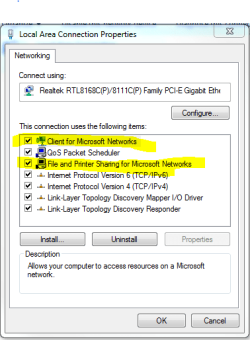
See if these are installed on all computers. network and sharing center, change adapter settings, right click your network adapter, properties, and install these.
 

Attachments

  • Capture solved.PNG
    Capture solved.PNG
    13.3 KB · Views: 96

My Computer My Computer

Computer Manufacturer/Model Number
Custom
OS
Windows 7 64 bit
CPU
AMD Athlon II x3 (unlocked to a Phenom x4)
Motherboard
ASUS M4A77D
Memory
4gb Patriot Viper
Graphics Card(s)
Sapphire Radeon HD 5770 (1gb)
Sound Card
On board with cheap 5.1 speakers, lol
Monitor(s) Displays
ASUS VH198 21"
Screen Resolution
1440 x 900
Hard Drives
250 gb Western Digital
500 gb Samsung
PSU
Thermaltake 500w
Case
Gigabyte Triton 180
Cooling
Thermaltake TR2-R1 for CPU, 120mm stock case fans
Keyboard
Logitech wireless
Mouse
Logitech wireless
Both my computers have these functions installed but still no joy.

The folder icons on my laptop which I try to access from my desktop are still greyed out.

I can do the reverse. I can access the folders on my desktop from my laptop.
 

My Computer My Computer

OS
Windows 7
Back
Top