Solved Homegroup connection problem

tradervic

New member
Local time
2:51 PM
Messages
17
Hello. I have two Windows 7 Pro computers. For the Homegroup they both have the same password yet both say that no other computers are currently available.

Under the network icon I can see the other computer but when I map a network drive each require a username and password. Neither computer requires a logon.

Both computers belong to Workgroup.

I thought this was supposed to be automatic. Initially I did get a couple of drives showing. I'm not sure what happened but the mapped network folders were showing one way but never seemed to work very well and the client computer didn't recognize a Homegroup password. I fixed that but now I can't get any further.

Computers - just one problem after another. Tiring.

Well this may have something to do with it. On System Properties\ Computer Name\ Network ID. I changed both computers to read 'This is a home computer...' and restarted. Now I see that neither selection actually changed. When I look again both selections still read 'This computer is part of a business network...'.

I'm still working on it. This should have maybe been obvious but I had all the 'Share Libraries unchecked - except printers. I could see the printer. I don't use libraries. I don't really have any convenient use for them. What I want is simply the other computer and all of it's drives showing in the navigation pane. I thought that's what was going to show - the whole computer. Not just libraries. That's what I'm trying to do. Show each computer in its entirety.

I am utterly baffled by what Microsoft thinks a home computer user needs. Years ago I had two XP computers connected . Took me 5 minutes. Everything up. All the drives showed and worked perfectly. Never a single problem.

I have got the Homegroup libraries to show. And I shared a 'user' folder, I turn off password protected sharing but I still get a requirement to enter a username and password when I try to open it.
 
Last edited:

My Computer

Computer type
PC/Desktop
Computer Manufacturer/Model Number
custom build
OS
Microsoft Windows 7 Professional 64-bit 7601 Multiprocessor Service Pack 1
CPU
AMD FX(tm)-8120 Eight-Core Processor
Motherboard
Gigabyte Technology Co., Ltd. GA-990FXA-UD3
Memory
16.00 GB
Graphics Card(s)
(1) AMD Radeon HD 6800 Series (2) AMD Radeon HD 6800 Serie
Sound Card
(1) Realtek High Definition Audio (2) AMD High Definition
Monitor(s) Displays
8 monitors
Screen Resolution
(1) 1920 x 1080 x 32 bits (4294967296 colors) @ 60 Hz (2)
Hard Drives
(1) ST500DM0 02-1BC142 SATA Disk Device (2) ST500DM0 02-1BC142 SATA Disk Device (3) WDC WD10 EZEX-00RKKA0 SATA Disk Device (4) WDC WD25 00JB-00GVC0 USB Device
PSU
Antec 750
Case
Corsair
Keyboard
Logitech
Mouse
Logitech
Internet Speed
Hi-speed
Antivirus
Webroot
Browser
IE Firefox
I have 2 W7, 1 Vista U, and a XP box and was struggling to get everyone taking to each other. I fought pass words and login names. I turned all pass word requirements off in all boxes, now they work fine and it was all automatic.
 

My Computer

Computer type
PC/Desktop
Computer Manufacturer/Model Number
Custom, Dell and Lenono LT's
OS
Win8/8.1,Win7-U64, Vista U64, uncounted Linux distor's
CPU
AMD and Intell, 9590, 8350, i5 3570k
Motherboard
CFVFZ, GA990FXA, Z77e-itx
Memory
Corsair G Skill
Graphics Card(s)
Crossfired Sapphire HD 7950 Vapor-X, ASUS R9 280X TOP
Sound Card
Realtek ALC889
Monitor(s) Displays
ViewSonic VX2770SMH 27" / ViewSonic VX2433 LCD 24"
Screen Resolution
1080i HD
Hard Drives
Samsung SSD 840 Pro
OCZ Agility 3's
OCZ Vector's
WD's Blue, red, green, Velociraptors
Seagate USB3 & Hybrid's
ASUS Blu-Ray
ASUS DVD
PSU
Corsair AX1200i, Seasonice 850 Gold
Case
Cooler Master HAF 922 & HAF 932, Lian Li Train case.
Cooling
Air, Glacer 240L expanded, custom EK loop with duel D5's
Keyboard
Microsoft SideWinder X4 USB Keyboard / Logitech 250 PS2
Mouse
Logitech G500 / MS wireless 5000
Internet Speed
Best of 5ms / 75+ dn / 12+ up More or less.
Antivirus
MS esentials-MalwareBytes
Browser
Firefox Chromebook
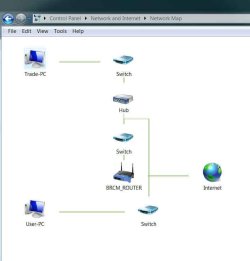
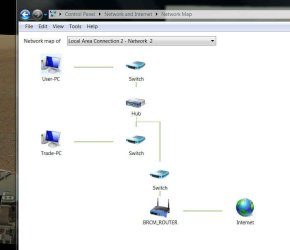
I have gone over everything a dozen times. But I did get a public folder working one way so I must have done something. But there just aren't that many places to adjust settings. Or at least not many that I know. I have looked at the map the Windows creates for the network to which the computer is connected. In this case the two maps are different. Why are they different. Personally I think it has something to do with the type of router that my ISP provides. This is Telus. Big company with lots of customers who I've been connected to for several years. But I have heard a couple remarks from techs in the past who scratched their heads and commented that they didn't know why Telus does it this way. In the context that it is much simpler and better to do it another way like other companies. Unfortunately that's as much as I know. I have made a screen shot of each mapped network in the hopes that it may be a clue for someone.

It's maddening. For instance, I couldn't open the computer which showed under the Network folder without getting a request for username and password. I decided to enter 'user' and leave the password field blank. After that I no longer get the request for logon, instead I just get a message telling me that the resource can't be accessed.

I have mapped a network drive and shared it and checked the permission to everyone. The drive shows in the Networked computer folder but won't open it claiming I don't have permission.

In the images below, the first network (the main computer) map is the one on the left and the added computer is the one on the right. Just looking at each configuration it appears to me that it is the first configuration (the one on the left), which looks odd.
 

Attachments

  • main pc.jpg
    main pc.jpg
    31.7 KB · Views: 2
  • client pc.jpg
    client pc.jpg
    40.8 KB · Views: 2
Last edited:

My Computer

Computer type
PC/Desktop
Computer Manufacturer/Model Number
custom build
OS
Microsoft Windows 7 Professional 64-bit 7601 Multiprocessor Service Pack 1
CPU
AMD FX(tm)-8120 Eight-Core Processor
Motherboard
Gigabyte Technology Co., Ltd. GA-990FXA-UD3
Memory
16.00 GB
Graphics Card(s)
(1) AMD Radeon HD 6800 Series (2) AMD Radeon HD 6800 Serie
Sound Card
(1) Realtek High Definition Audio (2) AMD High Definition
Monitor(s) Displays
8 monitors
Screen Resolution
(1) 1920 x 1080 x 32 bits (4294967296 colors) @ 60 Hz (2)
Hard Drives
(1) ST500DM0 02-1BC142 SATA Disk Device (2) ST500DM0 02-1BC142 SATA Disk Device (3) WDC WD10 EZEX-00RKKA0 SATA Disk Device (4) WDC WD25 00JB-00GVC0 USB Device
PSU
Antec 750
Case
Corsair
Keyboard
Logitech
Mouse
Logitech
Internet Speed
Hi-speed
Antivirus
Webroot
Browser
IE Firefox
So in summary -

I have a Homegroup with the same password on both machines.
I do not use any logon requirements on either machine.
I have mapped a network drive and granted permission to everyone.

Network discovery - ON
File and print sharing - ON
Public folder sharing - ON
Media streaming - ON
Password protected sharing - OFF
Homegroup connections - Allow windows to manage...

What I have is a public folder available in one direction. One machine can see the public folders of the other. I have no network drives available. Which is what I want.

Clearly there must be a lot more options that I know nothing about. But I'm just a home user. You know, the guy that Microsoft created the Homegroup for to make it easier to connect two computers together. Uh-hu.
 

My Computer

Computer type
PC/Desktop
Computer Manufacturer/Model Number
custom build
OS
Microsoft Windows 7 Professional 64-bit 7601 Multiprocessor Service Pack 1
CPU
AMD FX(tm)-8120 Eight-Core Processor
Motherboard
Gigabyte Technology Co., Ltd. GA-990FXA-UD3
Memory
16.00 GB
Graphics Card(s)
(1) AMD Radeon HD 6800 Series (2) AMD Radeon HD 6800 Serie
Sound Card
(1) Realtek High Definition Audio (2) AMD High Definition
Monitor(s) Displays
8 monitors
Screen Resolution
(1) 1920 x 1080 x 32 bits (4294967296 colors) @ 60 Hz (2)
Hard Drives
(1) ST500DM0 02-1BC142 SATA Disk Device (2) ST500DM0 02-1BC142 SATA Disk Device (3) WDC WD10 EZEX-00RKKA0 SATA Disk Device (4) WDC WD25 00JB-00GVC0 USB Device
PSU
Antec 750
Case
Corsair
Keyboard
Logitech
Mouse
Logitech
Internet Speed
Hi-speed
Antivirus
Webroot
Browser
IE Firefox
So in summary -

I have a Homegroup with the same password on both machines.
I do not use any logon requirements on either machine.
I have mapped a network drive and granted permission to everyone.

Network discovery - ON
File and print sharing - ON
Public folder sharing - ON
Media streaming - ON
Password protected sharing - OFF
Homegroup connections - Allow windows to manage...

What I have are public folder available in one direction. I have no network drives available at all.

Clearly there must be a lot more options that I know nothing about. But I'm just a home user. You know, the guy that Microsoft created the Homegroup for to make it easier to connect two computers together. Uh-hu.

From what you are saying the problem is that both machines aren't connecting through the Homegroup and when you try to access them it says that "No other Homegroup machines are Available"?
 

My Computer

Computer type
PC/Desktop
Computer Manufacturer/Model Number
Home built
OS
Windows 7 Ult, Windows 8.1 Pro,
CPU
Q9650-4.275GHz, E8600 4.5GHz, E6750-3.8GHz
Motherboard
Evga 780i FTW
Memory
G.Skill PC2 9600 1200Mhz 5 5 5 15 2T
Graphics Card(s)
GTX480
Sound Card
Asus Xonar D2
Monitor(s) Displays
HannsG
Screen Resolution
1680X1050
Hard Drives
GSkill Phoenix Pro 120GB SSD
PSU
ThermalTake Toughpower 1000Watt modular
Case
ThermalTake XaserV
Cooling
Xigmatek S1283
Keyboard
Logitech G15
Mouse
Logitech G9
Internet Speed
T1
I have struggled and pushed buttons for hours now but I have managed to change that. Under Homegroup each machine is visible to the other. Clicking on the public folders which appeared after I checked the boxes in the Homegroup Settings page does nothing. A public shared public folder returns the '\\User-PC\Users\User refers to a location that is unavailable.'

Under the Network icon I can access Network\Trade-PC\Users\Public\Public Documents...

And that's it. Not at all what I was expecting. In fact downright dismal.
 

My Computer

Computer type
PC/Desktop
Computer Manufacturer/Model Number
custom build
OS
Microsoft Windows 7 Professional 64-bit 7601 Multiprocessor Service Pack 1
CPU
AMD FX(tm)-8120 Eight-Core Processor
Motherboard
Gigabyte Technology Co., Ltd. GA-990FXA-UD3
Memory
16.00 GB
Graphics Card(s)
(1) AMD Radeon HD 6800 Series (2) AMD Radeon HD 6800 Serie
Sound Card
(1) Realtek High Definition Audio (2) AMD High Definition
Monitor(s) Displays
8 monitors
Screen Resolution
(1) 1920 x 1080 x 32 bits (4294967296 colors) @ 60 Hz (2)
Hard Drives
(1) ST500DM0 02-1BC142 SATA Disk Device (2) ST500DM0 02-1BC142 SATA Disk Device (3) WDC WD10 EZEX-00RKKA0 SATA Disk Device (4) WDC WD25 00JB-00GVC0 USB Device
PSU
Antec 750
Case
Corsair
Keyboard
Logitech
Mouse
Logitech
Internet Speed
Hi-speed
Antivirus
Webroot
Browser
IE Firefox
I have struggled and pushed buttons for hours now but I have managed to change that. Under Homegroup each machine is visible to the other. Clicking on the public folders which appeared after I checked the boxes in the Homegroup Settings page does nothing. A public shared public folder returns the '\\User-PC\Users\User refers to a location that is unavailable.'

Under the Network icon I can access Network\Trade-PC\Users\Public\Public Documents...

And that's it. Not at all what I was expecting. In fact downright dismal.

So now you are having problems accessing one of the Public folders on just one machine?

We need to nail the actual problem down here but it seems to keep changing from one post to the next.

If the problem is with a Public folder you need to be sure that it is shared out through the Sharing tab "on both machines" at C:>Users>Public per the picture below.
 

Attachments

  • Public folders sharing enabled.PNG
    Public folders sharing enabled.PNG
    80.1 KB · Views: 4

My Computer

Computer type
PC/Desktop
Computer Manufacturer/Model Number
Home built
OS
Windows 7 Ult, Windows 8.1 Pro,
CPU
Q9650-4.275GHz, E8600 4.5GHz, E6750-3.8GHz
Motherboard
Evga 780i FTW
Memory
G.Skill PC2 9600 1200Mhz 5 5 5 15 2T
Graphics Card(s)
GTX480
Sound Card
Asus Xonar D2
Monitor(s) Displays
HannsG
Screen Resolution
1680X1050
Hard Drives
GSkill Phoenix Pro 120GB SSD
PSU
ThermalTake Toughpower 1000Watt modular
Case
ThermalTake XaserV
Cooling
Xigmatek S1283
Keyboard
Logitech G15
Mouse
Logitech G9
Internet Speed
T1
It keeps changing because I keep pushing buttons because I don't want to just sit here doing nothing.

I have gotten the public folders to work. These are the 'Public' folders that appear under the network drive on each machine. However, if you click on the PC icon visible under the Homegroup (the folders which appear are the ones that result after you check the boxes in the Homegroup Settings page), nothing happens at all.

The 'User' folder also appears in this group but clicking on it presents the message that the location is unavailable.

This is one problem. But I would be happy to ignore this problem and solve the problem of why I can't get any drives from one machine to be accessible to the other. All this public, library folders that seem to never be in the location you were expecting is very confusing. The best and simplest is to just make the whole damn machine appear. What else is there to us layman?

Thanks very much for your interest. I know its confusing. I am not that good of an explainer. Previously the second machine was configured with Vista. I even had a tech over here and after many hours couldn't figure it out. So I went out and spent a bunch of money to upgrade and put Windows 7 on the machine. Now I have the same problem. Unbelievable.
 

My Computer

Computer type
PC/Desktop
Computer Manufacturer/Model Number
custom build
OS
Microsoft Windows 7 Professional 64-bit 7601 Multiprocessor Service Pack 1
CPU
AMD FX(tm)-8120 Eight-Core Processor
Motherboard
Gigabyte Technology Co., Ltd. GA-990FXA-UD3
Memory
16.00 GB
Graphics Card(s)
(1) AMD Radeon HD 6800 Series (2) AMD Radeon HD 6800 Serie
Sound Card
(1) Realtek High Definition Audio (2) AMD High Definition
Monitor(s) Displays
8 monitors
Screen Resolution
(1) 1920 x 1080 x 32 bits (4294967296 colors) @ 60 Hz (2)
Hard Drives
(1) ST500DM0 02-1BC142 SATA Disk Device (2) ST500DM0 02-1BC142 SATA Disk Device (3) WDC WD10 EZEX-00RKKA0 SATA Disk Device (4) WDC WD25 00JB-00GVC0 USB Device
PSU
Antec 750
Case
Corsair
Keyboard
Logitech
Mouse
Logitech
Internet Speed
Hi-speed
Antivirus
Webroot
Browser
IE Firefox
It keeps changing because I keep pushing buttons because I don't want to just sit here doing nothing.

I have gotten the public folders to work. These are the 'Public' folders that appear under the network drive on each machine. However, if you click on the pc visible under the Homegroup icon the folders (which appear are the ones that result after you check the boxes in the Homegroup Settings page), Nothing happens at all.

The 'User' folder also appears in this group but clicking on it presents the message that the location is unavailable.

This is one problem. But I would be happy to ignore this problem and solve the problem of why I can't get any drives from one machine to be accessible to the other. All this public, library folders that seem to never be in the location you were expecting is very confusing. The best and simplest is to just make the whole damn machine appear. What else is there to us layman?

Thanks very much for your interest. Previously the second machine was configured with Vista. I even had a tech over here and after many hours couldn't figure it out. So I went out and spent a bunch of money to upgrade and put Windows 7 on the machine. Now I have the same problem. Unbelievable.

So now drive access is the problem? Follow the link below to fix the drive access problems. Typically just adding the "Everyone" share to the Security tab will fix this.

http://www.sevenforums.com/network-sharing/92521-hdd-sharing.html#post798310
 

My Computer

Computer type
PC/Desktop
Computer Manufacturer/Model Number
Home built
OS
Windows 7 Ult, Windows 8.1 Pro,
CPU
Q9650-4.275GHz, E8600 4.5GHz, E6750-3.8GHz
Motherboard
Evga 780i FTW
Memory
G.Skill PC2 9600 1200Mhz 5 5 5 15 2T
Graphics Card(s)
GTX480
Sound Card
Asus Xonar D2
Monitor(s) Displays
HannsG
Screen Resolution
1680X1050
Hard Drives
GSkill Phoenix Pro 120GB SSD
PSU
ThermalTake Toughpower 1000Watt modular
Case
ThermalTake XaserV
Cooling
Xigmatek S1283
Keyboard
Logitech G15
Mouse
Logitech G9
Internet Speed
T1
It keeps changing because I keep pushing buttons because I don't want to just sit here doing nothing.

I have gotten the public folders to work. These are the 'Public' folders that appear under the network drive on each machine. However, if you click on the pc visible under the Homegroup icon the folders (which appear are the ones that result after you check the boxes in the Homegroup Settings page), Nothing happens at all.

The 'User' folder also appears in this group but clicking on it presents the message that the location is unavailable.

This is one problem. But I would be happy to ignore this problem and solve the problem of why I can't get any drives from one machine to be accessible to the other. All this public, library folders that seem to never be in the location you were expecting is very confusing. The best and simplest is to just make the whole damn machine appear. What else is there to us layman?

Thanks very much for your interest. Previously the second machine was configured with Vista. I even had a tech over here and after many hours couldn't figure it out. So I went out and spent a bunch of money to upgrade and put Windows 7 on the machine. Now I have the same problem. Unbelievable.

So now drive access is the problem? Follow the link below to fix the drive access problems. Typically just adding the "Everyone" share to the Security tab will fix this.

http://www.sevenforums.com/network-sharing/92521-hdd-sharing.html#post798310


'So now the drives are the problem.'
From original post -

"What I want is simply the other computer and all of it's drives showing in the navigation pane. I thought that's what was going to show - the whole computer. Not just libraries. That's what I'm trying to do. Show each computer in its entirety."

Adding 'Everyone' to security tad. From the second post above -

"I have a Homegroup with the same password on both machines.
I do not use any logon requirements on either machine.
I have mapped a network drive and granted permission to everyone."

Is the security tab you mention the 'Permission' granting tab?
 

My Computer

Computer type
PC/Desktop
Computer Manufacturer/Model Number
custom build
OS
Microsoft Windows 7 Professional 64-bit 7601 Multiprocessor Service Pack 1
CPU
AMD FX(tm)-8120 Eight-Core Processor
Motherboard
Gigabyte Technology Co., Ltd. GA-990FXA-UD3
Memory
16.00 GB
Graphics Card(s)
(1) AMD Radeon HD 6800 Series (2) AMD Radeon HD 6800 Serie
Sound Card
(1) Realtek High Definition Audio (2) AMD High Definition
Monitor(s) Displays
8 monitors
Screen Resolution
(1) 1920 x 1080 x 32 bits (4294967296 colors) @ 60 Hz (2)
Hard Drives
(1) ST500DM0 02-1BC142 SATA Disk Device (2) ST500DM0 02-1BC142 SATA Disk Device (3) WDC WD10 EZEX-00RKKA0 SATA Disk Device (4) WDC WD25 00JB-00GVC0 USB Device
PSU
Antec 750
Case
Corsair
Keyboard
Logitech
Mouse
Logitech
Internet Speed
Hi-speed
Antivirus
Webroot
Browser
IE Firefox
It keeps changing because I keep pushing buttons because I don't want to just sit here doing nothing.

I have gotten the public folders to work. These are the 'Public' folders that appear under the network drive on each machine. However, if you click on the pc visible under the Homegroup icon the folders (which appear are the ones that result after you check the boxes in the Homegroup Settings page), Nothing happens at all.

The 'User' folder also appears in this group but clicking on it presents the message that the location is unavailable.

This is one problem. But I would be happy to ignore this problem and solve the problem of why I can't get any drives from one machine to be accessible to the other. All this public, library folders that seem to never be in the location you were expecting is very confusing. The best and simplest is to just make the whole damn machine appear. What else is there to us layman?

Thanks very much for your interest. Previously the second machine was configured with Vista. I even had a tech over here and after many hours couldn't figure it out. So I went out and spent a bunch of money to upgrade and put Windows 7 on the machine. Now I have the same problem. Unbelievable.

So now drive access is the problem? Follow the link below to fix the drive access problems. Typically just adding the "Everyone" share to the Security tab will fix this.

http://www.sevenforums.com/network-sharing/92521-hdd-sharing.html#post798310

From original post -

"What I want is simply the other computer and all of it's drives showing in the navigation pane. I thought that's what was going to show - the whole computer. Not just libraries. That's what I'm trying to do. Show each computer in its entirety."

From the second post above -

"I have a Homegroup with the same password on both machines.
I do not use any logon requirements on either machine.
I have mapped a network drive and granted permission to everyone."

I know it's confusing to read all my writing. But I have covered both of those items.

Using the same password to join the Homegroup goes without saying, if the passwords weren't the same then you wouldn't be in the same Homegroup.

No you actually haven't covered that, you really need to pay attention here. I'm not concerned that you want to show the entire computer, I don't even know what that means.

You gave permission to Everyone through the Sharing tab of the C:>Users folder, which is required.

As in the link I posted clearly shows, you need to add the Everyone share to the Security tab of the C:>Users folder as well. :)

This is what is required in order to share drives that were created under a different user name than the one you are using.
 

My Computer

Computer type
PC/Desktop
Computer Manufacturer/Model Number
Home built
OS
Windows 7 Ult, Windows 8.1 Pro,
CPU
Q9650-4.275GHz, E8600 4.5GHz, E6750-3.8GHz
Motherboard
Evga 780i FTW
Memory
G.Skill PC2 9600 1200Mhz 5 5 5 15 2T
Graphics Card(s)
GTX480
Sound Card
Asus Xonar D2
Monitor(s) Displays
HannsG
Screen Resolution
1680X1050
Hard Drives
GSkill Phoenix Pro 120GB SSD
PSU
ThermalTake Toughpower 1000Watt modular
Case
ThermalTake XaserV
Cooling
Xigmatek S1283
Keyboard
Logitech G15
Mouse
Logitech G9
Internet Speed
T1
But all this permission stuff is idiotic. Why have a home group and uncheck the requirement for password authentication if you still have to go around selecting permissions. I have checked permissions and maybe I just can't find the right page. I will continue to double check the permissions.
 

My Computer

Computer type
PC/Desktop
Computer Manufacturer/Model Number
custom build
OS
Microsoft Windows 7 Professional 64-bit 7601 Multiprocessor Service Pack 1
CPU
AMD FX(tm)-8120 Eight-Core Processor
Motherboard
Gigabyte Technology Co., Ltd. GA-990FXA-UD3
Memory
16.00 GB
Graphics Card(s)
(1) AMD Radeon HD 6800 Series (2) AMD Radeon HD 6800 Serie
Sound Card
(1) Realtek High Definition Audio (2) AMD High Definition
Monitor(s) Displays
8 monitors
Screen Resolution
(1) 1920 x 1080 x 32 bits (4294967296 colors) @ 60 Hz (2)
Hard Drives
(1) ST500DM0 02-1BC142 SATA Disk Device (2) ST500DM0 02-1BC142 SATA Disk Device (3) WDC WD10 EZEX-00RKKA0 SATA Disk Device (4) WDC WD25 00JB-00GVC0 USB Device
PSU
Antec 750
Case
Corsair
Keyboard
Logitech
Mouse
Logitech
Internet Speed
Hi-speed
Antivirus
Webroot
Browser
IE Firefox
"No you actually haven't covered that, you really need to pay attention here. I'm not concerned that you want to show the entire computer, I don't even know what that means. "

I'm not trying to begrudge you when you are trying to help. But if I need to pay attention so do you. What would 'Show the entire computer mean?'

Really? You list all the drives from one computer on the other. Simple. All the drives from the computer you are sitting at are listed. Under 'Network' all the drives from a second computer are visible.
 

My Computer

Computer type
PC/Desktop
Computer Manufacturer/Model Number
custom build
OS
Microsoft Windows 7 Professional 64-bit 7601 Multiprocessor Service Pack 1
CPU
AMD FX(tm)-8120 Eight-Core Processor
Motherboard
Gigabyte Technology Co., Ltd. GA-990FXA-UD3
Memory
16.00 GB
Graphics Card(s)
(1) AMD Radeon HD 6800 Series (2) AMD Radeon HD 6800 Serie
Sound Card
(1) Realtek High Definition Audio (2) AMD High Definition
Monitor(s) Displays
8 monitors
Screen Resolution
(1) 1920 x 1080 x 32 bits (4294967296 colors) @ 60 Hz (2)
Hard Drives
(1) ST500DM0 02-1BC142 SATA Disk Device (2) ST500DM0 02-1BC142 SATA Disk Device (3) WDC WD10 EZEX-00RKKA0 SATA Disk Device (4) WDC WD25 00JB-00GVC0 USB Device
PSU
Antec 750
Case
Corsair
Keyboard
Logitech
Mouse
Logitech
Internet Speed
Hi-speed
Antivirus
Webroot
Browser
IE Firefox
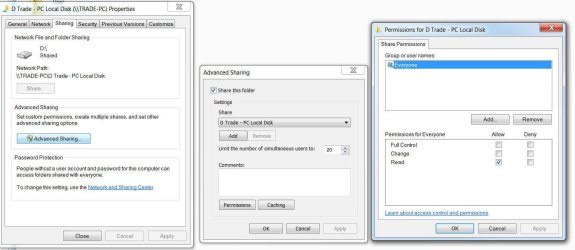
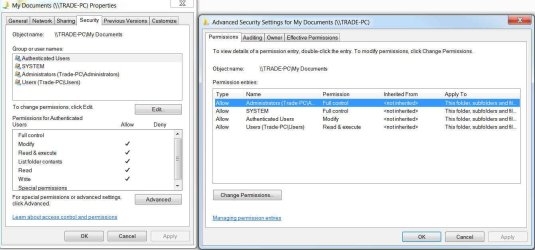
These are my permissions. I notice that there are two different methods of granting permission. In one way you go through the sharing tab and the other you go through security tab. To me it seems as if both of these permissions are acceptable. On one everyone has permission and on the other authenticated users have permission. I guess they both have different purposes. But what would a Homegroup be if the computers belonging weren't already authenticated users? Besides as we can see the second computer is listed and granted permission.
 

Attachments

  • Permission 1.jpg
    Permission 1.jpg
    99.9 KB · Views: 1
  • Permission 2.jpg
    Permission 2.jpg
    104.1 KB · Views: 1

My Computer

Computer type
PC/Desktop
Computer Manufacturer/Model Number
custom build
OS
Microsoft Windows 7 Professional 64-bit 7601 Multiprocessor Service Pack 1
CPU
AMD FX(tm)-8120 Eight-Core Processor
Motherboard
Gigabyte Technology Co., Ltd. GA-990FXA-UD3
Memory
16.00 GB
Graphics Card(s)
(1) AMD Radeon HD 6800 Series (2) AMD Radeon HD 6800 Serie
Sound Card
(1) Realtek High Definition Audio (2) AMD High Definition
Monitor(s) Displays
8 monitors
Screen Resolution
(1) 1920 x 1080 x 32 bits (4294967296 colors) @ 60 Hz (2)
Hard Drives
(1) ST500DM0 02-1BC142 SATA Disk Device (2) ST500DM0 02-1BC142 SATA Disk Device (3) WDC WD10 EZEX-00RKKA0 SATA Disk Device (4) WDC WD25 00JB-00GVC0 USB Device
PSU
Antec 750
Case
Corsair
Keyboard
Logitech
Mouse
Logitech
Internet Speed
Hi-speed
Antivirus
Webroot
Browser
IE Firefox
It keeps changing because I keep pushing buttons because I don't want to just sit here doing nothing.

I have gotten the public folders to work. These are the 'Public' folders that appear under the network drive on each machine. However, if you click on the pc visible under the Homegroup icon the folders (which appear are the ones that result after you check the boxes in the Homegroup Settings page), Nothing happens at all.

The 'User' folder also appears in this group but clicking on it presents the message that the location is unavailable.

This is one problem. But I would be happy to ignore this problem and solve the problem of why I can't get any drives from one machine to be accessible to the other. All this public, library folders that seem to never be in the location you were expecting is very confusing. The best and simplest is to just make the whole damn machine appear. What else is there to us layman?

Thanks very much for your interest. Previously the second machine was configured with Vista. I even had a tech over here and after many hours couldn't figure it out. So I went out and spent a bunch of money to upgrade and put Windows 7 on the machine. Now I have the same problem. Unbelievable.

So now drive access is the problem? Follow the link below to fix the drive access problems. Typically just adding the "Everyone" share to the Security tab will fix this.

http://www.sevenforums.com/network-sharing/92521-hdd-sharing.html#post798310


I'm pretty sure your suggestion worked. Windows security is changing the security settings on each file on the drive. It's a large drive with millions of files. Literally. It'll take a while to complete. In the meantime I want to thank you for your time. I apologize for my frustration. After 12 hours and an all nighter and checking permissions till I was blue in the face I was beginning to lose it. I thought the 'everyone' that was being referred to was not the 'everyone' that needed to be typed into a field. In your posting of the first permission images that was not the 'everyone' that needed to be changed. That was from your other post. I overlooked that 'HDD' link at the bottom of your post. And I would never have seen it if I hadn't gone over and reread your posts. Unbelievable amount of permission settings. Not so much I guess once you're familiar with them. I suppose it does a lot of good.

Thanks again for your time. I will be sure to increase your reputation when this thing finishes and I confirm that this is what the problem was. Then again maybe you should get a check just for putting up with me.
 

My Computer

Computer type
PC/Desktop
Computer Manufacturer/Model Number
custom build
OS
Microsoft Windows 7 Professional 64-bit 7601 Multiprocessor Service Pack 1
CPU
AMD FX(tm)-8120 Eight-Core Processor
Motherboard
Gigabyte Technology Co., Ltd. GA-990FXA-UD3
Memory
16.00 GB
Graphics Card(s)
(1) AMD Radeon HD 6800 Series (2) AMD Radeon HD 6800 Serie
Sound Card
(1) Realtek High Definition Audio (2) AMD High Definition
Monitor(s) Displays
8 monitors
Screen Resolution
(1) 1920 x 1080 x 32 bits (4294967296 colors) @ 60 Hz (2)
Hard Drives
(1) ST500DM0 02-1BC142 SATA Disk Device (2) ST500DM0 02-1BC142 SATA Disk Device (3) WDC WD10 EZEX-00RKKA0 SATA Disk Device (4) WDC WD25 00JB-00GVC0 USB Device
PSU
Antec 750
Case
Corsair
Keyboard
Logitech
Mouse
Logitech
Internet Speed
Hi-speed
Antivirus
Webroot
Browser
IE Firefox
Thanks. Much appreciated. I had to redo everything a couple of times. But when you set things up in the correct order it is quite effortless and it has been working flawlessly. I'm using a disc copy program to backup the drive to the other computer. Piece of cake. Thanks again.

Plus I have Synergy running. Cool program. Lets you use one mouse and keyboard over two computers. It'll do several computers if you have the need.
 

My Computer

Computer type
PC/Desktop
Computer Manufacturer/Model Number
custom build
OS
Microsoft Windows 7 Professional 64-bit 7601 Multiprocessor Service Pack 1
CPU
AMD FX(tm)-8120 Eight-Core Processor
Motherboard
Gigabyte Technology Co., Ltd. GA-990FXA-UD3
Memory
16.00 GB
Graphics Card(s)
(1) AMD Radeon HD 6800 Series (2) AMD Radeon HD 6800 Serie
Sound Card
(1) Realtek High Definition Audio (2) AMD High Definition
Monitor(s) Displays
8 monitors
Screen Resolution
(1) 1920 x 1080 x 32 bits (4294967296 colors) @ 60 Hz (2)
Hard Drives
(1) ST500DM0 02-1BC142 SATA Disk Device (2) ST500DM0 02-1BC142 SATA Disk Device (3) WDC WD10 EZEX-00RKKA0 SATA Disk Device (4) WDC WD25 00JB-00GVC0 USB Device
PSU
Antec 750
Case
Corsair
Keyboard
Logitech
Mouse
Logitech
Internet Speed
Hi-speed
Antivirus
Webroot
Browser
IE Firefox
Back
Top