PC can't see homegroup

Barry144

New member
Local time
9:35 AM
Messages
11
I've got a laptop and a desktop, both running Win7 Pro. Both are cabled to simple 1Gbps network. If I create a homegroup on one, the other reports "there is currently no homegroup on the network." Same result when I try both ways. Firewall services are off.

Both computers running IPv4 and IPv6. HomeGroup Troubleshooter yields nothing.

Any suggestions?


- - - Updated - - -

looks like my two computers can't ping each other, so maybe there's some fundamental issues with the networking; firewall is off, both computers plugged into same unmanaged switch
 
Last edited:

My Computers

System One System Two

  • OS
    Windows 7 Professional
  • Computer type
    PC/Desktop
Open a cmd prompt type
ipconfig /all

post results for both pcs are they connected to a router?
 

My Computer

Computer type
PC/Desktop
OS
win 8 32 bit
I seemed to have fixed ping by adding a Windows Firewall rule that enables "echo request" for ICMPv4.

The current status has changed and is as follows:
Both PC's can ping each other. PC A hosts the homegroup. PC B is able to join the homegroup. PC A can connect to file shares on PC B. PC A doesn't show up at all in PC B's Network browse (even though it was able to see and join PC A's homegroup) so PC B is unable to connect to files shares on PC A.

Any troubleshooting tips to allow PC B to browse/connect to shares on PC A?

(Both are connected to router and DHCP and network config looks good; both can access all other resources on network)
 

My Computers

System One System Two

  • OS
    Windows 7 Professional
  • Computer type
    PC/Desktop
Run this on both pc does it see it and which is master browser this often kick it into life. You should be able to connect via ip \\192.168.1.2\share
 

My Computer

Computer type
PC/Desktop
OS
win 8 32 bit
You replaced the IP with the correct one for your pc? did the scanner find it
 

My Computer

Computer type
PC/Desktop
OS
win 8 32 bit
running command on PC A returns Logon failure: unknown user name or bad password. Running command on PC B returns the network path was not found
 

My Computers

System One System Two

  • OS
    Windows 7 Professional
  • Computer type
    PC/Desktop
Post results from post 2 and the scanner results
 

My Computer

Computer type
PC/Desktop
OS
win 8 32 bit
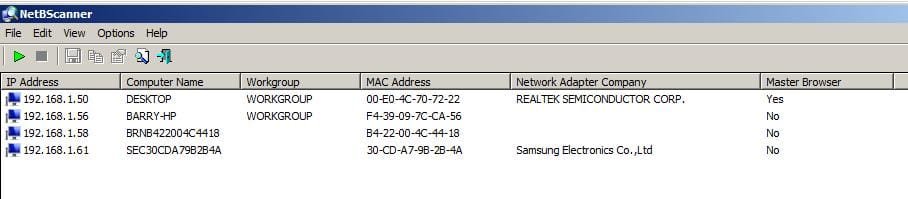
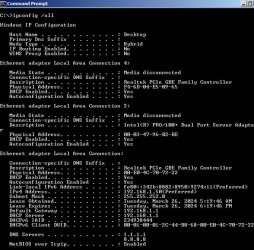
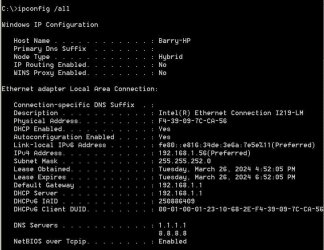
The output from ipconfig and from the scanner showing pcs and master browser
 

My Computer

Computer type
PC/Desktop
OS
win 8 32 bit
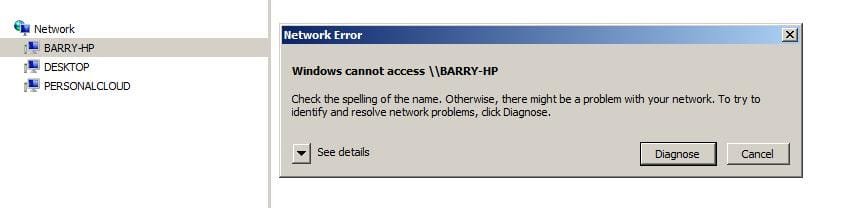
Below are screen captures. The master browser "Desktop" cannot access file shares on "Barry-HP", which is in the Workgroup. Network access error screenshots from Desktop.

___wkgrp1.jpg___wkgrpDesktop.jpg___wrkgrp HP.jpg___wkgrp.jpg

- - - Updated - - -

View attachment 423647

- - - Updated - - -

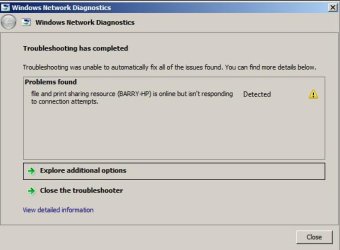
The above is with Windows Firewall running on both computers. If I turn off Firewall on Barry-HP and run the diagnostic again on Desktop, the returned message is now this. Is there a setting I need to change on Barry-HP?
 

Attachments

  • ___wkgrpdiag.jpg
    ___wkgrpdiag.jpg
    28.9 KB · Views: 7
Last edited:

My Computers

System One System Two

  • OS
    Windows 7 Professional
  • Computer type
    PC/Desktop
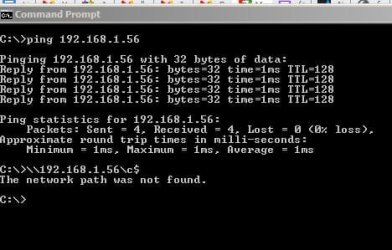
Several problems can you access \192.168.1.56\c$
The subnets are wrong the subnet should be 255.255.255.0 and the lease is only 2 hour you may need to change this on the router or if not on the network card you want a lease of 24 hours or more as it will go off line for a short time as it renews the lease

what are the last 2 entries as they dont show as workgroup
 

My Computer

Computer type
PC/Desktop
OS
win 8 32 bit
last two entries are NAS and a printer

I fixed subnet mask and added address reservations (there's no ability to change DHCP lease time on Deco X55 router)

When I try to browse Barry-HP from Desktop, I still get Barry-HP is online but isn't responding to connection attempts
 

My Computers

System One System Two

  • OS
    Windows 7 Professional
  • Computer type
    PC/Desktop
Did you try \192.168.1.56\c$
have you setup shares on the pc?
 

My Computer

Computer type
PC/Desktop
OS
win 8 32 bit
Have you got any firewall or security running on that pc?
 

My Computer

Computer type
PC/Desktop
OS
win 8 32 bit
That was with Windows Firewall running on both computers. If I shut down the Firewalls, I get the same result (network path not found). Barry-HP disappears from the Windows Explorer Network browse if I shut down the Firewalls. Ability to ping each other also disappears without the Firewalls running.
 

My Computers

System One System Two

  • OS
    Windows 7 Professional
  • Computer type
    PC/Desktop
Back
Top