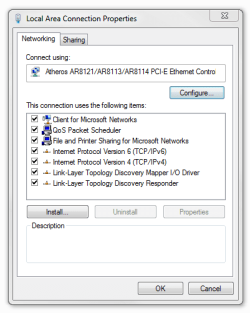
Homegroup - I get this warning ?

williamb

New member
Local time
8:03 AM
Messages
6
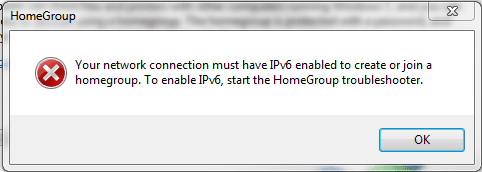
I thought I would Create a homepage , but when I try I get the warning ( X )


so I go to the Registry and check to see if IPv6 is enabled , and it seems to be ok, ( set to 0 )


I'm not too sure what to try next to enable IPv6

Any Ideas please


I am using Windows 7 Professional 32bit


Thanks
 

Attachments
  • 2010-09-18_0807.png
    2010-09-18_0807.png
    8.5 KB · Views: 6
  • 2010-09-18_0843.png
    2010-09-18_0843.png
    11.4 KB · Views: 11

My Computer My Computer

At a glance

Windows XP
OS
Windows XP
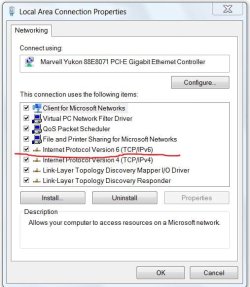
Welcome to SevenForums. Does your connection support ipv6?:)
netwrk ip6.JPG
 

My Computer My Computer

At a glance

Windows 7 Ulti. x64AMD Phenom 8450 triple-core 2.10 ghz4GBATI Radion HD 3200
Computer Manufacturer/Model Number
Gateway GT5692
OS
Windows 7 Ulti. x64
CPU
AMD Phenom 8450 triple-core 2.10 ghz
Memory
4GB
Graphics Card(s)
ATI Radion HD 3200
Monitor(s) Displays
Gateway FPD1775W
Screen Resolution
1280x720
Hard Drives
465.6613 Gibibytes

Attachments

  • 2010-09-18_0935.png
    2010-09-18_0935.png
    11.6 KB · Views: 1

My Computer My Computer

At a glance

Windows XP
OS
Windows XP
I thought I would Create a homepage , but when I try I get the warning ( X )


so I go to the Registry and check to see if IPv6 is enabled , and it seems to be ok, ( set to 0 )


I'm not too sure what to try next to enable IPv6

Any Ideas please


I am using Windows 7 Professional 32bit


Thanks

This problem is very common and easily fixed.

1. Temporarily disable Firewall and third party antivirus program on the computer for a test.

2. Verify relevant services
=========================
a. Click "Start", type "services.msc" (without quotation marks) in Search Bar and press Enter.

Note: If you are prompted for an administrator password or confirmation, type your password, or click Continue.

b. Right click the "Peer Networking Grouping" service and choose Properties.
c. Please check if the service is started; if not, please click the Start button and see if it works.
d. You may also choose Automatic next to Startup type.
e. Click OK.
f. Please repeat the above steps with another service: PNRP Machine Name Publication Service.

3. Modify IPv6 registry key to enable IPV6
==========================
a. Click Start, type regedit in Search Bar, and then click regedit in the Programs list.

Note: If you are prompted for an administrator password or confirmation, type your password or click Continue.

b. Locate and then click the following registry subkey:

HKEY_LOCAL_MACHINE\SYSTEM\CurrentControlSet\services\TCPIP6\Parameters

c. Check whether the "DisabledComponents" registry key exists. If so, let's move on the next steps.

d. Double click the "DisabledComponents" registry key and modify the value to 0.

(If the key doesn't exist, please create the key above and assign the value 0)

e. Exit Registry Editor, and then restart the computer.

Just a Note here Create a DWORD -> DisabledComponents
"# Note If the DisabledComponents entry is unavailable, you must create it. To do this, follow these steps:

1. In the Edit menu, point to New, and then click DWORD (32-bit) Value.
2. Type DisabledComponents, and then press ENTER.
3. Double-click DisabledComponents.

# Type any one of the following values to configure the IPv6 protocol, and then click OK:

1. Type 0 to enable all IPv6 components. "

Source> HomeGroup get an error of must have IPv6 enabled
 

My Computer My Computer

At a glance

Windows 7 Ult, Windows 8.1 Pro,Q9650-4.275GHz, E8600 4.5GHz, E6750-3.8GHzG.Skill PC2 9600 1200Mhz 5 5 5 15 2TGTX480
Computer type
PC/Desktop
Computer Manufacturer/Model Number
Home built
OS
Windows 7 Ult, Windows 8.1 Pro,
CPU
Q9650-4.275GHz, E8600 4.5GHz, E6750-3.8GHz
Motherboard
Evga 780i FTW
Memory
G.Skill PC2 9600 1200Mhz 5 5 5 15 2T
Graphics Card(s)
GTX480
Sound Card
Asus Xonar D2
Monitor(s) Displays
HannsG
Screen Resolution
1680X1050
Hard Drives
GSkill Phoenix Pro 120GB SSD
PSU
ThermalTake Toughpower 1000Watt modular
Case
ThermalTake XaserV
Cooling
Xigmatek S1283
Keyboard
Logitech G15
Mouse
Logitech G9
Internet Speed
T1
#3 in chev65's post fixed mine right up on a previous occasion.
 

My Computer My Computer

At a glance

Windows 7 Home Premium x64Phenom II X4 955 BE8 GB OCZ BE 1667EVGA GeForce GTX470 SC
Computer Manufacturer/Model Number
Home built
OS
Windows 7 Home Premium x64
CPU
Phenom II X4 955 BE
Motherboard
Asus Sabertooth 990FX
Memory
8 GB OCZ BE 1667
Graphics Card(s)
EVGA GeForce GTX470 SC
Monitor(s) Displays
BenQ 19"
Screen Resolution
1280x1024
Hard Drives
256 GB OCZ Vertex 3 SSD
2x WD 1 TB
1x WD 2 TB
PSU
Thermaltake 850W
Case
Coolermaster Cosmos 1000
Cooling
Air
Keyboard
Logitech
Mouse
Cyborg R.A.T 7
Internet Speed
Standard RR
#3 in chev65's post fixed mine right up on a previous occasion.

Thanks for pointing that out mlevy. The registry adjustment does indeed work to fix this specific problem. It's a common problem although I'm not too sure what causes it in the first place.
 

My Computer My Computer

At a glance

Windows 7 Ult, Windows 8.1 Pro,Q9650-4.275GHz, E8600 4.5GHz, E6750-3.8GHzG.Skill PC2 9600 1200Mhz 5 5 5 15 2TGTX480
Computer type
PC/Desktop
Computer Manufacturer/Model Number
Home built
OS
Windows 7 Ult, Windows 8.1 Pro,
CPU
Q9650-4.275GHz, E8600 4.5GHz, E6750-3.8GHz
Motherboard
Evga 780i FTW
Memory
G.Skill PC2 9600 1200Mhz 5 5 5 15 2T
Graphics Card(s)
GTX480
Sound Card
Asus Xonar D2
Monitor(s) Displays
HannsG
Screen Resolution
1680X1050
Hard Drives
GSkill Phoenix Pro 120GB SSD
PSU
ThermalTake Toughpower 1000Watt modular
Case
ThermalTake XaserV
Cooling
Xigmatek S1283
Keyboard
Logitech G15
Mouse
Logitech G9
Internet Speed
T1
Back
Top