
Homegroup Problem: Network Discovery Issue

Try doing this from the Bad machine. Click the share with button then choose Homegroup read/write.
I'm not using Homegroups. I would need to set location to Home rather than Work. Is that what you were wondering?

Also did you get this question?

"I'm not sure what you mean by "If even one part of a name isn't correct""

Thanks again.

You said> I would need to set location to Home rather than Work. Is that what you were wondering?
You should only choose the Home setting if setting up a Homegroup. It's the first part of setting up Homegroup sharing IMO. If the machines are Windows 7 this one should work. I can't believe the amount of problems people are having with this,...Unbelievable!!

Use the "Work" setting if you need to use Workgroup for network sharing. We are talking about these settings in the picture. Besides going through all the check lists around here that is about all I can think of.

I'll tell you what, I'm at my wits end with this problem also, and the funny thing is that I don't even have a problem at all with my networking. I'm beginning to realize how silly it is that I'm having to track down a problem that I don't even have. :sarc:
 

Attachments
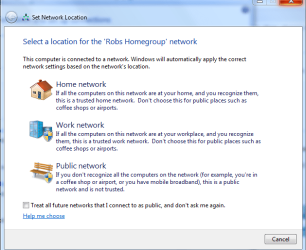
  • Homegroup workgroup public.PNG
    Homegroup workgroup public.PNG
    26.6 KB · Views: 30

My Computer

Computer type
PC/Desktop
Computer Manufacturer/Model Number
Home built
OS
Windows 7 Ult, Windows 8.1 Pro,
CPU
Q9650-4.275GHz, E8600 4.5GHz, E6750-3.8GHz
Motherboard
Evga 780i FTW
Memory
G.Skill PC2 9600 1200Mhz 5 5 5 15 2T
Graphics Card(s)
GTX480
Sound Card
Asus Xonar D2
Monitor(s) Displays
HannsG
Screen Resolution
1680X1050
Hard Drives
GSkill Phoenix Pro 120GB SSD
PSU
ThermalTake Toughpower 1000Watt modular
Case
ThermalTake XaserV
Cooling
Xigmatek S1283
Keyboard
Logitech G15
Mouse
Logitech G9
Internet Speed
T1
You should only choose the Home setting if setting up a Homegroup. It's the first part of setting up Homegroup sharing IMO. If the machines are Windows 7 this one should work. I can't believe the amount of problems people are having with this,...Unbelievable!!
Sounds like your relentless patience is running out. I don't know if you mean I am having a problem following directions or Microsoft is having a problem with buggy software. Just so you know, I'm not having a problem with directions. I tried setting up a homegroup and have since given up. Now I'm just trying Workgroup sharing. They are Windows 7 and it doesn't work.
 

My Computer

OS
Win 7
I found the answer elsewhere. Thanks again for all the help.

Here is what I needed to know:

Problems sharing files between computers on a network are generally caused by 1) a misconfigured firewall or overlooked firewall (including a stateful firewall in a VPN); or 2) inadvertently running two firewalls such as the built-in Windows Firewall and a third-party firewall; and/or 3) not having identical user accounts and passwords on all Workgroup machines; 4) trying to create shares where the operating system does not permit it.

In Windows 7, go to Control Panel>All Control Panel Items>Network and Sharing Center. Click on "Change advanced sharing settings". You don't want to use Homegroup unless you have all Windows 7 machines. If you do and you want to use Homegroup, see Windows 7's Help & Support. Otherwise, in the Advanced Sharing:

Turn ON network discovery
Turn ON file and printer sharing
Turn ON sharing in the Public folder sharing section
Turn ON password protected sharing

For XP, start by running the Network Setup Wizard on all machines (see caveat in Item A below).

A. Configure firewalls on all machines to allow the Local Area Network (LAN) traffic as trusted. With Windows Firewall, turning on Windows 7's File and Printer Sharing as above will take care of this for you. If you aren't running a third-party firewall or have an antivirus/security program with its own firewall component, then you're fine. With third-party firewalls, I usually configure the LAN allowance with an IP range. Ex. would be 192.168.1.0-192.168.1.254. Obviously you would substitute your correct subnet. Refer to any third party security program's Help or user forums for how to properly configure its firewall. Do not run more than one firewall. DO NOT TURN OFF FIREWALLS; CONFIGURE THEM CORRECTLY.

B. For ease of organization, put all computers in the same Workgroup. This is done from the System applet in Control Panel, Computer Name tab.

C. Create matching user accounts and passwords on all machines. You do not need to be logged into the same account on all machines and the passwords assigned to each user account can be different; the accounts/passwords just need to exist and match on all machines. DO NOT NEGLECT TO CREATE PASSWORDS, EVEN IF ONLY SIMPLE ONES . If you wish a machine to boot directly to the Desktop (into one particular user's account) for convenience, you can do this:

Start>Search box>type: netplwiz [enter]
Click on Continue (or supply an administrator's password) when prompted by UAC

Uncheck the option "Users must enter a user name and password to use this computer". Select a user account to automatically log on by clicking on the desired account to highlight it and then hit OK. Enter the correct password for that user account (if there is one) when prompted. Leave it blank if there is no password (null).

D. If one or more of the computers on your network is XP Pro or Media Center, turn off Simple File Sharing (Folder Options>View tab).

E. Create shares as desired. In Windows 7 I usually share out the user's Desktop and the Public directory.
 

My Computer

OS
Win 7
I'll tell you what, I'm at my wits end with this problem also, and the funny thing is that I don't even have a problem at all with my networking. I'm beginning to realize how silly it is that I'm having to track down a problem that I don't even have. :sarc:

Good on ya for persevering as long as you have. As you know, I have spent a lot of time trying to get Homegroups to work on my network. Reading through the (many) threads on the topic, I've come to the conclusion the software isn't 'mature' yet. SP1?
 

My Computer

Computer type
PC/Desktop
Computer Manufacturer/Model Number
Custom
OS
7 x64 Ultimate
CPU
AMD Ryzen 5
Motherboard
Gigabyte GA-AB350-Gaming
Memory
16GB DDR4
Graphics Card(s)
Radeon R7 360
Monitor(s) Displays
2 x Dell U2518D
Screen Resolution
2560x1440 2560x1440
Hard Drives
WD 500GB x2
Samsung SSD 128MB (OS)
XPG SX8200 Pro M.2 2280 1TB
PSU
Antec 500
Cooling
Hyper 212 EVO
Keyboard
Logitech cordless K800
Mouse
Logitech M510
Antivirus
Avira
I'll tell you what, I'm at my wits end with this problem also, and the funny thing is that I don't even have a problem at all with my networking. I'm beginning to realize how silly it is that I'm having to track down a problem that I don't even have. :sarc:

Good on ya for persevering as long as you have. As you know, I have spent a lot of time trying to get Homegroups to work on my network. Reading through the (many) threads on the topic, I've come to the conclusion the software isn't 'mature' yet. SP1?

The problem in nearly every case is user error from what I can tell. Nearly every problem I have seen here was solved by going through the procedure for setting up Homegroup and making sure to get all settings correct. No doubt there are exceptions to this, like what ever problem your having.

It also doesn't help that some of the services settings for using Homegroup were disabled by default on certain versions of Windows 7. :rolleyes:

For me Homegroup is the best thing ever, I was getting prompts to type in the Homegroup password the second I got to the desktop after installing the Op system on all my Windows 7 machines. It doesn't get much easier than that.
 

My Computer

Computer type
PC/Desktop
Computer Manufacturer/Model Number
Home built
OS
Windows 7 Ult, Windows 8.1 Pro,
CPU
Q9650-4.275GHz, E8600 4.5GHz, E6750-3.8GHz
Motherboard
Evga 780i FTW
Memory
G.Skill PC2 9600 1200Mhz 5 5 5 15 2T
Graphics Card(s)
GTX480
Sound Card
Asus Xonar D2
Monitor(s) Displays
HannsG
Screen Resolution
1680X1050
Hard Drives
GSkill Phoenix Pro 120GB SSD
PSU
ThermalTake Toughpower 1000Watt modular
Case
ThermalTake XaserV
Cooling
Xigmatek S1283
Keyboard
Logitech G15
Mouse
Logitech G9
Internet Speed
T1
I'll tell you what, I'm at my wits end with this problem also, and the funny thing is that I don't even have a problem at all with my networking. I'm beginning to realize how silly it is that I'm having to track down a problem that I don't even have. :sarc:

Good on ya for persevering as long as you have. As you know, I have spent a lot of time trying to get Homegroups to work on my network. Reading through the (many) threads on the topic, I've come to the conclusion the software isn't 'mature' yet. SP1?

The problem in nearly every case is user error from what I can tell. Nearly every problem I have seen here was solved by going through the procedure for setting up Homegroup and making sure to get all settings correct. No doubt there are exceptions to this, like what ever problem your having.
execpt when it profile corruption (there have been a few) which i tried to help with a few posts back...;)
 

My Computer

Computer Manufacturer/Model Number
Tx2500z Tablet Pc/Homemade Server
OS
Windows 7 Ult x64(x2), HomePrem x32(x4), Server 08 (+VM), 08 R2 (VM) , SuSe 11.2 (VM), XP 32 (VM)
CPU
Turion X2 ultra (oh well came with laptop)/P4 @3.2 (yes P4)
Motherboard
IDK HP Motherboard / Intel DG965SS
Memory
OCZ Dual Channel 4GB kit/ 1gb Dual Channel
Graphics Card(s)
HD 3200 graphics /GMA x3100 (yay for intergrated!!)
Sound Card
Realtek HD Audio(mic working, well sort of)/Siig IC-70012
Monitor(s) Displays
built-in Hp 12" laptop screen/ Acer 19"
Screen Resolution
1280x800 /1440x900
Cooling
All Air Cooled
Mouse
Logi MX Rev. /MS Wheel Optical 1.1A /Logitech Optical Mouse
Internet Speed
College baby but its still routed through vpn to 1536k...
Other Info
love my wacom pen and pressure sensitivity...
wished it worked in 7, SUSE for that matter though
The problem in nearly every case is user error from what I can tell.

That becomes tautological if you include among "user error" the act of inserting the Windows 7 disk. :)

The only thing that fixed my problem was hearing from Microsoft that I need to create matching user names on all computers. I must have missed the dialog box that informed me of the need to do so.
 

My Computer

OS
Win 7
The problem in nearly every case is user error from what I can tell.

That becomes tautological if you include among "user error" the act of inserting the Windows 7 disk. :)


The only thing that fixed my problem was hearing from Microsoft that I need to create matching user names on all computers. I must have missed the dialog box that informed me of the need to do so.

I don't have matching user names at all and Homegroup is working perfectly. :)

Incorrectly creating the network share name is still the most likely problem and I would still have to consider that user error, untauntingly of course.

The other problems are stange like services being magically disabled when for everyone else they appear to be enabled, still, I can't help but to think that the user had something to do with that also. You know that entire Black Viper disabling check list deal... No blame on anyone, just bad luck I think.

There is NO diaglog box for that anywhere in the Homegroup setup which tends to point to the work around theory I have presented.

There are no official instructions for setting up the same user name and password on all machines anywhere from what I can tell so I would still consider that a work around for an under lying problem.

I certainly never needed to do that for Homegroup to work for me. :)

I'm glad you got the problem sorted out either way Richard. Also I'm curious, did you need to use the same user name and password for XP, Vista and Win 7 sharing "workgroup" sharing to work properly or did you need to do that in order for Homegroup to work for you?
 
Last edited:

My Computer

Computer type
PC/Desktop
Computer Manufacturer/Model Number
Home built
OS
Windows 7 Ult, Windows 8.1 Pro,
CPU
Q9650-4.275GHz, E8600 4.5GHz, E6750-3.8GHz
Motherboard
Evga 780i FTW
Memory
G.Skill PC2 9600 1200Mhz 5 5 5 15 2T
Graphics Card(s)
GTX480
Sound Card
Asus Xonar D2
Monitor(s) Displays
HannsG
Screen Resolution
1680X1050
Hard Drives
GSkill Phoenix Pro 120GB SSD
PSU
ThermalTake Toughpower 1000Watt modular
Case
ThermalTake XaserV
Cooling
Xigmatek S1283
Keyboard
Logitech G15
Mouse
Logitech G9
Internet Speed
T1
I don't have matching user names at all and Homegroup is working perfectly. :)

Good for you, although a sample of one or even one million is not conclusive. If Windows 7 fails only one percent of the time, that still affects hundreds of thousands of people.

There are no official instructions for setting up the same user name and password on all machines anywhere from what I can tell so I would still consider that a work around for an under lying problem.

I agree, but it's an underlying problem entirely created by Microsoft. My absolutely fresh install failed. With that fix it works. So clearly my hardware is capable of functioning properly. The only software on the network was Microsoft and it failed.

Windows 7 failed through no fault of the hardware (or user), and the cure was an undocumented workaround from Microsoft Tech Support.

FWIW this was for Workgroup networking, not Homegroup. I haven't tried Homegroup since the fix.
 

My Computer

OS
Win 7
I've tried it in both settings (it is currently set to the second option). I actually have got it working right now, here is what I did.

I went to Control Panel -> Administrative Tools -> Services. I found that SSDP Discovery service was set to "Disabled". I haven't had any reason to change services, so apparently it was set that way by default. After setting the service to "Automatic" and starting it, I was able to set Network Discovery to "on" successfully.

it works for me, thanx
 

My Computer

OS
windows 7
I have the same problem of not being able to turn on network discovery. I have tried to setup a homegroup several times to no avail. I just did a clean install of 7 Ultimate on my desktop and netbook, and an upgrade from Vista to 7 Ultimate on my laptop.
The desktop is where I have a problem. On the laptop and netbook, which are connected through a wireless router, the homegroup appears to be fine, with the Desktop and other portable visible and sharing. On the Desktop, both of the other computers show up in "network", but not in the homegroup.
I have turned on all the services suggested. I am assuming that not being able to turn on network discovery is the reason homegroup doesn't work.
 

My Computer

Computer Manufacturer/Model Number
Acer Aspire M5800
OS
windows 7
CPU
Intel Core Q8200
Memory
2G

My Computer

Computer Manufacturer/Model Number
Tx2500z Tablet Pc/Homemade Server
OS
Windows 7 Ult x64(x2), HomePrem x32(x4), Server 08 (+VM), 08 R2 (VM) , SuSe 11.2 (VM), XP 32 (VM)
CPU
Turion X2 ultra (oh well came with laptop)/P4 @3.2 (yes P4)
Motherboard
IDK HP Motherboard / Intel DG965SS
Memory
OCZ Dual Channel 4GB kit/ 1gb Dual Channel
Graphics Card(s)
HD 3200 graphics /GMA x3100 (yay for intergrated!!)
Sound Card
Realtek HD Audio(mic working, well sort of)/Siig IC-70012
Monitor(s) Displays
built-in Hp 12" laptop screen/ Acer 19"
Screen Resolution
1280x800 /1440x900
Cooling
All Air Cooled
Mouse
Logi MX Rev. /MS Wheel Optical 1.1A /Logitech Optical Mouse
Internet Speed
College baby but its still routed through vpn to 1536k...
Other Info
love my wacom pen and pressure sensitivity...
wished it worked in 7, SUSE for that matter though
I don't know exactly what I did to make the change, but I am now able to turn on Network Discovery. However, this did not fix my Homegroup problem. I can still see my desktop with both of my laptops, but cannot see either laptop with the desktop. I have turned on all services mentioned, but this doesn't help. I'm really beginning to wonder if there is any value to "Homegroups".
 

My Computer

Computer Manufacturer/Model Number
Acer Aspire M5800
OS
windows 7
CPU
Intel Core Q8200
Memory
2G
It works

Thank you! That worked for me! You have to start and set to "Automatic" the following Services in Control panel > Administrative Tools > Services: Computer Browser , DHCP Client, DNS Client, Function Discovery Resource Publication, Network Location Awareness, Remote Procedure Call (RPC), Server, SSDP Discovery, TCP/IP NetBIOS, UPnP Device Host and Workstation.


I had all those services started but "Function Discovery Resource Publication, and it finally worked!
 

My Computer

OS
Windows 7
I've tried it in both settings (it is currently set to the second option). I actually have got it working right now, here is what I did.

I went to Control Panel -> Administrative Tools -> Services. I found that SSDP Discovery service was set to "Disabled". I haven't had any reason to change services, so apparently it was set that way by default. After setting the service to "Automatic" and starting it, I was able to set Network Discovery to "on" successfully.


Wow, thank you so very much for this... I had the same problem for months and I was getting really fed up with my laptop. I just thought it was my windows 7 being stupid. But thanks for this it definitely solved my problem.
 

My Computer

Computer Manufacturer/Model Number
HP Pavillion dv2000 Laptop
OS
Windows 7 Ultimate
CPU
Centrino Duo
Hard Drives
140 Gig
Back
Top