Homegroup problems

SaltyPete

New member
Local time
8:06 PM
Messages
7
I've just bought a Notebook, and replaced my old router with a WiFi hub (BT Hub). During the installation of the BT Hub software it asked if I wanted to create a homegroup, I did, so it set one up. My intention is that my PC and new notebook should be able to share files. When I fired up my notebook for the first time, it found the Wi-Fi hub no problem and is receiving data. However it obstinately refuses to recognise that a homegroup has been set up. I suspect that it is something to do with the naming of the network. When I use the network schematic diagram with the Notebook the network icon is called BTHub3,,,,, when I use my PC it is called Network4.
So how can I either get my notebbok to use a homegroup using a wireless connection, or change the network names ? :confused:
 

My Computer

OS
Windows 7 Home Premium 32 bit
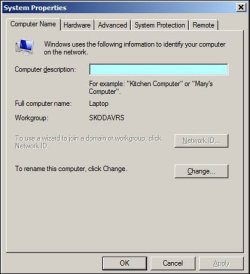
You will need to check the name of your Workgroup. The default name in Win7 for Workgroup is Workgroup. Check yours here:-

RR.JPG
 

My Computer

Computer Manufacturer/Model Number
Look in my Signature.
OS
Win7 H.Prem. 32bit+SP1
Yup my workgroup name is WORKGROUP.
I've also checked that the date and time are synchronised. I can't help feeling that it's something to do with how the home network is named. The one my PC is connected to is NETWORK 4, which basicaly comprises of the router with the ethernet connection to my PC, and the notebook is seeing the wireless access point as BThub....4
 

My Computer

OS
Windows 7 Home Premium 32 bit
This is how I do it. My Desktop computer is ON 24/7, if it was OFF I would not get access as in my preferred method in this pdf. View attachment File sharing.pdf
 

My Computer

Computer Manufacturer/Model Number
Look in my Signature.
OS
Win7 H.Prem. 32bit+SP1

My Computer

Computer Manufacturer/Model Number
HP Pavilion Elite 495UK
OS
Windows 7 Ultimate SP1 64-Bit
CPU
Intel Core i7 870 @ 2.93GHz
Motherboard
MSI 2A9C (CPU1)
Memory
8Gb Dual-Channel DDR3 @ 664MHz
Graphics Card(s)
nVidia GeForce GTX 460 1024MB dedicated RAM
Sound Card
Realtek HD Audio
Monitor(s) Displays
HP2310i
Screen Resolution
1920 x 1080
Hard Drives
1x1954GB Hitachi HDS22020ALA 330 (RAID), 1x1954GB Hitachi External for backup and storage
PSU
460W
Case
HP Elite
Cooling
Air cooled
Keyboard
Logitech K750 solar-powered keyboard
Mouse
Logitech Wireless M180 mouse
Internet Speed
2Mb
Other Info
Pure Avanti Flow Internet Radio with iPod Dock, 64Gb iPod, HP USB Speakers, Sony MDR-V500 Headphones, Sony Vaio F-Series Laptop
Thanks for your responses I'll work through the info and try and identify what I need to re-configure. As yet I'm only getting 1 computer showing up in the "Network" view instead of Notebook and PC, and no HomeGroup icon either as per page 4 of the FileSharing pdf. If the wife allows me enough time I'll get there in the end.
 

My Computer

OS
Windows 7 Home Premium 32 bit
Back
Top