Homegroup Sharing won't see new files

Mothman

New member
Local time
3:59 PM
Messages
7
Hi all.... noob here, hoping I can get an answer.

I've got Windows 7 set up with a homegroup, and have shared a video folder, viewable through a media box connected to the TV.

The media box sees, and can connect, to the shared folder on the desktop, and can see, and play, the content that was there when I set up the media box.

However, when I add new files to the shared folder on the desktop, those new files don't show up on the media box.

Have tried restarting both the desktop and the media box, but no luck.

Maybe it's some silly little thing I'm missing (hopefully)!

THe shared settings appear to be the same on the new files as they are on the already-existing files.... but for some reason new files won't share to the media box, and I've tried many different files.
 

My Computer My Computer

At a glance

Windows 7 Home Premium 64bit
Computer type
PC/Desktop
OS
Windows 7 Home Premium 64bit
So, of course as soon as I post, I think I got it working. If I right click the new file and set it to share with nobody, and then right click again and re-do the sharing permissions, it now shows up. Almost like the new file(s) need a kickstart/reminder to "Yes, please share".
 

My Computer My Computer

At a glance

Windows 7 Home Premium 64bit
Computer type
PC/Desktop
OS
Windows 7 Home Premium 64bit
So, of course as soon as I post, I think I got it working. If I right click the new file and set it to share with nobody, and then right click again and re-do the sharing permissions, it now shows up. Almost like the new file(s) need a kickstart/reminder to "Yes, please share".

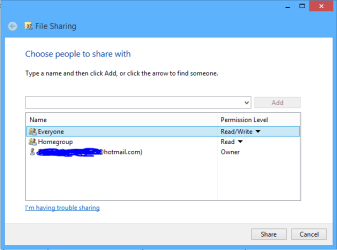
Since you have a Homegroup set up it may help to use the Homegroup style share settings, go to your Video Library and perform the usual "Share With" > Specific People"> click on the drop down menu then choose "Everyone" from the list, hit share etc. This should allow the media box to access the entire Video Library. :)
 

Attachments

  • share with Everyone.PNG
    share with Everyone.PNG
    6.7 KB · Views: 4

My Computer My Computer

At a glance

Windows 7 Ult, Windows 8.1 Pro,Q9650-4.275GHz, E8600 4.5GHz, E6750-3.8GHzG.Skill PC2 9600 1200Mhz 5 5 5 15 2TGTX480
Computer type
PC/Desktop
Computer Manufacturer/Model Number
Home built
OS
Windows 7 Ult, Windows 8.1 Pro,
CPU
Q9650-4.275GHz, E8600 4.5GHz, E6750-3.8GHz
Motherboard
Evga 780i FTW
Memory
G.Skill PC2 9600 1200Mhz 5 5 5 15 2T
Graphics Card(s)
GTX480
Sound Card
Asus Xonar D2
Monitor(s) Displays
HannsG
Screen Resolution
1680X1050
Hard Drives
GSkill Phoenix Pro 120GB SSD
PSU
ThermalTake Toughpower 1000Watt modular
Case
ThermalTake XaserV
Cooling
Xigmatek S1283
Keyboard
Logitech G15
Mouse
Logitech G9
Internet Speed
T1
Thanks Chev. I've already got it set up like that though... but for some reason when I add new files to that folder, they don't share. To get them to share, I found (through trial and error) that I have to:

- add the file to the shared folder
- right-click the new file and choose Share With -> Nobody
- right-click the file again, go into Share With -> Specific People -> Everyone.

As soon as I do that, the new file shows up immediately on the media device.
 

My Computer My Computer

At a glance

Windows 7 Home Premium 64bit
Computer type
PC/Desktop
OS
Windows 7 Home Premium 64bit
Thanks Chev. I've already got it set up like that though... but for some reason when I add new files to that folder, they don't share. To get them to share, I found (through trial and error) that I have to:

- add the file to the shared folder
- right-click the new file and choose Share With -> Nobody
- right-click the file again, go into Share With -> Specific People -> Everyone.

As soon as I do that, the new file shows up immediately on the media device.

I'm not sure why it would be doing this but try using the Advanced settings to add the check mark to include inheritable permissions from the objects parent. The link below shows you how. :)

http://www.sevenforums.com/tutorials/122666-permissions-allow-deny-users-groups.html
 

My Computer My Computer

At a glance

Windows 7 Ult, Windows 8.1 Pro,Q9650-4.275GHz, E8600 4.5GHz, E6750-3.8GHzG.Skill PC2 9600 1200Mhz 5 5 5 15 2TGTX480
Computer type
PC/Desktop
Computer Manufacturer/Model Number
Home built
OS
Windows 7 Ult, Windows 8.1 Pro,
CPU
Q9650-4.275GHz, E8600 4.5GHz, E6750-3.8GHz
Motherboard
Evga 780i FTW
Memory
G.Skill PC2 9600 1200Mhz 5 5 5 15 2T
Graphics Card(s)
GTX480
Sound Card
Asus Xonar D2
Monitor(s) Displays
HannsG
Screen Resolution
1680X1050
Hard Drives
GSkill Phoenix Pro 120GB SSD
PSU
ThermalTake Toughpower 1000Watt modular
Case
ThermalTake XaserV
Cooling
Xigmatek S1283
Keyboard
Logitech G15
Mouse
Logitech G9
Internet Speed
T1
Thanks, I'll play around with that setting.

If I understand correctly, it sounds like I'd still have to (if this is the issue) do this for every file that I add though, right?
 

My Computer My Computer

At a glance

Windows 7 Home Premium 64bit
Computer type
PC/Desktop
OS
Windows 7 Home Premium 64bit
Well, apparently my trial and error work-around isn't consistent either... just tried it again (removing sharing then re-enabling) and the new file won't show up no matter what I do. :(

The option to include inherited permissions is enabled on the file.
 

My Computer My Computer

At a glance

Windows 7 Home Premium 64bit
Computer type
PC/Desktop
OS
Windows 7 Home Premium 64bit
Well, apparently my trial and error work-around isn't consistent either... just tried it again (removing sharing then re-enabling) and the new file won't show up no matter what I do. :(

The option to include inherited permissions is enabled on the file.

Try going into the Advanced settings of the C:Users folder and be sure that sharing is enabled through the sharing tab. Everything is controlled from the C:Users folder so it's important that this is shared out correctly.
 

My Computer My Computer

At a glance

Windows 7 Ult, Windows 8.1 Pro,Q9650-4.275GHz, E8600 4.5GHz, E6750-3.8GHzG.Skill PC2 9600 1200Mhz 5 5 5 15 2TGTX480
Computer type
PC/Desktop
Computer Manufacturer/Model Number
Home built
OS
Windows 7 Ult, Windows 8.1 Pro,
CPU
Q9650-4.275GHz, E8600 4.5GHz, E6750-3.8GHz
Motherboard
Evga 780i FTW
Memory
G.Skill PC2 9600 1200Mhz 5 5 5 15 2T
Graphics Card(s)
GTX480
Sound Card
Asus Xonar D2
Monitor(s) Displays
HannsG
Screen Resolution
1680X1050
Hard Drives
GSkill Phoenix Pro 120GB SSD
PSU
ThermalTake Toughpower 1000Watt modular
Case
ThermalTake XaserV
Cooling
Xigmatek S1283
Keyboard
Logitech G15
Mouse
Logitech G9
Internet Speed
T1
I think C:Users is set up OK.

Properties -> Sharing, shows the "Share" button greyed out... but if I click the "Advanced Sharing" button, the "Share this folder" check box at the top is checked.

Just seems very random to me that the old files share fine, and I can turn sharing off (right-click -> Share with Nobody), have the file disappear off the media device... then re-enable sharing and have the file return again on the media device. But new files don't want to show up (other than the one the other day that for some reason suddenly worked).
 

My Computer My Computer

At a glance

Windows 7 Home Premium 64bit
Computer type
PC/Desktop
OS
Windows 7 Home Premium 64bit
Wow, this is driving me crazy... I just can't get this to work.

Old files are working perfect... but other than on file that worked when I posted earlier, I can't get ANY new files to share at all.

Tried recreating the Homegroup, have monkeyed around with all the share settings I can find, and no luck. :cry:
 

My Computer My Computer

At a glance

Windows 7 Home Premium 64bit
Computer type
PC/Desktop
OS
Windows 7 Home Premium 64bit
Back
Top