
HomeGroup... what is the advantages?

Firestrider

New member
Power User
VIP
Local time
5:36 PM
Messages
333
I have Windows 7 RC 64-bit on both my desktop and my laptop and I don't see what the difference between just connecting to my laptop over the network and through HomeGroup is...

Anyone care to explain?

Also when first setting up Windows 7 on both my laptop and desktop and my router I had read/write access to my Users/<UserName> folder... do other people on the router have that access?

Also what does the padlock here mean?
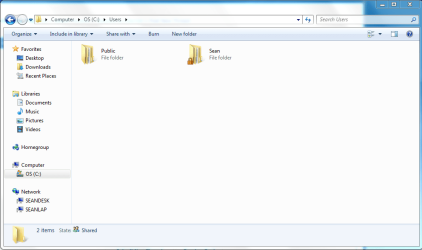
padlock.PNG
 

My Computer My Computer

At a glance

Linux (Debian, Android)Intel Core i7 8602x 2GB Kingston DDR3-1333AMD Radeon HD 5750
Computer Manufacturer/Model Number
Intel WBIBX10J
OS
Linux (Debian, Android)
CPU
Intel Core i7 860
Motherboard
Intel DP55WB
Memory
2x 2GB Kingston DDR3-1333
Graphics Card(s)
AMD Radeon HD 5750
Sound Card
Realtek ALC888
Monitor(s) Displays
2x Dell Inc. E248WFP
Screen Resolution
3840x1200
Hard Drives
Intel X25-V
Samsung HD103SJ
PSU
Corsair CX400
Case
Silverstone GD05
Cooling
Stock
Keyboard
Dell Inc. Bluetooth Wireless
Internet Speed
30 Mbps
Homegroup makes workgroups ezer. If you have 10 PC's in a workgroup with passworded shares u need to make user accnts on all the PC's. With homegroup u make 1 password for shares, no accnts needed.

The padlock means you need permission to get into the folder.

And if all your user home accnts are shared by default on your network u have something configured wrong.
 

My Computer My Computer

At a glance

Windows 7 Ultimate x64 Retail RTM, Ubuntu 9.10
OS
Windows 7 Ultimate x64 Retail RTM, Ubuntu 9.10
It's IPV6. That's all that matters. ;)
 

My Computer My Computer

At a glance

Windows 7 Home Premium x64Intel QX9650 Extreme 4.0 GHz8GB (4x2) Corsair Dominator DDR32x Radeon R390X [8GB]
Computer type
PC/Desktop
Computer Manufacturer/Model Number
Custom Build/Mod
OS
Windows 7 Home Premium x64
CPU
Intel QX9650 Extreme 4.0 GHz
Motherboard
ASUS Rampage Extreme Rev2
Memory
8GB (4x2) Corsair Dominator DDR3
Graphics Card(s)
2x Radeon R390X [8GB]
Sound Card
SupremeFX X-Fi
Monitor(s) Displays
Dell 2408WFP 26" Panel
Screen Resolution
1920x1200
Hard Drives
4x WD 2TB (8TB+ Total)
2x Crucial SSD 128GB (RAID-0)
1x LG Blu-ray read/write
1x Phillips LightScribe DVD read/write
PSU
Corsair HX1000
Case
CoolerMaster - Cosmos S
Cooling
Custom Liquid - 320mm rad w/ 3x 80mm fans, CPU/NB/SB Blocks
Keyboard
Logitech Illuminater Pro
Mouse
Logitech
Internet Speed
Fractional T1 - 125Mbps
Antivirus
ESET Security Suite / Microsoft Security Essentials
Browser
Cyberfox Intel x64
Other Info
OC'd to 5.0GHz @ 44c under full load
I think it setup a homegroup automatically? Since I had my laptop on with Windows 7 when I installed it on my desktop.

Anyways I have my Users/<UserName> folder set so Nobody read/write access, yet I can still view files with HomeGroup, are there two different connections to Network and to HomeGroup?
 

My Computer My Computer

At a glance

Linux (Debian, Android)Intel Core i7 8602x 2GB Kingston DDR3-1333AMD Radeon HD 5750
Computer Manufacturer/Model Number
Intel WBIBX10J
OS
Linux (Debian, Android)
CPU
Intel Core i7 860
Motherboard
Intel DP55WB
Memory
2x 2GB Kingston DDR3-1333
Graphics Card(s)
AMD Radeon HD 5750
Sound Card
Realtek ALC888
Monitor(s) Displays
2x Dell Inc. E248WFP
Screen Resolution
3840x1200
Hard Drives
Intel X25-V
Samsung HD103SJ
PSU
Corsair CX400
Case
Silverstone GD05
Cooling
Stock
Keyboard
Dell Inc. Bluetooth Wireless
Internet Speed
30 Mbps
It's IPV6. That's all that matters. ;)

I have been unable to add my second computer to the Homegroup. The second computer is Networked. My ISP doesn't support IPV6, Could this be the problem?
 

My Computer My Computer

At a glance

Windows 7 Home Premiun 64bitIntel Core i3-2100 301Ghz6 gigOnboard
Computer Manufacturer/Model Number
Clone
OS
Windows 7 Home Premiun 64bit
CPU
Intel Core i3-2100 301Ghz
Motherboard
Asus P8H61-M Rev 3.0
Memory
6 gig
Graphics Card(s)
Onboard
Sound Card
Onboard
Monitor(s) Displays
HP w1858
Hard Drives
WD Sata 500 Gig
It's IPV6. That's all that matters. ;)

I have been unable to add my second computer to the Homegroup. The second computer is Networked. My ISP doesn't support IPV6, Could this be the problem?

This thread is very old and you should start a new one.

IPv6 support from the ISP doesn't really matter because IPv6 is only working on the LAN at this point. However the router does need to support IPv6 in order to set up a Homegroup.

Many other Homegroup problems can be solved by going through the Homegroup trouble shooter link below.

Ultimate Troubleshooting Guide for Windows 7 HomeGroup Connection Issues - Help Desk Geek
 

My Computer My Computer

At a glance

Windows 7 Ult, Windows 8.1 Pro,Q9650-4.275GHz, E8600 4.5GHz, E6750-3.8GHzG.Skill PC2 9600 1200Mhz 5 5 5 15 2TGTX480
Computer type
PC/Desktop
Computer Manufacturer/Model Number
Home built
OS
Windows 7 Ult, Windows 8.1 Pro,
CPU
Q9650-4.275GHz, E8600 4.5GHz, E6750-3.8GHz
Motherboard
Evga 780i FTW
Memory
G.Skill PC2 9600 1200Mhz 5 5 5 15 2T
Graphics Card(s)
GTX480
Sound Card
Asus Xonar D2
Monitor(s) Displays
HannsG
Screen Resolution
1680X1050
Hard Drives
GSkill Phoenix Pro 120GB SSD
PSU
ThermalTake Toughpower 1000Watt modular
Case
ThermalTake XaserV
Cooling
Xigmatek S1283
Keyboard
Logitech G15
Mouse
Logitech G9
Internet Speed
T1
Back
Top