
Horizontal lines on monitor

starzfan31

New member
Local time
6:34 PM
Messages
3
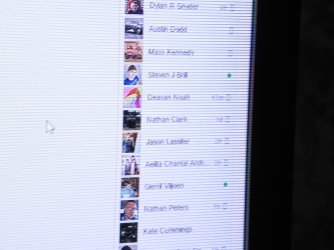
Have a fairly new Dell S2740L monitor and all of a sudden it is showing horizontal lines on the right side of the screen.. They are black and evenly spaced apart. Ive tried updating the driver, trying different cables, resetting the monitor, running the lcd saver..... they persist. Does this mean my monitor is toasting itself?? I will try to attach a photo of the problem to give ya an idea what I am talking about . They go about half way across the screen then stop. It is really annoying. Ideas??
 

Attachments
  • P9200458.jpg
    P9200458.jpg
    195.3 KB · Views: 4
Last edited:

My Computer My Computer

At a glance

Win 10i7 377012gb DDR3Radeon R9 200 series
Computer type
PC/Desktop
Computer Manufacturer/Model Number
Dell Studio
OS
Win 10
CPU
i7 3770
Motherboard
Dell 0NW73C
Memory
12gb DDR3
Graphics Card(s)
Radeon R9 200 series
Antivirus
windows defender
Browser
google chrome
Hi Starzfan31 and welcome to 7 Forums. The issue could be your monitor or graphics system. The only was to tell is to hook the monitor up to another computer and also try another monitor on your PC. Good Luck.
 

My Computer My Computer

At a glance

Windows 7 x64 Ultimate and numerous virtual m...AMD FX-8350 Vishera 32nm Technology @ 4.2 GHz...G Skill 32.0GB Dual-Channel DDR3 @ 1204MHz (1...EVGA GeForce GTX 960 4GB Super SC ACX 2.0+ wi...
Computer type
PC/Desktop
Computer Manufacturer/Model Number
Bluethunder II
OS
Windows 7 x64 Ultimate and numerous virtual machines
CPU
AMD FX-8350 Vishera 32nm Technology @ 4.2 GHz default
Motherboard
ASUSTeK COMPUTER INC. SABERTOOTH 990FX R2.0 (Socket 942)
Memory
G Skill 32.0GB Dual-Channel DDR3 @ 1204MHz (11-13-13-31)
Graphics Card(s)
EVGA GeForce GTX 960 4GB Super SC ACX 2.0+ with Back Plate
Sound Card
Creative X-Fi Titanium HD Audiophile PCIe
Monitor(s) Displays
LG L227WTG x 3
Screen Resolution
1680 x 1050 16:10
Hard Drives
238GB Samsung850 PRO SATA Disk Device (SSD)
1863GB Seagate ST2000DM 001-1CH164 (SATA)
1397GB Seagate ST1500DL 003-9VT16L(SATA)
466GB Western Digital WDC WD50 03AZEX-00K1GA0 (SATA) x 2
932GB Seagate ST310005 28AS SATA Disk Device (SATA)
PSU
Enermax Revolution87+ 1000 Watts Gold Certified Power Supply
Case
Rocketfish Full Tower
Cooling
Cooler Master Hyper 212 EVO Push Pull 120mm Fans
Keyboard
Logitech K740
Mouse
Logitech G100S Laser LED + Logitech Gamepad F310
Internet Speed
500 mbs down and 30mbs up
Antivirus
Malwarebytes Pro & Avast and MSE on certain Virtual Machines
Browser
Firefox (Main) Chrome, Internet Explorer (Back Up)
Other Info
Logitech X 230 2.1 Stereo System and 5.1 Yamaha RX V2090
B&W DM6 Monitor Speakers + Center and Surround Speakers
Using Mouse Without Borders (Google it)
I use a dual monitor setup... the lines are there whether I use a digital cable or HDMI but are no on the second monitor.... its just very odd to me that it is only on one side of the monitor and they are perfectly spaced.. makes me think something inside that side of the monitor is loose,, but I will be damned if I can figure out how to open this thing up and look at the contact strips on that side of the lcd
 

My Computer My Computer

At a glance

Win 10i7 377012gb DDR3Radeon R9 200 series
Computer type
PC/Desktop
Computer Manufacturer/Model Number
Dell Studio
OS
Win 10
CPU
i7 3770
Motherboard
Dell 0NW73C
Memory
12gb DDR3
Graphics Card(s)
Radeon R9 200 series
Antivirus
windows defender
Browser
google chrome
Go to using one monitor at a time, and swap the monitors out to see if the affected one does it when you're only using one monitor, or whether the "good" monitor exhibits the behavior when plugged into the "bad" monitor port.

That way you'll be able to tell if your graphics card is causing the issue, or if it's your monitor that has the problem.
 

My Computer My Computer

At a glance

Win 7 Pro x64/Win 10 Pro x64 dual bootAMD FX 8350 Vishera @ 420016 GB Mushkin Blackline DDR3-2400 @ 1866 (9-1...XFX Radeon R9 280 Double D Black Edition
Computer type
PC/Desktop
Computer Manufacturer/Model Number
Mellon Labs (custom build)
OS
Win 7 Pro x64/Win 10 Pro x64 dual boot
CPU
AMD FX 8350 Vishera @ 4200
Motherboard
ASUS M5A97 R2.0
Memory
16 GB Mushkin Blackline DDR3-2400 @ 1866 (9-10-10-10-31)
Graphics Card(s)
XFX Radeon R9 280 Double D Black Edition
Sound Card
Realtek HD Audio on MB. Sounds great.
Monitor(s) Displays
Acer 24", Acer 22"
Screen Resolution
3840 x 1080
Hard Drives
1 x Mushkin Chronos 120 GB SSD (Win 10)
1 x Samsung 850 EVO 250 GB SSD (Win 7)
1 x WD 1TB SATA Blue
1 x WD 1TB SATA Green
PSU
Corsair TX-750
Case
CoolerMaster HAF 912+
Cooling
Coolermaster Seidon 240M Liquid AIO. 6 case fans
Keyboard
Logitech G710+
Mouse
Logitech G500s
Internet Speed
Much better since I got fiber, but still way overpriced.
Antivirus
MSE, Malware Bytes for scanning
Browser
Firefox
Other Info
Corsair VOID USB headphones.

A Mellon Labs X-1 - LCD Smartie driven system status display.

Brought to you by the letter E
Back
Top