
You are using an out of date browser. It may not display this or other websites correctly.
You should upgrade or use an alternative browser.
You should upgrade or use an alternative browser.
Host Process for Windows Tasks has stopped working
- Thread starter rayjayy
- Start date

Hello rayjayy.
In what OS are you getting this error? This is a Windows Se7en forum but we'll help you if we can.
Later :shock: Ted
In what OS are you getting this error? This is a Windows Se7en forum but we'll help you if we can.
Later :shock: Ted
My Computer
At a glance
W 7 64-bit UltimateIntel Q9550 Yorkfield8GB Dominator 8500C5DATI : XFX 5870
- Computer Manufacturer/Model Number
- * BFK Customs *
- OS
- W 7 64-bit Ultimate
- CPU
- Intel Q9550 Yorkfield
- Motherboard
- ASUS P5Q Pro
- Memory
- 8GB Dominator 8500C5D
- Graphics Card(s)
- ATI : XFX 5870
- Sound Card
- Realtek HD Audio 7-1
- Monitor(s) Displays
- 1x 47" LCD HDMI & 3x 26" LCD HDMI
- Screen Resolution
- 1920x1080P & 1920x1200
- Hard Drives
- 1x 80GB Intel X25-M G2 SSD : 1x 500GB & 1x 640GB WD Caviar Black(s)
- PSU
- Corsair 620HX
- Case
- Cooler Master RC-690
- Cooling
- Tuniq Tower 120, 2x 140mm and 3x 120mm case fans
- Keyboard
- Microsoft 500
- Mouse
- Razer Diamondback 3G
- Internet Speed
- 14 Mb/s
- Other Info
- 1x Koutech 3Gb/s SATA HDD Hot Swap Rack
Well ... the only OS you have (had) listed says (said) Vista!
Later :shock: Ted
Later :shock: Ted
My Computer
At a glance
W 7 64-bit UltimateIntel Q9550 Yorkfield8GB Dominator 8500C5DATI : XFX 5870
- Computer Manufacturer/Model Number
- * BFK Customs *
- OS
- W 7 64-bit Ultimate
- CPU
- Intel Q9550 Yorkfield
- Motherboard
- ASUS P5Q Pro
- Memory
- 8GB Dominator 8500C5D
- Graphics Card(s)
- ATI : XFX 5870
- Sound Card
- Realtek HD Audio 7-1
- Monitor(s) Displays
- 1x 47" LCD HDMI & 3x 26" LCD HDMI
- Screen Resolution
- 1920x1080P & 1920x1200
- Hard Drives
- 1x 80GB Intel X25-M G2 SSD : 1x 500GB & 1x 640GB WD Caviar Black(s)
- PSU
- Corsair 620HX
- Case
- Cooler Master RC-690
- Cooling
- Tuniq Tower 120, 2x 140mm and 3x 120mm case fans
- Keyboard
- Microsoft 500
- Mouse
- Razer Diamondback 3G
- Internet Speed
- 14 Mb/s
- Other Info
- 1x Koutech 3Gb/s SATA HDD Hot Swap Rack

No. But do yourself a favor and dump the content of your taskhost commandlines from time to time and compare it to a dump you do immediately after you get this error message. That will show you what is crashing on you. Taskhost is kinda like the old dllhost.exe -- just a standard shell for utility processes. You see, in the Win31-98 days each process took a certain amount of real (below 640k) memory so if you had a bunch of background procs running as well as a host of forground tasks you could get the dreaded "out of real memory" error. In addition, each task still eats a meg of stack and process memory no matter what it does so it's better to have a single process to hang these processes off of. It's the same principle as svchost.exe for services. I'll get some more detailed instructions on how to do this in a while.
My Computer
At a glance
El Capitan / Windows 10i7-4980HQ16GBIris 5200
- Computer type
- Laptop
- Computer Manufacturer/Model Number
- Apple
- OS
- El Capitan / Windows 10
- CPU
- i7-4980HQ
- Memory
- 16GB
- Graphics Card(s)
- Iris 5200
I have been getting this error as well. I hadn't posted it because it seemed like an isolated issue, and frankly it isn't too bothersome; I see no performance decreases.
Interestingly, I installed 6956 on my sister's laptop, and she suddenly started to get the errors as well, so I thought it may have something to do with our installation or software we both use.
We seemed to have started to recieve the error sometime around the last windows update, but I'm not totally sure.
Its a hindrance, but not major.
Still, I'd like to resolve it.
Interestingly, I installed 6956 on my sister's laptop, and she suddenly started to get the errors as well, so I thought it may have something to do with our installation or software we both use.
We seemed to have started to recieve the error sometime around the last windows update, but I'm not totally sure.
Its a hindrance, but not major.
Still, I'd like to resolve it.
My Computer
At a glance
Windows 7 Build 7077 x64AMD Athlon Dual Core QL-60 - 1.9Ghz2GBNVIDIA GeForce 8200 M G
- Computer Manufacturer/Model Number
- Compaq CQ50-107NR
- OS
- Windows 7 Build 7077 x64
- CPU
- AMD Athlon Dual Core QL-60 - 1.9Ghz
- Memory
- 2GB
- Graphics Card(s)
- NVIDIA GeForce 8200 M G
- Screen Resolution
- 1280 x 800
- Hard Drives
- 120GB, Not sure of RPM but prolly 5400 or lower.
well for one, my windows update isn't in working order in this build; so i'm not too sure about that theory.
and true, it isn't pull-your-hair annoying; so my only hope is to wait for the beta i guess. thanks for letting me know i'm not alone.
and true, it isn't pull-your-hair annoying; so my only hope is to wait for the beta i guess.
thanks for letting me know i'm not alone.My Computer
At a glance
Build 6956
- OS
- Build 6956
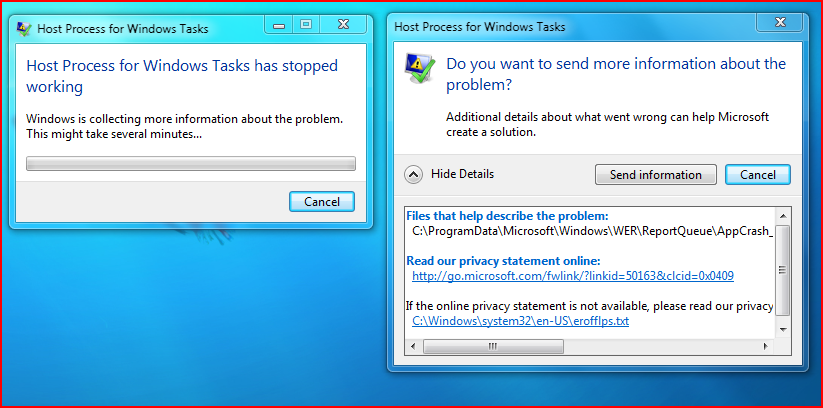
Please post the content of the first link in the text box under "Files that help describe the problem:"
My Computer
At a glance
El Capitan / Windows 10i7-4980HQ16GBIris 5200
- Computer type
- Laptop
- Computer Manufacturer/Model Number
- Apple
- OS
- El Capitan / Windows 10
- CPU
- i7-4980HQ
- Memory
- 16GB
- Graphics Card(s)
- Iris 5200
I am also having the exact same problem, get an identical error with an identical screenshot. Just wondering have you installed any new networking tools such as LogMeIn because that and another network sharing tool called OrbLive are the only two "applications" I have installed ever since this Host Process stopped working error showed up last week...
Also it may be caused due to itunes too... just a wild guess but how can i know for sure?
Thanks.
PS: First post so HI ALL!
Also it may be caused due to itunes too... just a wild guess but how can i know for sure?
Thanks.
PS: First post so HI ALL!
My Computer
At a glance
Windows 7 Build 6956
- OS
- Windows 7 Build 6956
Host Process for Windows Tasks has stopped Error
Here is the fix for this error:
Click start and search for Task Scheduler
Open the Task Scheduler
In the left pane click the following:
Task Scheduler Library>Microsoft>Windows>RAC
Now on the top menu click View>Show Hidden Tasks
Now in the top center pane you will see RAC Task, Right Click on it then click
disable.
This will stop this error from ever appearing again....
source: Host Process for Windows Services Has Stopped Working Error - Workaround Fix » My Digital Life
Hope this helps
Regards
Dev
Here is the fix for this error:
Click start and search for Task Scheduler
Open the Task Scheduler
In the left pane click the following:
Task Scheduler Library>Microsoft>Windows>RAC
Now on the top menu click View>Show Hidden Tasks
Now in the top center pane you will see RAC Task, Right Click on it then click
disable.
This will stop this error from ever appearing again....
source: Host Process for Windows Services Has Stopped Working Error - Workaround Fix » My Digital Life
Hope this helps
Regards
Dev
My Computer
At a glance
Windows 7 Beta 1 build 7000
- OS
- Windows 7 Beta 1 build 7000
curryking1
New member
- Local time
- 12:52 AM
- Messages
- 15
Wow, had the exact same problem here on 6956. Thanks for the help.
My Computer
At a glance
Windows 7 Ultimate x64 // Windows 7 Ultimate x64AMD 8320 // i7 4810MQ16 GB // 8 GBMSI 760 GTX // Nvidia 860M Maxwell
- Computer Manufacturer/Model Number
- Custom // SAGER
- OS
- Windows 7 Ultimate x64 // Windows 7 Ultimate x64
- CPU
- AMD 8320 // i7 4810MQ
- Memory
- 16 GB // 8 GB
- Graphics Card(s)
- MSI 760 GTX // Nvidia 860M Maxwell
- Screen Resolution
- 1920x1080 // 1920x1080
- Mouse
- Zowie FK1 // Zowie FK1
curryking1
New member
- Local time
- 12:52 AM
- Messages
- 15
I know but my computer is working fine so I don't feel any need to change it. Don't want to fool around with my computer now during a busy period of school 
My Computer
At a glance
Windows 7 Ultimate x64 // Windows 7 Ultimate x64AMD 8320 // i7 4810MQ16 GB // 8 GBMSI 760 GTX // Nvidia 860M Maxwell
- Computer Manufacturer/Model Number
- Custom // SAGER
- OS
- Windows 7 Ultimate x64 // Windows 7 Ultimate x64
- CPU
- AMD 8320 // i7 4810MQ
- Memory
- 16 GB // 8 GB
- Graphics Card(s)
- MSI 760 GTX // Nvidia 860M Maxwell
- Screen Resolution
- 1920x1080 // 1920x1080
- Mouse
- Zowie FK1 // Zowie FK1

Similar threads
- Replies
- 2
- Views
- 2K

- Replies
- 12
- Views
- 2K
- Replies
- 1
- Views
- 2K

- Replies
- 1
- Views
- 9K
