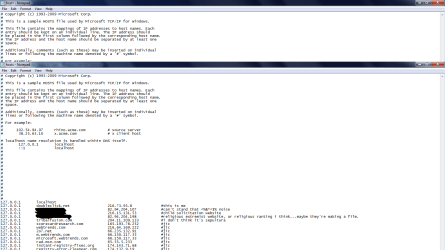
hosts...again...but differed

colinearpsycho

New member
Local time
5:24 PM
Messages
37
Location
illinois us, albeit mexico
i put some of the network computers on my hosts list, to try and circumvent some issues and lost internet connectivity. none of the ip addresses are listed as the subnet, default gateway; etc. they were just ip's of other computers that connect to this network at times. why did that happen? is it because i used

127.0.0.1 localhost domain ip?

again it doesn't make sense to me because the netstat information does not return these seperate network ip's as default gateways;etc.
 
Last edited:

My Computer

Computer Manufacturer/Model Number
emachines el1352g-41w
OS
7 home premium 64-bit
CPU
Athlon II X2 220 Stepping 3
Motherboard
EL1352G-41w (generic e-Machines Nvidia)
Memory
DDR3 1066MhZ 144-pin (2 gigs)
Graphics Card(s)
nvidia 6150se 256mb dedicated
Sound Card
realtek ac97 hd
Monitor(s) Displays
hp wide panel lcd 21"
Screen Resolution
1600x900
Hard Drives
1tb seagate 7200rpm barracuda external
500gb seagate 7200rpm barracuda
PSU
lite-on small form factor unit (oblong looking thing)
Case
small form factor oem
Cooling
whatever they slopped on it, a heat sink and lacking paste
Keyboard
emachines multimedia keyboard
Mouse
wired ps/2 optical
Internet Speed
don't kiss and tell
Other Info
i've had her two weeks and i need to get it upgraded!
i'm confused about some hosts related things, again. this is the second post except that this one is for a different query. in the hosts file, the instructions are to use 127 as a loopback point. i pinged a lot of addresses that are placed on the hosts file. most of them resolve to 127 (presumedly because they are on the hosts file), although, not all the addresses on the hosts file resolve to 127 and those that do and are on the hosts file toward 127 can still be navigated to in a browser, because they're domain ip address isn't recorded in the right hand column. addresses that don't resolve to 127, but still return ping output of their domain ip cannot be navigated to though. i don't understand that so that i can suggest to myself that the ping return from 127 is because of an entry made in the hosts file. then also, if 127 is a hypothetical address as some people put it, although others have said that 127 is a default network address (all the more reason it doesn't make sense to point potentially maliciously traffic at 127), then why is some of my youtube traffic originating from 127 according to sysiunternals tcpview? under tcp and udp protocols? i would tell myself that it's a gateway thing, except that the default gateway as listed is not 127 either, it is a local network address.

i also have explorer connections originating from 0.0.0.0 which is the other suggested loopback for the hosts file.

and i was digging around a bit more, i have to clarify that some of the addresses that are entered into hosts without a domain ip can be navigated to, while others can't. so was i correct in the first presumptino that it was an interface enumeration or dns resolution malfunction over the network>?
 

My Computer

Computer Manufacturer/Model Number
emachines el1352g-41w
OS
7 home premium 64-bit
CPU
Athlon II X2 220 Stepping 3
Motherboard
EL1352G-41w (generic e-Machines Nvidia)
Memory
DDR3 1066MhZ 144-pin (2 gigs)
Graphics Card(s)
nvidia 6150se 256mb dedicated
Sound Card
realtek ac97 hd
Monitor(s) Displays
hp wide panel lcd 21"
Screen Resolution
1600x900
Hard Drives
1tb seagate 7200rpm barracuda external
500gb seagate 7200rpm barracuda
PSU
lite-on small form factor unit (oblong looking thing)
Case
small form factor oem
Cooling
whatever they slopped on it, a heat sink and lacking paste
Keyboard
emachines multimedia keyboard
Mouse
wired ps/2 optical
Internet Speed
don't kiss and tell
Other Info
i've had her two weeks and i need to get it upgraded!
i in the hosts file, the instructions are to use 127 as a loopback point.
Instructions for what? The 127.0.0.1 address is a local loopback address and means "THIS COMPUTER". So, if you point a website to instead go directly to your computer....these pages won't come up...since you don't host the page on your computer.

i pinged a lot of addresses that are placed on the hosts file. most of them resolve to 127 (presumedly because they are on the hosts file)
All of the addresses that you put into the hosts file should come back with exactly the address that you put into the hosts files. Exactly the same thing that you put into the hosts file and nothing else.


127 is a hypothetical address as some people put it, although others have said that 127 is a default network address (all the more reason it doesn't make sense to point potentially maliciously traffic at 127),
127.0.0.x are the local loopback addresses. They go absolutely nowhwere. Your own local computer responds to those addresses.

The reason that you would point malicious traffic at 127.0.0.1 is to PREVENT it from going anywhere. This would effectively do it. Let's say that a nasty piece of malware directed you to
Code:
www.[URL="http://www.gooogle.com/"]gooogle.com[/URL]
http://www.gooogle.com (notice that I put in too many letter o's). So, let's say you went to www.infectedwebsite.com and it redirected you to Google (too many o's). Well, if regular 'ole DNS were in place it might send you to 68.42.91.1 and that webpage may contain nasty malware that infects your machine. however, if you put the following in your hosts file,
Code:
127.0.0.1 www.gooogle.com
When you went to www.infectedwebsite.com and it redirected you to www.gooooooogle.com...instead of hitting 68.42.91.1 (which contains the nasty stuff), your computer tries to go to 127.0.0.1 (which is the local computer, which doesn't have the nasty stuff).....and thus you remain safe. It's like having kids and telling them when a stranger pulls up next to you in a car to NOT get into the car. If they get into the car, it's like relying on DNS and they jump in the car and potentially bad stuff happens to them. If they instead, rely on what they are told and instead don't get into the car and run home...that's like following the instructions in the hosts file instead and the bad thing doesn't happen to them.


And i was digging around a bit more, i have to clarify that some of the addresses that are entered into hosts without a domain ip can be navigated to, while others can't. so was i correct in the first presumptino that it was an interface enumeration or dns resolution malfunction over the network>?
If you have an entry in the hosts file like this
Code:
x.x.x.x  www.domain.com (x.x.x.x is any valid IP address)
your computer should ALWAYS return that address when you ping or when you try to navigate with your browser. If it doesn't, your computer is not working properly.
 

My Computer

Computer Manufacturer/Model Number
Self-Built in July 2009
OS
Windows 7 Ultimate x64
CPU
Intel Q9550 2.83Ghz OC'd to 3.40Ghz
Motherboard
Gigabyte GA-EP45-UD3R rev. 1.1, F12 BIOS
Memory
8GB G.Skill PI DDR2-800, 4-4-4-12 timings
Graphics Card(s)
EVGA 1280MB Nvidia GeForce GTX570
Sound Card
Realtek ALC899A 8 channel onboard audio
Monitor(s) Displays
23" Acer x233H
Screen Resolution
1920x1080
Hard Drives
Intel X25-M 80GB Gen 2 SSD
Western Digital 1TB Caviar Black, 32MB cache. WD1001FALS
PSU
Corsair 620HX modular
Case
Antec P182
Cooling
stock
Keyboard
ABS M1 Mechanical
Mouse
Logitech G9 Laser Mouse
Internet Speed
15/2 cable modem
Other Info
Windows and Linux enthusiast. Logitech G35 Headset.
...

you mean windows isn't working properly?

because i understand what you are trying to tell me, except it isn't the case. so in the event my computer isn't functioning correctly, what should i do?

i'll restate the problems for you, or anyone else who wants to jump in that's fine, afterall this is a support forum :) (<---that's the sadist in me)

127 website.com (nothing) i can still navigate to the traffic
0 website.com (nothing) same thing
127 or 0 website.com (website.com's ip address) i cannot navigate to website.com

since the entries are in the hosts file, the ping should return the loopback point if i'm understanding what you're expressing as the correct form of the windows operating systems hosts file....

and the hosts file then is strictly a windows (or other operating system) implementation then right? because 127 or 0 are not my ip address. and the reason for traffic from those addresses is to say 'web traffic reached your computer'...not it's originating from, but that this is the location your computer is making said internet communication at...

btw, this computer is almost brand new (and by that i mean i've almost had it for 30 days). it's the second computer i've had that the hosts file functions in the same way, i didn't have the previous one for more than a year and a month or two.

i know it doesn't help fix the problem, but that's sad to purchase new computers or run a new and improved os and have a simple thing such as that go wrong, especially when it's integral. i'm not on the up and up with microsoft implementations, do they plan to address the issues with the hosts file for home computer users that don't want to be a part of a large network implementation? because unless the interfaces are messed, then ultimately it comes down to a calculation problem insofar as intrusion detection/prevention or susceptibiltiy to web code or bugs. in the event that the issue is a hardware problem or a hardware configuration problem with enumerations or resolution, how is that supposed to be addressed?

in short, other than connecting to the internet, i can't think of a reason for windows or the pc to malfunction, low budget machine or not. i don't think i've run the computer to the point that it should have fried and the innards are clean; etc.

oh haha, just so you feel safe i meant to put oregon and mexico in my profile flag, that's not viral lol...

no further advice?
 

My Computer

Computer Manufacturer/Model Number
emachines el1352g-41w
OS
7 home premium 64-bit
CPU
Athlon II X2 220 Stepping 3
Motherboard
EL1352G-41w (generic e-Machines Nvidia)
Memory
DDR3 1066MhZ 144-pin (2 gigs)
Graphics Card(s)
nvidia 6150se 256mb dedicated
Sound Card
realtek ac97 hd
Monitor(s) Displays
hp wide panel lcd 21"
Screen Resolution
1600x900
Hard Drives
1tb seagate 7200rpm barracuda external
500gb seagate 7200rpm barracuda
PSU
lite-on small form factor unit (oblong looking thing)
Case
small form factor oem
Cooling
whatever they slopped on it, a heat sink and lacking paste
Keyboard
emachines multimedia keyboard
Mouse
wired ps/2 optical
Internet Speed
don't kiss and tell
Other Info
i've had her two weeks and i need to get it upgraded!
you mean windows isn't working properly?
Possibly, or you are doing something wrong.

127 website.com (nothing) i can still navigate to the traffic
0 website.com (nothing) same thing
127 or 0 website.com (website.com's ip address) i cannot navigate to website.com
I don't understand what you are doing. Here is a clip from my hosts file...how about you post your host file here so i can see it;
Code:
#
# For example:
#
#      102.54.94.97     rhino.acme.com          # source server
#       38.25.63.10     x.acme.com              # x client host

# localhost name resolution is handled within DNS itself.
#    127.0.0.1       localhost
#    ::1             localhost

192.168.1.1        www.google.com        #This line is correct
192.168.1.2        www.sevenforums.com    #This line is correct
127.0.0.1            www.google.com           #This line is correct

127            www.google.com        #This syntax is incorrect
0            www.google.com        #This syntax is incorrect


and the hosts file then is strictly a windows (or other operating system) implementation then right? because 127 or 0 are not my ip address.
127.0.0.1 is your loopback address. It's an internal IP address that your NIC card will respond to.
Loopback - Wikipedia, the free encyclopedia

It's like this in Windows, Linux and OSX.

and the reason for traffic from those addresses is to say 'web traffic reached your computer'...not it's originating from, but that this is the location your computer is making said internet communication at...
NO, NO, NO. It's to prevent your computer from hitting the website. You are deliberately pointing it to yourself...a place that does not contain the website and cannot cause you a problem. You are doing this to keep from hitting known malware sites by not allowing your computer to get to where it should be going, but rather you are making sure it doesn't leave your local machine.

btw, this computer is almost brand new. it's the second computer i've had that the hosts file functions in the same way, i didn't have the previous one for more than a year and a month or two.


i know it doesn't help fix the problem, but that's sad to purchase new computers or run a new and improved os and have a simple thing such as that go wrong, especially when it's integral. i'm not on the up and up with microsoft implementations, do they plan to address the issues with the hosts file for home computer users that don't want to be a part of a large network implementation? because unless the interfaces are messed, then ultimately it comes down to a calculation problem insofar as intrusion detection or susceptibiltiy to web code or bugs.
I honestly don't even understand the point you are trying to make here. Not to be rude, but I think your hosts file is not working properly because i'm 99.9% sure that you aren't sure what you are doing and you are entering things wrong. Either that, or you expect it to be something that it's not supposed to do.

The Microsoft implementation of the hosts file works properly and it does exactly what it's supposed to do. I've never had a Windows install that didn't use the hosts file properly in any version of Windows that I have ever used or supported.

Would it help you if we chatted on AIM or Yahoo...or would you like me to do a quick video that I could post on YouTube showing you exactly how the file is supposed to work?
 

My Computer

Computer Manufacturer/Model Number
Self-Built in July 2009
OS
Windows 7 Ultimate x64
CPU
Intel Q9550 2.83Ghz OC'd to 3.40Ghz
Motherboard
Gigabyte GA-EP45-UD3R rev. 1.1, F12 BIOS
Memory
8GB G.Skill PI DDR2-800, 4-4-4-12 timings
Graphics Card(s)
EVGA 1280MB Nvidia GeForce GTX570
Sound Card
Realtek ALC899A 8 channel onboard audio
Monitor(s) Displays
23" Acer x233H
Screen Resolution
1920x1080
Hard Drives
Intel X25-M 80GB Gen 2 SSD
Western Digital 1TB Caviar Black, 32MB cache. WD1001FALS
PSU
Corsair 620HX modular
Case
Antec P182
Cooling
stock
Keyboard
ABS M1 Mechanical
Mouse
Logitech G9 Laser Mouse
Internet Speed
15/2 cable modem
Other Info
Windows and Linux enthusiast. Logitech G35 Headset.
...

Well, I'm in the habit of regularly reloading Windows, I know it makes the entire circumstances suspicious and a nuissance, but I'm in a transitory phase with the OS at the time which need not be expanded on (not development, installation process)...

but here is how I've layed out the file, and here are the first two lines by MS:
Code:
# 127.0.0.1 localhost
# ::1 localhost
#
127.0.0.1 website.net (website ip or 127 --according to ping)
0.0.0.0 website.com (ping address to domain)
0.0.0.0 doubleclick.net (website address)

and then there are also entries put in place by anti-malware programs which read like this

Code:
127.0.0.0        suchandsuch.info
127.0.0.0        suchandsuch.ch
127.0.0.0        etc.net

in the first example, redirection is only being stopped if the website is followed by the website or domain ip (i had to think about that) for the website. although now, one entry that i can say for sure which was pinging to a website address two days ago, now pings to 127.0.0.1, so i don't have it's web address in the third place in example one () in my actual hosts file --anymore, but I guess the website has been changed or made inaccessible by our ISP --in which case thanks comcast (sadist withheld).

in the first example, most of the websites are producing web errors, or reverting to like an ISS default document that the domain is for sale.

then i tried an example such as this, where the names and ip's are for local computers I wanted not to be mistakenly used as proxy via the network --learning ipv6 or other network stuff and being precautious don't run together in good time, so i tried it seeing that in example one i could stop traffic to a website using the syntax in that first example.
here is the final syntax structure used though:
Code:
127.0.0.0     localhost       (network computers ip)
0.0.0.0        localhost       (network computers ip)

I had to remove those lines though, because it may have been a momentary cause that i lost internet connection, but I'm not sure for certain just because any number of things seems to make the network connection screwy.

i'm pretty sure if i was going to use that third example in the hosts file though, that I would need to use:

Code:
loopback point       computer name       computer ipaddress

again i'm very unsure as to the truth in that assumption.

then as per your hosts file
192.168.1.1 www.google.com #This line is correct
192.168.1.2 www.sevenforums.com #This line is correct
those two lines confuse me, 192.168.1.2 is not google on this network that i know. it's 74.125.255.18

NO, NO, NO. It's to prevent your computer from hitting the website. You are deliberately pointing it to yourself...a place that does not contain the website and cannot cause you a problem.

and what I meant here, in case you misunderstood is that if I'm listening to youtube or something, sysinternals suite tools said that this process was linked to this ip address, and it was 127 and 0 (which I'm abbreviating from 127.0.0.1 and 0.0.0.0), so does dns use 127 by default when using the internet? i can't see how it would differentiate between hosts file entries and the network card then.

insofar as chat/tuts etc. that's not necessary. i understand how the file is supposed to work, it just isn't functioning that way. but it's obviously a network issue (perhaps similar to goto statement error or what have you); and while I'm sure it isn't a computer malfunction but specification flaw i'm not unsure it isn't Windows. so I think i'll switch back to linux or tryout netbsd or something. i prefer linux anyway it runs much smoother, and selinux isn't far from the windows services provided by 7 that i can see. respectively, that's from a fedora 12 edition as well insofar as inferring from that kind of logic. at least as my main platform, windows is far more kind to my games. by that i mean it let's them run, not that they run well.

 
Last edited:

My Computer

Computer Manufacturer/Model Number
emachines el1352g-41w
OS
7 home premium 64-bit
CPU
Athlon II X2 220 Stepping 3
Motherboard
EL1352G-41w (generic e-Machines Nvidia)
Memory
DDR3 1066MhZ 144-pin (2 gigs)
Graphics Card(s)
nvidia 6150se 256mb dedicated
Sound Card
realtek ac97 hd
Monitor(s) Displays
hp wide panel lcd 21"
Screen Resolution
1600x900
Hard Drives
1tb seagate 7200rpm barracuda external
500gb seagate 7200rpm barracuda
PSU
lite-on small form factor unit (oblong looking thing)
Case
small form factor oem
Cooling
whatever they slopped on it, a heat sink and lacking paste
Keyboard
emachines multimedia keyboard
Mouse
wired ps/2 optical
Internet Speed
don't kiss and tell
Other Info
i've had her two weeks and i need to get it upgraded!
in the first example, most of the websites are producing web errors, or reverting to like an ISS default document that the domain is for sale.
YES, that is EXACTLY what you want. You are redirecting these web addresses to non-existent locations. You are trying to prevent yourself from getting to the websites.

then as per your hosts file
192.168.1.1 www.google.com #This line is correct
192.168.1.2 www.sevenforums.com #This line is correct
those two lines confuse me, 192.168.1.2 is not google on this network that i know. it's 74.125.255.18
YES, absolutely correct. The entire point of putting the misleading information into the HOSTS file is to prevent you from hitting the nasty website. That's why you point it someplace nonsensical. In this example, we are to accept that going to google is dangerous and needs to be avoided. So, we override DNS providing the right answer (74.125.255.18) and force the local computer to provide the wrong answer (192.168.1.2) and then our browser errors out and gives us a broken page link because the page cannot be found.

and what I meant here, in case you misunderstood is that if I'm listening to youtube or something, sysinternals suite tools said that this process was linked to this ip address, and it was 127 and 0 (which I'm abbreviating from 127.0.0.1 and 0.0.0.0), so does dns use 127 by default when using the internet? i can't see how it would differentiate between hosts file entries and the network card then.
That's probably just sysinternals way of saying that traffic from YouTube is coming to your local network card as 127.0.0.1 is the loopback address on any network card.
 

My Computer

Computer Manufacturer/Model Number
Self-Built in July 2009
OS
Windows 7 Ultimate x64
CPU
Intel Q9550 2.83Ghz OC'd to 3.40Ghz
Motherboard
Gigabyte GA-EP45-UD3R rev. 1.1, F12 BIOS
Memory
8GB G.Skill PI DDR2-800, 4-4-4-12 timings
Graphics Card(s)
EVGA 1280MB Nvidia GeForce GTX570
Sound Card
Realtek ALC899A 8 channel onboard audio
Monitor(s) Displays
23" Acer x233H
Screen Resolution
1920x1080
Hard Drives
Intel X25-M 80GB Gen 2 SSD
Western Digital 1TB Caviar Black, 32MB cache. WD1001FALS
PSU
Corsair 620HX modular
Case
Antec P182
Cooling
stock
Keyboard
ABS M1 Mechanical
Mouse
Logitech G9 Laser Mouse
Internet Speed
15/2 cable modem
Other Info
Windows and Linux enthusiast. Logitech G35 Headset.
I've successfully resisted the urge to put in a sound clip from Mortal Kombat (Round two... FIGHT!).

Now then. I would say, quite simply, if you're still having issues with your hosts file, and really want to play with it the way you are, you ought to post a screen shot. It'll make us helping you a LOT easier, methinks.
 

My Computer

Computer Manufacturer/Model Number
HP 6000 Pro Micro Tower
OS
W7 Professional x64
CPU
Core 2 Duo 2.93
Memory
2 GB
Graphics Card(s)
ATI Radeon 4695
Monitor(s) Displays
Two HP 17's
Hard Drives
150GB Sata Drive
Case
Tiny. Kinda cute.
Keyboard
HP Supplied. Surprisingly nice.
Mouse
Gateway Mouse from an E2610D
Internet Speed
45 mbps
....

i had to place it as an attachment, the insertion tool only permits hyperlinked images. but here is a screenshot of my hosts file. in this version, which is not largely altered from the common syntax i've used, i placed 127.0.0.1, which I really prefer to use 0.0.0.0 for whatever reason, i suppose that's a compulsive thing. i also placed the comments, no one is that punctual, i don't think...but this is the format which has successfully blocked navigation to websites, using just a line like the top line commented out

Code:
127.0.0.0       localhost

has not worked successfully. and it's really stretching my memory with this ipv4 ipv6 stuff, because i could have sworn ip's used to be 127.0.0 for instance....just a little bit of relatively useless information.

@Mattr, a.k.a towtruck a.k.a backwardsmasked.... :) are you sure if I put entries into the lmhosts file it won't assist in DNS name resolution? how do I know my ISP isn't implementing lmhosts as a standard of service? btw your mortal kombat slam had me rolling.

As an afterthought, is there anyway to put some boolean capability into the hosts file? So I can block specific youtube videos that seem to communicate far more than they should, or really defunct the browser? can i block specific activex prompts without disabling the entire feature?
 

Attachments

  • hosts.png
    hosts.png
    48.3 KB · Views: 32
Last edited:

My Computer

Computer Manufacturer/Model Number
emachines el1352g-41w
OS
7 home premium 64-bit
CPU
Athlon II X2 220 Stepping 3
Motherboard
EL1352G-41w (generic e-Machines Nvidia)
Memory
DDR3 1066MhZ 144-pin (2 gigs)
Graphics Card(s)
nvidia 6150se 256mb dedicated
Sound Card
realtek ac97 hd
Monitor(s) Displays
hp wide panel lcd 21"
Screen Resolution
1600x900
Hard Drives
1tb seagate 7200rpm barracuda external
500gb seagate 7200rpm barracuda
PSU
lite-on small form factor unit (oblong looking thing)
Case
small form factor oem
Cooling
whatever they slopped on it, a heat sink and lacking paste
Keyboard
emachines multimedia keyboard
Mouse
wired ps/2 optical
Internet Speed
don't kiss and tell
Other Info
i've had her two weeks and i need to get it upgraded!
@Mattr, a.k.a towtruck a.k.a backwardsmasked.... :) are you sure if I put entries into the lmhosts file it won't assist in DNS name resolution? how do I know my ISP isn't implementing lmhosts as a standard of service? btw your mortal kombat slam had me rolling.

As an afterthought, is there anyway to put some boolean capability into the hosts file? So I can block specific youtube videos that seem to communicate far more than they should, or really defunct the browser? can i block specific activex prompts without disabling the entire feature?
Lmhosts is purely a LAN functionality, meaning it never gets past your router (coming in OR going out). I'm glad that Mortal Kombat remark had you laughing. :)

Host files is very basic. You could block youtube's individual servers, but not youtube itself. And no, not that I'm aware of. Activex runs in websites, and is beyond the scope of the host file.
 

My Computer

Computer Manufacturer/Model Number
HP 6000 Pro Micro Tower
OS
W7 Professional x64
CPU
Core 2 Duo 2.93
Memory
2 GB
Graphics Card(s)
ATI Radeon 4695
Monitor(s) Displays
Two HP 17's
Hard Drives
150GB Sata Drive
Case
Tiny. Kinda cute.
Keyboard
HP Supplied. Surprisingly nice.
Mouse
Gateway Mouse from an E2610D
Internet Speed
45 mbps
...

thanks to you and pparks, i think i've learned as much about hosts as i can from these issues. your help has been appreciated.
 

My Computer

Computer Manufacturer/Model Number
emachines el1352g-41w
OS
7 home premium 64-bit
CPU
Athlon II X2 220 Stepping 3
Motherboard
EL1352G-41w (generic e-Machines Nvidia)
Memory
DDR3 1066MhZ 144-pin (2 gigs)
Graphics Card(s)
nvidia 6150se 256mb dedicated
Sound Card
realtek ac97 hd
Monitor(s) Displays
hp wide panel lcd 21"
Screen Resolution
1600x900
Hard Drives
1tb seagate 7200rpm barracuda external
500gb seagate 7200rpm barracuda
PSU
lite-on small form factor unit (oblong looking thing)
Case
small form factor oem
Cooling
whatever they slopped on it, a heat sink and lacking paste
Keyboard
emachines multimedia keyboard
Mouse
wired ps/2 optical
Internet Speed
don't kiss and tell
Other Info
i've had her two weeks and i need to get it upgraded!
I'm glad we're able to be of assistance to you. If you've any more questions, please let us know. :)
 

My Computer

Computer Manufacturer/Model Number
HP 6000 Pro Micro Tower
OS
W7 Professional x64
CPU
Core 2 Duo 2.93
Memory
2 GB
Graphics Card(s)
ATI Radeon 4695
Monitor(s) Displays
Two HP 17's
Hard Drives
150GB Sata Drive
Case
Tiny. Kinda cute.
Keyboard
HP Supplied. Surprisingly nice.
Mouse
Gateway Mouse from an E2610D
Internet Speed
45 mbps
Back
Top