...
Well, I'm in the habit of regularly reloading Windows, I know it makes the entire circumstances suspicious and a nuissance, but I'm in a transitory phase with the OS at the time which need not be expanded on (not development, installation process)...
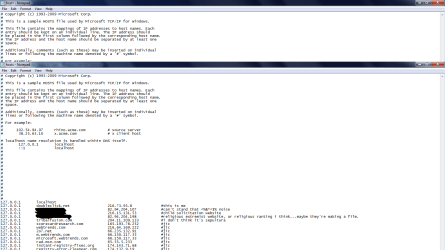
but here is how I've layed out the file, and here are the first two lines by MS:
Code:
# 127.0.0.1 localhost
# ::1 localhost
#
127.0.0.1 website.net (website ip or 127 --according to ping)
0.0.0.0 website.com (ping address to domain)
0.0.0.0 doubleclick.net (website address)
and then there are also entries put in place by anti-malware programs which read like this
Code:
127.0.0.0        suchandsuch.info
127.0.0.0        suchandsuch.ch
127.0.0.0        etc.net
in the first example, redirection is only being stopped if the website is followed by the website or domain ip (i had to think about that) for the website. although now, one entry that i can say for sure which was pinging to a website address two days ago, now pings to 127.0.0.1, so i don't have it's web address in the third place in example one () in my actual hosts file --anymore, but I guess the website has been changed or made inaccessible by our ISP --in which case thanks comcast (sadist withheld).
in the first example, most of the websites are producing web errors, or reverting to like an ISS default document that the domain is for sale.
then i tried an example such as this, where the names and ip's are for local computers I wanted not to be mistakenly used as proxy via the network --learning ipv6 or other network stuff and being precautious don't run together in good time, so i tried it seeing that in example one i could stop traffic to a website using the syntax in that first example.
here is the final syntax structure used though:
Code:
127.0.0.0     localhost       (network computers ip)
0.0.0.0        localhost       (network computers ip)
I had to remove those lines though, because it may have been a momentary cause that i lost internet connection, but I'm not sure for certain just because any number of things seems to make the network connection screwy.
i'm pretty sure if i was going to use that third example in the hosts file though, that I would need to use:
Code:
loopback point computer name computer ipaddress
again i'm very unsure as to the truth in that assumption.
then as per your hosts file
192.168.1.1
www.google.com #This line is correct
192.168.1.2
www.sevenforums.com #This line is correct
those two lines confuse me, 192.168.1.2 is not google on this network that i know. it's 74.125.255.18
NO, NO, NO. It's to prevent your computer from hitting the website. You are deliberately pointing it to yourself...a place that does not contain the website and cannot cause you a problem.
and what I meant here, in case you misunderstood is that if I'm listening to youtube or something, sysinternals suite tools said that this process was linked to this ip address, and it was 127 and 0 (which I'm abbreviating from 127.0.0.1 and 0.0.0.0), so does dns use 127 by default when using the internet? i can't see how it would differentiate between hosts file entries and the network card then.
insofar as chat/tuts etc. that's not necessary. i understand how the file is supposed to work, it just isn't functioning that way. but it's obviously a network issue (perhaps similar to goto statement error or what have you); and while I'm sure it isn't a computer malfunction but specification flaw i'm not unsure it isn't Windows. so I think i'll switch back to linux or tryout netbsd or something. i prefer linux anyway it runs much smoother, and selinux isn't far from the windows services provided by 7 that i can see. respectively, that's from a fedora 12 edition as well insofar as inferring from that kind of logic. at least as my main platform, windows is far more kind to my games. by that i mean it let's them run, not that they run well.


 (<---that's the sadist in me)