Hotmail - Windows Live - Issues

songkrai

New member
Local time
11:48 PM
Messages
86
I have no idea if there are different versions of Hotmail. I have had Hotmail for 8 years.

I do know that my Hotmail page states Windows Live. Are there different versions of Hotmail? And can one switch from one version to another?

Today (June 29, 2010) a dialog box came up from Microsoft or Hotmail and asked me if I agree to the Terms of Service - or some such wording. I clicked Yes.

And after clicking "Yes" - the whole Hotmail page changed. All emails and folders are there - but a slightly different font.

FOLDERS.

I have all my folders. But I would like to create a new folder. And for the life of me I cannot find out how to create a new folder with this newest and latest version of Hotmail. I have done a search. And every answer states to go to Folders and just 'click' create a new folder. But that option is not apparent on this latest version of Hotmail. When I go to Folders - the only option I have is to 'Show/Hide' folders - no option to 'create' a new folder. When I go to 'New' it only lets me create a new email.

I'm lost is a sea of obtuse technolgy !
 

My Computer

Computer Manufacturer/Model Number
Dell XPS 410
OS
Windows 7
CPU
unknow
Motherboard
unkown
Memory
2
Graphics Card(s)
LE
Sound Card
LE
Monitor(s) Displays
Samsung
Hard Drives
Unknow
PSU
What is PSU?
Case
Plastic
Cooling
Fan
Are you using Windows Live to access your mail?
 

My Computer

Computer type
PC/Desktop
Computer Manufacturer/Model Number
Dell XPS 420
OS
Windows 10, Home Clean Install
CPU
Intel Core2 processsor Q8200(2.33Ghz 1333FSB) Quad Core Tech
Motherboard
Dell
Memory
6 gb
Graphics Card(s)
ATI Radeon 256MB HD3650
Sound Card
Intergrated 7.1 Channel Audio
Monitor(s) Displays
Dell SP2009W 20"
Hard Drives
640 GB Serial ATA Hard drive
Cooling
Fan
Keyboard
Dell USB Keyboard
Mouse
Dell Premium Optical USB
Internet Speed
DSL 2.85
Are you using Windows Live to access your mail?

I don't know what this means.

If there are different ways to access Hotmail, please provide them. Thanks.
 

My Computer

Computer Manufacturer/Model Number
Dell XPS 410
OS
Windows 7
CPU
unknow
Motherboard
unkown
Memory
2
Graphics Card(s)
LE
Sound Card
LE
Monitor(s) Displays
Samsung
Hard Drives
Unknow
PSU
What is PSU?
Case
Plastic
Cooling
Fan
Windows Live Mail is great. I use it to access my mail. You just push a button and your mail is downloaded to your computer. If you have more than one account, with that one button all of your mail from all accounts will be downloaded.

Windows Live Mail
 

My Computer

Computer type
PC/Desktop
Computer Manufacturer/Model Number
Dell XPS 420
OS
Windows 10, Home Clean Install
CPU
Intel Core2 processsor Q8200(2.33Ghz 1333FSB) Quad Core Tech
Motherboard
Dell
Memory
6 gb
Graphics Card(s)
ATI Radeon 256MB HD3650
Sound Card
Intergrated 7.1 Channel Audio
Monitor(s) Displays
Dell SP2009W 20"
Hard Drives
640 GB Serial ATA Hard drive
Cooling
Fan
Keyboard
Dell USB Keyboard
Mouse
Dell Premium Optical USB
Internet Speed
DSL 2.85
I found this while doing a search for 'Folders':

"On May 18, 2010, Microsoft unveiled a new version of Hotmail which offers features such as 1-Click Filters, Active Views, Inbox Sweeping and 10GB attachments. It also includes integration with a 25GB Windows Live SkyDrive and Windows Live Office, a free version of Microsoft's Office Web Apps suite. The new version was released on June 15, 2010 and will roll out to Hotmail's 360 million users over the course of the next six weeks."
 

My Computer

Computer Manufacturer/Model Number
Dell XPS 410
OS
Windows 7
CPU
unknow
Motherboard
unkown
Memory
2
Graphics Card(s)
LE
Sound Card
LE
Monitor(s) Displays
Samsung
Hard Drives
Unknow
PSU
What is PSU?
Case
Plastic
Cooling
Fan
And I still can't figure out how to create a new folder with this new version of Hotmail.
 

My Computer

Computer Manufacturer/Model Number
Dell XPS 410
OS
Windows 7
CPU
unknow
Motherboard
unkown
Memory
2
Graphics Card(s)
LE
Sound Card
LE
Monitor(s) Displays
Samsung
Hard Drives
Unknow
PSU
What is PSU?
Case
Plastic
Cooling
Fan
Windows Live Hotmail
Powerful free e-mail with security from Microsoft - Windows Live Hotmail is a best in class e-mail service that helps you organize and manage all your ...
mail.live.com/ - Cached - Similar
 

My Computer

Computer Manufacturer/Model Number
Dell XPS 410
OS
Windows 7
CPU
unknow
Motherboard
unkown
Memory
2
Graphics Card(s)
LE
Sound Card
LE
Monitor(s) Displays
Samsung
Hard Drives
Unknow
PSU
What is PSU?
Case
Plastic
Cooling
Fan
When viewing your inbox in Hotmail, scroll down the list of your current folders on the left side of the screen and you should see a link titled "Manage Folders". Click on that, which will bring you to a page where you can add new, rename or delete folders.
 

My Computer

Computer type
PC/Desktop
Computer Manufacturer/Model Number
Home Built desktop, Dell G15 5511 Gaming laptop,MS Surface Pro 7 tablet
OS
W10 Pro desktop, W11 laptop, W11 Pro tablet (all 64-bit)
CPU
3.7Ghz 8700K i7, i7-11800H, i7-1065G7
Motherboard
ASUS TUF Z370-Pro Gaming in desktop
Memory
16G desktop, 16G laptop, 4G tablet
Graphics Card(s)
AMD Radeon RX580, RTX 3060, Intel Iris Plus
Sound Card
High Definition Audio (Built-in to mobo)
Monitor(s) Displays
Samsung U32J59 32" (2x), 15.6", 12"
Screen Resolution
3840x2160, 3840x2160, 1920x1080, 2160x1440
Hard Drives
500G SSD for OS; 2T, 10T & 15T HDDs for Data on Desktop, 1TB SSD laptop, 128G SSD tablet.
PSU
Corsair CX 750M
Case
Antec 100
Cooling
CM 212+
Keyboard
IBM Model M - used continuously since 1986
Mouse
Microsoft Pro IntelliMouse
Internet Speed
400M down 8M up
Antivirus
Windows Defender
Browser
FireFox
Other Info
Built my first computer (8Mhz 8088cpu, 640K RAM, 20MB HDD, 2 360K floppy drives) in 1985 and have been building them for myself, relatives and friends ever since.
And I still can't figure out how to create a new folder with this new version of Hotmail.
Hello Songkrai, what Rich is trying to determine is if you access your mail account thru your browser? Hotmail is web based, all web based mail clients such as hotmail require you to access a web page where you view your mail. Windows Live is an evolution from Microsofts hotmail. So I'm guessing that since you evolved from the hotmail days where you used your browser you are accessing your mail drom the small icon on the upper right of your screen. Correct me if you access your mail account through a different method.
 

My Computer

Computer Manufacturer/Model Number
Custom Build
OS
Windows 7 7600 1 X64
CPU
AMD PHENOM II X 550 PROCESSOR 3.1 ghz
Motherboard
ASUS M4A78-TE
Memory
Corsair 4 gig ddr 3
Graphics Card(s)
ati radeon 3300
Sound Card
ati hd
Monitor(s) Displays
syncmaster 2033sw
Screen Resolution
1600X900 60 hz refresh
Hard Drives
twin_seagates SATA's 1 TB & 500 Gig, hitachi_slimline 160 gig
PSU
antec_550 watt
Case
cooler master GLite
Cooling
stock_heat sink
Internet Speed
20mbs up/ 1.5mbs down
Other Info
favorite child "stewie"
favorite dog "brian"
New Folder

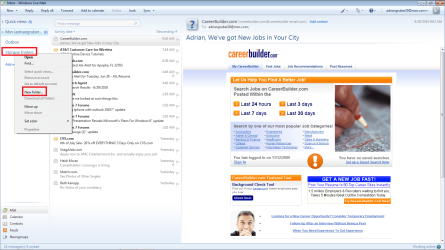
Songkrai, I created a screenshot of my windows live mail client and it shows how to create a folder in the dropdown menu on the left.
 

Attachments

  • mail.png
    mail.png
    112.4 KB · Views: 42

My Computer

Computer Manufacturer/Model Number
Custom Build
OS
Windows 7 7600 1 X64
CPU
AMD PHENOM II X 550 PROCESSOR 3.1 ghz
Motherboard
ASUS M4A78-TE
Memory
Corsair 4 gig ddr 3
Graphics Card(s)
ati radeon 3300
Sound Card
ati hd
Monitor(s) Displays
syncmaster 2033sw
Screen Resolution
1600X900 60 hz refresh
Hard Drives
twin_seagates SATA's 1 TB & 500 Gig, hitachi_slimline 160 gig
PSU
antec_550 watt
Case
cooler master GLite
Cooling
stock_heat sink
Internet Speed
20mbs up/ 1.5mbs down
Other Info
favorite child "stewie"
favorite dog "brian"
Windows Live Hotmail
Powerful free e-mail with security from Microsoft - Windows Live Hotmail is a best in class e-mail service that helps you organize and manage all your ...
mail.live.com/ - Cached - Similar
Open Windows Live Mail. If you cant see the toolbar (File, Edit, View etc.) Press Alt+M on your keyboard. Choose "Show Toolbar".
Click "File" Click "New Folder" Select where you want the new folder and give it a name. Job done!
 

My Computer

Computer type
PC/Desktop
OS
Microsoft Windows 7 Home Premium 64-bit 7601 Multiprocessor Free Service Pack 1
CPU
Intel(R) Core(TM) i7-3770 CPU @ 3.40GHz
Motherboard
ASUSTeK COMPUTER INC. P8H77-M
Memory
8.00 GB
Graphics Card(s)
Intel(R) HD Graphics 4000
Sound Card
On Board
Monitor(s) Displays
Dell 24"
Screen Resolution
1920 x 1080
Hard Drives
(1) INTEL SSDSC2CT180A3 ATA Device (2) ST500DM002-1BD142 ATA Device (3) WDC WD3200AAKS-75L9A0 ATA Device (4) Generic- Compact Flash USB Device (5) Generic- MS/MS-Pro USB Device (6) Generic- SD/MMC USB Device (7) Generic- SM/xD-Picture USB
PSU
500w Corsair
Case
Cooler Master
Cooling
3 Fans
Keyboard
Logitech MK300
Mouse
Logitech WOM
Internet Speed
75Mb
Antivirus
Norton 360
Browser
Firefox, Opera, IE
Songkrai, I created a screenshot of my windows live mail client and it shows how to create a folder in the dropdown menu on the left.


I don't have that screen when I get to Hotmail. And I don't know what way I get there other than www.hotmail.com. I actually have an icon on my destop that gets me there - and I dont' have a clue as to which way the icon is getting me there.
 

My Computer

Computer Manufacturer/Model Number
Dell XPS 410
OS
Windows 7
CPU
unknow
Motherboard
unkown
Memory
2
Graphics Card(s)
LE
Sound Card
LE
Monitor(s) Displays
Samsung
Hard Drives
Unknow
PSU
What is PSU?
Case
Plastic
Cooling
Fan
Windows Live Hotmail
Powerful free e-mail with security from Microsoft - Windows Live Hotmail is a best in class e-mail service that helps you organize and manage all your ...
mail.live.com/ - Cached - Similar
Open Windows Live Mail. If you cant see the toolbar (File, Edit, View etc.) Press Alt+M on your keyboard. Choose "Show Toolbar".
Click "File" Click "New Folder" Select where you want the new folder and give it a name. Job done!


When I click on Alt+M all I get is a dialog box that states:

Google
Add or Change Homepage
Remove

That's it.

Thanks.
 

My Computer

Computer Manufacturer/Model Number
Dell XPS 410
OS
Windows 7
CPU
unknow
Motherboard
unkown
Memory
2
Graphics Card(s)
LE
Sound Card
LE
Monitor(s) Displays
Samsung
Hard Drives
Unknow
PSU
What is PSU?
Case
Plastic
Cooling
Fan
I don't know if this makes any difference.

I have more than one Hotmail email address.

I signed out of my "problem" email address and signed into my other Hotmail address - and low and behold on the left side is "Manage Folders" in blue.

When I went back to my primary (the one I use the most) Hotmail email address - the "Manage Folders" is not there.

There must be a box, setting, default, or something that I have checked or unchecked that is missing on this one Hotmail email address.
 

My Computer

Computer Manufacturer/Model Number
Dell XPS 410
OS
Windows 7
CPU
unknow
Motherboard
unkown
Memory
2
Graphics Card(s)
LE
Sound Card
LE
Monitor(s) Displays
Samsung
Hard Drives
Unknow
PSU
What is PSU?
Case
Plastic
Cooling
Fan
When viewing your inbox in Hotmail, scroll down the list of your current folders on the left side of the screen and you should see a link titled "Manage Folders". Click on that, which will bring you to a page where you can add new, rename or delete folders.


Thank you. THAT does sum up my issue. There is no Folders option. Folders is not there. I do have all my other folders. I have about a dozen and all do show up.

The Manage Folders is nowhere to be seen. It is not there. That is my issue. I have everything else. Everything but Manage Folders. And only on this one email address.

Others have asked how I access Hotmail. I have no idea what this means. I do not use Outlook. And if there are different ways to access Hotmail, then please state the different ways. And please be specific and detailed.

Thanks.
 

My Computer

Computer Manufacturer/Model Number
Dell XPS 410
OS
Windows 7
CPU
unknow
Motherboard
unkown
Memory
2
Graphics Card(s)
LE
Sound Card
LE
Monitor(s) Displays
Samsung
Hard Drives
Unknow
PSU
What is PSU?
Case
Plastic
Cooling
Fan
I viewed this but I can't seem to find it. I went to Options, the More Options.

And I get a completely different screen with no option to revert back.


Switch back to original MSN Hotmail

If you want to revert back to MSN Hotmail, and don’t care whether you have the free 2GB mail space, click on Options on the top right corner (in full version, a pull down menu will be shown, where you should further click on More Options). You will see the following message.
For full version:
You’re using the full version of Windows Live Hotmail.
Click here to try the classic version, which is good for slow connections.
You can also Switch to MSN Hotmail.
For classic version:
You are using the classic version of Windows Live Hotmail.
Have a fast connection and want more features? Try the full version to see message previews in your inbox. (It’s free, too.)
You can also Switch to MSN Hotmail.
So to revert, click on “Switch to MSN Hotmail”. In the Switch Back page, confirm by clicking on Switch back button. And you’re back to original MSN Hotmail.
 

My Computer

Computer Manufacturer/Model Number
Dell XPS 410
OS
Windows 7
CPU
unknow
Motherboard
unkown
Memory
2
Graphics Card(s)
LE
Sound Card
LE
Monitor(s) Displays
Samsung
Hard Drives
Unknow
PSU
What is PSU?
Case
Plastic
Cooling
Fan
... I went to Options, the More Options.

And I get a completely different screen with no option to revert back...

I get the same thing, no options to change versions. Here is the "more options" link:
Sign In
 

My Computer

Computer type
PC/Desktop
Computer Manufacturer/Model Number
OQO 2+
OS
Windows 8 Pro w/MC 32-bit
CPU
Intel Atom 1.86 GHz
Motherboard
OQO 2+
Memory
2 GB
Graphics Card(s)
Intel GMA 500
Sound Card
IDT
Monitor(s) Displays
LCD
Screen Resolution
800 x 480 (portable) 1280 x 1024 (docked)
Hard Drives
64 GB SSD
PSU
9 Ah Battery (portable) or OQO Brick (docked)
Case
Shirt Pocket Sized
Cooling
Tiny Fan
Keyboard
Slide out (portable) DiNovo Edge (docked)
Mouse
Eraser head (portable) Logitech Bluetooth (docked)
Internet Speed
WWAN or 802.11G (portable) T1 (docked)
Browser
IE 10
Other Info
DVD-RW OQO Docking Station
Windows Live Hotmail
Powerful free e-mail with security from Microsoft - Windows Live Hotmail is a best in class e-mail service that helps you organize and manage all your ...
mail.live.com/ - Cached - Similar
Open Windows Live Mail. If you cant see the toolbar (File, Edit, View etc.) Press Alt+M on your keyboard. Choose "Show Toolbar".
Click "File" Click "New Folder" Select where you want the new folder and give it a name. Job done!


Thank you.

All I get when I do this is:

New Tab
New Window
New Session
Open
Edit (in light gray)
Save (in light gray)
Save as
Close tab
Page Setup
Print
Print Preview
Send
Imort and Export
Properties
Work Offline
Exit


I don't get any Folder options or New Folder.
 

My Computer

Computer Manufacturer/Model Number
Dell XPS 410
OS
Windows 7
CPU
unknow
Motherboard
unkown
Memory
2
Graphics Card(s)
LE
Sound Card
LE
Monitor(s) Displays
Samsung
Hard Drives
Unknow
PSU
What is PSU?
Case
Plastic
Cooling
Fan
It looks like songkrai is referring to Windows Live HOTMAIL. Mitchel65 is referring to Windows Live Mail. The first is a website for web-based email and the latter is a downloadable email program.
 

My Computer

Computer type
PC/Desktop
Computer Manufacturer/Model Number
OQO 2+
OS
Windows 8 Pro w/MC 32-bit
CPU
Intel Atom 1.86 GHz
Motherboard
OQO 2+
Memory
2 GB
Graphics Card(s)
Intel GMA 500
Sound Card
IDT
Monitor(s) Displays
LCD
Screen Resolution
800 x 480 (portable) 1280 x 1024 (docked)
Hard Drives
64 GB SSD
PSU
9 Ah Battery (portable) or OQO Brick (docked)
Case
Shirt Pocket Sized
Cooling
Tiny Fan
Keyboard
Slide out (portable) DiNovo Edge (docked)
Mouse
Eraser head (portable) Logitech Bluetooth (docked)
Internet Speed
WWAN or 802.11G (portable) T1 (docked)
Browser
IE 10
Other Info
DVD-RW OQO Docking Station
From reading all, I think my Hotmail account is web based.

So how does one change or fix a web based email account?
 

My Computer

Computer Manufacturer/Model Number
Dell XPS 410
OS
Windows 7
CPU
unknow
Motherboard
unkown
Memory
2
Graphics Card(s)
LE
Sound Card
LE
Monitor(s) Displays
Samsung
Hard Drives
Unknow
PSU
What is PSU?
Case
Plastic
Cooling
Fan
Back
Top