How can I add FLAC files to my WMP 12 library?

Think I might have found something. I got MP3tag editor and I noticed, when checking the the tags that both albums had the same album title. Now, I've barely used MP3Tag, if ever, so how does one quickly change an entire column's worth of album titles back to the correct one, e.g. from "With the Beatles" to "Please Please Me". I hate having to go through each and every track typing in "Please Please Me" 14 separate times.
CTRL-A should select all and highlight the entire column....then just change the album title on the left, and then click the floppy disk icon to save the changes.:cool:
 

My Computer My Computer

At a glance

Win 7 Ultimate 64-bit SP1 (desktop)Intel Core 2 Duo E84002x 2GB OCZ DDR II SDRAM PC2-6400NVIDIA GeForce 9400GT
Computer type
PC/Desktop
Computer Manufacturer/Model Number
Gigabyte Technology Co., Ltd.
OS
Win 7 Ultimate 64-bit SP1 (desktop)
CPU
Intel Core 2 Duo E8400
Motherboard
Gigabyte GA-EP35-DS3R
Memory
2x 2GB OCZ DDR II SDRAM PC2-6400
Graphics Card(s)
NVIDIA GeForce 9400GT
Monitor(s) Displays
HP 2009m(primary), Acer P191W
Screen Resolution
1600x900, 1440x900
Hard Drives
Internal:WD Caviar Black 640GB 32MB cache 7200RPM
External:Samsung Story Station 1TB HDD desktop drive
500GB Toshiba portable drive
PSU
Antec Earthwatts EA500D
Case
Antec Sonata III
Cooling
4 fans
Keyboard
Logitech Wave
Mouse
Logitech M-SBF90
Internet Speed
Slow due to home Wireless-G router
Antivirus
MSE, Hitman Pro, Malwarebytes
Browser
Chrome and Palemoon
Other Info
Laptop....Acer 5750Z-4835
15.6" HD Widescreen CineCrystal™ LED-backlit LCD Display: (1366x768 resolution, 16:9 aspect ratio)
Intel® Pentium® Processor B940 (2.0GHz, 2MB L3 cache)
Windows® 7 Home Premium,500GB Hard Drive,4GB DDR3 RAM, Intel® HD Graphics,8X DVD-Super Multi Double-Layer Drive
Multi-in-1 Digital Media Card Reader,802.11b/g/n Wi-Fi
Chrome and Palemoon, MSE, Hitman Pro
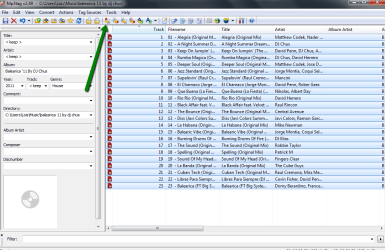
select the album you want to change tags for and right click the folder, if you have mp3tag in the context menu then click it ,it will open the album in mp3tag.
then highlight all the tracks and click the tag to filename,

2011-11-20_1745.png
 

My Computer My Computer

At a glance

Microsoft Windows 7 Home Premium 64-bit 7600IIx4 amd athelon 635 processor2x2gbati radeon HD 5450
Computer Manufacturer/Model Number
Hewlett packard/p6512uk
OS
Microsoft Windows 7 Home Premium 64-bit 7600
CPU
IIx4 amd athelon 635 processor
Motherboard
FOXCONN 2AA9
Memory
2x2gb
Graphics Card(s)
ati radeon HD 5450
Sound Card
(1) Realtek High Definition Audio (2) AMD High Definition
Monitor(s) Displays
samsung lcd tv 32"
Screen Resolution
1360x 768
Hard Drives
(1) WDC WD10 01FAES-60Z2A0 SATA Disk Device (2) Maxtor OneTouch USB Device (3) ST310003 33AS USB Device (4) WD My Book 1111 USB Device
PSU
?
Cooling
air!
Keyboard
wireless hp
Mouse
wireless Hp,optical
Internet Speed
1.10mb/s
Antivirus
MSE
Browser
Firefox
Thanks. Another quick question as I hardly ever use it, "How does one bring up the window (column if you will) with all the separate fields on the left hand margin? Sorry, I know the answer is basic, but when I use MP3Tag maybe, two or three times a year, I forget the basics.
 

My Computer My Computer

At a glance

Windows 7 64 bit
OS
Windows 7 64 bit
select the album you want to change tags for and right click the folder, if you have mp3tag in the context menu then click it ,it will open the album in mp3tag.
then highlight all the tracks and click the tag to filename,

View attachment 184614

How'd you get the column to appear on the left hand side? Mine just has track as it appears on the right. Sorry for such a dumb question. Used to know the answer but long since forgotten it.
 

My Computer My Computer

At a glance

Windows 7 64 bit
OS
Windows 7 64 bit
Nevermind. Got it. View>Tag Panel (Select/Check) Thanks boohbah and noobvious! God, my brain feels swollen! Thanks again!
 

My Computer My Computer

At a glance

Windows 7 64 bit
OS
Windows 7 64 bit
no worries. :)
 

My Computer My Computer

At a glance

Microsoft Windows 7 Home Premium 64-bit 7600IIx4 amd athelon 635 processor2x2gbati radeon HD 5450
Computer Manufacturer/Model Number
Hewlett packard/p6512uk
OS
Microsoft Windows 7 Home Premium 64-bit 7600
CPU
IIx4 amd athelon 635 processor
Motherboard
FOXCONN 2AA9
Memory
2x2gb
Graphics Card(s)
ati radeon HD 5450
Sound Card
(1) Realtek High Definition Audio (2) AMD High Definition
Monitor(s) Displays
samsung lcd tv 32"
Screen Resolution
1360x 768
Hard Drives
(1) WDC WD10 01FAES-60Z2A0 SATA Disk Device (2) Maxtor OneTouch USB Device (3) ST310003 33AS USB Device (4) WD My Book 1111 USB Device
PSU
?
Cooling
air!
Keyboard
wireless hp
Mouse
wireless Hp,optical
Internet Speed
1.10mb/s
Antivirus
MSE
Browser
Firefox
I went the easy way. Renamed the files from .flac to .flac.mp3 !

It works :)

Edit: No sorry, it doesn't work as WMP isn't recognizing the tags for the files.
 

My Computer My Computer

At a glance

Windows 7 x64
Computer type
PC/Desktop
OS
Windows 7 x64
I sympathize with you. The plugin mentioned in these posts does not work with WMP12. I have tried it a dozen times. Even worse, it crashes when adding flac files. I don't understand why they say it works in WMP12 when it is really a mess! I can tell you, however, that it did work in WMP10 and 11. With every new release MS always manages to remove functionality in its' players, until they become useless unless you only care for mp3 and wma, which I particularly don't...
 

My Computer My Computer

At a glance

Windows 8.1 Pro x64i7 4770 3.4GHz32GBNvidia 1GB
Computer type
PC/Desktop
Computer Manufacturer/Model Number
custom build, Inter mbo, nvidia graphics
OS
Windows 8.1 Pro x64
CPU
i7 4770 3.4GHz
Motherboard
Intel Core i7
Memory
32GB
Graphics Card(s)
Nvidia 1GB
Hard Drives
1x 1.5TB
1x 1TB
1x 150GB
Antivirus
Windows Defender
Browser
Firefox26 and IE11
Are you referring to the WMP Tag Plus plug-in? I'm the author of that plug-in and it's working fine with WMP 12 here.

Please contact me privately through email so we can further troubleshoot this. You can use the email link on the left at http://www.bm-productions.tk.
 

My Computer My Computer

At a glance

Windows 10
Computer type
PC/Desktop
OS
Windows 10
Thx for the quick reply, yes this is the plugin I'm referring to ...Will contact you shortly.
 

My Computer My Computer

At a glance

Windows 8.1 Pro x64i7 4770 3.4GHz32GBNvidia 1GB
Computer type
PC/Desktop
Computer Manufacturer/Model Number
custom build, Inter mbo, nvidia graphics
OS
Windows 8.1 Pro x64
CPU
i7 4770 3.4GHz
Motherboard
Intel Core i7
Memory
32GB
Graphics Card(s)
Nvidia 1GB
Hard Drives
1x 1.5TB
1x 1TB
1x 150GB
Antivirus
Windows Defender
Browser
Firefox26 and IE11

My Computer My Computer

At a glance

Windows 8.1 Pro x64i7 4770 3.4GHz32GBNvidia 1GB
Computer type
PC/Desktop
Computer Manufacturer/Model Number
custom build, Inter mbo, nvidia graphics
OS
Windows 8.1 Pro x64
CPU
i7 4770 3.4GHz
Motherboard
Intel Core i7
Memory
32GB
Graphics Card(s)
Nvidia 1GB
Hard Drives
1x 1.5TB
1x 1TB
1x 150GB
Antivirus
Windows Defender
Browser
Firefox26 and IE11

My Computer My Computer

At a glance

Windows 8.1 Pro x64i7 4770 3.4GHz32GBNvidia 1GB
Computer type
PC/Desktop
Computer Manufacturer/Model Number
custom build, Inter mbo, nvidia graphics
OS
Windows 8.1 Pro x64
CPU
i7 4770 3.4GHz
Motherboard
Intel Core i7
Memory
32GB
Graphics Card(s)
Nvidia 1GB
Hard Drives
1x 1.5TB
1x 1TB
1x 150GB
Antivirus
Windows Defender
Browser
Firefox26 and IE11
OK, I'm in...Do I click on the email icon to the right...?

I downloaded v2.2 last week
 

My Computer My Computer

At a glance

Windows 8.1 Pro x64i7 4770 3.4GHz32GBNvidia 1GB
Computer type
PC/Desktop
Computer Manufacturer/Model Number
custom build, Inter mbo, nvidia graphics
OS
Windows 8.1 Pro x64
CPU
i7 4770 3.4GHz
Motherboard
Intel Core i7
Memory
32GB
Graphics Card(s)
Nvidia 1GB
Hard Drives
1x 1.5TB
1x 1TB
1x 150GB
Antivirus
Windows Defender
Browser
Firefox26 and IE11
Yes, the email icon on the left.
 

My Computer My Computer

At a glance

Windows 10
Computer type
PC/Desktop
OS
Windows 10
Back
Top