How can I backup my DVDs for quick & easy access?

Yeah but I'd like it to pull the artwork so it shows up in Media center instead of a big green poster or something.

Will Handbrake pull the artwork?

No copying/encoding software can pull the movie artwork. Either you have to install a media manager in your media center (as wishmaster suggested), or you may download them manually (what I do).

I obtain the movie posters from google search, and place them in a folder where the movie is located, rename the poster as Folder.jpg, and thats all.
 

My Computer My Computer

At a glance

Microsoft Windows 10 Pro Insider Preview 64-bitIntel(R) Core(TM) i3-4130 CPU @ 3.40GHzCorsair Vengence 4GB x2 (8.00GB Dual-Channel ...2047MB GeForce GTS 450 (ZOTAC International)
Computer type
PC/Desktop
Computer Manufacturer/Model Number
Self Assembled
OS
Microsoft Windows 10 Pro Insider Preview 64-bit
CPU
Intel(R) Core(TM) i3-4130 CPU @ 3.40GHz
Motherboard
Gigabyte Technology Co., Ltd. B85M-D3H
Memory
Corsair Vengence 4GB x2 (8.00GB Dual-Channel DDR3 @ 798MHz)
Graphics Card(s)
2047MB GeForce GTS 450 (ZOTAC International)
Sound Card
Onboard (Realtek High Definition Audio)
Monitor(s) Displays
LG Flatron E2040T
Screen Resolution
1600x900
Hard Drives
Western Digital 1 TB
Seagate 500 GB
PSU
Corsair VS550
Case
Cooler Master K380
Cooling
Cooler Master Seidon 120V Plus
Keyboard
Logitech MK260r
Mouse
Logitech MK260r
Internet Speed
PMPL Broadband
Antivirus
Windows Defender + MBAM
Browser
Firefox
Other Info
Dell Studio 15" Laptop
Yeah but I'd like it to pull the artwork so it shows up in Media center instead of a big green poster or something.

Will Handbrake pull the artwork?

No copying/encoding software can pull the movie artwork. Either you have to install a media manager in your media center (as wishmaster suggested), or you may download them manually (what I do).

I obtain the movie posters from google search, and place them in a folder where the movie is located, rename the poster as Folder.jpg, and thats all.

What else will a media manager do other than grab artwork & info etc?

I'm already using the folder.jpg with the file2folder option, but having to grab artwork & info just seems time consuming if there is a program that will pull all the meta data.
 

My Computer My Computer

At a glance

Windows 7 64 & Ubuntu 64Intel Quad Core Q6600 2.40GHz8gNvidia 9600 GT & 9800 GT
Computer Manufacturer/Model Number
Built it myself
OS
Windows 7 64 & Ubuntu 64
CPU
Intel Quad Core Q6600 2.40GHz
Motherboard
Asus
Memory
8g
Graphics Card(s)
Nvidia 9600 GT & 9800 GT
Sound Card
Turtle Beach 5.1
Monitor(s) Displays
Three 19" Dell's & one 46" Samsung 750
Yeah but I'd like it to pull the artwork so it shows up in Media center instead of a big green poster or something.

Will Handbrake pull the artwork?

No copying/encoding software can pull the movie artwork. Either you have to install a media manager in your media center (as wishmaster suggested), or you may download them manually (what I do).

I obtain the movie posters from google search, and place them in a folder where the movie is located, rename the poster as Folder.jpg, and thats all.

What else will a media manager do other than grab artwork & info etc?

I'm already using the folder.jpg with the file2folder option, but having to grab artwork & info just seems time consuming if there is a program that will pull all the meta data.

Did you try YAMMM?
 

My Computer My Computer

At a glance

Win 10 Pro x64Intel I5-2500K @3.3GHz16GB G.Skill Ripjaws X (4x4GB)EVGA GeForce 750 Ti SC 2GB
Computer type
PC/Desktop
Computer Manufacturer/Model Number
Self Built
OS
Win 10 Pro x64
CPU
Intel I5-2500K @3.3GHz
Motherboard
Asrock P67 Extreme4
Memory
16GB G.Skill Ripjaws X (4x4GB)
Graphics Card(s)
EVGA GeForce 750 Ti SC 2GB
Sound Card
ASUS Xonar DG 5.1 Channels 24-bit 96KHz PCI Interface Sound
Monitor(s) Displays
auria eq2367
Screen Resolution
1920 x 1080
Hard Drives
250GB Samsung 850 EVO SSD
1TB WD Blue
1TB Hitachi
PSU
SeaSonic X 650W 80 Plus Gold
Case
Corsair Obsidian 750D
Cooling
Corsair H60, Three 140mm case fans
Keyboard
Logitech Wireless Keyboard K520
Mouse
Logitech Wireless Mouse M310
Internet Speed
Wave Broadband ~ 100 dn 5 up
Antivirus
Windows Defender, Malwarebytes Premium
Browser
Edge, IE11, Chrome
Other Info
Laptop specs: HP g7-1365dx /
CPU: AMD A6-3420M APU with Radeon(tm) HD Graphics /
RAM: Crucial 8Gb (2x4Gb) /
SSD: Crucial M4-CT128M4SSD2 ATA Device/ FW 000F /
GFX: AMD Radeon HD 6520G /
OS: Windows 10 Pro x64
No copying/encoding software can pull the movie artwork. Either you have to install a media manager in your media center (as wishmaster suggested), or you may download them manually (what I do).

I obtain the movie posters from google search, and place them in a folder where the movie is located, rename the poster as Folder.jpg, and thats all.

What else will a media manager do other than grab artwork & info etc?

I'm already using the folder.jpg with the file2folder option, but having to grab artwork & info just seems time consuming if there is a program that will pull all the meta data.

Did you try YAMMM?

Not yet. I just read the link & it seems promising.

But when do I run this program? Is it something that always runs in the background, or do I have to run it every time I rip a movie?
 

My Computer My Computer

At a glance

Windows 7 64 & Ubuntu 64Intel Quad Core Q6600 2.40GHz8gNvidia 9600 GT & 9800 GT
Computer Manufacturer/Model Number
Built it myself
OS
Windows 7 64 & Ubuntu 64
CPU
Intel Quad Core Q6600 2.40GHz
Motherboard
Asus
Memory
8g
Graphics Card(s)
Nvidia 9600 GT & 9800 GT
Sound Card
Turtle Beach 5.1
Monitor(s) Displays
Three 19" Dell's & one 46" Samsung 750
What else will a media manager do other than grab artwork & info etc?

I'm already using the folder.jpg with the file2folder option, but having to grab artwork & info just seems time consuming if there is a program that will pull all the meta data.

Did you try YAMMM?

Not yet. I just read the link & it seems promising.

But when do I run this program? Is it something that always runs in the background, or do I have to run it every time I rip a movie?

No it installs a service that runs in the background and every time you add a movie it d/l the coverart and metadata, Just make sure the name of the movie is spelled correctly and it will find it. And use that link I gave you earlier in this thread cause the other one hasn't been updated...nevermind here it is again,
mikinhosoft: Yammm - Yet Another Media Meta Manager then just use the settings in the "setting up media center library" thread for YAMMM. You'll be all set, never even know it's there till you add a movie.
 

My Computer My Computer

At a glance

Win 10 Pro x64Intel I5-2500K @3.3GHz16GB G.Skill Ripjaws X (4x4GB)EVGA GeForce 750 Ti SC 2GB
Computer type
PC/Desktop
Computer Manufacturer/Model Number
Self Built
OS
Win 10 Pro x64
CPU
Intel I5-2500K @3.3GHz
Motherboard
Asrock P67 Extreme4
Memory
16GB G.Skill Ripjaws X (4x4GB)
Graphics Card(s)
EVGA GeForce 750 Ti SC 2GB
Sound Card
ASUS Xonar DG 5.1 Channels 24-bit 96KHz PCI Interface Sound
Monitor(s) Displays
auria eq2367
Screen Resolution
1920 x 1080
Hard Drives
250GB Samsung 850 EVO SSD
1TB WD Blue
1TB Hitachi
PSU
SeaSonic X 650W 80 Plus Gold
Case
Corsair Obsidian 750D
Cooling
Corsair H60, Three 140mm case fans
Keyboard
Logitech Wireless Keyboard K520
Mouse
Logitech Wireless Mouse M310
Internet Speed
Wave Broadband ~ 100 dn 5 up
Antivirus
Windows Defender, Malwarebytes Premium
Browser
Edge, IE11, Chrome
Other Info
Laptop specs: HP g7-1365dx /
CPU: AMD A6-3420M APU with Radeon(tm) HD Graphics /
RAM: Crucial 8Gb (2x4Gb) /
SSD: Crucial M4-CT128M4SSD2 ATA Device/ FW 000F /
GFX: AMD Radeon HD 6520G /
OS: Windows 10 Pro x64
Did you try YAMMM?

Not yet. I just read the link & it seems promising.

But when do I run this program? Is it something that always runs in the background, or do I have to run it every time I rip a movie?

No it installs a service that runs in the background and every time you add a movie it d/l the coverart and metadata, Just make sure the name of the movie is spelled correctly and it will find it. And use that link I gave you earlier in this thread cause the other one hasn't been updated...nevermind here it is again,
mikinhosoft: Yammm - Yet Another Media Meta Manager then just use the settings in the "setting up media center library" thread for YAMMM. You'll be all set, never even know it's there till you add a movie.

Ok nice I'll download that shortly.

What about all of the movies I just ripped with DVDShrink? Will it download all of that stuff?

This works within Media Center right?
 

My Computer My Computer

At a glance

Windows 7 64 & Ubuntu 64Intel Quad Core Q6600 2.40GHz8gNvidia 9600 GT & 9800 GT
Computer Manufacturer/Model Number
Built it myself
OS
Windows 7 64 & Ubuntu 64
CPU
Intel Quad Core Q6600 2.40GHz
Motherboard
Asus
Memory
8g
Graphics Card(s)
Nvidia 9600 GT & 9800 GT
Sound Card
Turtle Beach 5.1
Monitor(s) Displays
Three 19" Dell's & one 46" Samsung 750
Not yet. I just read the link & it seems promising.

But when do I run this program? Is it something that always runs in the background, or do I have to run it every time I rip a movie?

No it installs a service that runs in the background and every time you add a movie it d/l the coverart and metadata, Just make sure the name of the movie is spelled correctly and it will find it. And use that link I gave you earlier in this thread cause the other one hasn't been updated...nevermind here it is again,
mikinhosoft: Yammm - Yet Another Media Meta Manager then just use the settings in the "setting up media center library" thread for YAMMM. You'll be all set, never even know it's there till you add a movie.

Ok nice I'll download that shortly.

What about all of the movies I just ripped with DVDShrink? Will it download all of that stuff?

This works within Media Center right?

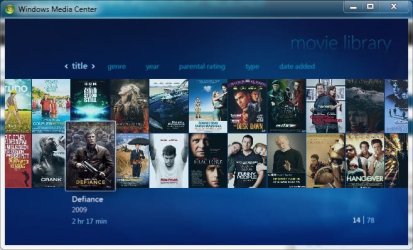
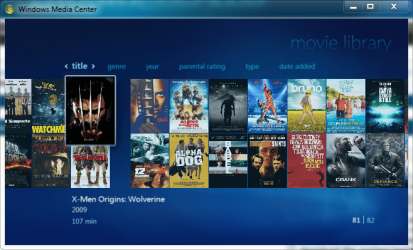
As long as your movies are titled correctly and you tell Yammm what folder to watch for movies, which should also be the same one you tell media center to watch, your media center library will look like this,
So yes it will d/l all the stuff for your movies if it knows where to look for them.:D
 

Attachments

  • Movie Library.JPG
    Movie Library.JPG
    55.8 KB · Views: 11

My Computer My Computer

At a glance

Win 10 Pro x64Intel I5-2500K @3.3GHz16GB G.Skill Ripjaws X (4x4GB)EVGA GeForce 750 Ti SC 2GB
Computer type
PC/Desktop
Computer Manufacturer/Model Number
Self Built
OS
Win 10 Pro x64
CPU
Intel I5-2500K @3.3GHz
Motherboard
Asrock P67 Extreme4
Memory
16GB G.Skill Ripjaws X (4x4GB)
Graphics Card(s)
EVGA GeForce 750 Ti SC 2GB
Sound Card
ASUS Xonar DG 5.1 Channels 24-bit 96KHz PCI Interface Sound
Monitor(s) Displays
auria eq2367
Screen Resolution
1920 x 1080
Hard Drives
250GB Samsung 850 EVO SSD
1TB WD Blue
1TB Hitachi
PSU
SeaSonic X 650W 80 Plus Gold
Case
Corsair Obsidian 750D
Cooling
Corsair H60, Three 140mm case fans
Keyboard
Logitech Wireless Keyboard K520
Mouse
Logitech Wireless Mouse M310
Internet Speed
Wave Broadband ~ 100 dn 5 up
Antivirus
Windows Defender, Malwarebytes Premium
Browser
Edge, IE11, Chrome
Other Info
Laptop specs: HP g7-1365dx /
CPU: AMD A6-3420M APU with Radeon(tm) HD Graphics /
RAM: Crucial 8Gb (2x4Gb) /
SSD: Crucial M4-CT128M4SSD2 ATA Device/ FW 000F /
GFX: AMD Radeon HD 6520G /
OS: Windows 10 Pro x64
No it installs a service that runs in the background and every time you add a movie it d/l the coverart and metadata, Just make sure the name of the movie is spelled correctly and it will find it. And use that link I gave you earlier in this thread cause the other one hasn't been updated...nevermind here it is again,
mikinhosoft: Yammm - Yet Another Media Meta Manager then just use the settings in the "setting up media center library" thread for YAMMM. You'll be all set, never even know it's there till you add a movie.

Ok nice I'll download that shortly.

What about all of the movies I just ripped with DVDShrink? Will it download all of that stuff?

This works within Media Center right?

As long as your movies are titled correctly and you tell Yammm what folder to watch for movies, which should also be the same one you tell media center to watch, your media center library will look like this,
So yes it will d/l all the stuff for your movies if it knows where to look for them.:D

Ok great so everything seems to have installed properly... where/how do I activate it to download the 50 or so dvds I've ripped recently?

Just turn Media Center on?

---------- Post added at 04:45 AM ---------- Previous post was at 04:41 AM ----------

Ok nice I'll download that shortly.

What about all of the movies I just ripped with DVDShrink? Will it download all of that stuff?

This works within Media Center right?

As long as your movies are titled correctly and you tell Yammm what folder to watch for movies, which should also be the same one you tell media center to watch, your media center library will look like this,
So yes it will d/l all the stuff for your movies if it knows where to look for them.:D

Ok great so everything seems to have installed properly... where/how do I activate it to download the 50 or so dvds I've ripped recently?

Just turn Media Center on?

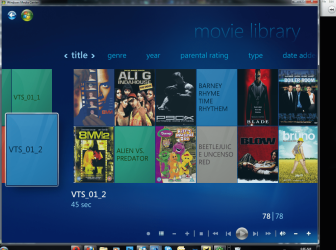
Hmm ok it seems to have downloaded a bunch of posters, but there are still a lot with out posters. I'm sure there are some it wont find, but things like Alien vs. Predator, Blade, all the Matrix' etc, there are big name movies I have that it didnt download the posters/meta data for?

Also why does my MC look different than yours? I have a break in mine or something & it seems to be a real pain to scroll through?

Is there any way I can set it up to scroll through the movies with the mouse wheel?
 

Attachments

  • Untitled.png
    Untitled.png
    363.3 KB · Views: 9

My Computer My Computer

At a glance

Windows 7 64 & Ubuntu 64Intel Quad Core Q6600 2.40GHz8gNvidia 9600 GT & 9800 GT
Computer Manufacturer/Model Number
Built it myself
OS
Windows 7 64 & Ubuntu 64
CPU
Intel Quad Core Q6600 2.40GHz
Motherboard
Asus
Memory
8g
Graphics Card(s)
Nvidia 9600 GT & 9800 GT
Sound Card
Turtle Beach 5.1
Monitor(s) Displays
Three 19" Dell's & one 46" Samsung 750
This info may be late to the scene but its about Shrink.
DvD Shrink is a dated program, yet still functional. It has trouble with some of the newer encription and so then you will need something like anydvd. Shrink by default breaks up vob files into 1gig chunks. But you can edit that setting.

DvDFab is a decent app. But got me into creating a rip folder with categorys, if you'll forgive the term, XP style. I've been following this thread because I'd like to take advantage of MC as well. Now the folder deal is nice because I can use speech to just open the folder and play the file. But with 7 my thoughts are some kind of forward thinking would be better.
 

My Computer My Computer

At a glance

10 x64 | 7 x64AMD FX-9590 Vishera 4.7 | i5 Sandy Bridge16 gigs Crucial Ballistix | 8 gigs Adata ddr3...RX-570 4gd5 | Intel HD 3000
Computer type
PC/Desktop
Computer Manufacturer/Model Number
Self - Build | Asus K53e Laptop
OS
10 x64 | 7 x64
CPU
AMD FX-9590 Vishera 4.7 | i5 Sandy Bridge
Motherboard
MSI 990 FXA | K53e
Memory
16 gigs Crucial Ballistix | 8 gigs Adata ddr3 1600
Graphics Card(s)
RX-570 4gd5 | Intel HD 3000
Sound Card
Realtek HD OnBoard Audio
Monitor(s) Displays
Samsung 22" & 37" Toshiba | 15.6
Hard Drives
ADATA 240 ssd & 750 Caviar Black 7200 sata | 250 840 EVO ssd & samsung ssd
PSU
Thermaltake 700 | 65w
Case
CoolMaster Centurion 534+
Cooling
Corsair H60
Keyboard
Rosewill RK-800G PS/2 Gaming Keyboard | Asus Chiclet
Mouse
Ventus | MS w/side buttons
Internet Speed
RoadRunner
Other Info
I hate the smell of friggin corn chip butt breath snacks.
Ok nice I'll download that shortly.

What about all of the movies I just ripped with DVDShrink? Will it download all of that stuff?

This works within Media Center right?

As long as your movies are titled correctly and you tell Yammm what folder to watch for movies, which should also be the same one you tell media center to watch, your media center library will look like this,
So yes it will d/l all the stuff for your movies if it knows where to look for them.:D

Ok great so everything seems to have installed properly... where/how do I activate it to download the 50 or so dvds I've ripped recently?

Just turn Media Center on?

---------- Post added at 04:45 AM ---------- Previous post was at 04:41 AM ----------

As long as your movies are titled correctly and you tell Yammm what folder to watch for movies, which should also be the same one you tell media center to watch, your media center library will look like this,
So yes it will d/l all the stuff for your movies if it knows where to look for them.:D

Ok great so everything seems to have installed properly... where/how do I activate it to download the 50 or so dvds I've ripped recently?

Just turn Media Center on?

Hmm ok it seems to have downloaded a bunch of posters, but there are still a lot with out posters. I'm sure there are some it wont find, but things like Alien vs. Predator, Blade, all the Matrix' etc, there are big name movies I have that it didnt download the posters/meta data for?

Also why does my MC look different than yours? I have a break in mine or something & it seems to be a real pain to scroll through?

Is there any way I can set it up to scroll through the movies with the mouse wheel?

Alright, The movies it isn't finding, Go here IMDb Search and see if you can find them, make sure yours are named exactly like they are at imdb so Yammm can find them.

As for media center looking different, mine looks that way too, it's the beginning of the movie list.

I don't think you can scroll through the movies with the mouse wheel, it's either those arrows on the side or a remote.

Also those vts folders you have need to be in named folders, unless thats something else you got going on there, that one is only 45 seconds?
 

Attachments

  • movie library 2.PNG
    movie library 2.PNG
    105.6 KB · Views: 7

My Computer My Computer

At a glance

Win 10 Pro x64Intel I5-2500K @3.3GHz16GB G.Skill Ripjaws X (4x4GB)EVGA GeForce 750 Ti SC 2GB
Computer type
PC/Desktop
Computer Manufacturer/Model Number
Self Built
OS
Win 10 Pro x64
CPU
Intel I5-2500K @3.3GHz
Motherboard
Asrock P67 Extreme4
Memory
16GB G.Skill Ripjaws X (4x4GB)
Graphics Card(s)
EVGA GeForce 750 Ti SC 2GB
Sound Card
ASUS Xonar DG 5.1 Channels 24-bit 96KHz PCI Interface Sound
Monitor(s) Displays
auria eq2367
Screen Resolution
1920 x 1080
Hard Drives
250GB Samsung 850 EVO SSD
1TB WD Blue
1TB Hitachi
PSU
SeaSonic X 650W 80 Plus Gold
Case
Corsair Obsidian 750D
Cooling
Corsair H60, Three 140mm case fans
Keyboard
Logitech Wireless Keyboard K520
Mouse
Logitech Wireless Mouse M310
Internet Speed
Wave Broadband ~ 100 dn 5 up
Antivirus
Windows Defender, Malwarebytes Premium
Browser
Edge, IE11, Chrome
Other Info
Laptop specs: HP g7-1365dx /
CPU: AMD A6-3420M APU with Radeon(tm) HD Graphics /
RAM: Crucial 8Gb (2x4Gb) /
SSD: Crucial M4-CT128M4SSD2 ATA Device/ FW 000F /
GFX: AMD Radeon HD 6520G /
OS: Windows 10 Pro x64
As long as your movies are titled correctly and you tell Yammm what folder to watch for movies, which should also be the same one you tell media center to watch, your media center library will look like this,
So yes it will d/l all the stuff for your movies if it knows where to look for them.:D

Ok great so everything seems to have installed properly... where/how do I activate it to download the 50 or so dvds I've ripped recently?

Just turn Media Center on?

---------- Post added at 04:45 AM ---------- Previous post was at 04:41 AM ----------

Ok great so everything seems to have installed properly... where/how do I activate it to download the 50 or so dvds I've ripped recently?

Just turn Media Center on?

Hmm ok it seems to have downloaded a bunch of posters, but there are still a lot with out posters. I'm sure there are some it wont find, but things like Alien vs. Predator, Blade, all the Matrix' etc, there are big name movies I have that it didnt download the posters/meta data for?

Also why does my MC look different than yours? I have a break in mine or something & it seems to be a real pain to scroll through?

Is there any way I can set it up to scroll through the movies with the mouse wheel?

Alright, The movies it isn't finding, Go here IMDb Search and see if you can find them, make sure yours are named exactly like they are at imdb so Yammm can find them.

As for media center looking different, mine looks that way too, it's the beginning of the movie list.

I don't think you can scroll through the movies with the mouse wheel, it's either those arrows on the side or a remote.

Also those vts folders you have need to be in named folders, unless thats something else you got going on there, that one is only 45 seconds?

Was I supposed to click the IMBD box in YAMMM?

Also that sucks that shrink is out dated... I wish I knew that before I used it to back up all my dvds...
 

My Computer My Computer

At a glance

Windows 7 64 & Ubuntu 64Intel Quad Core Q6600 2.40GHz8gNvidia 9600 GT & 9800 GT
Computer Manufacturer/Model Number
Built it myself
OS
Windows 7 64 & Ubuntu 64
CPU
Intel Quad Core Q6600 2.40GHz
Motherboard
Asus
Memory
8g
Graphics Card(s)
Nvidia 9600 GT & 9800 GT
Sound Card
Turtle Beach 5.1
Monitor(s) Displays
Three 19" Dell's & one 46" Samsung 750
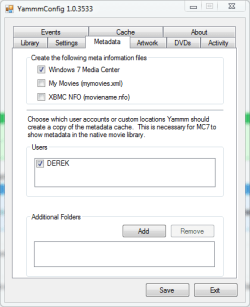
There is no imbd box in Yammm, That is where yammm gets it's movie info, that's why I said to go there to make sure your movie title is labeled correctly, I think the box you're talking about is XBMC, leave it on windows 7 media center.

EDIT: Sorry, I mistakenly said imdb is where Yammm gets it's info It's tmdb http://www.themoviedb.org/movie Sorry for the confusion. :o
 

Attachments

  • yammm.PNG
    yammm.PNG
    11 KB · Views: 3
Last edited:

My Computer My Computer

At a glance

Win 10 Pro x64Intel I5-2500K @3.3GHz16GB G.Skill Ripjaws X (4x4GB)EVGA GeForce 750 Ti SC 2GB
Computer type
PC/Desktop
Computer Manufacturer/Model Number
Self Built
OS
Win 10 Pro x64
CPU
Intel I5-2500K @3.3GHz
Motherboard
Asrock P67 Extreme4
Memory
16GB G.Skill Ripjaws X (4x4GB)
Graphics Card(s)
EVGA GeForce 750 Ti SC 2GB
Sound Card
ASUS Xonar DG 5.1 Channels 24-bit 96KHz PCI Interface Sound
Monitor(s) Displays
auria eq2367
Screen Resolution
1920 x 1080
Hard Drives
250GB Samsung 850 EVO SSD
1TB WD Blue
1TB Hitachi
PSU
SeaSonic X 650W 80 Plus Gold
Case
Corsair Obsidian 750D
Cooling
Corsair H60, Three 140mm case fans
Keyboard
Logitech Wireless Keyboard K520
Mouse
Logitech Wireless Mouse M310
Internet Speed
Wave Broadband ~ 100 dn 5 up
Antivirus
Windows Defender, Malwarebytes Premium
Browser
Edge, IE11, Chrome
Other Info
Laptop specs: HP g7-1365dx /
CPU: AMD A6-3420M APU with Radeon(tm) HD Graphics /
RAM: Crucial 8Gb (2x4Gb) /
SSD: Crucial M4-CT128M4SSD2 ATA Device/ FW 000F /
GFX: AMD Radeon HD 6520G /
OS: Windows 10 Pro x64
Shrink may be old, but its close to the best at what it does. If you really wanted the best quality, each film would be close to 7GB for standard Hollywood fare i.e. Saving Private Ryan.
 

My Computer My Computer

At a glance

Windows 7 Ultimate x86-64[email protected] 1066MHz FSB6GB DDR3 1066MHz9300M GS 256MB Dedicated (Speed) + Intel4500M...
Computer Manufacturer/Model Number
Sony Vaio Z46GDU
OS
Windows 7 Ultimate x86-64
CPU
[email protected] 1066MHz FSB
Motherboard
Sony branded
Memory
6GB DDR3 1066MHz
Graphics Card(s)
9300M GS 256MB Dedicated (Speed) + Intel4500MHD (Stamina)
Sound Card
Realtek HD Audio
Monitor(s) Displays
13.1' WXGA
Screen Resolution
1600x900
Hard Drives
320GB 7200RPM w/ 16MB cache
Internet Speed
1MB/s
There is no imbd box in Yammm, That is where yammm gets it's movie info, that's why I said to go there to make sure your movie title is labeled correctly, I think the box you're talking about is XBMC, leave it on windows 7 media center.

EDIT: Sorry, I mistakenly said imdb is where Yammm gets it's info It's tmdb welcome | themoviedb.org (TMDb) Sorry for the confusion. :o

Ahh ok I was looking at the "Use IMDB Rating" box under settings

So I guess that isnt going to import info other than stuff like rated R, PG-13 etc?

I like shrink I guess. I just wished it ripped to a single file.

Can I play these .vob files in media player?
 

My Computer My Computer

At a glance

Windows 7 64 & Ubuntu 64Intel Quad Core Q6600 2.40GHz8gNvidia 9600 GT & 9800 GT
Computer Manufacturer/Model Number
Built it myself
OS
Windows 7 64 & Ubuntu 64
CPU
Intel Quad Core Q6600 2.40GHz
Motherboard
Asus
Memory
8g
Graphics Card(s)
Nvidia 9600 GT & 9800 GT
Sound Card
Turtle Beach 5.1
Monitor(s) Displays
Three 19" Dell's & one 46" Samsung 750
There is no imbd box in Yammm, That is where yammm gets it's movie info, that's why I said to go there to make sure your movie title is labeled correctly, I think the box you're talking about is XBMC, leave it on windows 7 media center.

EDIT: Sorry, I mistakenly said imdb is where Yammm gets it's info It's tmdb welcome | themoviedb.org (TMDb) Sorry for the confusion. :o

Ahh ok I was looking at the "Use IMDB Rating" box under settings

So I guess that isnt going to import info other than stuff like rated R, PG-13 etc?

I like shrink I guess. I just wished it ripped to a single file.

Can I play these .vob files in media player?

To rip to a single file, you need to find the right PGC in Decryptor. .vob files will play in WMP if you have an MPEG-2 decoder, which WMP has included in 7.
 

My Computer My Computer

At a glance

Windows 7 Ultimate x86-64[email protected] 1066MHz FSB6GB DDR3 1066MHz9300M GS 256MB Dedicated (Speed) + Intel4500M...
Computer Manufacturer/Model Number
Sony Vaio Z46GDU
OS
Windows 7 Ultimate x86-64
CPU
[email protected] 1066MHz FSB
Motherboard
Sony branded
Memory
6GB DDR3 1066MHz
Graphics Card(s)
9300M GS 256MB Dedicated (Speed) + Intel4500MHD (Stamina)
Sound Card
Realtek HD Audio
Monitor(s) Displays
13.1' WXGA
Screen Resolution
1600x900
Hard Drives
320GB 7200RPM w/ 16MB cache
Internet Speed
1MB/s
Back
Top