HDD possibly dead, can i still backup my data?

Kx4

New member
Local time
1:57 PM
Messages
6
Hi Sevenforums.

I have recently had problems with my laptop. I believe that my HDD is about to die, or is dead, but im not sure. (Im not much of a HDD specialist).
Suddently my laptop froze completely. I had a lot of things going on, and then it just froze. There was nothing i could do, but hold the power button, to force it to shut down. When i restarted it, my nightmare began.
I could no longer boot normally, it would run VERY slow, when i tried to repair.
I have tried several attempts to regain control of my HDD.
First i had CHKDSK running, throughout the night, and it solved a bunch of errors. As i though that i have fixed the issue, it became even worse! Now i could not even boot up into the repair mode, it simply just could not boot. (The loading bar, with the Microsoft Corporation (R) was stuck in forever). As i tried different attempts i ended up with this error message:
"SMART Failure Predicted on Hard Disk 0: ST9500325AS-(S1)" and it told me to backup my data asap. But since i could not boot it up to save my data, i fetched another HDD, and reinstalled my Windows 7 (Home Premium 32-bit, as the one before). I then tried with a USB connection, to connect my old HDD to my laptop. It showed up in My Computer, as the E drive, but would not load. I only had it for 10 minutes, before i gave up. The HDD is pretty filled (80-90%), so should i give it another chance and wait for longer?
Nevertheless, then i started to Google again, (Many times stumbling upon this forum, with users with similar issues, but none helped me), but i found this Paragon Rescue Kit 11 Free Edition. So i put back my old HDD, loaded up the program.
Then as i tried to search for boot problems on the HDD, it first had this issue: "I/O", something like that. I tried to reboot, and the error disappeared. Well, then this error appeared "No HDD installed".
And this is where i am now, stuck at this point, i just want to rescue my data, but im afraid its too late.
Does someone in here have healing hands(solutions), i would be very happy!

Thanks in advance
-kx4
 

My Computer My Computer

At a glance

Windows 7 Home Premium 32-bitIntel Core i3 M330 @ 2.13 GHz4 GB (3 GB available)Nvidia Gforce 330M
Computer type
Laptop
Computer Manufacturer/Model Number
Samsung R580
OS
Windows 7 Home Premium 32-bit
CPU
Intel Core i3 M330 @ 2.13 GHz
Memory
4 GB (3 GB available)
Graphics Card(s)
Nvidia Gforce 330M
Hard Drives
Seagate 500gb
Antivirus
Comodo
Browser
Chrome

My Computer My Computer

At a glance

Windows 10 Pro x64 ; Xubuntu x64Intel i7 860 @ 2.80 GHz O/C'ed to 4.0GHz16GB Corsair Vengance DDR3 @ 661 MHz Dual Cha...EVGA NVidia GTX 560 1024MB
Computer type
PC/Desktop
Computer Manufacturer/Model Number
Golden Mk. I.4
OS
Windows 10 Pro x64 ; Xubuntu x64
CPU
Intel i7 860 @ 2.80 GHz O/C'ed to 4.0GHz
Motherboard
Gigabyte P55A-UD3R Rev.1. Award BIOS F13
Memory
16GB Corsair Vengance DDR3 @ 661 MHz Dual Channel (9-9-9-24)
Graphics Card(s)
EVGA NVidia GTX 560 1024MB
Sound Card
Realtek Integrated
Monitor(s) Displays
Dual Samsung SyncMaster 2494HS
Screen Resolution
1920*1080 and 1920*1080
Hard Drives
1*Samsung 840 EVO 120GB SSD;
1*OCZ Vertex 2 60GB SSD;
2*Samsung F3 SpinPoint 1TB in RAID0;
1*Samsung F1 SpinPoint 1TB;
2*Western Digital 1TB External USB 3.0
1*Western Digital 500GB External USB 3.0
1*Seagate 500GB External USB 2.0
PSU
Thermaltake ToughPower QFan 750W
Case
Thermaltake Element S VK60001W2Z
Cooling
Corsair H60 Water Cooling, 2*230mm and 2*80mm case fans
Keyboard
Logitech G110
Mouse
Logitech MX518

My Computer My Computer

At a glance

Windows 7 Home Premium 32-bitIntel Core i3 M330 @ 2.13 GHz4 GB (3 GB available)Nvidia Gforce 330M
Computer type
Laptop
Computer Manufacturer/Model Number
Samsung R580
OS
Windows 7 Home Premium 32-bit
CPU
Intel Core i3 M330 @ 2.13 GHz
Memory
4 GB (3 GB available)
Graphics Card(s)
Nvidia Gforce 330M
Hard Drives
Seagate 500gb
Antivirus
Comodo
Browser
Chrome
Okay so i have fiddled a little bit with Peppermint 4, but with absolutely no luck.
When i boot into it, i get this message:

ISOLINUX 4.01 debian-20100714 ETCD Copyright (C) 1994-2010 H. Peter Anvin et al
No DEFAULT or UI configuration directive found!
boot: _

I have tried to format my USB into Fat32, and Fat. No luck.
I have tried to rename some of the files (I Googled the errormessage, and that solution came up). No luck.
I have tried to type this boot parameter: "mboot.c32 -c boot.cfg". No luck.
But neither of them worked. Any suggestions?

EDIT: Also, i can not exclude the possibility of virus/malware being the cause. So that might be a factor as well.
 

My Computer My Computer

At a glance

Windows 7 Home Premium 32-bitIntel Core i3 M330 @ 2.13 GHz4 GB (3 GB available)Nvidia Gforce 330M
Computer type
Laptop
Computer Manufacturer/Model Number
Samsung R580
OS
Windows 7 Home Premium 32-bit
CPU
Intel Core i3 M330 @ 2.13 GHz
Memory
4 GB (3 GB available)
Graphics Card(s)
Nvidia Gforce 330M
Hard Drives
Seagate 500gb
Antivirus
Comodo
Browser
Chrome

My Computer My Computer

At a glance

Windows 7x64 Home Premium SP1Intel i7 2600kG.Skill Ripjaws (DDR3-1600) 2x4GBNvidia GeForce GTS 450; Intel HD Graphics 300...
Computer type
PC/Desktop
Computer Manufacturer/Model Number
Own build
OS
Windows 7x64 Home Premium SP1
CPU
Intel i7 2600k
Motherboard
ASUS P8Z68 Deluxe
Memory
G.Skill Ripjaws (DDR3-1600) 2x4GB
Graphics Card(s)
Nvidia GeForce GTS 450; Intel HD Graphics 3000(GT2+)
Monitor(s) Displays
Dell Ultrasharp IPS panel U2311H, Samsung SyncMaster P2350
Screen Resolution
1920x1080
Hard Drives
Samsung 850 Pro SSD 256GB, Samsung SSD 840 120GB, Seagates 1TB Barracuda ST31000528AS x2
PSU
Seasonic M12II 520W
Case
Lian Li Lancool PC-K60
Cooling
Case: 1x120mm, 3x140mm CPU: Hyper 212+
Keyboard
Logitech MK520 (wireless)
Mouse
Logitech MK520
Internet Speed
6-7 Mbps
Antivirus
Norton Security Premium, Malwarebytes on 2 (MSE on 3rd PC)
Browser
FireFox
Other Info
Audio: Logitech Z523 2.1
hey try to boot to safe mode by tapping f8 or windows + r and type "msconfig" go to boot option and click safe mode, it will restart and go to page of safe mode, you can now see your all of your important files in the document. if not try to use any easeus software or any recovery tool to recover ur hdd. i hope it helps thanks
 
Last edited:

My Computer My Computer

At a glance

windows 7 64bit, windows 7 ultimate 64bitB9708gbintel R graphics Family
Computer type
Laptop
Computer Manufacturer/Model Number
Dell,N4050
OS
windows 7 64bit, windows 7 ultimate 64bit
CPU
B970
Motherboard
Dell inc
Memory
8gb
Graphics Card(s)
intel R graphics Family
Hard Drives
500gb, western digital
Antivirus
Microsoft Essentials
Browser
Google Chrome
Another light weight linux distro is Puppy linux (don't let the name put you off). You can boot from a CD or USB flash drive like the advice given above.
Puppy Linux Community Home - Getting Started

Try Puppy Linux as mjf suggested.

Download Lucid Puppy Ubuntu-Compatible Build lupu-528.005.iso (132.6MB) Download latest Puppy Linux release

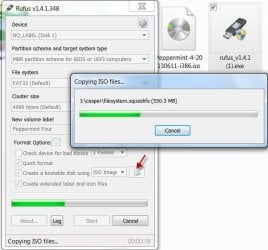
Create your bootable USB pendrive with Rufus v1.4.1 (534 KB) Rufus - Create bootable USB drives the easy way

Boot your system with it.

How-to : http://www.sevenforums.com/software/198909-lucid-puppy-way-recover-files-non-bootable-computer.html
 

My Computer My Computer

At a glance

Windows 7 Home Premium 32 bit
OS
Windows 7 Home Premium 32 bit
Okay so i have fiddled a little bit with Peppermint 4, but with absolutely no luck.
When i boot into it, i get this message:

ISOLINUX 4.01 debian-20100714 ETCD Copyright (C) 1994-2010 H. Peter Anvin et al
No DEFAULT or UI configuration directive found!
boot: _

I have tried to format my USB into Fat32, and Fat. No luck.
I have tried to rename some of the files (I Googled the errormessage, and that solution came up). No luck.
I have tried to type this boot parameter: "mboot.c32 -c boot.cfg". No luck.
But neither of them worked. Any suggestions?

EDIT: Also, i can not exclude the possibility of virus/malware being the cause. So that might be a factor as well.

On the Peppermint issue, you perhaps didn't do it right.

Download Peppermint 4 32 bit from 1. Download and Install | Peppermint | The Linux Desktop OS. The only difference is you will be now downloading Peppermint 4, the latest version.

Use Rufus to create your bootable pen drive. ( I think you didn't create it that way as detailed in Golden's tutorial.)

You need not format your pen drive prior to using Rufus. Rufus will format it automatically once you show the location of the ISO and click on Start. ( Yep, if you have any valuable data on the pen drive, backup prior to Rufus formatting it, for you will lose all of it.)

12-01-2014 18-13-51.jpg

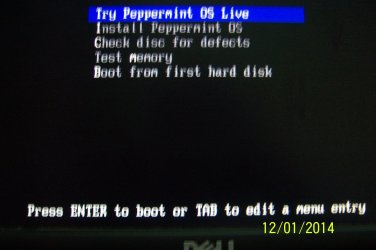
Boot from the pen drive using the one-time bootmenu.

100_3444.JPG

In the menu, highlight "Try Peppermint OS Live" - if not selected already - and press Enter.

You may have to wait a few moments, for the OS to load.
 

My Computer My Computer

At a glance

Windows 7 Home Premium 32 bit
OS
Windows 7 Home Premium 32 bit
Hello
Thank you for your responses so far.
I am sorry i have not been able to reply, but i finally found time to try to revive this old bud.
As of right now i am downloading Lucid Puppy, and i'll again return with the outcome of this.
Thanks to everyone trying to help me, greatly apreciated!

@jumanji I did do everything right, freshly formated the drive(FAT32), and then installing the .iso with Rufus, but it didnt work. I hope im luckier with Lucid Puppy :)
 

My Computer My Computer

At a glance

Windows 7 Home Premium 32-bitIntel Core i3 M330 @ 2.13 GHz4 GB (3 GB available)Nvidia Gforce 330M
Computer type
Laptop
Computer Manufacturer/Model Number
Samsung R580
OS
Windows 7 Home Premium 32-bit
CPU
Intel Core i3 M330 @ 2.13 GHz
Memory
4 GB (3 GB available)
Graphics Card(s)
Nvidia Gforce 330M
Hard Drives
Seagate 500gb
Antivirus
Comodo
Browser
Chrome
I'm afraid there is nothing to save. This error showed up while trying to access my folders:
24xpgtt.jpg

I can see all the different folders on my drive, though everyone has that "!" Marked on them. Except the Windows folder, which opened does not show any content at all.
 

My Computer My Computer

At a glance

Windows 7 Home Premium 32-bitIntel Core i3 M330 @ 2.13 GHz4 GB (3 GB available)Nvidia Gforce 330M
Computer type
Laptop
Computer Manufacturer/Model Number
Samsung R580
OS
Windows 7 Home Premium 32-bit
CPU
Intel Core i3 M330 @ 2.13 GHz
Memory
4 GB (3 GB available)
Graphics Card(s)
Nvidia Gforce 330M
Hard Drives
Seagate 500gb
Antivirus
Comodo
Browser
Chrome
Is there nothing i can do?
 

My Computer My Computer

At a glance

Windows 7 Home Premium 32-bitIntel Core i3 M330 @ 2.13 GHz4 GB (3 GB available)Nvidia Gforce 330M
Computer type
Laptop
Computer Manufacturer/Model Number
Samsung R580
OS
Windows 7 Home Premium 32-bit
CPU
Intel Core i3 M330 @ 2.13 GHz
Memory
4 GB (3 GB available)
Graphics Card(s)
Nvidia Gforce 330M
Hard Drives
Seagate 500gb
Antivirus
Comodo
Browser
Chrome

My Computer My Computer

At a glance

Windows 7 Home Premium 32-Bit - Build 7600 SP1Intel Core i3-2120 3.30GhzKingston 4 GB DDR3 1333 mhzAMD Radeon HD6670
Computer type
PC/Desktop
Computer Manufacturer/Model Number
Custom Build
OS
Windows 7 Home Premium 32-Bit - Build 7600 SP1
CPU
Intel Core i3-2120 3.30Ghz
Motherboard
Asus P8Z68-V LX Intel Z68 Socket H2 ATX
Memory
Kingston 4 GB DDR3 1333 mhz
Graphics Card(s)
AMD Radeon HD6670
Sound Card
Sound Blaster Audigy SE 24-Bit
Monitor(s) Displays
Asus VE228
Screen Resolution
1440 X 900
Hard Drives
OCZ Vertex 3 120 GB Sata 3 SSD ==
Kingston SH103/S3 120 G Hyper X 120 GB SSD ==
Western Digital 500 GB Caviar Green 7200 RPM ==
PSU
Corsair CX600M == 600 Watt
Case
NZXT Apollo - Silver with Clear Side Panel
Cooling
Three 120 mm Fans
Keyboard
Microsoft Natural 4000
Mouse
Microsoft Custom Optical 3000
Internet Speed
AT&T Fiber Optic Wireless Network
Antivirus
Microsoft Security Essentials
Browser
Chrome
Other Info
120 mm Blue LED Fan -- Three Blue LED Lazer Light Sticks
Back
Top