
How can I change line in port to microphone

raphh

New member
Local time
11:04 PM
Messages
2
hello guys I have one problem when I put the microphone cable in pc he read like a line in no like a microphone and line in I can't use like a microphone


did you know how to change line in in the microphone or
can I change the line in jack information to microphone jack info..
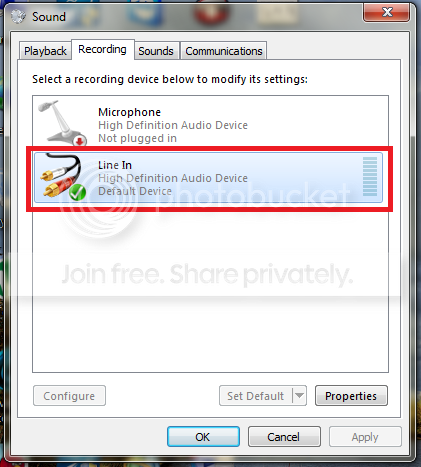

Untitled-3_zps00ce2a0a.png


sorry for my bad english if you don't understand the question look I have the same problem like this man
Windows 7 sound: change jack infomation
 

My Computer My Computer

At a glance

Windows 7 Ultimate x86
OS
Windows 7 Ultimate x86
A computer microphone requires 5VDC to operate. The Line In is a stereo (two channel) input but does not have the 5VDC.

I also notice that you do not have the proper sound driver installed. You only have the generic, basic function, Windows installed HD Audio Codec. You need the full PC vendor (or Motherboard vendor if home built) for full operation.
 

My Computer My Computer

At a glance

Windows 10 64 bitIntel i7 6700K16GB Corsair DominatorIntel CPU Graphics
Computer type
PC/Desktop
Computer Manufacturer/Model Number
My Own Build
OS
Windows 10 64 bit
CPU
Intel i7 6700K
Motherboard
ASUS ROG Maximus VIII Hero
Memory
16GB Corsair Dominator
Graphics Card(s)
Intel CPU Graphics
Sound Card
RealTek
Monitor(s) Displays
27" Dell S2719dgf
Screen Resolution
2560X1440
Hard Drives
1 TB Samsung 850 EVO SSD for Win 10 Pro
500GB Samsung 850 EVO SSD for Win 10 Insider
2 TB drive for backup
PSU
EVGA Supernova 750G2
Case
BeQuiet Silent Base 600
Cooling
Deepcool Captain 120EX
Keyboard
Microsoft Wireless 2000
Mouse
Microsoft wireless
Internet Speed
100 MB/sec (Cable)
Antivirus
Microsoft Defender and Malwarebytes
Browser
Edge/Firefox
Other Info
Cakewalk (Sonar) by BandLab and Studio One 4.1 Pro recording studio software. MOTU 896Mk3 Hybrid recording interface, Frontier Tranzport wireless control unit, Behringer X-Touch Control Surface.
Five USB connected optical drives for CD Audio production using Nero BurningROM
A computer microphone requires 5VDC to operate. The Line In is a stereo (two channel) input but does not have the 5VDC.

I also notice that you do not have the proper sound driver installed. You only have the generic, basic function, Windows installed HD Audio Codec. You need the full PC vendor (or Motherboard vendor if home built) for full operation.

its any way to solve this problem
 

My Computer My Computer

At a glance

Windows 7 Ultimate x86
OS
Windows 7 Ultimate x86
I don't know. I have a current version RealTek integrated audio and the control panel for that will not allow me to change the line in port to a mic in port.

Some Laptops have a combination jack for mic or line. Those are the only ones that I know of.
 

My Computer My Computer

At a glance

Windows 10 64 bitIntel i7 6700K16GB Corsair DominatorIntel CPU Graphics
Computer type
PC/Desktop
Computer Manufacturer/Model Number
My Own Build
OS
Windows 10 64 bit
CPU
Intel i7 6700K
Motherboard
ASUS ROG Maximus VIII Hero
Memory
16GB Corsair Dominator
Graphics Card(s)
Intel CPU Graphics
Sound Card
RealTek
Monitor(s) Displays
27" Dell S2719dgf
Screen Resolution
2560X1440
Hard Drives
1 TB Samsung 850 EVO SSD for Win 10 Pro
500GB Samsung 850 EVO SSD for Win 10 Insider
2 TB drive for backup
PSU
EVGA Supernova 750G2
Case
BeQuiet Silent Base 600
Cooling
Deepcool Captain 120EX
Keyboard
Microsoft Wireless 2000
Mouse
Microsoft wireless
Internet Speed
100 MB/sec (Cable)
Antivirus
Microsoft Defender and Malwarebytes
Browser
Edge/Firefox
Other Info
Cakewalk (Sonar) by BandLab and Studio One 4.1 Pro recording studio software. MOTU 896Mk3 Hybrid recording interface, Frontier Tranzport wireless control unit, Behringer X-Touch Control Surface.
Five USB connected optical drives for CD Audio production using Nero BurningROM
Back
Top