
You are using an out of date browser. It may not display this or other websites correctly.
You should upgrade or use an alternative browser.
You should upgrade or use an alternative browser.
How can I complete clean the grease off my laptop screen?
- Thread starter Ravanx
- Start date
The TFT or LCD screen is one of the most expensive component of your notebook or desktop computer and they're very sensitive to dust, fingerprints or even when you cough or sneeze without covering the mouth and nose.
Unlike the standard CRT monitors with Glass screens, you are not advised to clean an LCD Monitor by wiping it with a piece of dry lint-free cloth since the sensitive display is likely to get scratches from dust particles.
So how do you clean an LCD monitor screen without buying any of those expensive LCD Monitor Cleaner solutions or Monitor Wipes available in the market ? We look at some proper methods and precautions before you clean the monitor [should apply to HDTVs, projection TVs and Plasma TVs as well]
Think of LCD Displays just like the soft and delicate skin of your newborn baby - Be very gentle and never put even the slightest pressure on the computer screen with your hand.
Second, you need to find a piece of soft cloth - old cotton handkerchiefs lying in your mom's wardrobe should be fine but don't try tissue papers, toilet rolls or even shower towels as the fabric will scratch your screen permanently [like sandpaper or utensil scrubbers]
Either turn the monitor off or set the background to black and hide all the desktop icons and minimize the open windows. This will easily help you identify the dirty areas of the monitor.
To prepare the solution for cleaning LCD monitors, you will need deionized or distilled water and vinegar or iso-propyl alcohol - Don't use tap water or mineral water as they could leave white marks on the screen because of the dissolved salts.
Dilute the vinegar or IPA with distilled water [1:1] and spray this liquid on the cloth. Never ever spray liquid directly onto the LCD screen. Moisten the cloth with this home made LCD cleaner and gently move the wet cloth in just one direction - from top to bottom.
Word of Caution: Be sure that the LCD screen is dry before closing it or using the computer. Do not use any solutions that contain Acetone, ethyl alcohol, toluene, ethyl acid, ammonia, or methyl chloride. Never touch the LCD screen with your fingers as this can cause the pixels to burn out.
The Pink is the most useful information IMO.
Soruce :The Proper Way to Clean LCD Screens Of Your Laptop or Flat Screen Monitors
Unlike the standard CRT monitors with Glass screens, you are not advised to clean an LCD Monitor by wiping it with a piece of dry lint-free cloth since the sensitive display is likely to get scratches from dust particles.
So how do you clean an LCD monitor screen without buying any of those expensive LCD Monitor Cleaner solutions or Monitor Wipes available in the market ? We look at some proper methods and precautions before you clean the monitor [should apply to HDTVs, projection TVs and Plasma TVs as well]
Think of LCD Displays just like the soft and delicate skin of your newborn baby - Be very gentle and never put even the slightest pressure on the computer screen with your hand.
Second, you need to find a piece of soft cloth - old cotton handkerchiefs lying in your mom's wardrobe should be fine but don't try tissue papers, toilet rolls or even shower towels as the fabric will scratch your screen permanently [like sandpaper or utensil scrubbers]
Either turn the monitor off or set the background to black and hide all the desktop icons and minimize the open windows. This will easily help you identify the dirty areas of the monitor.
To prepare the solution for cleaning LCD monitors, you will need deionized or distilled water and vinegar or iso-propyl alcohol - Don't use tap water or mineral water as they could leave white marks on the screen because of the dissolved salts.
Dilute the vinegar or IPA with distilled water [1:1] and spray this liquid on the cloth. Never ever spray liquid directly onto the LCD screen. Moisten the cloth with this home made LCD cleaner and gently move the wet cloth in just one direction - from top to bottom.
Word of Caution: Be sure that the LCD screen is dry before closing it or using the computer. Do not use any solutions that contain Acetone, ethyl alcohol, toluene, ethyl acid, ammonia, or methyl chloride. Never touch the LCD screen with your fingers as this can cause the pixels to burn out.
The Pink is the most useful information IMO.
Soruce :The Proper Way to Clean LCD Screens Of Your Laptop or Flat Screen Monitors
My Computer
At a glance
Windows 7 Home Premium 32bitIntel(R) Core(TM)2 Quad CPU3GB DDR2Geforce 9800GTX+
- Computer Manufacturer/Model Number
- Lenovo
- OS
- Windows 7 Home Premium 32bit
- CPU
- Intel(R) Core(TM)2 Quad CPU
- Memory
- 3GB DDR2
- Graphics Card(s)
- Geforce 9800GTX+
- Monitor(s) Displays
- Dell 22"
- Screen Resolution
- 1440x900
- Hard Drives
- 1TB, 120GB External
- Mouse
- Razer Death Adder

MacGyvr
Banned
Wow, okay...I clean all mine with Windex on a paper towel...never had a problem.
My Computer
At a glance
Windows 7 Ultimate RTM (Technet)3.00 gigahertz Intel Core2 Duo E84004GBATI Radeon X1950 Pro
- Computer Manufacturer/Model Number
- Custom
- OS
- Windows 7 Ultimate RTM (Technet)
- CPU
- 3.00 gigahertz Intel Core2 Duo E8400
- Motherboard
- ASUSTeK Computer INC. P5K/EPU Rev 1.xx
- Memory
- 4GB
- Graphics Card(s)
- ATI Radeon X1950 Pro
- Sound Card
- Built in HD Audio
- Monitor(s) Displays
- 22" Gateway LCD
- Screen Resolution
- 1920 x 1200
- Hard Drives
- ST3160023A [Hard drive] (160.04 GB) -- drive 0, rev 8.01, ST3500630AS [Hard drive] (500.11 GB) -- drive 2, rev 3.AAK
ST3500630AS [Hard drive] (500.11 GB) -- drive 1, rev 3.AAK
- Keyboard
- Logitech G11
- Mouse
- Microsoft Wireless Laser Mouse 5000
- Internet Speed
- 13.44 Mbps
Wow, okay...I clean all mine with Windex on a paper towel...never had a problem.
You shouldn't use Windex it will leave "streaks" that run under the surface of the screen. That will not go away.
And Paper towels move the dust and it can scratch the LCD.
Last edited:
My Computer
At a glance
Windows 7 Home Premium 32bitIntel(R) Core(TM)2 Quad CPU3GB DDR2Geforce 9800GTX+
- Computer Manufacturer/Model Number
- Lenovo
- OS
- Windows 7 Home Premium 32bit
- CPU
- Intel(R) Core(TM)2 Quad CPU
- Memory
- 3GB DDR2
- Graphics Card(s)
- Geforce 9800GTX+
- Monitor(s) Displays
- Dell 22"
- Screen Resolution
- 1440x900
- Hard Drives
- 1TB, 120GB External
- Mouse
- Razer Death Adder
Second, you need to find a piece of soft cloth - old cotton handkerchiefs lying in your mom's wardrobe should be fine but don't try tissue papers, toilet rolls or even shower towels as the fabric will scratch your screen permanently [like sandpaper or utensil scrubbers]
Would the kind of cloth for cleaning cars be ok?
Where can I get distilled water? What kind of vinegar is suitable vinegar? Isn't vinegar used for food or something? Wouldn't it contain food additives?To prepare the solution for cleaning LCD monitors, you will need deionized or distilled water and vinegar or iso-propyl alcohol - Don't use tap water or mineral water as they could leave white marks on the screen because of the dissolved salts.
The Pink is the most useful information IMO.
Soruce :The Proper Way to Clean LCD Screens Of Your Laptop or Flat Screen Monitors
My Computer
At a glance
Windows 7 Professional 32bit
- OS
- Windows 7 Professional 32bit

bmcdevitt
New member
- Local time
- 2:01 PM
- Messages
- 124
Wow, okay...I clean all mine with Windex on a paper towel...never had a problem.
lol me 2...
just dont smear the greas, you should probly try to soak it up before rubbing it around...
My Computer
At a glance
Windows 7 pro 64 bitIntel Core i7-870 Lynnfield 2.93GHzGskill 8 gig, 4x2gigASUS EAH5850
- OS
- Windows 7 pro 64 bit
- CPU
- Intel Core i7-870 Lynnfield 2.93GHz
- Motherboard
- MSI P55-GD80 LGA 1156
- Memory
- Gskill 8 gig, 4x2gig
- Graphics Card(s)
- ASUS EAH5850
- Sound Card
- built in HD
- Monitor(s) Displays
- HP 23 inch
- Hard Drives
- 1tbHDD,500HDD,500HDD,30SSD no RAID...
- Case
- Cooler master HAF 932
- Cooling
- 4 case fans, v6 cpu cooler
- Keyboard
- Logitech G110
- Mouse
- Razer Death Adder
- Internet Speed
- never fast enough
The TFT or LCD screen is one of the most expensive component of your notebook or desktop computer and they're very sensitive to dust, fingerprints or even when you cough or sneeze without covering the mouth and nose.
Oh crap. I cleaned my desktop LCD monitor with tissue :\
Thanks for all that useful information

My Computer
At a glance
Windows 7 Pro
- OS
- Windows 7 Pro
Would the kind of cloth for cleaning cars be ok?Second, you need to find a piece of soft cloth - old cotton handkerchiefs lying in your mom's wardrobe should be fine but don't try tissue papers, toilet rolls or even shower towels as the fabric will scratch your screen permanently [like sandpaper or utensil scrubbers]
I would use anything that is 100% cotton.
Where can I get distilled water? What kind of vinegar is suitable vinegar? Isn't vinegar used for food or something? Wouldn't it contain food additives?To prepare the solution for cleaning LCD monitors, you will need deionized or distilled water and vinegar or iso-propyl alcohol - Don't use tap water or mineral water as they could leave white marks on the screen because of the dissolved salts.
The Pink is the most useful information IMO.
Soruce :The Proper Way to Clean LCD Screens Of Your Laptop or Flat Screen Monitors
Distilled water
How to Make Your Own Distilled Water | eHow.com
Distilled Vinegar
How to Make Distilled Vinegar | eHow.com
I would just get iso-propyl alcohol its around $3 and you can get it at CVS
http://www.cvs.com/CVSApp/catalog/s...id=Shopping_Feed_Products_Google_Free_Listing
My Computer
At a glance
Windows 7 Home Premium 32bitIntel(R) Core(TM)2 Quad CPU3GB DDR2Geforce 9800GTX+
- Computer Manufacturer/Model Number
- Lenovo
- OS
- Windows 7 Home Premium 32bit
- CPU
- Intel(R) Core(TM)2 Quad CPU
- Memory
- 3GB DDR2
- Graphics Card(s)
- Geforce 9800GTX+
- Monitor(s) Displays
- Dell 22"
- Screen Resolution
- 1440x900
- Hard Drives
- 1TB, 120GB External
- Mouse
- Razer Death Adder
The TFT or LCD screen is one of the most expensive component of your notebook or desktop computer and they're very sensitive to dust, fingerprints or even when you cough or sneeze without covering the mouth and nose.
Oh crap. I cleaned my desktop LCD monitor with tissue :\
Thanks for all that useful information
Your welcome you could also buy Monitor Wipes there like $10.
My Computer
At a glance
Windows 7 Home Premium 32bitIntel(R) Core(TM)2 Quad CPU3GB DDR2Geforce 9800GTX+
- Computer Manufacturer/Model Number
- Lenovo
- OS
- Windows 7 Home Premium 32bit
- CPU
- Intel(R) Core(TM)2 Quad CPU
- Memory
- 3GB DDR2
- Graphics Card(s)
- Geforce 9800GTX+
- Monitor(s) Displays
- Dell 22"
- Screen Resolution
- 1440x900
- Hard Drives
- 1TB, 120GB External
- Mouse
- Razer Death Adder

Wow, okay...I clean all mine with Windex on a paper towel...never had a problem.
We have cleaned all LCD monitors with Windex and a lint free micro LCD cloth for years and have never had an issue (I have seen maybe 4000 LCD monitors by now). We do spray the cloth first and then apply it to the screen. We have never had streaks or issues from the ammonia. We have tried every brand on the market and still have never had an issue. Never had a problem returning a monitor that went bad and was under warranty. Vendor never said we cleaned it incorrectly.
We cleaning with 99% IPA when the monitor has pen marks, glue, white-out, or oils etc. then clean with Windex after has worked for monitors that are very dirty due to being in an automotive repair area, or public area, etc.
On the other hand we have many 32 inch and above flat screen televisions, LCD and Plasma monitors for information displays throughout, as well as events displays, room information, schedules etc. in our conference rooms, or media centers. We do clean these with a special LCD cleaner and the lint free micro LCD cloth. This is mostly due to the extreme cost of these monitor/displays and upper management’s paranoia with having to replace them.
Since the LCD monitors for the computers are relatively inexpensive we are allowed to clean them however we see fit, and clean the bigger LCD TVs/monitors per the manufactures requirements.
Just my two cents. -WS
My Computer
At a glance
Windows 7 Enterprise (x64); Windows Server 20...16GB
- Computer type
- PC/Desktop
- Computer Manufacturer/Model Number
- Dell OP7010
- OS
- Windows 7 Enterprise (x64); Windows Server 2008 R2 (x64)
- Memory
- 16GB
- Monitor(s) Displays
- 4 Dell 24" LCD
- Screen Resolution
- 1280x1024
- Keyboard
- Dell
- Mouse
- Dell Optical
- Internet Speed
- 40meg
MacGyvr
Banned
Wow, okay...I clean all mine with Windex on a paper towel...never had a problem.
You shouldn't use Windex it will leave "streaks" that run under the surface of the screen. That will not go away.
And Paper towels move the dust and it can scratch the LCD.
Been doing it for years and never had an issue.
My Computer
At a glance
Windows 7 Ultimate RTM (Technet)3.00 gigahertz Intel Core2 Duo E84004GBATI Radeon X1950 Pro
- Computer Manufacturer/Model Number
- Custom
- OS
- Windows 7 Ultimate RTM (Technet)
- CPU
- 3.00 gigahertz Intel Core2 Duo E8400
- Motherboard
- ASUSTeK Computer INC. P5K/EPU Rev 1.xx
- Memory
- 4GB
- Graphics Card(s)
- ATI Radeon X1950 Pro
- Sound Card
- Built in HD Audio
- Monitor(s) Displays
- 22" Gateway LCD
- Screen Resolution
- 1920 x 1200
- Hard Drives
- ST3160023A [Hard drive] (160.04 GB) -- drive 0, rev 8.01, ST3500630AS [Hard drive] (500.11 GB) -- drive 2, rev 3.AAK
ST3500630AS [Hard drive] (500.11 GB) -- drive 1, rev 3.AAK
- Keyboard
- Logitech G11
- Mouse
- Microsoft Wireless Laser Mouse 5000
- Internet Speed
- 13.44 Mbps

- Local time
- 3:01 PM
- Messages
- 329
How can I complete clean the grease off my laptop screen?
I can't use soap and water... what can I do?
If you don't have time , then buy this ..:
It works very good ...i have been using this 2 years now ...Expensive though ...
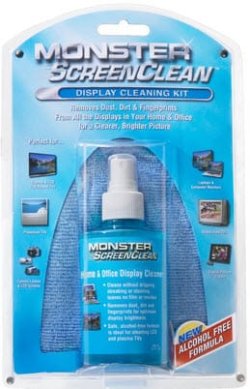
My Computer
At a glance
WDS 7 Home Pre.x64Intel Core i5 2450M @ 2.50GHz8GB Kingston[2x4] Dual-Channel DDR3 @ 1333MHzAMD Radeon(TM) HD 6470M + Intel(R) HD Graph 3000
- Computer type
- Laptop
- Computer Manufacturer/Model Number
- Sony Vaio VPC-SE23FXS
- OS
- WDS 7 Home Pre.x64
- CPU
- Intel Core i5 2450M @ 2.50GHz
- Memory
- 8GB Kingston[2x4] Dual-Channel DDR3 @ 1333MHz
- Graphics Card(s)
- AMD Radeon(TM) HD 6470M + Intel(R) HD Graph 3000
- Hard Drives
- TOSHIBA MK6459GSXP 600GB x 5400RPM (SATA)
Wow, okay...I clean all mine with Windex on a paper towel...never had a problem.
You shouldn't use Windex it will leave "streaks" that run under the surface of the screen. That will not go away.
And Paper towels move the dust and it can scratch the LCD.
Been doing it for years and never had an issue.
It "can" leave streaks.
My Computer
At a glance
Windows 7 Home Premium 32bitIntel(R) Core(TM)2 Quad CPU3GB DDR2Geforce 9800GTX+
- Computer Manufacturer/Model Number
- Lenovo
- OS
- Windows 7 Home Premium 32bit
- CPU
- Intel(R) Core(TM)2 Quad CPU
- Memory
- 3GB DDR2
- Graphics Card(s)
- Geforce 9800GTX+
- Monitor(s) Displays
- Dell 22"
- Screen Resolution
- 1440x900
- Hard Drives
- 1TB, 120GB External
- Mouse
- Razer Death Adder

How can I complete clean the grease off my laptop screen?
I can't use soap and water... what can I do?
If you don't have time , then buy this ..:
It works very good ...i have been using this 2 years now ...Expensive though ...
View attachment 126903
+1 It a great cleaner
Jerry
My Computer
At a glance
Win 7 Pro x64 / Win 10 ProIntel(R) Core(TM) i7-3630QM CPU @ 2.40GHz12 GB(1) Intel(R) HD Graphics 4000 (2) NVIDIA GeFo...
- Computer type
- Laptop
- Computer Manufacturer/Model Number
- Sager NP9170
- OS
- Win 7 Pro x64 / Win 10 Pro
- CPU
- Intel(R) Core(TM) i7-3630QM CPU @ 2.40GHz
- Motherboard
- CLEVO P170EM
- Memory
- 12 GB
- Graphics Card(s)
- (1) Intel(R) HD Graphics 4000 (2) NVIDIA GeForce GTX 675M
- Sound Card
- (1) Realtek High Definition Audio (2) Intel(R) Display Aud
- Monitor(s) Displays
- 17.3
- Screen Resolution
- 1920x1080
- Hard Drives
- (1) Samsung 860 EVO 500GB(OS) (1) Samsung 860 EVO 500GB(Data)
- Keyboard
- Backlite
- Antivirus
- MSE, Malwarebytes Pro
- Browser
- Firefox
- Other Info
- DESKTOP: Custom-built.
OS: Win 10 Pro x64.
CASE: Rosewill R5.
CPU: Intel I5 4670K CPU @ 3.40GHz.
CPU COOLER: Cool Master Hyper 212 EVO.
MOTHERBOARD: Asus Z87-A.
MEMORY: Kingston HyperX 2x4 GB.
GPU: Nvidia Geforce 650 TI.
PSU: Corsair TX750.
DRIVES: (1) Samsung 840 120 GB SSD (2) Western Digital blue 500 GB 7200 RPM.
JustPassingBy
New member
- Local time
- 2:01 PM
- Messages
- 3
My 2 cents as well. I have actually (horrors) sprayed Windex straight on to the screen then wiped and polished with a duster. I also stuck a creative microphone in the corner of the screen for a period of time, (until I decided to get a more expensive Logitech web cam with microphone incorporated) and when I came to remove it used a drop of baby oil to loosen, then cleaned up with a drop of rubbing alcohol on a cotton swab and polished with a Kleenex.
TA DAAAH!
Not recommending anything here, always best to be safe than sorry, but a lot of fuss seems to be made about the fragility of computer screens they seem fairly tough to me, none of these things have eaten into the screen or damaged the pixels or anything, just be sure to do everything gently, you are not cleaning the car. There are household products you can use that are less expensive than those wipes.
TA DAAAH!
Not recommending anything here, always best to be safe than sorry, but a lot of fuss seems to be made about the fragility of computer screens they seem fairly tough to me, none of these things have eaten into the screen or damaged the pixels or anything, just be sure to do everything gently, you are not cleaning the car. There are household products you can use that are less expensive than those wipes.
My Computer
At a glance
Windows 7 64 bit
- OS
- Windows 7 64 bit

Interesting how so many people are pretty cavalier about cleaning their screens with any old this-and-that. . . UNTIL they damage their screen. Then, they're not so happy, but it's too late --- their screen's been permanently damaged.
The point is -- damage to a screen is CUMULATIVE. You don't notice it at first, but little by little it builds up until you can visually see that the screen has been damaged. So, a word to the wise, just like with TV screens, eyeglasses, binoculars, camera lens, or anything else we want to look through, be careful and protect your item!
The point is -- damage to a screen is CUMULATIVE. You don't notice it at first, but little by little it builds up until you can visually see that the screen has been damaged. So, a word to the wise, just like with TV screens, eyeglasses, binoculars, camera lens, or anything else we want to look through, be careful and protect your item!
My Computer
At a glance
Vista 64 bit and 32 bit (SP2)Intel(R) Core(TM)2 Duo Processor T9400 (2.53 GHz4GB DDR2 System Memory (2 Dimm)512 MB NVIDIA GeForce 9600M GT
- Computer Manufacturer/Model Number
- HP Pavillion dv5t (generation 1)
- OS
- Vista 64 bit and 32 bit (SP2)
- CPU
- Intel(R) Core(TM)2 Duo Processor T9400 (2.53 GHz
- Memory
- 4GB DDR2 System Memory (2 Dimm)
- Graphics Card(s)
- 512 MB NVIDIA GeForce 9600M GT
- Monitor(s) Displays
- 15.4" diagonal WSXGA+ High-Definition HP BrightView Widescre
- Screen Resolution
- 1680 x 1050
- Hard Drives
- 320GB 5400RPM SATA Hard Drive with HP ProtectSmart Hard Drive Protection
- Keyboard
- Built-in HP
- Mouse
- Built in - Synaptics TouchPad V6.5 on PS/2 Port
- Internet Speed
- Max
- Other Info
- ~ Intel Next-Gen Wireless-N Mini-card w/Bluetooth ~ Blu-Ray ROM DVD+/-R/RW ~ Integ. HDTV Hybrid Tuner ~ 12 Cell Battery ~ MS Office (Home Premium) 2007 ~
JustPassingBy
New member
- Local time
- 2:01 PM
- Messages
- 3
RightyHo....
I am back here to say that Imperfect1 is absolutely correct! - Does that make her perfect now?
Unfortunately I could not successfully remove the remnants of baby oil try as I may with household products, they didn't seem to have the desired effect. However, (good news) I bought some very cheap, (couple of dollars) towelettes from Wal-Mart which worked like magic!
So the moral of this story is, stick to professional products, but you are able to achieve an excellent result using very cheap wipes from Wal-Mart rather than the expensive ones mentioned by people before.
There are a lot in the box as well to use on other things and at other times, (when you mess-up like me)
I am back here to say that Imperfect1 is absolutely correct! - Does that make her perfect now?
Unfortunately I could not successfully remove the remnants of baby oil try as I may with household products, they didn't seem to have the desired effect. However, (good news) I bought some very cheap, (couple of dollars) towelettes from Wal-Mart which worked like magic!
So the moral of this story is, stick to professional products, but you are able to achieve an excellent result using very cheap wipes from Wal-Mart rather than the expensive ones mentioned by people before.
There are a lot in the box as well to use on other things and at other times, (when you mess-up like me)
My Computer
At a glance
Windows 7 64 bit
- OS
- Windows 7 64 bit

- Local time
- 12:01 PM
- Messages
- 50,634
What kind of wipes did you buy - isopropyl alcohol which is what's in Windex?
There are all kinds including ones with baby oil.
There are all kinds including ones with baby oil.
JustPassingBy
New member
- Local time
- 2:01 PM
- Messages
- 3
Re: wipes
Sorry, should have been more specific... Glad you asked.
They are called "Nice'n Clean," Electronic Cleaning Wipes, Anti-Static/Alcohol Free, Multi-Surface Wipes. 24 individual packets in box. You get them in the electronics dept.
Couldn't tell you exactly how much they cost, lost my receipt, but they were not very much.
Sorry, should have been more specific... Glad you asked.
They are called "Nice'n Clean," Electronic Cleaning Wipes, Anti-Static/Alcohol Free, Multi-Surface Wipes. 24 individual packets in box. You get them in the electronics dept.
Couldn't tell you exactly how much they cost, lost my receipt, but they were not very much.
My Computer
At a glance
Windows 7 64 bit
- OS
- Windows 7 64 bit
- Local time
- 12:01 PM
- Messages
- 50,634
Purrfect, thanks.
Similar threads
- Replies
- 5
- Views
- 2K

- Replies
- 19
- Views
- 2K
- Replies
- 13
- Views
- 13K

- Replies
- 4
- Views
- 1K