
Solved How can I completely hide taskbar icons?

nabilalk

New member
Power User
Local time
1:10 PM
Messages
299
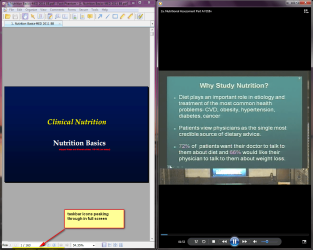
After enabling Autohide taskbar, the outline of the taskbar icons still peak through. Is there a way to hide them completely, perhaps flatten them so they don't show with the taskbar hidden? I'm OCD and I find the icons distracting when trying to focus on lectures.

Please see attached screen.

Solved:Thanks Orbital Shark for recommending Taskbar Eliminator
 

Attachments
  • taskbar icons peak through.png
    taskbar icons peak through.png
    158 KB · Views: 198
Last edited:

My Computer

Computer Manufacturer/Model Number
Gateway M6827
OS
Win 7 Professional 32-bit
CPU
Intel Core 2 Duo CPU T5750 @ 2.00 GHz
Memory
3GB
Monitor(s) Displays
ViewSonic Vx900
Screen Resolution
1280x1024
Hard Drives
150GB Hard Drive
It doesn't happen on my computer. Perhaps you need to try another theme??
 

My Computer

Computer Manufacturer/Model Number
Three desktops and one laptop with good specs..
OS
Vista and now 7 in 32 and 64 bit.
It doesn't happen on my computer. Perhaps you need to try another theme??

What theme are you using? Just switched to Architecture and its still happening. In fact, I tired every theme available and the only one where I don't notice this is with high contrast, because it changes the taskbar to be more like Win 2000
 

My Computer

Computer Manufacturer/Model Number
Gateway M6827
OS
Win 7 Professional 32-bit
CPU
Intel Core 2 Duo CPU T5750 @ 2.00 GHz
Memory
3GB
Monitor(s) Displays
ViewSonic Vx900
Screen Resolution
1280x1024
Hard Drives
150GB Hard Drive
I use a solid color theme. Just tried a few other solid colors and they all seem ok??
 

My Computer

Computer Manufacturer/Model Number
Three desktops and one laptop with good specs..
OS
Vista and now 7 in 32 and 64 bit.
Just a though. Try changing your screen resolution.
 

My Computer

Computer type
PC/Desktop
Computer Manufacturer/Model Number
Home made Desktop
OS
Windows 10 Pro. 64/ version 1709 Windows 7 Pro/64
CPU
Intel i7-6800K @ 4.3
Motherboard
ASUS X-99 Deluxe II
Memory
Corsair Platinum 16 gig @2400
Graphics Card(s)
EVGA GTX 1070 OC
Monitor(s) Displays
Asus 27" LED LCD/VE278Q
Screen Resolution
1920-1080 or 1280-720 HDMI
Hard Drives
INTEL SSD 730-240 Gb Sata 3.0/
PSU
EVGA Platium 1200W
Case
Phanteks Luxe Tempered Glass 8 fans/ one radiator
Cooling
XSPC/ Water Cooled CPU
Keyboard
Das 4 Professional
Mouse
Logitech M705/MX Anywhere 2-S
Internet Speed
100 mbits
Antivirus
Microsoft Security Essentials/ Malwarebytes Premium 3.0/ SAS
Browser
I.E. 11 default/Firefox/ ISP Time Warner Cable/Spectrum
Other Info
LG BluRay Burner/
Sound system-KLipsch-THX/
Icy Dock ssd Hot Swap bays.
Some programs in full screen mode leave a "line" at the edge where the task-bar is docked. This is so you can actually access the task-bar when it is in auto-hide mode by moving to it when the program is in full screen mode. With some themes and screen resolutions you see this as a dotted line of colour etc, with whatever is in that part of the task-bar.

Some programs take the full screen and you can't access the task-bar in auto-hide without resizing the window.

You can make it invisible in most cases if you try various themes and settings.

Regards....Mike Connor
 

My Computer

OS
Several, including Windows 7 x64 Ultimate
So the only solution is to switch to the god-awful ugly Windows classic theme? Isn't there a registry hack to change the look of the taskbar icons so they are more flattened?
 

My Computer

Computer Manufacturer/Model Number
Gateway M6827
OS
Win 7 Professional 32-bit
CPU
Intel Core 2 Duo CPU T5750 @ 2.00 GHz
Memory
3GB
Monitor(s) Displays
ViewSonic Vx900
Screen Resolution
1280x1024
Hard Drives
150GB Hard Drive
By default, Windows leaves a small portion of the taskbar available so that mouse-over action can bring it into view. As you have found out, you can get wht you want by using the Hideous basic theme but that's not really an option.

There is a 3rd party apps available that can do what you require...

Taskbar Eliminator

Hope it helps :)
 

My Computer

Computer Manufacturer/Model Number
Compaq Desktop
OS
Windows 7 Ultimate x64
CPU
AMD Sempron Dual Core
Memory
3GB
Graphics Card(s)
NVIDIA GeForce 6150SE nForce 430
Screen Resolution
1024x768
Hard Drives
150GB Sata
By default, Windows leaves a small portion of the taskbar available so that mouse-over action can bring it into view. As you have found out, you can get wht you want by using the Hideous basic theme but that's not really an option.

There is a 3rd party apps available that can do what you require...

Taskbar Eliminator

Hope it helps :)
Cheers! It would be nice to do this without a 3rd party app, but this works great. Thanks!
 

My Computer

Computer Manufacturer/Model Number
Gateway M6827
OS
Win 7 Professional 32-bit
CPU
Intel Core 2 Duo CPU T5750 @ 2.00 GHz
Memory
3GB
Monitor(s) Displays
ViewSonic Vx900
Screen Resolution
1280x1024
Hard Drives
150GB Hard Drive
You're welcome :)
 

My Computer

Computer Manufacturer/Model Number
Compaq Desktop
OS
Windows 7 Ultimate x64
CPU
AMD Sempron Dual Core
Memory
3GB
Graphics Card(s)
NVIDIA GeForce 6150SE nForce 430
Screen Resolution
1024x768
Hard Drives
150GB Sata
Back
Top