Solved How can I create a back up disk of my BIOS in Windows 7

Melita

New member
Power User
VIP
Local time
3:34 PM
Messages
293
Location
Canada
How can I create a back-up disk of my BIOS in Windows 7

I want to back up my BIOS. My OS is Windows 7 Home Premium. How can I create a back-up disk for this purpose? Please note, this is not about a system recovery disk. What I need is a back-up for the BIOS, to be used in case of boot failure. Regards,
 

My Computer My Computer

At a glance

Windows 7 Home Premium 64bitAMD Dual Core C-502GB DDR3/320GB HDDAMD Radeon HD 6250
Computer Manufacturer/Model Number
Laptop - Acer Aspire 5250-BZ479
OS
Windows 7 Home Premium 64bit
CPU
AMD Dual Core C-50
Memory
2GB DDR3/320GB HDD
Graphics Card(s)
AMD Radeon HD 6250
Monitor(s) Displays
15.6" HD LED LCD
Internet Speed
ADSL
I think this BIOS backup toolkit provided through the My Digital Life forum may help. FYI, My Digital Life is a respected and popular site that's been around for many years. It has how-to guides, tutorials, reviews and information for software, hardware, operating systems, etc.

Universal BIOS Backup Toolkit

My Digital Life
 

My Computer My Computer

At a glance

Win 7 Pro 64-bitIntel i5 2.4 Ghz8GB DDR3Intel HD 3000
Computer type
Laptop
Computer Manufacturer/Model Number
Sony Vaio VPCEB47GM Laptop
OS
Win 7 Pro 64-bit
CPU
Intel i5 2.4 Ghz
Memory
8GB DDR3
Graphics Card(s)
Intel HD 3000
Sound Card
IDT High Definition
Monitor(s) Displays
15.6 WGXA Anti-Glare LED
Screen Resolution
1280x800
Hard Drives
640Gb 7200rpm
Antivirus
MSE
Browser
Opera (primary) with IE9 backup
I always wondered if there was a utility Marmimar to copy the BIOS - thanks.
@Melita
If you go onto the ACER support site you should be able to download the BIOS firmware plus reflash guidance.
 

My Computer My Computer

At a glance

Windows 7x64 Home Premium SP1Intel i7 2600kG.Skill Ripjaws (DDR3-1600) 2x4GBNvidia GeForce GTS 450; Intel HD Graphics 300...
Computer type
PC/Desktop
Computer Manufacturer/Model Number
Own build
OS
Windows 7x64 Home Premium SP1
CPU
Intel i7 2600k
Motherboard
ASUS P8Z68 Deluxe
Memory
G.Skill Ripjaws (DDR3-1600) 2x4GB
Graphics Card(s)
Nvidia GeForce GTS 450; Intel HD Graphics 3000(GT2+)
Monitor(s) Displays
Dell Ultrasharp IPS panel U2311H, Samsung SyncMaster P2350
Screen Resolution
1920x1080
Hard Drives
Samsung 850 Pro SSD 256GB, Samsung SSD 840 120GB, Seagates 1TB Barracuda ST31000528AS x2
PSU
Seasonic M12II 520W
Case
Lian Li Lancool PC-K60
Cooling
Case: 1x120mm, 3x140mm CPU: Hyper 212+
Keyboard
Logitech MK520 (wireless)
Mouse
Logitech MK520
Internet Speed
6-7 Mbps
Antivirus
Norton Security Premium, Malwarebytes on 2 (MSE on 3rd PC)
Browser
FireFox
Other Info
Audio: Logitech Z523 2.1
Thank you to both of you. I remember seeing this facility in Windows 7, but now I have forgotten the path to get there. When the correct window is opened, there is a place where it says "create start up disk". I believe it is built in to Windows 7. Would you know how I can access this facility in Windows 7? Regards,
 
Last edited:

My Computer My Computer

At a glance

Windows 7 Home Premium 64bitAMD Dual Core C-502GB DDR3/320GB HDDAMD Radeon HD 6250
Computer Manufacturer/Model Number
Laptop - Acer Aspire 5250-BZ479
OS
Windows 7 Home Premium 64bit
CPU
AMD Dual Core C-50
Memory
2GB DDR3/320GB HDD
Graphics Card(s)
AMD Radeon HD 6250
Monitor(s) Displays
15.6" HD LED LCD
Internet Speed
ADSL
Melita,
You may be talking about something else rather than the BIOS. The BIOS is actually firmware code that lives on a chip in your computer. This is the first bit of code your PC runs when it's turn on. It's not that uncommon to change BIOS settings but fairly uncommon for most PC users to worry about the firmware code. The windows OS won't do it.
Just to get things straight you may be referring to the Windows "System Repair CD". To make one of these type
Backup and Restore
in your start search box then over on the left select "Create a system repair disc"

If this is the "system recovery" disk you say you don't want then you need to be more specific about what you want.
 
Last edited:

My Computer My Computer

At a glance

Windows 7x64 Home Premium SP1Intel i7 2600kG.Skill Ripjaws (DDR3-1600) 2x4GBNvidia GeForce GTS 450; Intel HD Graphics 300...
Computer type
PC/Desktop
Computer Manufacturer/Model Number
Own build
OS
Windows 7x64 Home Premium SP1
CPU
Intel i7 2600k
Motherboard
ASUS P8Z68 Deluxe
Memory
G.Skill Ripjaws (DDR3-1600) 2x4GB
Graphics Card(s)
Nvidia GeForce GTS 450; Intel HD Graphics 3000(GT2+)
Monitor(s) Displays
Dell Ultrasharp IPS panel U2311H, Samsung SyncMaster P2350
Screen Resolution
1920x1080
Hard Drives
Samsung 850 Pro SSD 256GB, Samsung SSD 840 120GB, Seagates 1TB Barracuda ST31000528AS x2
PSU
Seasonic M12II 520W
Case
Lian Li Lancool PC-K60
Cooling
Case: 1x120mm, 3x140mm CPU: Hyper 212+
Keyboard
Logitech MK520 (wireless)
Mouse
Logitech MK520
Internet Speed
6-7 Mbps
Antivirus
Norton Security Premium, Malwarebytes on 2 (MSE on 3rd PC)
Browser
FireFox
Other Info
Audio: Logitech Z523 2.1
I assume we are talking about a full laptop or desktop. Desktops will generally offer more Advanced bios tweaks than a laptop. That
being said you can always reset the bios back to the default setup by removing the cmos battery for about 20 minutes. Many desktop
motherboards have a hardware jumber to change position to do this. Every manufacturer I know of will at least work with the default
bios level settings. Resetting by this method goes back to very basic settings. Date/time, which drive or CD to boot from etc.

I would try this first before I went to any Universal BIOS restore option IMHO.
 

My Computer My Computer

At a glance

Windows 7 professional 64
OS
Windows 7 professional 64
Melita,
You may be talking about something else rather than the BIOS. The BIOS is actually firmware code that lives on a chip in your computer. This is the first bit of code your PC runs when it's turn on. It's not that uncommon to change BIOS settings but fairly uncommon for most PC users to worry about the firmware code. The windows OS won't do it.
Just to get things straight you may be referring to the Windows "System Repair CD". To make one of these type
Backup and Restore
in your start search box then over on the left select "Create a system repair disc"

If this is the "system recovery" disk you say you don't want then you need to be more specific about what you want.

Hello mjf,
Thank you very much. I created the system repair disk. It was so easy!

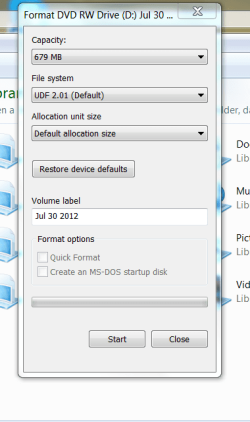
Here is something else that I found. I inserted a DVD and right clicked on "DVD RW Drive" and selected the option "Format". Please see the attached screen shot.
(1) What is the "Create an MS-DOS start up disk" under Format Options, at the bottom of the window? (2) As you can also see, the two items under Format Options are shaded out and the click option is not available. why is that?

Thank you bdstx4 for all the information. I am using a laptop Acer 5250

Regards
 

Attachments

  • START UP DISK.PNG
    START UP DISK.PNG
    22 KB · Views: 26
Last edited:

My Computer My Computer

At a glance

Windows 7 Home Premium 64bitAMD Dual Core C-502GB DDR3/320GB HDDAMD Radeon HD 6250
Computer Manufacturer/Model Number
Laptop - Acer Aspire 5250-BZ479
OS
Windows 7 Home Premium 64bit
CPU
AMD Dual Core C-50
Memory
2GB DDR3/320GB HDD
Graphics Card(s)
AMD Radeon HD 6250
Monitor(s) Displays
15.6" HD LED LCD
Internet Speed
ADSL
MS-Dos (Messy-Dos to the linux/unix community at the time) was were it all began for Microsoft. It was their basic command line operating system many years ago (how time flies:( ). It allows you to create a basic MS Dos floppy boot diskette. You will get an MS Dos command prompt much like the command prompt in Windows. It has limited use and I wouldn't worry about it.

Oh the unshaded business. Plug in a usb floppy/diskette drive and this option will become unshaded. I'm not sure that you can still buy these.
 
Last edited:

My Computer My Computer

At a glance

Windows 7x64 Home Premium SP1Intel i7 2600kG.Skill Ripjaws (DDR3-1600) 2x4GBNvidia GeForce GTS 450; Intel HD Graphics 300...
Computer type
PC/Desktop
Computer Manufacturer/Model Number
Own build
OS
Windows 7x64 Home Premium SP1
CPU
Intel i7 2600k
Motherboard
ASUS P8Z68 Deluxe
Memory
G.Skill Ripjaws (DDR3-1600) 2x4GB
Graphics Card(s)
Nvidia GeForce GTS 450; Intel HD Graphics 3000(GT2+)
Monitor(s) Displays
Dell Ultrasharp IPS panel U2311H, Samsung SyncMaster P2350
Screen Resolution
1920x1080
Hard Drives
Samsung 850 Pro SSD 256GB, Samsung SSD 840 120GB, Seagates 1TB Barracuda ST31000528AS x2
PSU
Seasonic M12II 520W
Case
Lian Li Lancool PC-K60
Cooling
Case: 1x120mm, 3x140mm CPU: Hyper 212+
Keyboard
Logitech MK520 (wireless)
Mouse
Logitech MK520
Internet Speed
6-7 Mbps
Antivirus
Norton Security Premium, Malwarebytes on 2 (MSE on 3rd PC)
Browser
FireFox
Other Info
Audio: Logitech Z523 2.1
Thank you for some great help. I have marked the question as "answered"

Best regards,
 

My Computer My Computer

At a glance

Windows 7 Home Premium 64bitAMD Dual Core C-502GB DDR3/320GB HDDAMD Radeon HD 6250
Computer Manufacturer/Model Number
Laptop - Acer Aspire 5250-BZ479
OS
Windows 7 Home Premium 64bit
CPU
AMD Dual Core C-50
Memory
2GB DDR3/320GB HDD
Graphics Card(s)
AMD Radeon HD 6250
Monitor(s) Displays
15.6" HD LED LCD
Internet Speed
ADSL
Back
Top