

How can I disable "always use the selected program" function?
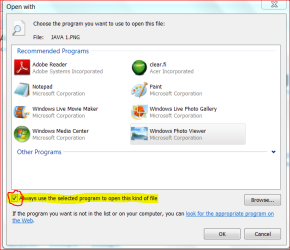
When choosing a program to open a file, in the 'open with' window, the option to "Always use the selected program to open this kind of file" is selected on (ticked) by default. Please see highlighted and red circled part in the attachment. How can I make this to remain always deselected (unticked), so that I can select it only when I want to?
When choosing a program to open a file, in the 'open with' window, the option to "Always use the selected program to open this kind of file" is selected on (ticked) by default. Please see highlighted and red circled part in the attachment. How can I make this to remain always deselected (unticked), so that I can select it only when I want to?
Attachments
My Computer
At a glance
Windows 7 Home Premium 64bitAMD Dual Core C-502GB DDR3/320GB HDDAMD Radeon HD 6250
- Computer Manufacturer/Model Number
- Laptop - Acer Aspire 5250-BZ479
- OS
- Windows 7 Home Premium 64bit
- CPU
- AMD Dual Core C-50
- Memory
- 2GB DDR3/320GB HDD
- Graphics Card(s)
- AMD Radeon HD 6250
- Monitor(s) Displays
- 15.6" HD LED LCD
- Internet Speed
- ADSL


