Open With - Add or Remove "Always use selected program"

How to Add or Remove "Always use selected program" in Open With


   Information
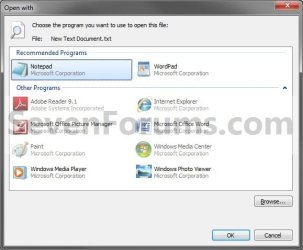
This will show you how to add (default) or remove the Always use the selected program to open this kind of file option from in Open with for only the current user or all users on the Windows computer.
   Note
This will include all Open with windows in Windows. For example, when you right click on a file and select Open with, or through Default Programs.
   Tip
When removed, this can be handy to prevent accidentally associating a program to always open a file extension type with that program when you only wanted to temporarily open the file with that program instead.

EXAMPLE: Open with
NOTE: This is with the Always use the selected program to open this kind of file option at default (added) and removed.
Default.jpg

Removed.jpg


OPTION ONE

Apply to Current User Only


NOTE: OPTION TWO below will override this option.
1. To Remove "Always use the selected program"
A) Click on the Download button below to download the file below.
Remove_Always_Select_Current_User.reg

Download


B) Go to step 3.
2. To Restore "Always use the selected program"
NOTE: This is the default setting.
A) Click on the Download button below to download the file below.
Restore_Always_Select_Current_User.reg

Download


3. Click on Save, and save the .reg file to the desktop.

4. Right click the downloaded .reg file and click on Merge.

5. Click on Run, Yes, Yes, and OK when prompted.

6. When done, you can delete the downloaded .reg file if you like.


OPTION TWO

Apply to All Users on Computer


NOTE: This option will override OPTION ONE above.
1. To Remove "Always use the selected program"
A) Click on the Download button below to download the file below.
Remove_Always_Select_All_Users.reg

Download


B) Go to step 3.
2. To Restore "Always use the selected program"
NOTE: This is the default setting.
A) Click on the Download button below to download the file below.
Restore_Always_Select_All_Users.reg

Download


3. Click on Save, and save the .reg file to the desktop.

4. Right click the downloaded .reg file and click on Merge.

5. Click on Run, Yes, Yes, and OK when prompted.

6. When done, you can delete the downloaded .reg file if you like.
That's it,
Shawn


Attachments

Last edited:
Thanks. There has been two too many times that I would go through so quickly that I would forget to uncheck the "Always" button only to mess up how a certain type of file acts giving me hours of headache trying to fix it (not knowing how). Ideally I would prefer it to still be there, but not defaulted as checked, but this is just as good for me.
 

My Computer

Computer Manufacturer/Model Number
HP Pav 2270us, Persario F700, Acer a true fightn' machine
OS
Win7 Ult. 32; Win7 Home Prem 64, WinXP On Life Support
Other Info
It's pretty?
Hello TheCuriosity,

Yeah, that would be a nice option to have. I'm happy this workaround will work for you though.
 

My Computer

Computer type
PC/Desktop
Computer Manufacturer/Model Number
Self built custom
OS
64-bit Windows 11 Pro for Workstations
CPU
Intel i7-8700K OC'd to 5 GHz
Motherboard
ASUS ROG Maximus XI Formula Z390
Memory
64 GB (4x16GB) G.SKILL TridentZ RGB DDR4 3600 MHz
Graphics Card(s)
ASUS ROG-STRIX-GTX1080TI-O11G-GAMING
Sound Card
Integrated
Monitor(s) Displays
2 x Samsung Odyssey G7 27"
Screen Resolution
2560x1440
Hard Drives
1TB Samsung 990 PRO M.2,
4TB Samsung 990 PRO PRO M.2,
TerraMaster F8 SSD Plus NAS
PSU
Seasonic Prime Titanium 850W
Case
Thermaltake Core P3
Cooling
Corsair Hydro H115i
Keyboard
Logitech wireless K800
Mouse
Logitech MX Master 4
Internet Speed
2 Gb/s Download and 100 Mb/s Upload
Antivirus
Malwarebyte Anti-Malware Premium
Browser
Google Chrome
Other Info
Logitech Z625 speaker system,
Logitech BRIO 4K Pro webcam,
HP Color LaserJet Pro MFP M477fdn,
APC SMART-UPS RT 1000 XL - SURT1000XLI,
Galaxy S23 Plus phone
hi

is there any way to just permanently uncheck the checkbox?
in earlier windows versions it was possible to change a value in HKEY_CLASSES_ROOT\Unknown\shell\openas\command
(C:\WINDOWS\Rundll32.exe Shell32.dll,OpenAs_RunDLL %1) to %2 but it doesn't work with win7. Hiding is good but I might need the option sometime where it is.

Cheers
 

My Computer

Computer Manufacturer/Model Number
hp
OS
win7.7100x64
CPU
core2duo t5870
Memory
4gb
Monitor(s) Displays
l2245w
Hello Nechan,

Not that I know of so far, but you could always use Default Programs to make it the "Always use" default program as a workaround.
 

My Computer

Computer type
PC/Desktop
Computer Manufacturer/Model Number
Self built custom
OS
64-bit Windows 11 Pro for Workstations
CPU
Intel i7-8700K OC'd to 5 GHz
Motherboard
ASUS ROG Maximus XI Formula Z390
Memory
64 GB (4x16GB) G.SKILL TridentZ RGB DDR4 3600 MHz
Graphics Card(s)
ASUS ROG-STRIX-GTX1080TI-O11G-GAMING
Sound Card
Integrated
Monitor(s) Displays
2 x Samsung Odyssey G7 27"
Screen Resolution
2560x1440
Hard Drives
1TB Samsung 990 PRO M.2,
4TB Samsung 990 PRO PRO M.2,
TerraMaster F8 SSD Plus NAS
PSU
Seasonic Prime Titanium 850W
Case
Thermaltake Core P3
Cooling
Corsair Hydro H115i
Keyboard
Logitech wireless K800
Mouse
Logitech MX Master 4
Internet Speed
2 Gb/s Download and 100 Mb/s Upload
Antivirus
Malwarebyte Anti-Malware Premium
Browser
Google Chrome
Other Info
Logitech Z625 speaker system,
Logitech BRIO 4K Pro webcam,
HP Color LaserJet Pro MFP M477fdn,
APC SMART-UPS RT 1000 XL - SURT1000XLI,
Galaxy S23 Plus phone
How to Add or Remove "Always use selected program" in Open With

This solves one of my problems.. thanks
 

My Computer

Computer type
PC/Desktop
Computer Manufacturer/Model Number
Compaq Presario
OS
Windows 7 64 bit
You're most welcome Artinusa. :)
 

My Computer

Computer type
PC/Desktop
Computer Manufacturer/Model Number
Self built custom
OS
64-bit Windows 11 Pro for Workstations
CPU
Intel i7-8700K OC'd to 5 GHz
Motherboard
ASUS ROG Maximus XI Formula Z390
Memory
64 GB (4x16GB) G.SKILL TridentZ RGB DDR4 3600 MHz
Graphics Card(s)
ASUS ROG-STRIX-GTX1080TI-O11G-GAMING
Sound Card
Integrated
Monitor(s) Displays
2 x Samsung Odyssey G7 27"
Screen Resolution
2560x1440
Hard Drives
1TB Samsung 990 PRO M.2,
4TB Samsung 990 PRO PRO M.2,
TerraMaster F8 SSD Plus NAS
PSU
Seasonic Prime Titanium 850W
Case
Thermaltake Core P3
Cooling
Corsair Hydro H115i
Keyboard
Logitech wireless K800
Mouse
Logitech MX Master 4
Internet Speed
2 Gb/s Download and 100 Mb/s Upload
Antivirus
Malwarebyte Anti-Malware Premium
Browser
Google Chrome
Other Info
Logitech Z625 speaker system,
Logitech BRIO 4K Pro webcam,
HP Color LaserJet Pro MFP M477fdn,
APC SMART-UPS RT 1000 XL - SURT1000XLI,
Galaxy S23 Plus phone
Server Error


404 - File or directory not found.

The resource you are looking for might have been removed, had its name changed, or is temporarily unavailable.
 

My Computer

OS
XP pro x32, 7 x32 & x64 mostly Ultimate but some times anothers
Thank you Cybercontroler for letting me know. They have been restored. :)
 

My Computer

Computer type
PC/Desktop
Computer Manufacturer/Model Number
Self built custom
OS
64-bit Windows 11 Pro for Workstations
CPU
Intel i7-8700K OC'd to 5 GHz
Motherboard
ASUS ROG Maximus XI Formula Z390
Memory
64 GB (4x16GB) G.SKILL TridentZ RGB DDR4 3600 MHz
Graphics Card(s)
ASUS ROG-STRIX-GTX1080TI-O11G-GAMING
Sound Card
Integrated
Monitor(s) Displays
2 x Samsung Odyssey G7 27"
Screen Resolution
2560x1440
Hard Drives
1TB Samsung 990 PRO M.2,
4TB Samsung 990 PRO PRO M.2,
TerraMaster F8 SSD Plus NAS
PSU
Seasonic Prime Titanium 850W
Case
Thermaltake Core P3
Cooling
Corsair Hydro H115i
Keyboard
Logitech wireless K800
Mouse
Logitech MX Master 4
Internet Speed
2 Gb/s Download and 100 Mb/s Upload
Antivirus
Malwarebyte Anti-Malware Premium
Browser
Google Chrome
Other Info
Logitech Z625 speaker system,
Logitech BRIO 4K Pro webcam,
HP Color LaserJet Pro MFP M477fdn,
APC SMART-UPS RT 1000 XL - SURT1000XLI,
Galaxy S23 Plus phone
To display the "Open with" with the box "Always use the selected program to open this kind of file" UNCHECKED by default but ACTIVE, I have found the solution on this page. Simply download the .zip file, extract the 3 files MyOpenAs_RestoreDefaults.reg, MyOpenAs.reg and MyOpenAs.dll (must be selected whether your PC is 64-bit or 32-bit) into your \Windows\System32 folder. Works perfectly.
 
Last edited by a moderator:

My Computer

Computer Manufacturer/Model Number
custom
OS
Windows 7 Home Premium 64 bit
CPU
3.40 gigahertz Intel Core i7-2600K
Motherboard
Gigabyte
Memory
2 TB
Monitor(s) Displays
Samsung SyncMaster 275T 27 inch
Hard Drives
2x 120GB AData SSDs
PSU
NotSure
Cooling
air

My Computer

Computer type
PC/Desktop
Computer Manufacturer/Model Number
Self built custom
OS
64-bit Windows 11 Pro for Workstations
CPU
Intel i7-8700K OC'd to 5 GHz
Motherboard
ASUS ROG Maximus XI Formula Z390
Memory
64 GB (4x16GB) G.SKILL TridentZ RGB DDR4 3600 MHz
Graphics Card(s)
ASUS ROG-STRIX-GTX1080TI-O11G-GAMING
Sound Card
Integrated
Monitor(s) Displays
2 x Samsung Odyssey G7 27"
Screen Resolution
2560x1440
Hard Drives
1TB Samsung 990 PRO M.2,
4TB Samsung 990 PRO PRO M.2,
TerraMaster F8 SSD Plus NAS
PSU
Seasonic Prime Titanium 850W
Case
Thermaltake Core P3
Cooling
Corsair Hydro H115i
Keyboard
Logitech wireless K800
Mouse
Logitech MX Master 4
Internet Speed
2 Gb/s Download and 100 Mb/s Upload
Antivirus
Malwarebyte Anti-Malware Premium
Browser
Google Chrome
Other Info
Logitech Z625 speaker system,
Logitech BRIO 4K Pro webcam,
HP Color LaserJet Pro MFP M477fdn,
APC SMART-UPS RT 1000 XL - SURT1000XLI,
Galaxy S23 Plus phone
You're welcome Zaw Lin Soe.
 

My Computer

Computer type
PC/Desktop
Computer Manufacturer/Model Number
Self built custom
OS
64-bit Windows 11 Pro for Workstations
CPU
Intel i7-8700K OC'd to 5 GHz
Motherboard
ASUS ROG Maximus XI Formula Z390
Memory
64 GB (4x16GB) G.SKILL TridentZ RGB DDR4 3600 MHz
Graphics Card(s)
ASUS ROG-STRIX-GTX1080TI-O11G-GAMING
Sound Card
Integrated
Monitor(s) Displays
2 x Samsung Odyssey G7 27"
Screen Resolution
2560x1440
Hard Drives
1TB Samsung 990 PRO M.2,
4TB Samsung 990 PRO PRO M.2,
TerraMaster F8 SSD Plus NAS
PSU
Seasonic Prime Titanium 850W
Case
Thermaltake Core P3
Cooling
Corsair Hydro H115i
Keyboard
Logitech wireless K800
Mouse
Logitech MX Master 4
Internet Speed
2 Gb/s Download and 100 Mb/s Upload
Antivirus
Malwarebyte Anti-Malware Premium
Browser
Google Chrome
Other Info
Logitech Z625 speaker system,
Logitech BRIO 4K Pro webcam,
HP Color LaserJet Pro MFP M477fdn,
APC SMART-UPS RT 1000 XL - SURT1000XLI,
Galaxy S23 Plus phone
Thank you Cybercontroler for letting me know. They have been restored. :)

Hey, i am having lots of problem. With my .dll i put a different program to open with. Now, it will not let me change back, i have tried everything. Please help me @Brink.
 
Last edited by a moderator:

My Computer

OS
Windows 7 Home Premium 64 bit

My Computer

Computer type
PC/Desktop
Computer Manufacturer/Model Number
Self built custom
OS
64-bit Windows 11 Pro for Workstations
CPU
Intel i7-8700K OC'd to 5 GHz
Motherboard
ASUS ROG Maximus XI Formula Z390
Memory
64 GB (4x16GB) G.SKILL TridentZ RGB DDR4 3600 MHz
Graphics Card(s)
ASUS ROG-STRIX-GTX1080TI-O11G-GAMING
Sound Card
Integrated
Monitor(s) Displays
2 x Samsung Odyssey G7 27"
Screen Resolution
2560x1440
Hard Drives
1TB Samsung 990 PRO M.2,
4TB Samsung 990 PRO PRO M.2,
TerraMaster F8 SSD Plus NAS
PSU
Seasonic Prime Titanium 850W
Case
Thermaltake Core P3
Cooling
Corsair Hydro H115i
Keyboard
Logitech wireless K800
Mouse
Logitech MX Master 4
Internet Speed
2 Gb/s Download and 100 Mb/s Upload
Antivirus
Malwarebyte Anti-Malware Premium
Browser
Google Chrome
Other Info
Logitech Z625 speaker system,
Logitech BRIO 4K Pro webcam,
HP Color LaserJet Pro MFP M477fdn,
APC SMART-UPS RT 1000 XL - SURT1000XLI,
Galaxy S23 Plus phone
Hello Bully, and welcome to Seven Forums.

You can download the DLL option in the tutorial below that should be able to fix this for you by restoring it's default associations. :)

http://www.sevenforums.com/tutorials/19449-default-file-type-associations-restore.html

Hope this helps,
Shawn


OMG! Thank you so much shawn!

Do you have a MSN or Skype? I can contact you in. So, if i have any other problems, i can just contact you! :D

YOUR the best..

So skype or MSN? or email?
 

My Computer

OS
Windows 7 Home Premium 64 bit
Back
Top