
How can I get rid of Network Magic folder?

MitchellEve

New member
Member
VIP
Local time
6:38 PM
Messages
117
I installed Network Magic because its needed for my router but it made this folder that is only visible in Windows Explorer MRUS - screenie below

I tried to delete it from registry and it worked but I still get this!
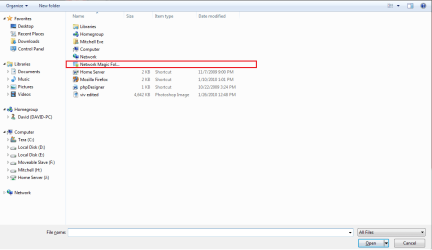
Untitled.png
 

My Computer My Computer

At a glance

Windows 7 Ultimate x64
OS
Windows 7 Ultimate x64
What part of your explorer has this? windows explorer MRUS? :confused:
 

My Computer My Computer

At a glance

Windows 7 64 bit build 7600Intel Core i5 750/Intel Pentium Duo T4200 2.0...6 gig/4 gigATI Radeon HD 4350/Intel Graphics Media Accel...
Computer Manufacturer/Model Number
Dell XPS 8000/HP G70 258US
OS
Windows 7 64 bit build 7600
CPU
Intel Core i5 750/Intel Pentium Duo T4200 2.00 ghz
Memory
6 gig/4 gig
Graphics Card(s)
ATI Radeon HD 4350/Intel Graphics Media Accelerator 4500MHD
Sound Card
Realtek/Conexant Smartaudio High Definition Device
Monitor(s) Displays
Two
Screen Resolution
1920x1080/1440x900
Hard Drives
750/250 gig
Internet Speed
24 mb
Have you tried Programs and Features->Remove that app
 

My Computer My Computer

At a glance

Windows 7 Home Premium x64 - Mac OS X 10.6.4 x64Intel Core 2 Duo T9300 2.5 GHz4GB Kingston DDR2-800NVIDIA Geforce 8600M GT (512MB Model)
Computer Manufacturer/Model Number
Compal JFT02 (Custom Build Laptop)
OS
Windows 7 Home Premium x64 - Mac OS X 10.6.4 x64
CPU
Intel Core 2 Duo T9300 2.5 GHz
Motherboard
JFT02
Memory
4GB Kingston DDR2-800
Graphics Card(s)
NVIDIA Geforce 8600M GT (512MB Model)
Sound Card
Realtek HD Audio
Monitor(s) Displays
WUXGA Standard Laptop Display
Screen Resolution
1680*1050
Hard Drives
Toshiba 320GB 5400RPM Laptop HD
PSU
Standard Laptop Power Supply
Case
Standard Laptop Case
Cooling
Standard Laptop Cooling
Keyboard
Standard Laptop 105 Key-Keyboard
Mouse
Synaptics Touchpad
Internet Speed
Verizion Online DSL 3360/864 kbs (dl/up)
thats when the explorer open dialogue
 

My Computer My Computer

At a glance

Windows 7 Ultimate x64
OS
Windows 7 Ultimate x64
Hello Mitchell,

Are you able to right click on the folder in the location of your screenshot above and delete it from there instead?
 

My Computer My Computer

At a glance

64-bit Windows 11 Pro for WorkstationsIntel i7-8700K OC'd to 5 GHz64 GB (4x16GB) G.SKILL TridentZ RGB DDR4 3600...ASUS ROG-STRIX-GTX1080TI-O11G-GAMING
Computer type
PC/Desktop
Computer Manufacturer/Model Number
Self built custom
OS
64-bit Windows 11 Pro for Workstations
CPU
Intel i7-8700K OC'd to 5 GHz
Motherboard
ASUS ROG Maximus XI Formula Z390
Memory
64 GB (4x16GB) G.SKILL TridentZ RGB DDR4 3600 MHz
Graphics Card(s)
ASUS ROG-STRIX-GTX1080TI-O11G-GAMING
Sound Card
Integrated
Monitor(s) Displays
2 x Samsung Odyssey G7 27"
Screen Resolution
2560x1440
Hard Drives
1TB Samsung 990 PRO M.2,
4TB Samsung 990 PRO PRO M.2,
TerraMaster F8 SSD Plus NAS
PSU
Seasonic Prime Titanium 850W
Case
Thermaltake Core P3
Cooling
Corsair Hydro H115i
Keyboard
Logitech wireless K800
Mouse
Logitech MX Master 4
Internet Speed
2 Gb/s Download and 100 Mb/s Upload
Antivirus
Malwarebyte Anti-Malware Premium
Browser
Google Chrome
Other Info
Logitech Z625 speaker system,
Logitech BRIO 4K Pro webcam,
HP Color LaserJet Pro MFP M477fdn,
APC SMART-UPS RT 1000 XL - SURT1000XLI,
Galaxy S23 Plus phone
nope
 

My Computer My Computer

At a glance

Windows 7 Ultimate x64
OS
Windows 7 Ultimate x64

My Computer My Computer

At a glance

64-bit Windows 11 Pro for WorkstationsIntel i7-8700K OC'd to 5 GHz64 GB (4x16GB) G.SKILL TridentZ RGB DDR4 3600...ASUS ROG-STRIX-GTX1080TI-O11G-GAMING
Computer type
PC/Desktop
Computer Manufacturer/Model Number
Self built custom
OS
64-bit Windows 11 Pro for Workstations
CPU
Intel i7-8700K OC'd to 5 GHz
Motherboard
ASUS ROG Maximus XI Formula Z390
Memory
64 GB (4x16GB) G.SKILL TridentZ RGB DDR4 3600 MHz
Graphics Card(s)
ASUS ROG-STRIX-GTX1080TI-O11G-GAMING
Sound Card
Integrated
Monitor(s) Displays
2 x Samsung Odyssey G7 27"
Screen Resolution
2560x1440
Hard Drives
1TB Samsung 990 PRO M.2,
4TB Samsung 990 PRO PRO M.2,
TerraMaster F8 SSD Plus NAS
PSU
Seasonic Prime Titanium 850W
Case
Thermaltake Core P3
Cooling
Corsair Hydro H115i
Keyboard
Logitech wireless K800
Mouse
Logitech MX Master 4
Internet Speed
2 Gb/s Download and 100 Mb/s Upload
Antivirus
Malwarebyte Anti-Malware Premium
Browser
Google Chrome
Other Info
Logitech Z625 speaker system,
Logitech BRIO 4K Pro webcam,
HP Color LaserJet Pro MFP M477fdn,
APC SMART-UPS RT 1000 XL - SURT1000XLI,
Galaxy S23 Plus phone
nope nope nope.
 

My Computer My Computer

At a glance

Windows 7 Ultimate x64
OS
Windows 7 Ultimate x64
I do not think it can be removed unless you uninstall Network Magic since it uses that folder. :(
 

My Computer My Computer

At a glance

64-bit Windows 11 Pro for WorkstationsIntel i7-8700K OC'd to 5 GHz64 GB (4x16GB) G.SKILL TridentZ RGB DDR4 3600...ASUS ROG-STRIX-GTX1080TI-O11G-GAMING
Computer type
PC/Desktop
Computer Manufacturer/Model Number
Self built custom
OS
64-bit Windows 11 Pro for Workstations
CPU
Intel i7-8700K OC'd to 5 GHz
Motherboard
ASUS ROG Maximus XI Formula Z390
Memory
64 GB (4x16GB) G.SKILL TridentZ RGB DDR4 3600 MHz
Graphics Card(s)
ASUS ROG-STRIX-GTX1080TI-O11G-GAMING
Sound Card
Integrated
Monitor(s) Displays
2 x Samsung Odyssey G7 27"
Screen Resolution
2560x1440
Hard Drives
1TB Samsung 990 PRO M.2,
4TB Samsung 990 PRO PRO M.2,
TerraMaster F8 SSD Plus NAS
PSU
Seasonic Prime Titanium 850W
Case
Thermaltake Core P3
Cooling
Corsair Hydro H115i
Keyboard
Logitech wireless K800
Mouse
Logitech MX Master 4
Internet Speed
2 Gb/s Download and 100 Mb/s Upload
Antivirus
Malwarebyte Anti-Malware Premium
Browser
Google Chrome
Other Info
Logitech Z625 speaker system,
Logitech BRIO 4K Pro webcam,
HP Color LaserJet Pro MFP M477fdn,
APC SMART-UPS RT 1000 XL - SURT1000XLI,
Galaxy S23 Plus phone
I guess I'll have to live with it.
 

My Computer My Computer

At a glance

Windows 7 Ultimate x64
OS
Windows 7 Ultimate x64
Take a look in the registry at:
HKEY_LOCAL_MACHINE\SOFTWARE\Microsoft\Windows\CurrentVersion\Explorer\Desktop\NameSpace

There is a long list of CLSIDs there. See if one of them is your Network Magic folder.
 

My Computer My Computer

At a glance

Windows 7 Ultimate 32-bitDual Xeon E5420 2.5 GHz4GB Kingston DDR2667 FB-DIMMs (4x1GB)ATI Radeon HD4850 1GB
OS
Windows 7 Ultimate 32-bit
CPU
Dual Xeon E5420 2.5 GHz
Motherboard
Intel S5000XVNSATAR
Memory
4GB Kingston DDR2667 FB-DIMMs (4x1GB)
Graphics Card(s)
ATI Radeon HD4850 1GB
Sound Card
Realtek ALC260
Monitor(s) Displays
Viewsonic VG2230wm
Screen Resolution
1680 x 1050
Hard Drives
-4 x WD Scorpio Black 250GB 7200 RPM 2.5" RAID 10 on Intel ESR2-
-5 x WD Caviar Black 640GB 7200 RPM 3.5" RAID 5 on LSI 8708ELP-
PSU
Thermaltake W0116RU 750W
Case
Chieftec WH-02B-B
Cooling
2 x Noctua NH-U9DX CPU coolers
Keyboard
Northgate Omnikey 102 !
Mouse
Logitech Performance Mouse MX
Other Info
-Lite-ON BD-ROM Drive-
-Lite-ON DVD-RW Drive-
-Azio BTD-V201 Bluetooth adapter-
-PCTV 801e TV Tuner-
Take a look in the registry at:
HKEY_LOCAL_MACHINE\SOFTWARE\Microsoft\Windows\CurrentVersion\Explorer\Desktop\NameSpace

There is a long list of CLSIDs there. See if one of them is your Network Magic folder.


I did that once before and I deleted the value but it came back.
 

My Computer My Computer

At a glance

Windows 7 Ultimate x64
OS
Windows 7 Ultimate x64
No you don't have to leave with it

Simply go into network magic's options and uncheck the "show network magic folder" check box. Refresh your desktop or any explorer window viewing the network magic folder. Vuala, your wish has come throuh, hope this works for you :D
 

My Computer My Computer

At a glance

Windows Se7en Ultimate x64BitIntel Centrino 2 Inside4BG RamNvidia GeForce 9300M GS
Computer Manufacturer/Model Number
HP Pavilion dv3510nr Entertainment Notebook PC
OS
Windows Se7en Ultimate x64Bit
CPU
Intel Centrino 2 Inside
Memory
4BG Ram
Graphics Card(s)
Nvidia GeForce 9300M GS
I installed Network Magic because its needed for my router but it made this folder that is only visible in Windows Explorer MRUS - screenie below

I tried to delete it from registry and it worked but I still get this!

View attachment 50374

You haven't filled out your system specs, but I'm going to go out on a limb here and guess that you are running a 64-bit version of Windows 7? If that is the case, then the reason that the "Network Magic" only shows up in Open/Save dialog boxes is that the Explorer Extension that creates it is likely 32-bit, and the program you are using to access the Open/Save dialog (you don't say which) is also 32-bit, hence it shows up only there. If you want Network Magic to show up in both 32-bit and 64-bit, then you need to upgrade to a 64-bit version that includes both 32-bit and 64-bit explorer extensions.
 

My Computer My Computer

At a glance

Windows 7 Professional 32-bit SP1AMD A4/A63.00GB EDOVMware SVGA 3D
Computer type
PC/Desktop
Computer Manufacturer/Model Number
Virtual Machine
OS
Windows 7 Professional 32-bit SP1
CPU
AMD A4/A6
Motherboard
Intel Corporation 440BX Desktop Reference Platform
Memory
3.00GB EDO
Graphics Card(s)
VMware SVGA 3D
Sound Card
High Definition Audio Device
Monitor(s) Displays
Generic Non-PnP Monitor on VMware SVGA 3D
Screen Resolution
1440x900
Hard Drives
1 x 60GB VMware Virtual SATA Hard Drive ATA Device
Antivirus
Kaspersky Total Security
Why are we bumping such an old thread? I managed to do a bit of exploring in the Network Magic program files and with a .dll editor I opened a .dll and ran a simply register hack.

The problem works - thanks for all of your suggestions but none of them worked.
 

My Computer My Computer

At a glance

Windows 7 Ultimate x64
OS
Windows 7 Ultimate x64
Hi, i've also have this problem, maybe any1 know the solution?
 

My Computer My Computer

At a glance

Windows 7 Ultimate x64
OS
Windows 7 Ultimate x64
MitchellEve, thanks it helped.
As you may know, this NM folder displayed not only on the desktop and in the explorer shell, but it might be deleted from everywhere, and still be visible in explorer shell in saving and loading windows.

Does this command:
Code:
unregistering library
solving this problem?

I was trying to watch from daemon tools and paint, and its gone, what keeps me happy)
 

My Computer My Computer

At a glance

Windows 7 Ultimate x64
OS
Windows 7 Ultimate x64
Back
Top