How can I install Windows 7 on my new Lenovo?

georgecy

New member
Local time
4:00 PM
Messages
5
Hi,
Can anybody help me to install Windows 7 on my new Lenovo AMD E1-1200?
It came with DOS and when i open it, it loads the DOS and goes to C:\> . No function keys work during or after the boot. There is only one directory named SRC with two zip files.
I tried to boot with CD or USB stick but did not work.
Can anybody help?
Thanks a lot
George
 

My Computer My Computer

At a glance

DOSamd2GB
Computer type
PC/Desktop
Computer Manufacturer/Model Number
Lenovo
OS
DOS
CPU
amd
Memory
2GB
Hard Drives
500GB
Welcome georgecy :)

It sounds like somebody erased the HD and just installed DOS to show the bare minimum that the HD works.
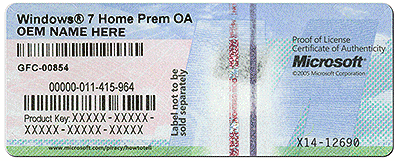
Do you have a valid Win7 install DVD and a valid COA-KeyCode ?
 

Attachments

  • coa-stickers.gif
    coa-stickers.gif
    495.9 KB · Views: 37

My Computer My Computer

At a glance

Win7 Enterprise, Win7 x86 (Ult 7600), Win7 x6...AMD fx8350 4ghz, AMD-32 2400mhz, AMD-64 3200m...2gb, 4gb on the Ult 7600, 4gb on Technet RTM,...Draw my own Graphics, several nVidia cards
Computer type
PC/Desktop
Computer Manufacturer/Model Number
Built them myself, Science Experiments !
OS
Win7 Enterprise, Win7 x86 (Ult 7600), Win7 x64 Ult 7600, TechNet RTM on AMD x64 (2.8Ghz)
CPU
AMD fx8350 4ghz, AMD-32 2400mhz, AMD-64 3200mhz, AMDx64 2.8G
Motherboard
SIS 755, ECS-K8M890M-M (Ult 7600), GigaByte & others
Memory
2gb, 4gb on the Ult 7600, 4gb on Technet RTM, 32gb on FX8350
Graphics Card(s)
Draw my own Graphics, several nVidia cards
Sound Card
on motherboard
Monitor(s) Displays
19" flat scr, 28" I-Inc widescr,22" Emprex Widescr, 23" Acer
Screen Resolution
1280 x 1024, 1440 x 900, 1920 x 1080
Hard Drives
6 pata Ide HD's & 2 Sata HD's
added 80gb external on Ult 7600 computer,
numerous extra 1tb, 2TB, 3Tb SATA HD's
A collection of ext HD Docks w/ HDs
PSU
430w, 550w, 600w, 700, 800, etc
Case
All Generic Full Towers
Cooling
Open Air & a few fans, some w/ colored LEDs
Keyboard
Compaq & Dell recycled from GoodWill
Mouse
Made in China Optical Wired Mouse
Internet Speed
Fast Cable InterNet
Antivirus
AVG Free on 24 different Desktops, NO Problems!
Browser
IE 8 is preferred, but use FireFox sometimes
Other Info
Linksys Routers, switches, & Hubs
Too Many USB Flash Drives to count, Biggest is 64GB !
Eight computers in my home network.
Sixteen computers at my business network.
Linked via TeamViewer !
Lots of old used spare computer parts everywhere!
I have original windows 7 serial number which i will install. All i need is to go to that phase....
To let me access either the DVD or the USB.
I think i must format the hard disk first, make partition etc. The computer is brand new, just bought it.
 

My Computer My Computer

At a glance

DOSamd2GB
Computer type
PC/Desktop
Computer Manufacturer/Model Number
Lenovo
OS
DOS
CPU
amd
Memory
2GB
Hard Drives
500GB
Boot the computer from your Windows 7 installation DVD/USB.
NOTE: Make sure that the CD/DVD drive is selected first and your HDD second in the boot priority order in your BIOS settings. Usually it is by default.

Also you can trigger the one time Boot Menu with one of the upper F-Keys during Bios power-up.
 

My Computer My Computer

At a glance

Win7 Enterprise, Win7 x86 (Ult 7600), Win7 x6...AMD fx8350 4ghz, AMD-32 2400mhz, AMD-64 3200m...2gb, 4gb on the Ult 7600, 4gb on Technet RTM,...Draw my own Graphics, several nVidia cards
Computer type
PC/Desktop
Computer Manufacturer/Model Number
Built them myself, Science Experiments !
OS
Win7 Enterprise, Win7 x86 (Ult 7600), Win7 x64 Ult 7600, TechNet RTM on AMD x64 (2.8Ghz)
CPU
AMD fx8350 4ghz, AMD-32 2400mhz, AMD-64 3200mhz, AMDx64 2.8G
Motherboard
SIS 755, ECS-K8M890M-M (Ult 7600), GigaByte & others
Memory
2gb, 4gb on the Ult 7600, 4gb on Technet RTM, 32gb on FX8350
Graphics Card(s)
Draw my own Graphics, several nVidia cards
Sound Card
on motherboard
Monitor(s) Displays
19" flat scr, 28" I-Inc widescr,22" Emprex Widescr, 23" Acer
Screen Resolution
1280 x 1024, 1440 x 900, 1920 x 1080
Hard Drives
6 pata Ide HD's & 2 Sata HD's
added 80gb external on Ult 7600 computer,
numerous extra 1tb, 2TB, 3Tb SATA HD's
A collection of ext HD Docks w/ HDs
PSU
430w, 550w, 600w, 700, 800, etc
Case
All Generic Full Towers
Cooling
Open Air & a few fans, some w/ colored LEDs
Keyboard
Compaq & Dell recycled from GoodWill
Mouse
Made in China Optical Wired Mouse
Internet Speed
Fast Cable InterNet
Antivirus
AVG Free on 24 different Desktops, NO Problems!
Browser
IE 8 is preferred, but use FireFox sometimes
Other Info
Linksys Routers, switches, & Hubs
Too Many USB Flash Drives to count, Biggest is 64GB !
Eight computers in my home network.
Sixteen computers at my business network.
Linked via TeamViewer !
Lots of old used spare computer parts everywhere!
If your still having trouble getting it to boot from CD/DVD drive.

Call Lenovo support at 18004267378 or 18774536686.

I don't think you will be charge for that info.

You will need to provide model and serial number.

John
 
Last edited:

My Computers My Computers

  • At a glance

    Win7, Win10, Win11
    Computer type
    PC/Desktop
    Computer Manufacturer/Model Number
    HP Pavilion 6751c
    OS
    Win7, Win10, Win11
    Internet Speed
    100 Mbps
    Antivirus
    Norton 360
    Browser
    IE 11
  • At a glance

    Win7, Win10, Win11
    Computer type
    PC/Desktop
    System Manufacturer/Model Number
    HP ENVY 750-514 & Dell XPS 8960
    OS
    Win7, Win10, Win11
    Antivirus
    Norton 360
You'll need to boot the WIn7 disk to Clean Install Windows 7, deleting all partitions at Steps 7 and 8 to create and Format new as you wish, or just click Next on the unallocated space to proceed.

If this is UEFI then you'll need to also follow the special steps in UEFI (Unified Extensible Firmware Interface) - Install Windows 7 with - Windows 7 Forums or Bypass UEFI to Install WIn7. Watch this video to understand better UEFI BIOS vs. Legacy BIOS - YouTube.

Failure to boot the disk is 90% of the time a user fault: How to Boot A Computer from CD or DVD - YouTube
 
Last edited:
Thanks all for your support. Finally i managed to get in bios and arrange the way to boot.
It was Fn (function key) + F2 and from there i selected the USB boot. Unfortunately it did not work with that. The hard disc was unformatted and asked me for the DVD so i had to use the DVD which i also had.
At the end it worked and did my job.
Thanks for the support again.
 

My Computer My Computer

At a glance

DOSamd2GB
Computer type
PC/Desktop
Computer Manufacturer/Model Number
Lenovo
OS
DOS
CPU
amd
Memory
2GB
Hard Drives
500GB
Back
Top