How can I keep all folders from changing?

JustAndrew

New member
Local time
7:08 PM
Messages
16
What I mean is, when I set Documents as Small Icons, how can I keep folders inside Documents from doing the same thing? Like when I go into My Received Files, I don't want the pictures to be small icons. I want them to be medium/large. But any change I make in a folder applies itself to every other folder as well.
 

My Computer My Computer

OS
Windows 7
CPU
E8400 @ 3.0 GHz
Motherboard
DFI Lanparty DK P35-T2RS
Memory
4 GB DDR2
Graphics Card(s)
EVGA 8800GT
Monitor(s) Displays
Acer 22"
Hard Drives
WD 500 GB
PSU
Antec Earthwatts 650W
Case
Cooler Master
Cooling
Arctic Cooling Freezer 64 Pro
Hello Andrew and welcome to Seven Forums.

If you access that folder from the C:\Users\(User-name)\My Documents location, then you can set each folder to have it's own separate folder views by default.

The Documents button on the dark right side of the Start Menu however opens to the Documents Library instead. These folder share the same folder views at this location and cannot be changed.

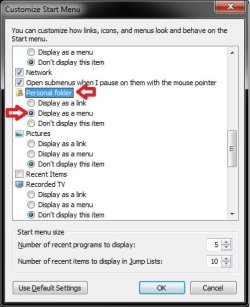
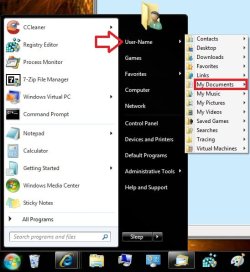
As a workaround, you can open My Documents from your User Folder button on the dark right side of the Start Menu instead. This opens to the C:\Users\(User-name)\My Documents location. To make it easier to select and open, have the Personal Folder (your user folder) set to Display as a menu.

Hope this helps,
Shawn
 

My Computer My Computer

Computer type
PC/Desktop
Computer Manufacturer/Model Number
Self built custom
OS
64-bit Windows 11 Pro for Workstations
CPU
Intel i7-8700K OC'd to 5 GHz
Motherboard
ASUS ROG Maximus XI Formula Z390
Memory
64 GB (4x16GB) G.SKILL TridentZ RGB DDR4 3600 MHz
Graphics Card(s)
ASUS ROG-STRIX-GTX1080TI-O11G-GAMING
Sound Card
Integrated
Monitor(s) Displays
2 x Samsung Odyssey G7 27"
Screen Resolution
2560x1440
Hard Drives
1TB Samsung 990 PRO M.2,
4TB Samsung 990 PRO PRO M.2,
TerraMaster F8 SSD Plus NAS
PSU
Seasonic Prime Titanium 850W
Case
Thermaltake Core P3
Cooling
Corsair Hydro H115i
Keyboard
Logitech wireless K800
Mouse
Logitech MX Master 4
Internet Speed
2 Gb/s Download and 100 Mb/s Upload
Antivirus
Malwarebyte Anti-Malware Premium
Browser
Google Chrome
Other Info
Logitech Z625 speaker system,
Logitech BRIO 4K Pro webcam,
HP Color LaserJet Pro MFP M477fdn,
APC SMART-UPS RT 1000 XL - SURT1000XLI,
Galaxy S23 Plus phone
What I mean is, when I set Documents as Small Icons, how can I keep folders inside Documents from doing the same thing? Like when I go into My Received Files, I don't want the pictures to be small icons. I want them to be medium/large. But any change I make in a folder applies itself to every other folder as well.


If you set for example large icons in a subfolder but not on the folder one level above it, then it should not apply itself upwards or downwards.

You could be experiencing a corrupt profile. Try creating another Windows 7 account and then try to set small icons to documents folder and then make you other settings within that folder the way you want and then back out and go back in to see if your prefs are keeping.
 

My Computer My Computer

Computer Manufacturer/Model Number
HP Pavilion dv7
OS
Windows 7
CPU
Core i7
Memory
8 GB
Graphics Card(s)
ATI FireGL
Monitor(s) Displays
Secondary is an HP L1940T
Screen Resolution
1680x1050
Hard Drives
160 GB SSD and 500 GB SATA
Keyboard
G11 Logitech
Mouse
G7 Logitech
Internet Speed
Fiber
Other Info
My rig smegging rules!
Hello JustAndrew,
What you have described will happen only if, for any particular folder, you go to Organize-FolderOptions-View tab and click on "Apply to Folders". If you dont like that setting, click on "Reset Folders" in the View tab. Then you can set individual view settings for folders and subfolders.
 

My Computer My Computer

Computer Manufacturer/Model Number
Too many to describe...
OS
Windows 7 x64 pro/ Windows 7 x86 Pro/ XP SP3 x86
Thank you for the welcome, Brink.

Well, I'd like to put My Documents in place of Documents, but it's nowhere on the list. I can only remove Documents.
 

My Computer My Computer

OS
Windows 7
CPU
E8400 @ 3.0 GHz
Motherboard
DFI Lanparty DK P35-T2RS
Memory
4 GB DDR2
Graphics Card(s)
EVGA 8800GT
Monitor(s) Displays
Acer 22"
Hard Drives
WD 500 GB
PSU
Antec Earthwatts 650W
Case
Cooler Master
Cooling
Arctic Cooling Freezer 64 Pro
You can remove the Documents button in the Start Menu.
Docs.jpg
Next, set your Personal Folder like this to have it that way if you like.
Start1.jpgStart2.jpg
 

My Computer My Computer

Computer type
PC/Desktop
Computer Manufacturer/Model Number
Self built custom
OS
64-bit Windows 11 Pro for Workstations
CPU
Intel i7-8700K OC'd to 5 GHz
Motherboard
ASUS ROG Maximus XI Formula Z390
Memory
64 GB (4x16GB) G.SKILL TridentZ RGB DDR4 3600 MHz
Graphics Card(s)
ASUS ROG-STRIX-GTX1080TI-O11G-GAMING
Sound Card
Integrated
Monitor(s) Displays
2 x Samsung Odyssey G7 27"
Screen Resolution
2560x1440
Hard Drives
1TB Samsung 990 PRO M.2,
4TB Samsung 990 PRO PRO M.2,
TerraMaster F8 SSD Plus NAS
PSU
Seasonic Prime Titanium 850W
Case
Thermaltake Core P3
Cooling
Corsair Hydro H115i
Keyboard
Logitech wireless K800
Mouse
Logitech MX Master 4
Internet Speed
2 Gb/s Download and 100 Mb/s Upload
Antivirus
Malwarebyte Anti-Malware Premium
Browser
Google Chrome
Other Info
Logitech Z625 speaker system,
Logitech BRIO 4K Pro webcam,
HP Color LaserJet Pro MFP M477fdn,
APC SMART-UPS RT 1000 XL - SURT1000XLI,
Galaxy S23 Plus phone
Ah, that makes sense. Thank you again. :)

And thanks to everyone else for their help and welcomes.
 

My Computer My Computer

OS
Windows 7
CPU
E8400 @ 3.0 GHz
Motherboard
DFI Lanparty DK P35-T2RS
Memory
4 GB DDR2
Graphics Card(s)
EVGA 8800GT
Monitor(s) Displays
Acer 22"
Hard Drives
WD 500 GB
PSU
Antec Earthwatts 650W
Case
Cooler Master
Cooling
Arctic Cooling Freezer 64 Pro
You're most welcome Andrew. :)
 

My Computer My Computer

Computer type
PC/Desktop
Computer Manufacturer/Model Number
Self built custom
OS
64-bit Windows 11 Pro for Workstations
CPU
Intel i7-8700K OC'd to 5 GHz
Motherboard
ASUS ROG Maximus XI Formula Z390
Memory
64 GB (4x16GB) G.SKILL TridentZ RGB DDR4 3600 MHz
Graphics Card(s)
ASUS ROG-STRIX-GTX1080TI-O11G-GAMING
Sound Card
Integrated
Monitor(s) Displays
2 x Samsung Odyssey G7 27"
Screen Resolution
2560x1440
Hard Drives
1TB Samsung 990 PRO M.2,
4TB Samsung 990 PRO PRO M.2,
TerraMaster F8 SSD Plus NAS
PSU
Seasonic Prime Titanium 850W
Case
Thermaltake Core P3
Cooling
Corsair Hydro H115i
Keyboard
Logitech wireless K800
Mouse
Logitech MX Master 4
Internet Speed
2 Gb/s Download and 100 Mb/s Upload
Antivirus
Malwarebyte Anti-Malware Premium
Browser
Google Chrome
Other Info
Logitech Z625 speaker system,
Logitech BRIO 4K Pro webcam,
HP Color LaserJet Pro MFP M477fdn,
APC SMART-UPS RT 1000 XL - SURT1000XLI,
Galaxy S23 Plus phone
Back
Top