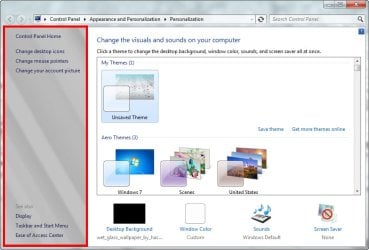
How can i replace this pane with the original

Cr7NeTwOrK

New member
Member
Local time
11:38 AM
Messages
25
[SOLVED] How can i replace this pane with the original

Hi guys,

I wanted to ask how can i change this pane to the blue-ish original one.

Yes i apply visual styles, maybe i replaced it and didn't know it.

Thanks :D
 

Attachments

  • 2011-06-07_215813.jpg
    2011-06-07_215813.jpg
    57.2 KB · Views: 15
Last edited:

My Computer My Computer

OS
Windows 7 Professional x86
Depends on how you apply those styles. If you use theme resource changer, all you'll have to do is apply a different theme that has the correct folders in place and that panel will change. If you've patched your system manually or with a patcher, the image you've pointed out is in the shell32.dll in the system32 folder, so that will have to be replaced with the original shell32.dll.

All the help I've got time for right now...sorry :-/
 

My Computer My Computer

OS
Windows 7 Home Premium 64bit
Hi guys,

I wanted to ask how can i change this pane to the blue-ish original one.

Yes i apply visual styles, maybe i replaced it and didn't know it.

Thanks :D

Just curious.... at the Personalize window
Have you tried to click at the " My Theme (1) - Unsave Theme " ?
 

My Computer My Computer

Computer Manufacturer/Model Number
Acer Aspire 7741Z
OS
Windows 7 Home Premium 64-bit, SP1
CPU
Intel Pentium P6200, Cores 2, 2.13 GHz
Memory
4 GB
Graphics Card(s)
Intel HD
Sound Card
unknown
Monitor(s) Displays
17.3 inches
Screen Resolution
1600 x 900
Hard Drives
640 GB, 5400 PRM
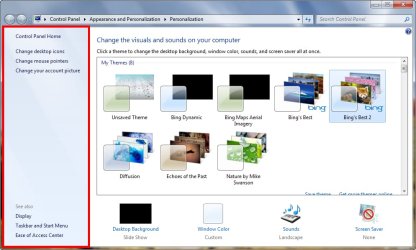
got it guys. Thanks sourpuss & t-4-2.

I downloaded a theme from Microsoft and it was replaced by the original.

Thanks for you help. :)
 

Attachments

  • 2011-06-08_065448.jpg
    2011-06-08_065448.jpg
    71 KB · Views: 4

My Computer My Computer

OS
Windows 7 Professional x86
Back
Top