Hi guys,
I am very new to this and I may not even have worded my problem correctly but I'll tell you what it is and if anyone can solve it I would be very grateful because I am at the limit of my windows knowledge here.
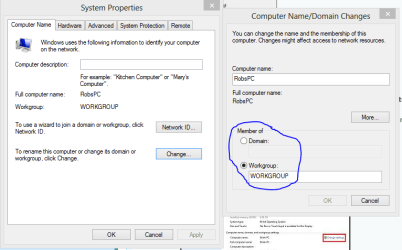
I am needing to set up a new administrator on my laptop, running Windows 7 Ultimate. The problem I'm having is when you try to create a new account it asks for a domain name? First of all - the only domains I am familiar with are website domains and I am assuming this is a different kind of domain, similar to a workgroup or something I've read. It seems my computer is attached to a domain which I have the name for now - found in the computers properties page. When I use this name for the domain when creating a new administrator account it gives me the error: The trust relationship between this workstation and the primary domain failed.
Here's the twist - This computer and I guess domain were set up in Australia. I am now in America trying to add this new admin....should this cause a problem? Is the domain an online network thing that it needs to connect to to operate, and if so do I have to literally be on the same internet network/modem to be connected to the domain? Really lost here but trying to find a way around this / work out if I am screwed and can't do it from America.
I've attached pics of the process I'm going through.
Step 1

Step 2

Step 3
https://sphotos-a.xx.fbcdn.net/hphotos-ash3/q71/s720x720/1011029_10151520000087197_27622763_n.jpg
Step 4
https://fbcdn-sphotos-h-a.akamaihd....20/1013157_10151520000147197_1269813512_n.jpg
Thnks in advance!
I am very new to this and I may not even have worded my problem correctly but I'll tell you what it is and if anyone can solve it I would be very grateful because I am at the limit of my windows knowledge here.
I am needing to set up a new administrator on my laptop, running Windows 7 Ultimate. The problem I'm having is when you try to create a new account it asks for a domain name? First of all - the only domains I am familiar with are website domains and I am assuming this is a different kind of domain, similar to a workgroup or something I've read. It seems my computer is attached to a domain which I have the name for now - found in the computers properties page. When I use this name for the domain when creating a new administrator account it gives me the error: The trust relationship between this workstation and the primary domain failed.
Here's the twist - This computer and I guess domain were set up in Australia. I am now in America trying to add this new admin....should this cause a problem? Is the domain an online network thing that it needs to connect to to operate, and if so do I have to literally be on the same internet network/modem to be connected to the domain? Really lost here but trying to find a way around this / work out if I am screwed and can't do it from America.
I've attached pics of the process I'm going through.
Step 1
Step 2
Step 3
https://sphotos-a.xx.fbcdn.net/hphotos-ash3/q71/s720x720/1011029_10151520000087197_27622763_n.jpg
Step 4
https://fbcdn-sphotos-h-a.akamaihd....20/1013157_10151520000147197_1269813512_n.jpg
Thnks in advance!
My Computer
At a glance
Windows 7 Ultimate 64 bitIntel core 2 extreme 2.53ghz4g
- Computer type
- PC/Desktop
- Computer Manufacturer/Model Number
- Dell
- OS
- Windows 7 Ultimate 64 bit
- CPU
- Intel core 2 extreme 2.53ghz
- Memory
- 4g
- Hard Drives
- 465gb
- Antivirus
- McAfee
- Browser
- Google Chrome