How can I take screenshots of a certain area?

BeardWix

New member
Local time
4:13 AM
Messages
12
Hey guys! Simple question.
So I need to take multiple screenshots of the screen, but only in a certain area.
I am aware that I can use the snipping tool or take a screenshot then edit it in Paint, but it's tedious work and is just plain inefficient when I need to take multiple screenshots of the same area.
Is there a way to add a shortcut (or install a program) that takes screenshots of a certain, PRE-selected area in just one click? I don't even mind if I need to paste it into Paint, I just need the screenshots.
Thank you!
 

My Computer My Computer

At a glance

Windows 7 Ultimate K x64As for the rest of the stuff I have no idea h...my software or hardware details? I didn't bui...
Computer type
PC/Desktop
OS
Windows 7 Ultimate K x64
CPU
As for the rest of the stuff I have no idea how to find out!
Motherboard
Is there a website or something I can go to to find out
Memory
my software or hardware details? I didn't build this PC.
Monitor(s) Displays
31" Samsung TV (Monitor)
Screen Resolution
1360 x 768
Mouse
Tecknet M002 Cordless Optical Mouse
Internet Speed
Download- 534.79Mbps / Upload- 247.31Mbps
Antivirus
Alyak 2.5
Browser
Chrome
The most straightforward solution is to use PrtScr and then paste the clipboard into Paint. You can crop the resultant image in Paint, to the region of the screen that you want.

Other programs may "remember" which region of the screen you set last time, allowing you to re-capture the same region, lots of times. Trouble is, these programs don't work as a background task meaning that you got to keep making the program the active window, before you can capture any region of the screen.
 

My Computer My Computer

At a glance

Windows 7 x64, Vista x64, 8.1 smartphoneIntel E8400 65W 64-bitDDR2 2 x 2GB, 1GB x 2XFX Radeon HD5750
Computer type
PC/Desktop
OS
Windows 7 x64, Vista x64, 8.1 smartphone
CPU
Intel E8400 65W 64-bit
Motherboard
Gigabyte EP45-UD3LR
Memory
DDR2 2 x 2GB, 1GB x 2
Graphics Card(s)
XFX Radeon HD5750
Sound Card
AMD High Definition Audio; Realtek High Definition Audio
Monitor(s) Displays
iiyama prolite X2377HDS
Screen Resolution
1920 x 1080
Hard Drives
500GB 7200 rpm Seagate ST3500413AS 16MB, 500GB 5400 rpm Toshiba MQ02ABF050H 32MB, 200GB 7200 rpm Seagate ST3200820AS 8MB, 2TB 7200 rpm Western Digital WD20EZRX 64MB
PSU
Enermax Liberty Modular
Case
Antec P193 Midi Tower
Keyboard
Mionix ZIBAL 60
Mouse
Razer USB 2.0 Diamondback Mouse or Huion Graphics Tablet
Browser
Internet Explorer, Lunascape, Firefox, Opera, Avast Safezone
I don't know of any program that does exactly what you want, but if you are snipping a window then screenpresso will cut down the work as it can auto select open windows on mouse over.
 

My Computer My Computer

At a glance

Windows 11
Computer type
PC/Desktop
OS
Windows 11

My Computers My Computers

  • At a glance

    Windows 11 Pro x64 [Latest Release and Releas...Ryzen 9 5950X, 3.8 - 5.2 MHz64GB [2 x 32GB] DDR4 3200MHz4GB NVIDIA GEFORCE GTX 1650 Ti
    Computer type
    PC/Desktop
    Computer Manufacturer/Model Number
    ChillBlast - Custom to my design
    OS
    Windows 11 Pro x64 [Latest Release and Release Preview]
    CPU
    Ryzen 9 5950X, 3.8 - 5.2 MHz
    Motherboard
    Asus Prime X570-Pro
    Memory
    64GB [2 x 32GB] DDR4 3200MHz
    Graphics Card(s)
    4GB NVIDIA GEFORCE GTX 1650 Ti
    Sound Card
    On-board SPDIF to 5.1 System + HDMI [5.1 system]
    Monitor(s) Displays
    32" UHD 32 Bit HDR Monitor + 43" UHD 4K 32Bit HDR TV
    Screen Resolution
    2 x 3840 x 2160 @60Hz
    Hard Drives
    1TB M2 SSD OS, 500GB Fast Access SSD, 2 x 8TB Data + Various Externals from 1TB to 4TB, 10TB NAS
    PSU
    NZXT C750 80 PLUS Gold 750W Modular PSU
    Case
    Workstation Case [Matt Black]
    Cooling
    NZXT Kraken X63 280mm CPU Cooler +2x Quiet Case fans
    Keyboard
    Logitech Wireless MX Keys & K400 + others
    Mouse
    Logitech Wireless MX Master 3S
    Internet Speed
    920 MB Down 50 MB Up
    Antivirus
    BitDefender Total Security Pro
    Browser
    Chrome (always run latest Non-Beta)
    Other Info
    Also run ...
    Laptop - Quad 8GB - Windows 10 Pro x64
    Nexus 7 Android tablet x2
    Samsung 10.2" tablet
    Blackview TAB 8 4G Android Tablet c/w Keyboard
    Wacom Intuos Pro Medium Pen Pad
    Wacom Intuos Pro Small Pen Pad
    Wacom Expresskeys Remote
    Loopdeck+ Graphics Controller
    Shuttle Pro v2 Control
  • At a glance

    Windows 11 Pro x64 Latest RPIntel I7 10750H 5.0GHz32GB [2x16GB] DDR4 2933 MHznVidia GTX1650Ti 4 GB GDDR6
    Computer type
    Laptop
    System Manufacturer/Model Number
    Dell XPS 17 10750H
    OS
    Windows 11 Pro x64 Latest RP
    CPU
    Intel I7 10750H 5.0GHz
    Motherboard
    Dell XPS
    Memory
    32GB [2x16GB] DDR4 2933 MHz
    Graphics Card(s)
    nVidia GTX1650Ti 4 GB GDDR6
    Sound Card
    Stock [Realtek] 4 Speaker
    Monitor(s) Displays
    17" IPS UHD+ Infinity Edge Touchscreen
    Screen Resolution
    3840 x 2400
    Hard Drives
    2TB M2 NVMe, 4TB External + various 500GB & 1TB External NVMe (also have access to spinner HDD from
    PSU
    Stock
    Case
    Stock XPS Aluminium & Carbon Fibre
    Cooling
    Stock - Active Fan Control
    Keyboard
    Backlit + Various Logitech
    Mouse
    Stock Track Pad + Logitech MX Trackball
    Internet Speed
    72 MB Down 18MB Up
    Browser
    Chrome
    Other Info
    Also run ...
    Laptop - Quad 8GB - Windows 10 Pro x64
    Nexus 7 Android tablet x2
    10.2" tablet
    Sony Z3 Android Smartphone
    Wacom Intuos Pro Medium Pen Pad
    Wacom Intuos Pro Small Pen Pad
    Wacom Expresskeys Remote
    Loopdeck+ Graphics Controller
    Shuttle Pro v2 Control Pad
    10TB NAS
Just go to the Start orb under search and begin by typing, "snipping tool."
 

My Computer My Computer

At a glance

Windows 7 Ultimate x64
Computer type
PC/Desktop
OS
Windows 7 Ultimate x64
A perfect capture.​


aCForHe.png
 

My Computer My Computer

At a glance

Windows 7 Ultimate x64
Computer type
PC/Desktop
OS
Windows 7 Ultimate x64
Just go to the Start orb under search and begin by typing, "snipping tool."

As I already said, the Snipping Tool always requires you to manually choose the section to capture (with your mouse), so it's pretty inconvenient and inaccurate, especially if I want to capture a section on the very side. :(

I don't know of any program that does exactly what you want, but if you are snipping a window then screenpresso will cut down the work as it can auto select open windows on mouse over.

That program seems really useful, but in this specific scenario...
As most other screen capture programs do, it makes you manually select the part to capture with a crosshair. It can work, I guess, but it's a little difficult..


I thought this was perfect, but the program only has options for cropping starting from the top left, top right, bottom left, and bottom right. My crop starts from the middle, which there isn't an option for.
HOWEVER, the top is very easy to crop (in MS Paint), so I can simply crop the sides and bottom, then crop it again in paint for a few seconds. That will work.

It would still be nice to be able to do that one-click, I wonder why it isn't a common feature yet..
I'm trying to crop out the top search bar and bottom icon bar on an all-screen screenshot, it shouldn't be that hard, should it?
 

My Computer My Computer

At a glance

Windows 7 Ultimate K x64As for the rest of the stuff I have no idea h...my software or hardware details? I didn't bui...
Computer type
PC/Desktop
OS
Windows 7 Ultimate K x64
CPU
As for the rest of the stuff I have no idea how to find out!
Motherboard
Is there a website or something I can go to to find out
Memory
my software or hardware details? I didn't build this PC.
Monitor(s) Displays
31" Samsung TV (Monitor)
Screen Resolution
1360 x 768
Mouse
Tecknet M002 Cordless Optical Mouse
Internet Speed
Download- 534.79Mbps / Upload- 247.31Mbps
Antivirus
Alyak 2.5
Browser
Chrome

My Computers My Computers

  • At a glance

    Windows 7 pro/Windows 10 ProIntel i7 860 Quad core 2.8 ghz8 gbATI Radeon HD 5770 1 gb ram
    Computer type
    PC/Desktop
    Computer Manufacturer/Model Number
    HP Pavillion Elite HPE-250f
    OS
    Windows 7 pro/Windows 10 Pro
    CPU
    Intel i7 860 Quad core 2.8 ghz
    Memory
    8 gb
    Graphics Card(s)
    ATI Radeon HD 5770 1 gb ram
    Monitor(s) Displays
    Alienware 25 AW2521HF & Viewsonic
    Screen Resolution
    1920 x1080 & 1680x1050
    Hard Drives
    WD blue 1 tb & 500 gb.
    Browser
    FF of course.
    Other Info
    https://www.bestbuy.com/site/hp-pavilion-elite-desktop-intel-core-i7-processor-8gb-memory-1tb-hard-drive/9921493.p?skuId=9921493
  • At a glance

    Windows 2012 R2 Data center/Linux Minti3 9100 3.6GHz, 8M cache, 4C/4T8GB 2666MT/s DDR4 ECC UDIMM
    Computer type
    PC/Desktop
    System Manufacturer/Model Number
    Dell Poweredge T140
    OS
    Windows 2012 R2 Data center/Linux Mint
    CPU
    i3 9100 3.6GHz, 8M cache, 4C/4T
    Memory
    8GB 2666MT/s DDR4 ECC UDIMM
    Monitor(s) Displays
    Viewsonic
    Screen Resolution
    1680x1050
    Hard Drives
    1 TB & 750 GB
    Other Info
    https://www.dell.com/en-us/work/shop/productdetailstxn/poweredge-t140?~ck=bt
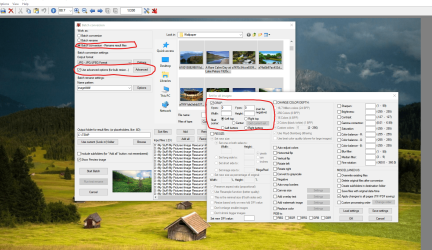
I have checked the advanced options in Irfanview 64 and a batch run should be possible on a set of images that are identically sized, [the system does not have access to that greatest of all computers, The human Brain]

Imagine an image 100x100 Pixels - a crop area of 10,0,90,100 would crop off the top and bottom to leave an area of 80x100 pixels, removing a 10 pixel strip at top and 10 pixel strip bottom


The advanced options can have an area set using + or - relative points - you would need to set up a "remain" area from the bottom of the top bar to the Top of the bottom bar with a width set to full width (assumption by me but can be set to mark any rectangle). This may be saved into the standard sizes.

Once set up you would need to try a test batch or two to fine tune

Batch crop.png

you select the thumbnails that you want to process from the display in the top right of the dialog shown above.

If you wished to remove the area of the top and bottom bars, retaining the image above /below the bars, then this would be possible by batch but would need more work as the area would need to be cut out rather than cropped, and you would require more than one batch operation [iteration]
 

My Computers My Computers

  • At a glance

    Windows 11 Pro x64 [Latest Release and Releas...Ryzen 9 5950X, 3.8 - 5.2 MHz64GB [2 x 32GB] DDR4 3200MHz4GB NVIDIA GEFORCE GTX 1650 Ti
    Computer type
    PC/Desktop
    Computer Manufacturer/Model Number
    ChillBlast - Custom to my design
    OS
    Windows 11 Pro x64 [Latest Release and Release Preview]
    CPU
    Ryzen 9 5950X, 3.8 - 5.2 MHz
    Motherboard
    Asus Prime X570-Pro
    Memory
    64GB [2 x 32GB] DDR4 3200MHz
    Graphics Card(s)
    4GB NVIDIA GEFORCE GTX 1650 Ti
    Sound Card
    On-board SPDIF to 5.1 System + HDMI [5.1 system]
    Monitor(s) Displays
    32" UHD 32 Bit HDR Monitor + 43" UHD 4K 32Bit HDR TV
    Screen Resolution
    2 x 3840 x 2160 @60Hz
    Hard Drives
    1TB M2 SSD OS, 500GB Fast Access SSD, 2 x 8TB Data + Various Externals from 1TB to 4TB, 10TB NAS
    PSU
    NZXT C750 80 PLUS Gold 750W Modular PSU
    Case
    Workstation Case [Matt Black]
    Cooling
    NZXT Kraken X63 280mm CPU Cooler +2x Quiet Case fans
    Keyboard
    Logitech Wireless MX Keys & K400 + others
    Mouse
    Logitech Wireless MX Master 3S
    Internet Speed
    920 MB Down 50 MB Up
    Antivirus
    BitDefender Total Security Pro
    Browser
    Chrome (always run latest Non-Beta)
    Other Info
    Also run ...
    Laptop - Quad 8GB - Windows 10 Pro x64
    Nexus 7 Android tablet x2
    Samsung 10.2" tablet
    Blackview TAB 8 4G Android Tablet c/w Keyboard
    Wacom Intuos Pro Medium Pen Pad
    Wacom Intuos Pro Small Pen Pad
    Wacom Expresskeys Remote
    Loopdeck+ Graphics Controller
    Shuttle Pro v2 Control
  • At a glance

    Windows 11 Pro x64 Latest RPIntel I7 10750H 5.0GHz32GB [2x16GB] DDR4 2933 MHznVidia GTX1650Ti 4 GB GDDR6
    Computer type
    Laptop
    System Manufacturer/Model Number
    Dell XPS 17 10750H
    OS
    Windows 11 Pro x64 Latest RP
    CPU
    Intel I7 10750H 5.0GHz
    Motherboard
    Dell XPS
    Memory
    32GB [2x16GB] DDR4 2933 MHz
    Graphics Card(s)
    nVidia GTX1650Ti 4 GB GDDR6
    Sound Card
    Stock [Realtek] 4 Speaker
    Monitor(s) Displays
    17" IPS UHD+ Infinity Edge Touchscreen
    Screen Resolution
    3840 x 2400
    Hard Drives
    2TB M2 NVMe, 4TB External + various 500GB & 1TB External NVMe (also have access to spinner HDD from
    PSU
    Stock
    Case
    Stock XPS Aluminium & Carbon Fibre
    Cooling
    Stock - Active Fan Control
    Keyboard
    Backlit + Various Logitech
    Mouse
    Stock Track Pad + Logitech MX Trackball
    Internet Speed
    72 MB Down 18MB Up
    Browser
    Chrome
    Other Info
    Also run ...
    Laptop - Quad 8GB - Windows 10 Pro x64
    Nexus 7 Android tablet x2
    10.2" tablet
    Sony Z3 Android Smartphone
    Wacom Intuos Pro Medium Pen Pad
    Wacom Intuos Pro Small Pen Pad
    Wacom Expresskeys Remote
    Loopdeck+ Graphics Controller
    Shuttle Pro v2 Control Pad
    10TB NAS
I have checked the advanced options in Irfanview 64 and a batch run should be possible on a set of images that are identically sized, [the system does not have access to that greatest of all computers, The human Brain]

Imagine an image 100x100 Pixels - a crop area of 10,0,90,100 would crop off the top and bottom to leave an area of 80x100 pixels, removing a 10 pixel strip at top and 10 pixel strip bottom


The advanced options can have an area set using + or - relative points - you would need to set up a "remain" area from the bottom of the top bar to the Top of the bottom bar with a width set to full width (assumption by me but can be set to mark any rectangle). This may be saved into the standard sizes.

Once set up you would need to try a test batch or two to fine tune

View attachment 406925

you select the thumbnails that you want to process from the display in the top right of the dialog shown above.

If you wished to remove the area of the top and bottom bars, retaining the image above /below the bars, then this would be possible by batch but would need more work as the area would need to be cut out rather than cropped, and you would require more than one batch operation [iteration]


Oof, that seems a little hard. However, if it just works properly, that is definitely the function I'll be using until I find a better alternative. Thank you!
 

My Computer My Computer

At a glance

Windows 7 Ultimate K x64As for the rest of the stuff I have no idea h...my software or hardware details? I didn't bui...
Computer type
PC/Desktop
OS
Windows 7 Ultimate K x64
CPU
As for the rest of the stuff I have no idea how to find out!
Motherboard
Is there a website or something I can go to to find out
Memory
my software or hardware details? I didn't build this PC.
Monitor(s) Displays
31" Samsung TV (Monitor)
Screen Resolution
1360 x 768
Mouse
Tecknet M002 Cordless Optical Mouse
Internet Speed
Download- 534.79Mbps / Upload- 247.31Mbps
Antivirus
Alyak 2.5
Browser
Chrome
I understand that it can seem a lot of work to set up a semi automatic and especially a fully automatic system, but it makes sense when you have a high number of a task to do, a regular smaller number, you need consistency from a number of people all doing the same task.

The set up is of course only done once so over time it is less and less of an issue.

The setup of the page['s] I linked to can be automated as a batch, or if you just set up the Crop parameters and save them, (within the Irfanview app as a new standard Page size), you can simply manually load an image select the crop "Page Size" and crop one or a small number quickly. this will give you options of consistency over 10 or 10000 images.
 

My Computers My Computers

  • At a glance

    Windows 11 Pro x64 [Latest Release and Releas...Ryzen 9 5950X, 3.8 - 5.2 MHz64GB [2 x 32GB] DDR4 3200MHz4GB NVIDIA GEFORCE GTX 1650 Ti
    Computer type
    PC/Desktop
    Computer Manufacturer/Model Number
    ChillBlast - Custom to my design
    OS
    Windows 11 Pro x64 [Latest Release and Release Preview]
    CPU
    Ryzen 9 5950X, 3.8 - 5.2 MHz
    Motherboard
    Asus Prime X570-Pro
    Memory
    64GB [2 x 32GB] DDR4 3200MHz
    Graphics Card(s)
    4GB NVIDIA GEFORCE GTX 1650 Ti
    Sound Card
    On-board SPDIF to 5.1 System + HDMI [5.1 system]
    Monitor(s) Displays
    32" UHD 32 Bit HDR Monitor + 43" UHD 4K 32Bit HDR TV
    Screen Resolution
    2 x 3840 x 2160 @60Hz
    Hard Drives
    1TB M2 SSD OS, 500GB Fast Access SSD, 2 x 8TB Data + Various Externals from 1TB to 4TB, 10TB NAS
    PSU
    NZXT C750 80 PLUS Gold 750W Modular PSU
    Case
    Workstation Case [Matt Black]
    Cooling
    NZXT Kraken X63 280mm CPU Cooler +2x Quiet Case fans
    Keyboard
    Logitech Wireless MX Keys & K400 + others
    Mouse
    Logitech Wireless MX Master 3S
    Internet Speed
    920 MB Down 50 MB Up
    Antivirus
    BitDefender Total Security Pro
    Browser
    Chrome (always run latest Non-Beta)
    Other Info
    Also run ...
    Laptop - Quad 8GB - Windows 10 Pro x64
    Nexus 7 Android tablet x2
    Samsung 10.2" tablet
    Blackview TAB 8 4G Android Tablet c/w Keyboard
    Wacom Intuos Pro Medium Pen Pad
    Wacom Intuos Pro Small Pen Pad
    Wacom Expresskeys Remote
    Loopdeck+ Graphics Controller
    Shuttle Pro v2 Control
  • At a glance

    Windows 11 Pro x64 Latest RPIntel I7 10750H 5.0GHz32GB [2x16GB] DDR4 2933 MHznVidia GTX1650Ti 4 GB GDDR6
    Computer type
    Laptop
    System Manufacturer/Model Number
    Dell XPS 17 10750H
    OS
    Windows 11 Pro x64 Latest RP
    CPU
    Intel I7 10750H 5.0GHz
    Motherboard
    Dell XPS
    Memory
    32GB [2x16GB] DDR4 2933 MHz
    Graphics Card(s)
    nVidia GTX1650Ti 4 GB GDDR6
    Sound Card
    Stock [Realtek] 4 Speaker
    Monitor(s) Displays
    17" IPS UHD+ Infinity Edge Touchscreen
    Screen Resolution
    3840 x 2400
    Hard Drives
    2TB M2 NVMe, 4TB External + various 500GB & 1TB External NVMe (also have access to spinner HDD from
    PSU
    Stock
    Case
    Stock XPS Aluminium & Carbon Fibre
    Cooling
    Stock - Active Fan Control
    Keyboard
    Backlit + Various Logitech
    Mouse
    Stock Track Pad + Logitech MX Trackball
    Internet Speed
    72 MB Down 18MB Up
    Browser
    Chrome
    Other Info
    Also run ...
    Laptop - Quad 8GB - Windows 10 Pro x64
    Nexus 7 Android tablet x2
    10.2" tablet
    Sony Z3 Android Smartphone
    Wacom Intuos Pro Medium Pen Pad
    Wacom Intuos Pro Small Pen Pad
    Wacom Expresskeys Remote
    Loopdeck+ Graphics Controller
    Shuttle Pro v2 Control Pad
    10TB NAS
Back
Top