How can I tell if it's Sata II or Sata III?

Hondajt

New member
Power User
VIP
Local time
5:59 PM
Messages
207
Location
Springboro, OH 45066
I just bought a new laptop, and I am unsure if it has the capability to use the faster Sata III (6gb/s)?

I know the drive in it is only capable of Sata II, but I need to know about the laptops capability.

It's an MSI A6400-042us. (MSI Notebook Official Website)

CPUz didn't tell me, and HDDTune didn't tell me. (I'd rather not pay for the one that might tell me, HDTune Pro)
 

My Computer My Computer

At a glance

Windows 7 Ultimate x64 Steve Ballmer EditionCore i7 920 @ 3.6GHz6Gb Kingston DDR3 1066MHzMSI GTX460 1GB Cyclone
OS
Windows 7 Ultimate x64 Steve Ballmer Edition
CPU
Core i7 920 @ 3.6GHz
Motherboard
EVGA X58 SLI Micro
Memory
6Gb Kingston DDR3 1066MHz
Graphics Card(s)
MSI GTX460 1GB Cyclone
Monitor(s) Displays
LG W2361V
Screen Resolution
1920 x 1080p
Hard Drives
64GB Microcenter SSD (Adata S599)
1TB SeaGate Barracuda 7200
PSU
Corsair HX750
Case
Antec 1200
Cooling
Corsair H50
Mouse
Logitech M/X Revolution
Internet Speed
2mb/s
Other Info
SSD Boot drive with MS Office
Hello Hondajt,

I would say it is safe to assume you don't have compatibility for Sata III as it only states Sata and because we don't use Sata I anymore and it does'nt specifically say its Sata III either.

Hope this helps
Lucky
 

My Computer My Computer

At a glance

Windows 7 Ultimate x64 RTM + SP1Intel Core i7 950 3.06GHZ (OC'd to 3.99Ghz)6GB OCZ Reaper HPC Edition PC3-16000 (set 160...EVGA Nvidia Geforce GTX 570
Computer Manufacturer/Model Number
The HAFmeister (Custom)
OS
Windows 7 Ultimate x64 RTM + SP1
CPU
Intel Core i7 950 3.06GHZ (OC'd to 3.99Ghz)
Motherboard
Asus Rampage III Extreme x58 SATA 6GB & USB 3.0
Memory
6GB OCZ Reaper HPC Edition PC3-16000 (set 1606Mhz 8-8-8-26)
Graphics Card(s)
EVGA Nvidia Geforce GTX 570
Sound Card
Creative SB X-Fi Titanium Fatal1ty Professional Series
Monitor(s) Displays
Samsung SM2433BW 24" Widescreen Monitor
Screen Resolution
1920x1200
Hard Drives
Western Digital Caviar Black 500GB 32Mb Buffer SATA II
Western Digital Caviar Black 750GB 32Mb Buffer SATA II
Western Digital Caviar Blue 500GB 16Mb Buffer SATA II
Western Digital My Book Essential Edition 750GB USB
Samsung Spinpoint 2TB SATA II
PSU
Thermaltake Toughpower 1200w (Modular)
Case
CoolerMaster HAF-932
Cooling
Zalman Reserator XT and ZM-WB5 Plus - GPU uses Stock coolers
Keyboard
Logitech G510
Mouse
Logitech G9 Gaming Mouse
Internet Speed
3MB Profile - 350-400kbs (Real-Speed)
Other Info
IcyBox Hot-Swap Bay,
Logitech G27 Steering Wheel,
Xbox 360 Wirless Elite Controller with Microsoft Reciever and
Play & Charge Kit,
Belkin USB Wireless Adaptor,
GAME Generic Controller (Playstation Looky-Likey),
Epson SX125 All-in-One.

My Computer My Computer

At a glance

Windows 7 Ultimate x86DualCore AMD Athlon 64 X2, 2600 MHz 5200+Samsung 2GB DDR2Onboard NVIDIA GeForce 6150SE nForce 430
Computer Manufacturer/Model Number
HP m8000n
OS
Windows 7 Ultimate x86
CPU
DualCore AMD Athlon 64 X2, 2600 MHz 5200+
Motherboard
Asus M2N68-LA (Narra)
Memory
Samsung 2GB DDR2
Graphics Card(s)
Onboard NVIDIA GeForce 6150SE nForce 430
Sound Card
Onboard nVIDIA nForce 6100-430 (MCP61P)
Monitor(s) Displays
Westinghouse 19" LED
Screen Resolution
1280x1024
Hard Drives
SATA II Seagate Barracuda 500GB
USB II WD Elements 500GB
USB II WD My Book 1TB
USB II WD My Book 2TB
PSU
Stock (HP)
Case
Stock (HP)
Cooling
Stock
Keyboard
Logitech Classic KB 200
Mouse
Standard HP opticle USB mouse
The reason I ask is because the new Second Generation Intel mobile chipsets (like my HM65) come with 2x Sata 6gb/s capability, and I would like to hope that manufactures are taking advantage of that......but you never know.

They probably aren't because it costs more. :(
 

My Computer My Computer

At a glance

Windows 7 Ultimate x64 Steve Ballmer EditionCore i7 920 @ 3.6GHz6Gb Kingston DDR3 1066MHzMSI GTX460 1GB Cyclone
OS
Windows 7 Ultimate x64 Steve Ballmer Edition
CPU
Core i7 920 @ 3.6GHz
Motherboard
EVGA X58 SLI Micro
Memory
6Gb Kingston DDR3 1066MHz
Graphics Card(s)
MSI GTX460 1GB Cyclone
Monitor(s) Displays
LG W2361V
Screen Resolution
1920 x 1080p
Hard Drives
64GB Microcenter SSD (Adata S599)
1TB SeaGate Barracuda 7200
PSU
Corsair HX750
Case
Antec 1200
Cooling
Corsair H50
Mouse
Logitech M/X Revolution
Internet Speed
2mb/s
Other Info
SSD Boot drive with MS Office
The manual states for almost everything"The actual equipment may be different. Ask your Dealer ;)
If that's not possible for some reason, get the exact make and model of your harddrive and google that.
Chances are if that's a SATA Rev III then the bus is too... (besides if the chipset is Rev.3 capable as you say why would it be more expensive to utilize that?)

-DG
 

My Computer My Computer

At a glance

Windows 7 Ultimate x86DualCore AMD Athlon 64 X2, 2600 MHz 5200+Samsung 2GB DDR2Onboard NVIDIA GeForce 6150SE nForce 430
Computer Manufacturer/Model Number
HP m8000n
OS
Windows 7 Ultimate x86
CPU
DualCore AMD Athlon 64 X2, 2600 MHz 5200+
Motherboard
Asus M2N68-LA (Narra)
Memory
Samsung 2GB DDR2
Graphics Card(s)
Onboard NVIDIA GeForce 6150SE nForce 430
Sound Card
Onboard nVIDIA nForce 6100-430 (MCP61P)
Monitor(s) Displays
Westinghouse 19" LED
Screen Resolution
1280x1024
Hard Drives
SATA II Seagate Barracuda 500GB
USB II WD Elements 500GB
USB II WD My Book 1TB
USB II WD My Book 2TB
PSU
Stock (HP)
Case
Stock (HP)
Cooling
Stock
Keyboard
Logitech Classic KB 200
Mouse
Standard HP opticle USB mouse
The reason I ask is because the new Second Generation Intel mobile chipsets (like my HM65) come with 2x Sata 6gb/s capability, and I would like to hope that manufactures are taking advantage of that......but you never know.

They probably aren't because it costs more. :(

Unless you are using SSD, SATA 3 Gb/s will give the exact same performance for hard drives as SATA 6Gb/s. The limit isn't the speed of the SATA link, which is 300 MB/s for Sata 3Gb/s, but the speed the data can be read off of the hard drives which is between 80 and 150 MB/s, depending on the drive (5400 rpm to 10k rpm).
 

My Computer My Computer

At a glance

Windows 10 Pro. EFI boot partition, full EFI ...i7 4770k 4.4GHz (44-44-43-43 turbo) @ 1.248V16GB (8GBx2) @2200 MHz G.skill Sniper 10-11-1...MSI GTX 970 Gaming 4G
Computer type
PC/Desktop
Computer Manufacturer/Model Number
Home built (GeneO industries)/Model 4
OS
Windows 10 Pro. EFI boot partition, full EFI boot
CPU
i7 4770k 4.4GHz (44-44-43-43 turbo) @ 1.248V
Motherboard
ASUS Maximus VI Hero
Memory
16GB (8GBx2) @2200 MHz G.skill Sniper 10-11-10-30-1, 1.6V
Graphics Card(s)
MSI GTX 970 Gaming 4G
Sound Card
Onboard SupremeFX Audio
Monitor(s) Displays
NEC Spectraview 2490WUXi-SV
Screen Resolution
1920 x 1200
Hard Drives
Samsung 850 Pro 256GB (OS), Samsung 2x 128GB 840 Pro SSD in RAID0, 3x WD Blue 6Gb/s 1TB RAID0, WD 2TB Black external USB 3.0, 2TB WD20EARS Green external USB 3.0, 2x 500GB Seagate and 1 750 GB external USB, 1x 350GB external USB3
PSU
Seasonic X-850 (2012 KM3 model)
Case
Fractal Design Define R4
Cooling
NH-D14, NF-F12, NF-A15; NF-P14, NF-P12,NF-A14, S12A PWM
Keyboard
Cooler Master Storm Quickfire Rapid - Brown
Mouse
Logitech G602
Internet Speed
126.4 Mb/s down, 24.3 Mb/s up
Other Info
USB 3.0 x8 , SATA III x8, eSATA, USB 2.0 x6. Samsung DVD R/W drive.

WEI: CPU 7.8, Memory 7.9, Graphics 7.9, Disk 7.9
Keep in mind also, I don't think there are any hard drives that are yet able to saturate a 3Gbps pipe... let alone 6Gbps.

EDIT: Even the fastest SSD's aren't much past the 250 MBps mark (2.0 Gbps). Basically, you won't see a performance difference between SATA 2.0 and SATA 3.0 for a while, unless you're running quad-RAID-0 SSD's
 
Last edited:

My Computer My Computer

At a glance

Windows 7 Professional, 64-Bit InstallAMD Phenom II X4 940 Black Edition, 3.5GHz OC8GB (4 x 2GB) OCZ Platinum Edition DDR2 800 S...XFX GeForce GTX 260 Core 216
Computer Manufacturer/Model Number
Custom Box
OS
Windows 7 Professional, 64-Bit Install
CPU
AMD Phenom II X4 940 Black Edition, 3.5GHz OC
Motherboard
Asus M4N72-E
Memory
8GB (4 x 2GB) OCZ Platinum Edition DDR2 800 SDRAM
Graphics Card(s)
XFX GeForce GTX 260 Core 216
Sound Card
Mobo On-Board 7.1
Monitor(s) Displays
37" HDTV
Hard Drives
160GB PATA (System Drive)
500GB PATA (Programs Drive)
2X Samsung 1TB SATA in RAID 1
PSU
Thermaltake Toughpower XT 775W Modular
Case
NZXT Full Tower
Cooling
Cooler Master Hyper 212+, lots of case fans
Keyboard
HP Wireless Elite
Mouse
Logitech MX1100
Internet Speed
Comcast Cable 18 Mbps
Other Info
Optical: LG WH10LS30K 10x Blu-Ray Burner
Keep in mind also, I don't think there are any hard drives that are yet able to saturate a 3Gbps pipe... let alone 6Gbps.

EDIT: Even the fastest SSD's aren't much past the 250 MBps mark (2.0 Gbps). Basically, you won't see a performance difference between SATA 2.0 and SATA 3.0 for a while, unless you're running quad-RAID-0 SSD's

That is not correct. There are SSD drives now that will do circa 500 MB/s. Examples are the OCZ vertex 3 and Intel 510 series SSD.

Also, you have to quote the right numbers. SATA transfer rates are in RAW bits. The SATA protocol does 8b/10b encoding - in other words only 8 data bits per 10 raw bits. This means a 3Gb/s raw link is (8b/10b) * 3000 Mbits/s / (8 bits/byte) = 300 MBytes/s data transfer speed. This makes it easy to translate RAW Mb/s to real data transfer speeds in MB/s for 8b/10b encoded protocols like SATA and PCI-e - you just divide by 10.
 
Last edited:

My Computer My Computer

At a glance

Windows 10 Pro. EFI boot partition, full EFI ...i7 4770k 4.4GHz (44-44-43-43 turbo) @ 1.248V16GB (8GBx2) @2200 MHz G.skill Sniper 10-11-1...MSI GTX 970 Gaming 4G
Computer type
PC/Desktop
Computer Manufacturer/Model Number
Home built (GeneO industries)/Model 4
OS
Windows 10 Pro. EFI boot partition, full EFI boot
CPU
i7 4770k 4.4GHz (44-44-43-43 turbo) @ 1.248V
Motherboard
ASUS Maximus VI Hero
Memory
16GB (8GBx2) @2200 MHz G.skill Sniper 10-11-10-30-1, 1.6V
Graphics Card(s)
MSI GTX 970 Gaming 4G
Sound Card
Onboard SupremeFX Audio
Monitor(s) Displays
NEC Spectraview 2490WUXi-SV
Screen Resolution
1920 x 1200
Hard Drives
Samsung 850 Pro 256GB (OS), Samsung 2x 128GB 840 Pro SSD in RAID0, 3x WD Blue 6Gb/s 1TB RAID0, WD 2TB Black external USB 3.0, 2TB WD20EARS Green external USB 3.0, 2x 500GB Seagate and 1 750 GB external USB, 1x 350GB external USB3
PSU
Seasonic X-850 (2012 KM3 model)
Case
Fractal Design Define R4
Cooling
NH-D14, NF-F12, NF-A15; NF-P14, NF-P12,NF-A14, S12A PWM
Keyboard
Cooler Master Storm Quickfire Rapid - Brown
Mouse
Logitech G602
Internet Speed
126.4 Mb/s down, 24.3 Mb/s up
Other Info
USB 3.0 x8 , SATA III x8, eSATA, USB 2.0 x6. Samsung DVD R/W drive.

WEI: CPU 7.8, Memory 7.9, Graphics 7.9, Disk 7.9
Wow I stand corrected. Didn't know there were drives out there that fast yet.

Still, odds are if he's running a "regular" drive, he won't see the different between a SATA 3Gbps vs. a 6Gbps.
 

My Computer My Computer

At a glance

Windows 7 Professional, 64-Bit InstallAMD Phenom II X4 940 Black Edition, 3.5GHz OC8GB (4 x 2GB) OCZ Platinum Edition DDR2 800 S...XFX GeForce GTX 260 Core 216
Computer Manufacturer/Model Number
Custom Box
OS
Windows 7 Professional, 64-Bit Install
CPU
AMD Phenom II X4 940 Black Edition, 3.5GHz OC
Motherboard
Asus M4N72-E
Memory
8GB (4 x 2GB) OCZ Platinum Edition DDR2 800 SDRAM
Graphics Card(s)
XFX GeForce GTX 260 Core 216
Sound Card
Mobo On-Board 7.1
Monitor(s) Displays
37" HDTV
Hard Drives
160GB PATA (System Drive)
500GB PATA (Programs Drive)
2X Samsung 1TB SATA in RAID 1
PSU
Thermaltake Toughpower XT 775W Modular
Case
NZXT Full Tower
Cooling
Cooler Master Hyper 212+, lots of case fans
Keyboard
HP Wireless Elite
Mouse
Logitech MX1100
Internet Speed
Comcast Cable 18 Mbps
Other Info
Optical: LG WH10LS30K 10x Blu-Ray Burner
Wow I stand corrected. Didn't know there were drives out there that fast yet.

Still, odds are if he's running a "regular" drive, he won't see the different between a SATA 3Gbps vs. a 6Gbps.

Yes, I don't disagree with you there - I stated that earlier as well.
 

My Computer My Computer

At a glance

Windows 10 Pro. EFI boot partition, full EFI ...i7 4770k 4.4GHz (44-44-43-43 turbo) @ 1.248V16GB (8GBx2) @2200 MHz G.skill Sniper 10-11-1...MSI GTX 970 Gaming 4G
Computer type
PC/Desktop
Computer Manufacturer/Model Number
Home built (GeneO industries)/Model 4
OS
Windows 10 Pro. EFI boot partition, full EFI boot
CPU
i7 4770k 4.4GHz (44-44-43-43 turbo) @ 1.248V
Motherboard
ASUS Maximus VI Hero
Memory
16GB (8GBx2) @2200 MHz G.skill Sniper 10-11-10-30-1, 1.6V
Graphics Card(s)
MSI GTX 970 Gaming 4G
Sound Card
Onboard SupremeFX Audio
Monitor(s) Displays
NEC Spectraview 2490WUXi-SV
Screen Resolution
1920 x 1200
Hard Drives
Samsung 850 Pro 256GB (OS), Samsung 2x 128GB 840 Pro SSD in RAID0, 3x WD Blue 6Gb/s 1TB RAID0, WD 2TB Black external USB 3.0, 2TB WD20EARS Green external USB 3.0, 2x 500GB Seagate and 1 750 GB external USB, 1x 350GB external USB3
PSU
Seasonic X-850 (2012 KM3 model)
Case
Fractal Design Define R4
Cooling
NH-D14, NF-F12, NF-A15; NF-P14, NF-P12,NF-A14, S12A PWM
Keyboard
Cooler Master Storm Quickfire Rapid - Brown
Mouse
Logitech G602
Internet Speed
126.4 Mb/s down, 24.3 Mb/s up
Other Info
USB 3.0 x8 , SATA III x8, eSATA, USB 2.0 x6. Samsung DVD R/W drive.

WEI: CPU 7.8, Memory 7.9, Graphics 7.9, Disk 7.9
The reason I am asking is because I want to put an SSD in here to reduce heat. If It is Sata III, then I would buy an SSD capable of that. If it is not Sata III, then I will buy an inexpensive SSD. (Yes, I understand Sata III is not a correct term, but it's easier than saying 6gb/s or similiar...)
 

My Computer My Computer

At a glance

Windows 7 Ultimate x64 Steve Ballmer EditionCore i7 920 @ 3.6GHz6Gb Kingston DDR3 1066MHzMSI GTX460 1GB Cyclone
OS
Windows 7 Ultimate x64 Steve Ballmer Edition
CPU
Core i7 920 @ 3.6GHz
Motherboard
EVGA X58 SLI Micro
Memory
6Gb Kingston DDR3 1066MHz
Graphics Card(s)
MSI GTX460 1GB Cyclone
Monitor(s) Displays
LG W2361V
Screen Resolution
1920 x 1080p
Hard Drives
64GB Microcenter SSD (Adata S599)
1TB SeaGate Barracuda 7200
PSU
Corsair HX750
Case
Antec 1200
Cooling
Corsair H50
Mouse
Logitech M/X Revolution
Internet Speed
2mb/s
Other Info
SSD Boot drive with MS Office
I don't know if these new Intel chipsets indicate whether they are 3 or 6 Gb/s anywhere. Best I can suggest is for you to call MSI technical support.
 

My Computer My Computer

At a glance

Windows 10 Pro. EFI boot partition, full EFI ...i7 4770k 4.4GHz (44-44-43-43 turbo) @ 1.248V16GB (8GBx2) @2200 MHz G.skill Sniper 10-11-1...MSI GTX 970 Gaming 4G
Computer type
PC/Desktop
Computer Manufacturer/Model Number
Home built (GeneO industries)/Model 4
OS
Windows 10 Pro. EFI boot partition, full EFI boot
CPU
i7 4770k 4.4GHz (44-44-43-43 turbo) @ 1.248V
Motherboard
ASUS Maximus VI Hero
Memory
16GB (8GBx2) @2200 MHz G.skill Sniper 10-11-10-30-1, 1.6V
Graphics Card(s)
MSI GTX 970 Gaming 4G
Sound Card
Onboard SupremeFX Audio
Monitor(s) Displays
NEC Spectraview 2490WUXi-SV
Screen Resolution
1920 x 1200
Hard Drives
Samsung 850 Pro 256GB (OS), Samsung 2x 128GB 840 Pro SSD in RAID0, 3x WD Blue 6Gb/s 1TB RAID0, WD 2TB Black external USB 3.0, 2TB WD20EARS Green external USB 3.0, 2x 500GB Seagate and 1 750 GB external USB, 1x 350GB external USB3
PSU
Seasonic X-850 (2012 KM3 model)
Case
Fractal Design Define R4
Cooling
NH-D14, NF-F12, NF-A15; NF-P14, NF-P12,NF-A14, S12A PWM
Keyboard
Cooler Master Storm Quickfire Rapid - Brown
Mouse
Logitech G602
Internet Speed
126.4 Mb/s down, 24.3 Mb/s up
Other Info
USB 3.0 x8 , SATA III x8, eSATA, USB 2.0 x6. Samsung DVD R/W drive.

WEI: CPU 7.8, Memory 7.9, Graphics 7.9, Disk 7.9
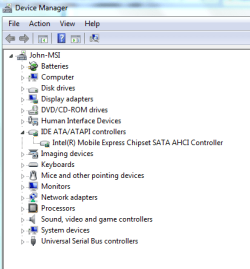
Well here is a long shot. According to the Intel manual, there are 6 SATA channels. The first two, 0 and 1, are 6Gb/s. If you have the laptop setup in AHCI mode, you should see six Channels under ATA/ATAPI controllers in the device manager. Click on channel 0 and 1 properties, then advanced settings. If you drive shows up under 0 or 1 advanced properties, then it is likely SATA 6Gb/s
 

My Computer My Computer

At a glance

Windows 10 Pro. EFI boot partition, full EFI ...i7 4770k 4.4GHz (44-44-43-43 turbo) @ 1.248V16GB (8GBx2) @2200 MHz G.skill Sniper 10-11-1...MSI GTX 970 Gaming 4G
Computer type
PC/Desktop
Computer Manufacturer/Model Number
Home built (GeneO industries)/Model 4
OS
Windows 10 Pro. EFI boot partition, full EFI boot
CPU
i7 4770k 4.4GHz (44-44-43-43 turbo) @ 1.248V
Motherboard
ASUS Maximus VI Hero
Memory
16GB (8GBx2) @2200 MHz G.skill Sniper 10-11-10-30-1, 1.6V
Graphics Card(s)
MSI GTX 970 Gaming 4G
Sound Card
Onboard SupremeFX Audio
Monitor(s) Displays
NEC Spectraview 2490WUXi-SV
Screen Resolution
1920 x 1200
Hard Drives
Samsung 850 Pro 256GB (OS), Samsung 2x 128GB 840 Pro SSD in RAID0, 3x WD Blue 6Gb/s 1TB RAID0, WD 2TB Black external USB 3.0, 2TB WD20EARS Green external USB 3.0, 2x 500GB Seagate and 1 750 GB external USB, 1x 350GB external USB3
PSU
Seasonic X-850 (2012 KM3 model)
Case
Fractal Design Define R4
Cooling
NH-D14, NF-F12, NF-A15; NF-P14, NF-P12,NF-A14, S12A PWM
Keyboard
Cooler Master Storm Quickfire Rapid - Brown
Mouse
Logitech G602
Internet Speed
126.4 Mb/s down, 24.3 Mb/s up
Other Info
USB 3.0 x8 , SATA III x8, eSATA, USB 2.0 x6. Samsung DVD R/W drive.

WEI: CPU 7.8, Memory 7.9, Graphics 7.9, Disk 7.9
Hi.

I am not sure this is what you are looking for. I was having probs trying to figure out what my hdd speeds or interface was. Some older programs was showing my sataIII hdd as a sataII drive. I found hwinfo32 It gives system specs and real time and has some bench marks and says my c: is sataIII and my e: is sataII which was the info I was looking for.

HWiNFO32 Download

Note1 I am not sure if this program states the mobo abilities if no drive say a sataIII hdd is not plugged into a sataIII port on the mobo. If your mobo manual etc says the mobo has sataIII abilities well it should- you just need to buy a sataIII hdd and or ssd that is sataIII. Monitoring programs do not state what your mobo can do. They just list the basics and or what is plugged into it. Your manual or product info tells ya what the mobo can do or interfaces etc.

Note2 you maybe have to turn on ahci support in the mobo bios. AHCI support is the proper mode for sata drives. Mobos default to ide mode [easy to just pop in any or old hdd and get it going] unless you first turn on ahci support in the bios and then install the os. But is a fix here a reg tweak you can do after os install. Saying your sataIII ports may not work until the drivers are installed. So do not plug in a sataIII drive to the ports until you know the drivers are installed then add the sataIII drive. Your drives might still work in ide mode [on say a sataII port] just not as fast as they would using ahci support and plugged into a sataIII port. Some newer and or ssd drives have fits and may not work at all unless set up in ahci. I would guess your msi mobo uses marvel for the sataIII ports. You have to install the drivers for the ports or they will not work at all.

Also note: you do not have to set up a raid to use ahci support or to use the extra 2 sets of drivers below. I have no raid- I just use the tray or utilities for info reasons..

Many folks have probs adding ssd drives until they config the mobo for ahci support. Even if you feel you do not need many of the added features from ahci your drives will not run full speeds unless it is set up in ahci support.

I am using hwinfo32 v373- 1220 with w7 64bit. Others here can give ya the link to tweak the reg for ahci support after os install. You need to read your mobo manual or post on its home site to figure out what settings you might need to change in your bios- it should be easy and only 2 places to check or change if need be.

Note3 my msi mobo shows 3x sataIII drivers for marvel for my mobo.

Marvell SATAIII Drivers- is the actual drivers.

Marvell RAID Tool for SATAIII and Marvell SATAIII Management Utility- are the same drivers just named different and will confuse ya if same for your msi product download page. Just try and figure which is the latest version and install only it. Neither of these last 2 are needed but the tray will show your actual sataIII as 6gigs etc. The only other place on the system that shows your c: as sataIII or sataII what ever is at boot you get the black boot screen which shows your bios version and pcie speeds which should be 5ghz and the main drive speeds [sataIII or sataII 6ghz or 3ghz] etc. Using the tray is the only other way I know to get actual info about my sataIII drive from windows other than hwinfo32.

Note4 your mobo may already be set up with ahci support and already using sataIII drives- just as said a lot of older monitoring programs list sataIII hdd's as sataII. HWInfo32 will show the right info for the drives. Your manual or product info should say what drives come installed in the unit sataII or sataIII etc.

Hope this helps some. Take care..
 
Last edited:

My Computer My Computer

At a glance

w7
OS
w7
Here ya go this first program hd tune [free] was made in like 1997. Bottom right shows my drive as sataII..>


HWIfnfo32 shows it as sataIII bottom left..>


The info and or your bios info is confusing. All drives in bios are listed as udma ata ide etc. They are not listed in bios as sata or sataII or III etc. You only get that info from the black boot screen or using the raid utilities from windows.

1 more note. After installing the marvel drivers or if your system uses them. They may not show up under storage controllers in device man- but will be showing under system devices in device man as marvel 91xx config. Do not be confuse by the word config it is just part of the name of the drivers. It does not mean they need to be configured.

As a fact or for my mobo the marvel drivers if not installed you do not get the yellow triangle in device man. You only see that triangle until you or I installed the jmicron drivers and shows under storage controllers. Or for my system any way.. Jmicron runs my esata and 1 sata [1.5g ?] and 1 ide port and my opti drive is ide- so.
 
Last edited:

My Computer My Computer

At a glance

w7
OS
w7
Not that it matters but many monitoring programs do not list your psu +12v rail right either. Many will peg it at like 11.55 or something but the bios or comes with mobo monitoring program shows it as it should be- say +12v @12.3 etc.

Good luck trying to get help from msi forums- I would avoid them and open a support ticket with msi corp instead if need be. The mods at the forums will treat ya like dirt if you type to much or your grammar etc is bad and might not help ya at all. It is said a community forum- it is not- it is a mod forum and only they care to talk to each other and can be idiots.

If your questions are not worded right and or short and exact- they can and will be idiots. Maybe spend all their time pm ya saying you need to learn english or something else stupid. This is my first and last msi product and just because of how folks treat ya at its said support forums- sorry to say.

See ya.
 

My Computer My Computer

At a glance

w7
OS
w7
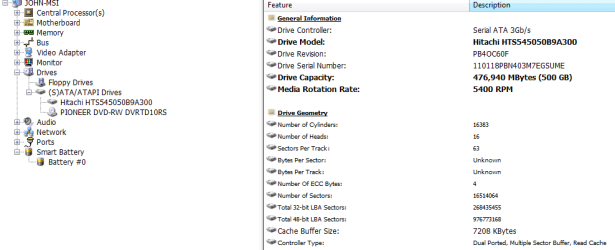
Well, mine is showing it as 3GB/s. I can't seem to find anything showing the controllers capability, just the drives...
sata3.PNG

sata2.PNG
 

Attachments

  • sata1.PNG
    sata1.PNG
    13.2 KB · Views: 169

My Computer My Computer

At a glance

Windows 7 Ultimate x64 Steve Ballmer EditionCore i7 920 @ 3.6GHz6Gb Kingston DDR3 1066MHzMSI GTX460 1GB Cyclone
OS
Windows 7 Ultimate x64 Steve Ballmer Edition
CPU
Core i7 920 @ 3.6GHz
Motherboard
EVGA X58 SLI Micro
Memory
6Gb Kingston DDR3 1066MHz
Graphics Card(s)
MSI GTX460 1GB Cyclone
Monitor(s) Displays
LG W2361V
Screen Resolution
1920 x 1080p
Hard Drives
64GB Microcenter SSD (Adata S599)
1TB SeaGate Barracuda 7200
PSU
Corsair HX750
Case
Antec 1200
Cooling
Corsair H50
Mouse
Logitech M/X Revolution
Internet Speed
2mb/s
Other Info
SSD Boot drive with MS Office
Hmm

If this is the right info your mobo only has sataII ports so that is right. I do not know of a program that states what the mobo is capable of- all I know just lists the basics and or shows what is installed.

Your device man looks different from mine..>


I think these are your mobo specs..>

Description: EVGA X58 DDR3 SLI Micro ATX Motherboard

Key Features:
mATX Form Factor
2-Way SLI x16/x16
Passive heatsinks
Onboard Clear CMOS, Power, and Reset buttons with built in power and hdd activity led indicators
Onboard Debug LED shows CPU Temperature

Features:
Supports Intel® Core™ i7 Processors
Intel® X58/ICH10R Chipset
6 Dimm Triple-Channel DDR3
Up to 24GB of memory
6 SATA II 3.0GB/s ports
12 USB 2.0 Ports (8 I/0, 4 External)l
Gigabit Ethernet Port (10/100/1000)
8 channel Audio (Includes COAX and Optical)
2 1394 Firewore ports (2 External)

Performance:
Based on Intel X58/ICH10R chipset
Supports Intel Core i7 Processors

Memory:
6 x 240-pin DIMM sockets
Triple Channel DDR3
Maximum of 24GB of DDR3 1600MHz+

Expansion Slot:
2 x PCIe x16, 1 x PCIe x1, 1 x PCI
1 x 32-bit PCI, support for PCI 2.1

Storage I/O:
0 x UltraDMA133
6 x Serial ATA 300MB/sec with support for RAID 0, RAID1, RAID 0+1, RAID5, JBOD

Integrated Peripherals:
8 Channel High Definition
10/100/1000

Multi I/O:
1 x PS2 Keyboard
12 x USB2.0 ports (8 external + 4 internal headers)
Audio connector (Line-in, Line-out, MIC)
FireWire 1394A (1 external, 2 header)

Form Factor:
mATX Form Factor
Length: 9.6in - 243.6mm
Width: 9.6in - 243.6mm
 

My Computer My Computer

At a glance

w7
OS
w7
Saying sata II or III is fine. Some say sata2-3. Anal folks will give ya a hard time no matter what- so.

I was saying sata or sata2 or sata3 but some gave me fits so I started saying sataII etc. Folks generally know what you are saying and different sites call it one or another- so maybe it is no real right or wrong. I am sure it is some who will argue the point tho.

Many are like woman in public places. They see some woman with larger breasts or better shoes or a dress than she has or she does not like- or does or not like the other gals boyfriend may or not want him for her self- not like her hair color what ever. Not know the woman and never spoke to her before and just hate her and sit there and talk about her. Or some folks have a mommy complex and think it is there right to correct folks or nit pick them over spelling or grammar what ever- like it is some rule saying you need perfect english to post or something.

Some act like they own the forums or they are the inventor of a product or service you might be iching about. I am 1 who will complain about buggy games etc- but at the same time point out what I like or its good points. Fan boys call me out by name talk to me any kind of way and get away with it- they are forum regulars etc.. Some gang up etc might even cuss me- I cuss them back I am the one ban- go figure..

It is best to ignore lots of folks man. I have a temper and it is hard for me. I find such folks on every forum I post in. Or folks have short attention spans and hate to read more than 1 word or 1 line posts. It gets sickening after a while I stop hanging out if I do not first get ban for cussing out some fan boy or something that seems to only care about giving me a hard time. Thread topic means nothing- they will post just to get in my butt. Ha ha they would not do it in person- its comical sometimes aggravating in other times.

You can post on a site asking for help- 98% of folks do not know the exact answer but are trying to help and are tossing out ideas or things to try. Some that would not post at all will post just to correct someone they do not like for some reason or another- yet not offering any help them selves. They are regulars and thought of him self as cool or something and get away with it. It makes many forums suck.. I normally say from the start- " I am not sure this will help or not" least my heart is in the right place and I am trying to help..

What can ya say- most are raised to be like lil girls today- ig them..
 

My Computer My Computer

At a glance

w7
OS
w7
Any way man. If the system info I posted is right- your mobo can only do sataII- so buy a sataII ssd and answers your question. Just pick a ssd with the fastest access time you can afford. I think the fastest is .01 and pick one with the longest warranty you can afford. I have read ssd'd start to die after a while [can start from 6 months to 1 1/2 years]- not as fast or something or another. They do not normally last as long as spinner drives. I normally look to replace my drives about the time the warranty is about to run out and hopefully before they die and I lose info etc.

I have never had a ssd but plan to get least 1 someday. I read they can be a pain in the butt tho. You do not treat them like normal drives and do not defrag them and have to run trim programs or something or another. I will try and read and understand them more when or if I go to buying 1. They are said quick or at somethings any way. A sataII ssd should be faster than a normal sataII or III spinner any way. So getting one is a good thing if it is what you want.. They cost to much for me or right now any way. Id like maybe 200 giger me self- but smaller might be faster.

I do not know tho. If I read to many more times they can start to die or have probs after only 6 months or so- I might skip them. I do not have money to waste or to buy drives with every 6 months. Also I do not care to be in rma for weeks or months at a time for drives dying under warranty- so.

Hope you get it like you want it. Sorry I went on and on or for the extra posts until I seen your mobo specs any way..

See ya..
 
Last edited:

My Computer My Computer

At a glance

w7
OS
w7
Back
Top